


Camera mount
As I already mentioned last week I manufactured a camera mount, where the Raspberry Pi camera and the Panasonic Grid-Eye sensor are mounted close together. Here is again the foto of the installation:
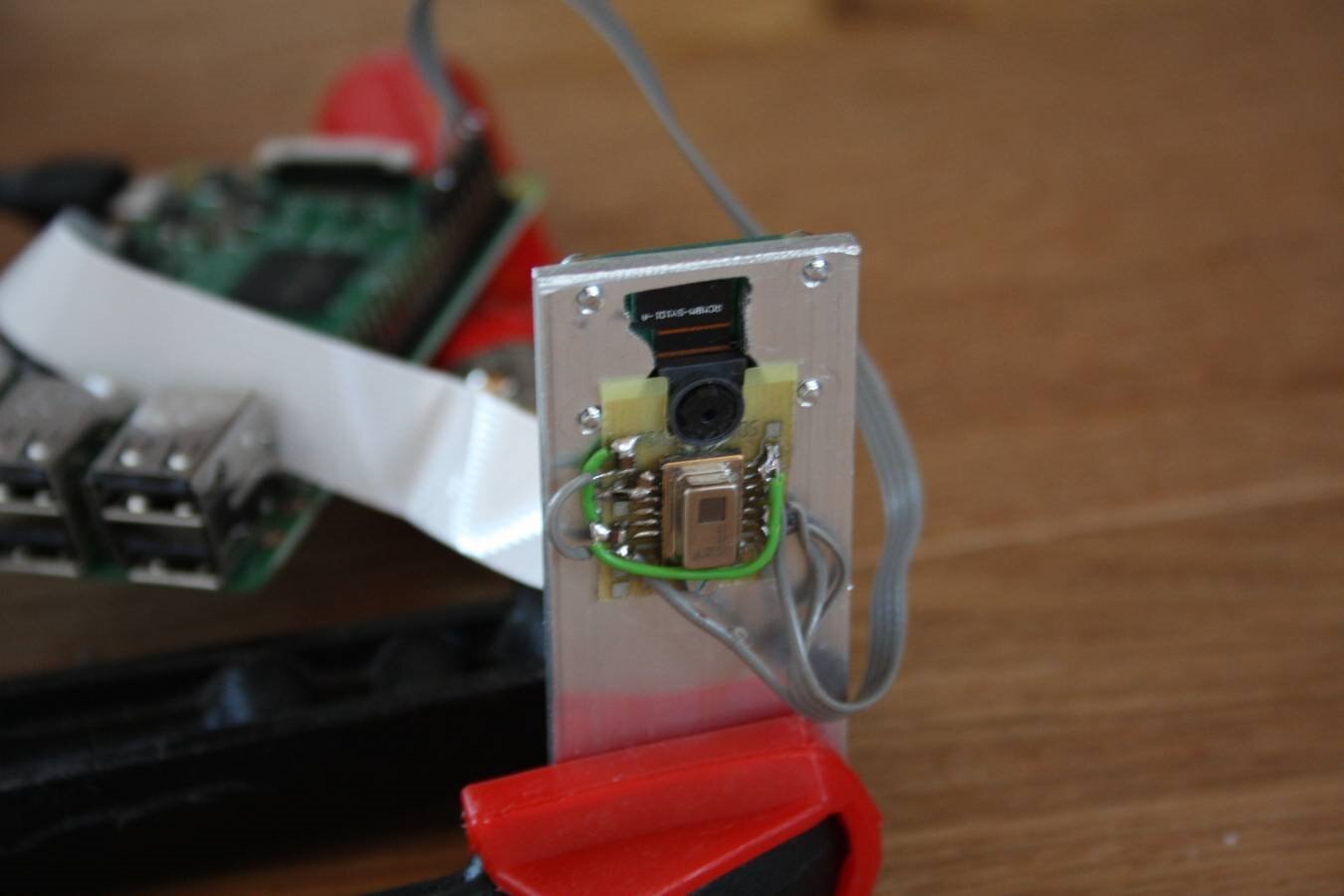
The idea was to overlay the image of the camera and the temperature sensor to 1. get an image with temperature information which is very nice to view and to 2. get information how good the sensors are aligned.
Matching the images together
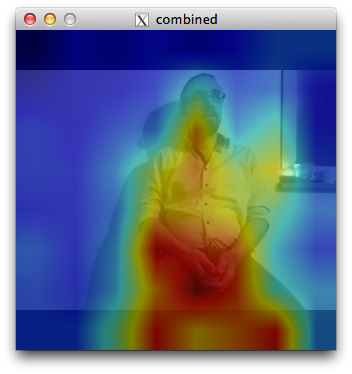
The grid-eye sensor has an viewing angle of 60 degrees in both directions and the Raspberry Pi Camera Module v2 has a field of view of horizontal 62.2 degrees and vertical 48.8 degrees. So horizontal it should match quite well (with little tolerance) but vertical the grid-eye sensor can see more than the camera. The grid-eye sensor has a aspect ration of 1:1 and the camera has one of 4:3. This is no big deal: I will add some black fields at the top and bottom of the camera and the data matches.
Here is an image of the combined output:
Making a video
The next step is to make a video with camera and temperature data to see how the data aligns in the whole sensing area. Making a video with OpenCV is quite simple: you just have to add each image/frame and OpenCV does the rest. First here is my source code (the image above was also made with the same source code):
#include <stdio.h>
#include <stdlib.h>
#include <linux/i2c-dev.h>
#include <fcntl.h>
#include <unistd.h>
#include <opencv2/opencv.hpp>
#include <opencv2/imgproc/imgproc.hpp>
#include <opencv2/contrib/contrib.hpp>

int main(void)
{
    int file;
    int addr=0x68;        // adress of AMG88xx
    int x,y;     // variables to got through the array
    char register_address=0;    // register address of each sensor pixel
    signed short int internal_temp;
    signed short int pixel_temp;

    int end=1;  // variable to end program
    printf("Pi Chef Stove Assistant Demo with AMG88xx\n");  // print start message
    if((file=open("/dev/i2c-1",O_RDWR))<0)    // open i2c-bus
    {
        perror("cannot open i2c-1");
        exit(1);
    }
    if(ioctl(file, I2C_SLAVE, addr)<0)    // open slave
    {
        perror("cannot open slave address");
        exit(1);
    }

    internal_temp=(signed short)(i2c_smbus_read_word_data(file, 0x0e)<<4);    // read internal temperature from sensor
    internal_temp=internal_temp/16;        // recalculate correct value
    printf("Internal Temp: %f C (0x%04X = %i)\n",(float)internal_temp*0.0625,internal_temp,internal_temp);    // print internal temperature

    cv::Mat cameraImage;  // create opencv mat for camera
    cv::Mat cameraImageGray; // create opencv mat for grayscale camera image
    cv::Mat cameraImageBig(320,320,CV_8UC3);  // create opencv mat for camera with final resolution
    cv::VideoCapture cap;    // create camera input
    cap.open(0);        // open camera
    cap.set(CV_CAP_PROP_FRAME_WIDTH, 320);    // change camera width to 320 - we do not need more
    cap.set(CV_CAP_PROP_FRAME_HEIGHT, 240);    // change camera height to 240
    cv::VideoWriter outputVideo;    // create video output
    outputVideo.open("output.avi", CV_FOURCC('M','J','P','G'), 10, cv::Size(320,320), true);    // set video output to 10 fps and MJPG
    if (!outputVideo.isOpened())    // check if generation of video output was successful
    {
        perror("Could not open the output video for write\n");
        exit(1);
    }

    cv::Mat outSmall(8,8,CV_8UC1);        // create opencv mat for sensor data
    cv::Mat outSmallnorm(8,8,CV_8UC1);    // create opencv mat for normalized data
    cv::Mat outColor;    // create opencv mat for color output
    cv::Mat combined;    // create opencv mat for combined output

    while(end==1)  // check end variable
    {
        for(x=0;x<8;x++)
        {
            for(y=0;y<8;y++)
            {
                register_address=0x80+2*((x*8)+y);
                pixel_temp=(signed short)(i2c_smbus_read_word_data(file, register_address)<<4);    // read pixel_temp and cast to signed short
                pixel_temp=pixel_temp/16;    // set pixel_temp to original value
                outSmall.at(7-x,7-y)=pixel_temp;    // save data to opencv mat and rotate it
            }
        }

        cv::normalize(outSmall,outSmallnorm,255,0,cv::NORM_MINMAX);    // normalize Mat to values between 0 and 255
        cv::resize(outSmallnorm,outSmallnorm,cv::Size(320,320));    // resize Mat to 320 x 320 pixel
        cv::applyColorMap(outSmallnorm,outColor,cv::COLORMAP_JET);  // generate colored output with colormap
        cap >> cameraImage;    // copy camera input to opencv mat
        cv::cvtColor(cameraImage,cameraImageGray,CV_RGB2GRAY);    // convert camera image to grayscale
        cv::cvtColor(cameraImageGray,cameraImageGray,CV_GRAY2RGB);    // make cameraImage 3 channels again
        cameraImageGray.copyTo(cameraImageBig(cv::Rect(0,40,320,240)));// copy camera ingae to mat with same resolution as temperature mat
        cv::addWeighted(cameraImageBig,0.5,outColor,0.5,0.0,combined);    // combine camera mat and temperature mat into one single image
        cv::imshow("combined",combined);  // display mat on screen
         outputVideo << combined;    // add frame to video

        char key = cv::waitKey(1);  // check keys for input
        if(key=='e') end=0;  // end if e was pressed
    }
    printf("ended regularly!\n");  // print end message
    close(file);
    return 0;
}
This code led to the following video:
Unfortunatelly OpenCV and the video input buffer always add a little delay to the video stream. So there is a little delay between the temperature data and the video. One solution would be to handle the video input in a second thread. But this is more complex so I have to live with this little delay for now.
What's next?
In the next days I will mount the sensor combination atop of my cook top and do some test measurements.
Top Comments