element14 Community
element14 Community
    Register Log In
  • Site
  • Search
  • Log In Register
  • Community Hub
    Community Hub
    • What's New on element14
    • Feedback and Support
    • Benefits of Membership
    • Personal Blogs
    • Members Area
    • Achievement Levels
  • Learn
    Learn
    • Ask an Expert
    • eBooks
    • element14 presents
    • Learning Center
    • Tech Spotlight
    • STEM Academy
    • Webinars, Training and Events
    • Learning Groups
  • Technologies
    Technologies
    • 3D Printing
    • FPGA
    • Industrial Automation
    • Internet of Things
    • Power & Energy
    • Sensors
    • Technology Groups
  • Challenges & Projects
    Challenges & Projects
    • Design Challenges
    • element14 presents Projects
    • Project14
    • Arduino Projects
    • Raspberry Pi Projects
    • Project Groups
  • Products
    Products
    • Arduino
    • Avnet & Tria Boards Community
    • Dev Tools
    • Manufacturers
    • Multicomp Pro
    • Product Groups
    • Raspberry Pi
    • RoadTests & Reviews
  • About Us
    About the element14 Community
  • Store
    Store
    • Visit Your Store
    • Choose another store...
      • Europe
      •  Austria (German)
      •  Belgium (Dutch, French)
      •  Bulgaria (Bulgarian)
      •  Czech Republic (Czech)
      •  Denmark (Danish)
      •  Estonia (Estonian)
      •  Finland (Finnish)
      •  France (French)
      •  Germany (German)
      •  Hungary (Hungarian)
      •  Ireland
      •  Israel
      •  Italy (Italian)
      •  Latvia (Latvian)
      •  
      •  Lithuania (Lithuanian)
      •  Netherlands (Dutch)
      •  Norway (Norwegian)
      •  Poland (Polish)
      •  Portugal (Portuguese)
      •  Romania (Romanian)
      •  Russia (Russian)
      •  Slovakia (Slovak)
      •  Slovenia (Slovenian)
      •  Spain (Spanish)
      •  Sweden (Swedish)
      •  Switzerland(German, French)
      •  Turkey (Turkish)
      •  United Kingdom
      • Asia Pacific
      •  Australia
      •  China
      •  Hong Kong
      •  India
      •  Japan
      •  Korea (Korean)
      •  Malaysia
      •  New Zealand
      •  Philippines
      •  Singapore
      •  Taiwan
      •  Thailand (Thai)
      •  Vietnam
      • Americas
      •  Brazil (Portuguese)
      •  Canada
      •  Mexico (Spanish)
      •  United States
      Can't find the country/region you're looking for? Visit our export site or find a local distributor.
  • Translate
  • Profile
  • Settings
Pi Chef Design Challenge
  • Challenges & Projects
  • Design Challenges
  • Pi Chef Design Challenge
  • More
  • Cancel
Pi Chef Design Challenge
Blog Stove Assistant - Bernhard - Pi Chef #6 - Camera mount and more tests
  • Blog
  • Forum
  • Documents
  • Polls
  • Files
  • Events
  • Mentions
  • Sub-Groups
  • Tags
  • More
  • Cancel
  • New
  • Share
  • More
  • Cancel
Group Actions
  • Group RSS
  • More
  • Cancel
Engagement
  • Author Author: bernhardmayer
  • Date Created: 21 Mar 2018 10:44 PM Date Created
  • Views 1185 views
  • Likes 6 likes
  • Comments 5 comments
  • testing
  • video
  • grideye
  • grid-eye®
  • designchallenge
  • raspberry3
  • raspberry_pi_design_challenge
  • pichef
Related
Recommended

Stove Assistant - Bernhard - Pi Chef #6 - Camera mount and more tests

bernhardmayer
bernhardmayer
21 Mar 2018

Today I made a better camera mount and did more tests.


Camera mount


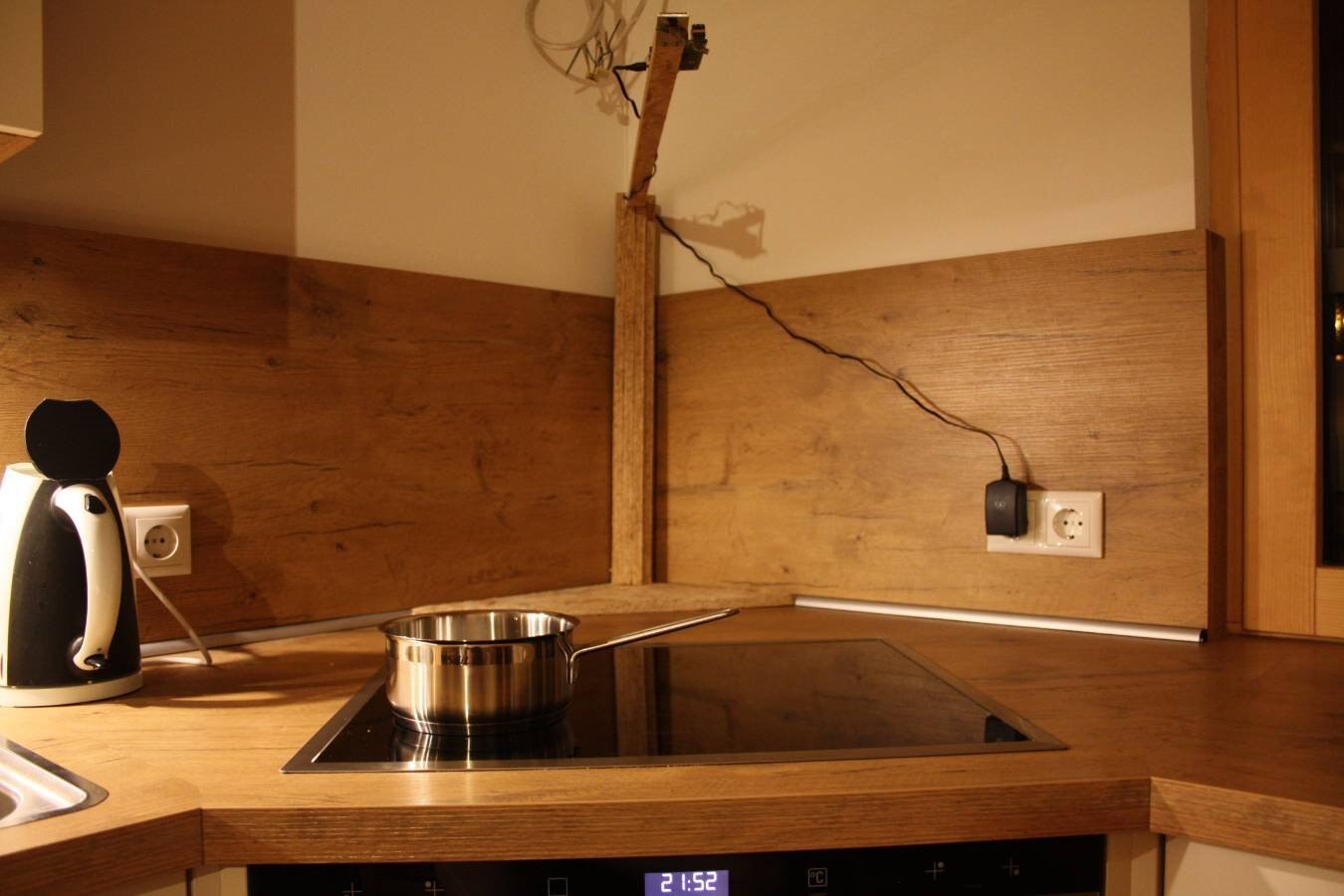
To get compareable results I need to place camera and temperature sensor always on the same spot above the cooktop. So I took a few wooden planks and made a new mounting arm for Raspberry Pi and camera. It places the camera 60 cm above the center of the cooktop.


Here is a photo from the front:
image

And here is a photo from top so you can imagine what the sensor sees:

image

The sensor is placed where normally the range hood sits. Maybe I should team up with aspork42 to get sensor and firmware into his Smart Range Hood - Pi Chef Challenge Blog post #1


Test measurements


Because I had the problems with the measurement in my last blog post I decided to dig deeper into this. To make easier reproduceable measurements I decided to simply boil water in a small pot. You can see the test drive in the following video.


You don't have permission to edit metadata of this video.
Edit media
x
image
Upload Preview
image


Again you can see that the measured temperature only goes up to around 65 degrees celsius. But the water in the pot is definitely boiling because there are bubbles anywhere in the water. So the temperature should be around 100 degrees celsius.


So I started to figure out what is the reason for this behaviour.


Interpolation


First I used another OpenCV algorithm to scale the temperature data up to the camera image where I can see where the real grid-eye sensor pixels are and nothing interpolated.

Before I had this code:

cv::resize(outSmall,outSmallnorm,cv::Size(320,320));

now I use:

cv::resize(outSmall,outSmallnorm,cv::Size(320,320),0,0,cv::INTER_NEAREST);


This prevents interpolation and I could move the pot so that one pixel lies completely in the middle of the pot.

But it turned out that this was not the problem.


Out-of-center-error


Then I thought: maybe it is because the pot is not in the center of the image and it somehow gets confused with the angle.

So I moved the pot with the boiling water to the center.


It turned out that this was also not the problem. The temperature stayed at around 65 degrees celsius.


distance to sensor


Then I decided to lift the pot and bring the boiling water closer to the sensor. This helped and the temperature rose to about 100 degrees celsius.


You can see all these tests in the following video:

You don't have permission to edit metadata of this video.
Edit media
x
image
Upload Preview
image


Conclusion


It seems that the grid-eye sensor needs more pixels which lay side by side to have the same temperature to get accurate temperature measurements in the center. I will figure out how to make a test setup to verify this.


What's next?


More testing ...

and start with the HMI.

  • Sign in to reply

Top Comments

  • aspork42
    aspork42 over 7 years ago +2
    Great work! i would guess the issue has to do most with the viewing area under each pixel. in digital cameras, each pixel has effectively a cone of viewable area. All the data within that field of view…
  • aspork42
    aspork42 over 7 years ago +2
    Here is my latest dual camera mount - I still don’t Have any awesome footage of thermal overlay though
  • genebren
    genebren over 7 years ago +1
    Great work on your project. It seems like you are getting closer to getting the temperature readings corrected (positioning and distance). Good luck moving forward, Gene
  • bernhardmayer
    bernhardmayer over 7 years ago in reply to aspork42

    3D printed parts are always nice. good work.

    Unfortunately I don't have a 3D printer so I had to do it the old-fashioned way with drilling and filing.

    Bernhard

    • Cancel
    • Vote Up 0 Vote Down
    • Sign in to reply
    • More
    • Cancel
  • bernhardmayer
    bernhardmayer over 7 years ago in reply to aspork42

    Hi.

    Thank you.

    In my latest blog post I tried to address your issues. I used a larger pot with boiling water to avoid the averaging of the pixels. But the result was the same. I stayed at about 70 degrees celsius. So it seems as if the grid-eye sensor is not good at making accurate absolute measurements at higher temperatures.


    BTW: The displayed temperature in my videos is the temperature whcih I read out of the sensor via I2C. I used OpenCV only to make the nice graphics.


    I will try to get all the code uploaded on github in the next couple of days.


    Also good luck with your project. It seems like it is going on well. I hope you get your Raspberry Pi fixed.


    Bernhard

    • Cancel
    • Vote Up 0 Vote Down
    • Sign in to reply
    • More
    • Cancel
  • genebren
    genebren over 7 years ago

    Great work on your project.  It seems like you are getting closer to getting the temperature readings corrected (positioning and distance).

    Good luck moving forward,

    Gene

    • Cancel
    • Vote Up +1 Vote Down
    • Sign in to reply
    • More
    • Cancel
  • aspork42
    aspork42 over 7 years ago

    Here is my latest dual camera mount -


    image


    image

    I still don’t Have any awesome footage of thermal overlay though image

    • Cancel
    • Vote Up +2 Vote Down
    • Sign in to reply
    • More
    • Cancel
  • aspork42
    aspork42 over 7 years ago

    Great work!

    i would guess the issue has to do most with the viewing area under each pixel. in digital cameras, each pixel has effectively a cone of viewable area. All the data within that field of view gets averaged by the sensor/thermopile and the final result is what the actual pixel value ends up as. So if half the FOV shows 50c and half the FOV is 100c then the pixel will report a temperature of 75C.


    your raw data is 64 temperature measurements. You may be farther ahead to read the sensors directly over I2C instead of doing anything with OpenCV - unless you overlay text showing the measured temperature.


    i have a fair amount left to do, but you have taken yours very far! I loved the video overlays!

    • Cancel
    • Vote Up +2 Vote Down
    • Sign in to reply
    • More
    • Cancel
element14 Community

element14 is the first online community specifically for engineers. Connect with your peers and get expert answers to your questions.

  • Members
  • Learn
  • Technologies
  • Challenges & Projects
  • Products
  • Store
  • About Us
  • Feedback & Support
  • FAQs
  • Terms of Use
  • Privacy Policy
  • Legal and Copyright Notices
  • Sitemap
  • Cookies

An Avnet Company © 2026 Premier Farnell Limited. All Rights Reserved.

Premier Farnell Ltd, registered in England and Wales (no 00876412), registered office: Farnell House, Forge Lane, Leeds LS12 2NE.

ICP 备案号 10220084.

Follow element14

  • X
  • Facebook
  • linkedin
  • YouTube