


I hope you are not tired of reading and are doing well. I was able to finish that very fast because I have already taken some notes while I was working so it was easy. I have already captured the picture of building inclusion so it also didn't take that much time.
- The hub, which includes the Arduino Uno, the temperature sensor, the radar module, and the e-ink display to not tire your eyes as you see them in the early morning. That's why I have included an e-ink display instead of a cheap TFT. I also have included a heatsink so the sensor can better sense the room temperature rather than from the smaller surface area.
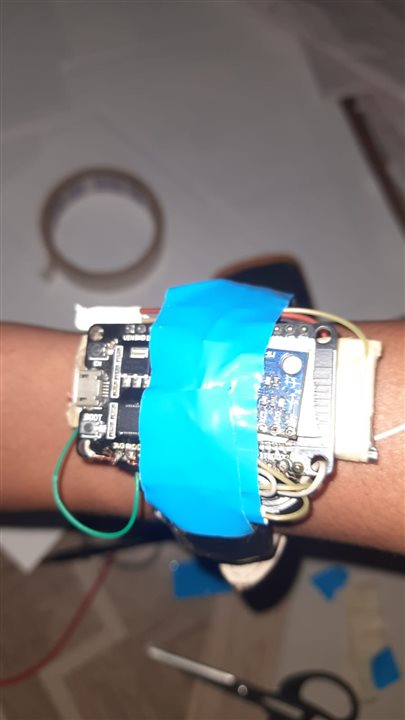
- Second is the variable that includes the ESP32, the MAXREFDES 117, and the MPU6050. That was not very easy but a little bit messy. The battery included also wasn't that capable of running the entire whole system in that small space so I had to power it with a USB for now.
If you weren't following, here are the past posts I made regarding the project.
Recap
Palno & Slemon #1 Introduction
Palno & Slemon #2.1 Configuring and Validating
Palno & Slemon #2.2 Configuring and Validating
Palno & Slemon #3 Building the Algorithm
Palno & Slemon #4 Final Firmware
Palno & Slemon #5 LabView Integration
My project was a dual-code system that helps us track sleep and also wake up at the right time so we don't feel tired and low on energy. It uses algorithms and data from the blood oxygen and blood beats-per-minute (BPM) sensor. The radar module detects movement while you are sleeping and I also have the temperature sensor for smart things.
1)Building the Selmon`s Enclosure
For building the salmon, which includes the Arduino Q, the Mac, the temperature sensor, the ink display, and the data module, I want a space that can house all of these without being too congested. It should be portable and look good also. I wanted it to be under 400 cm² so it would be a good fit.
I made it. First I designed the plan and how I should cut the cardboard pieces so they can form the structure for the supposed design I made. I made a rectangular cuboid that is a little tilted at a 20° angle on the front side, where it includes the ink display and the radar module. On the top I want it to be removable and to house the heat sink, which will be connected to the temperature sensor so we can sense the air's temperature and the room's temperature also.
I don't have a 3D printer, that's why I'm doing it. Also I'm a little bit good at art and craft.
First I made the quicker schematics of what I have to do and how to cut the cardboard pieces:

After cutting these are the pieces. They are quite rough so I have to also make the outer covering for them

After Sticking them.

then,

The display can be attached with the duct tape and surely I don't have to use bolts.

It seems magical when we don't have to power the display. It stays as it is.
After Placing all the components tightly and steadly.


The Heat sink I am going to used:

I have reused an old scrap aluminum heatsink because it's good for us(and the planet). Why buy if you already have.
Putting the Max30208

I use the EMI absorber because it reflects the radiation. You kind of say it's related to the Arduino Q and also the main heat from the system because Arduino Q is a heavy beast.
After all fabrication with paper its ready!


Because I don't have sufficient batteries right now, I want it to be powered by USB only so I have included a port on the right side, top right. It is steady because the adhesive was very strong.

2) Building the Palno
So instead of wasting time seeking new ideas, I decided to utilize the time and build it on a makeshift broken watch: not one watch but two, once using the strap and once using the main body (the lower part)

Below that is the Maxrefdes 117. I also have applied the EMI absorber as there will be the microcontroller and also the MPU6050 stacked on top. That could cause interference
Then

Then I place the battery, which won't be that useful. Later it only provides me with a lifetime of about 1 or 2 minutes because it's quite old and can't withstand the draw. Then I apply the MPU6050 on the top of the ESP52 processor heatsink.
I had placed the AMI observer in between them also so it does not cause any interference.

All together now:

And it was done, though it was a little heavy and not that study and compact, just a Frankenstein prototype, but it works well and can do the job. Firstly I was going to build it in a comfortable cloth format but I don't think I had time for this so I had to make it this way only.
Thanks to the Element14 this time I had enough duct tape to hold every piece from breaking apart : )


Thanks again for being here till here and following my journey. I think it was fairly enjoyable for you as you don't have to read along. You can just watch. In the next post I will be blogging the entire project, the most important part, so if you want you can read it. It will be very encouraging for me.
Thanks again for reading. Let me know your comments and thoughts on this.