element14 Community
element14 Community
    Register Log In
  • Site
  • Search
  • Log In Register
  • Community Hub
    Community Hub
    • What's New on element14
    • Feedback and Support
    • Benefits of Membership
    • Personal Blogs
    • Members Area
    • Achievement Levels
  • Learn
    Learn
    • Ask an Expert
    • eBooks
    • element14 presents
    • Learning Center
    • Tech Spotlight
    • STEM Academy
    • Webinars, Training and Events
    • Learning Groups
  • Technologies
    Technologies
    • 3D Printing
    • FPGA
    • Industrial Automation
    • Internet of Things
    • Power & Energy
    • Sensors
    • Technology Groups
  • Challenges & Projects
    Challenges & Projects
    • Design Challenges
    • element14 presents Projects
    • Project14
    • Arduino Projects
    • Raspberry Pi Projects
    • Project Groups
  • Products
    Products
    • Arduino
    • Avnet & Tria Boards Community
    • Dev Tools
    • Manufacturers
    • Multicomp Pro
    • Product Groups
    • Raspberry Pi
    • RoadTests & Reviews
  • About Us
  • Store
    Store
    • Visit Your Store
    • Choose another store...
      • Europe
      •  Austria (German)
      •  Belgium (Dutch, French)
      •  Bulgaria (Bulgarian)
      •  Czech Republic (Czech)
      •  Denmark (Danish)
      •  Estonia (Estonian)
      •  Finland (Finnish)
      •  France (French)
      •  Germany (German)
      •  Hungary (Hungarian)
      •  Ireland
      •  Israel
      •  Italy (Italian)
      •  Latvia (Latvian)
      •  
      •  Lithuania (Lithuanian)
      •  Netherlands (Dutch)
      •  Norway (Norwegian)
      •  Poland (Polish)
      •  Portugal (Portuguese)
      •  Romania (Romanian)
      •  Russia (Russian)
      •  Slovakia (Slovak)
      •  Slovenia (Slovenian)
      •  Spain (Spanish)
      •  Sweden (Swedish)
      •  Switzerland(German, French)
      •  Turkey (Turkish)
      •  United Kingdom
      • Asia Pacific
      •  Australia
      •  China
      •  Hong Kong
      •  India
      • Japan
      •  Korea (Korean)
      •  Malaysia
      •  New Zealand
      •  Philippines
      •  Singapore
      •  Taiwan
      •  Thailand (Thai)
      • Vietnam
      • Americas
      •  Brazil (Portuguese)
      •  Canada
      •  Mexico (Spanish)
      •  United States
      Can't find the country/region you're looking for? Visit our export site or find a local distributor.
  • Translate
  • Profile
  • Settings
Smart Spaces Design Challenge
  • Challenges & Projects
  • Design Challenges
  • Smart Spaces Design Challenge
  • More
  • Cancel
Smart Spaces Design Challenge
Forum PROBLEMS - Using MCUXpresso IDE with MCXA153 and MCXN236 on the same PC
  • Forum
  • Projects
  • DC
  • Leaderboard
  • Files
  • Members
  • More
  • Cancel
  • New
Join Smart Spaces Design Challenge to participate - click to join for free!
Actions
  • Share
  • More
  • Cancel
Forum Thread Details
  • Replies 7 replies
  • Subscribers 40 subscribers
  • Views 305 views
  • Users 0 members are here
  • NXP FRDM MCX A
  • NXP FRDM MCX A & MCX N development kit.
  • nxp
  • NXP FRDM MCX N
Related

PROBLEMS - Using MCUXpresso IDE with MCXA153 and MCXN236 on the same PC

skruglewicz
skruglewicz 1 month ago

I'm currently working to run example code on both the MCXA153 and MCXN236 boards from the same instance of MCUXpresso IDE on a single PC. I wanted to share my experiences here, in case anyone else is attempting this during the challenge, Also, to offer a solution I found for one of the issues I encountered after struggling with the IDE for some time. There’s still another issue described at the end of this post that I’m having difficulty understanding.

I followed the instructions on the MCXA153 Build and Run  page. On this page I learned:

  • To import an SDK example (like hello world) into MCUXpresso IDE.
  • The guide walks you through selecting the FRDM MCX board, expanding the demo_apps category, and choosing hello_world.
  • You’ll build the demo and set the debug console to UART for serial output.
  • Steps include connecting the board via USB MCU-LINK port, flashing the application, and selecting the MCU-Link CMSIS-DAP debug probe. NOTE – Be sure to include the 
  • Instructions for opening a serial terminal (settings: 115200 baud, 8 data bits, no parity, 1 stop bit) are provided.
  • Finally, you will run the demo and see terminal output.

 I tried the “hello world example” on both devices to get a feel for developing on two devices from the same IDE on the same PC. I followed the instructions from the “Build and Run Page” outlined above. I was able to get the example to run on the MCXA153 the first time, but unable to successfully run again after getting the following problem, trying to run it on the MCXN236 

Problem:1:  “no Terminal output” 

  1. Build 
  2. Debug 
  3. The following dialog appears to select a probe
    1. I selected the MCU-Link CMSIS-DAP debug probe for the MCXN236: 
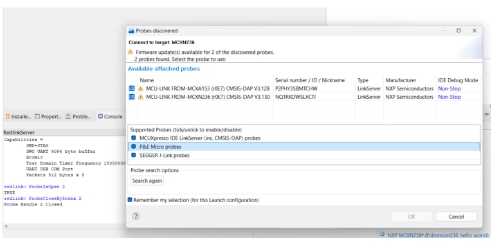
image

I selected the MCU-Link CMSIS-DAP debug probe for the MCXN236:
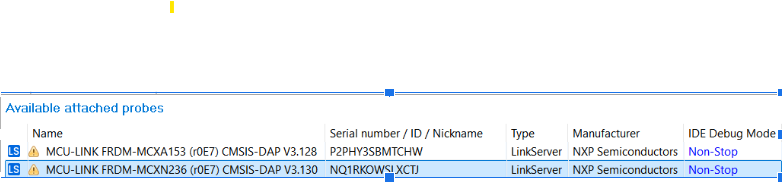
image

Hint: the next time you run the code, this screen does not show. to allow it to show up again , simply delete the file "frdmmcxn236_hello_world LinkServer Debug.launch", in this case for the MCXN236. Now the dialog should come up on the debug session.

Open up a serial terminal to be able to see the application's output.

       Problem: empty terminal?
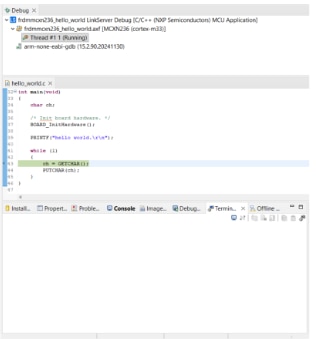
image

What could be wrong?

Solution : I had the wrong Serial COM port selected. It needs to be the com port that the MCXN236 is connected to . In my case it is COM4. 

Select the “Terminal” window and press the “new terminal” icon. Choose a “Serial Terminal” and then set the UART settings to 115200 baudrate, 8 bit data size, no parity and 1 stop bit. Press OK.
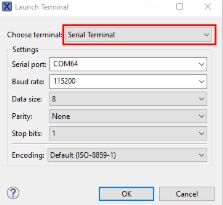
 image

Oh now the mcxa153 project is also working . I need to select the correct SDK, debug probe port and set the serial port at the proper COM port, in ny case COM3.

Now the debugger is running but it hangs the code here after pressing a character on the screen?
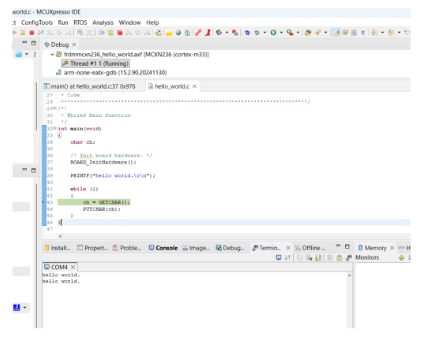
image

NOW I’m stuck and pondering this second Problem:

Why is it printing 2 lines of “Hello World”?
Why is it paused at the line ch = GETCHAR();
What is it expecting from the function call GETCHAR()


I was wondering If any of the challengers have this problem or have an answer? For now I’ll be continuing to run other coding examples to keep experimenting with the IDE using 2 devices.

Happy coding

  • Sign in to reply
  • Cancel

Top Replies

  • skruglewicz
    skruglewicz 9 days ago +3
    UPDATE STATUS on this problem It works on the new PC with a clean MCUXpresso + SDK install, so the board and probe are fine, and the root cause is almost certainly something broken or conflicting on…
  • skruglewicz
    skruglewicz 1 day ago +3
    UPDATE STATUS on the problem Success What was the reason? Turns out there were multiple versions of the MCU-Link firmware on my troubled PC. And as I found two Common Causes of Persistent Debugging…
  • balajivan1995
    balajivan1995 1 month ago +2
    I'm also facing the same issue when using two boards at the same time. 1. The reason you are getting two "Hello world" is, after the firmware was flashed, it immediately starts running in application…
Parents
  • skruglewicz
    skruglewicz 1 day ago

    UPDATE STATUS on the problem 

    Success

    What was the reason?

    Turns out there were multiple versions of the MCU-Link firmware on my troubled PC. And as I found two Common Causes of Persistent Debugging Connection Failures may be the reason for persistent debugging problems:

    • Corrupted or Conflicting USB/Debug Drivers: Drivers (MCU-Link / CMSIS-DAP / WinUSB) on the original PC may be corrupted or conflicting. This can result from prior installations of probes from NXP, SEGGER, PE Micro, or others.
    • Stale LinkServer Instance or Configuration: The IDE may be repeatedly reusing a stale or mismatched LinkServer instance or configuration on the original PC. This allows the probe to enumerate, but the SWD connection to the target core never actually establishes.

    What I did to get it working without getting the Error.

    I went into add/remove programs and noticed there were 3 versions of the MCU-Link Firmware install on my PC
    Here is the program screen showing 3 versions!

    image

    I uninstalled all but
    Mcu-Llnk firmware V3.148
    MCUXpresso ID V25.6
    I didn't need the other tools.

    image

    Now debug does not get the error as I described and works all the time?
    SUCCESS !!! I'm back on track with debugging on the MCXN236

    • Cancel
    • Vote Up +3 Vote Down
    • Sign in to reply
    • Cancel
  • Jan Cumps
    Jan Cumps 18 hours ago in reply to skruglewicz

    The strange thing is that you have an older version of both the IDE and debug software installed after a newer version.

    • Cancel
    • Vote Up 0 Vote Down
    • Sign in to reply
    • Cancel
Reply
  • Jan Cumps
    Jan Cumps 18 hours ago in reply to skruglewicz

    The strange thing is that you have an older version of both the IDE and debug software installed after a newer version.

    • Cancel
    • Vote Up 0 Vote Down
    • Sign in to reply
    • Cancel
Children
No Data
element14 Community

element14 is the first online community specifically for engineers. Connect with your peers and get expert answers to your questions.

  • Members
  • Learn
  • Technologies
  • Challenges & Projects
  • Products
  • Store
  • About Us
  • Feedback & Support
  • FAQs
  • Terms of Use
  • Privacy Policy
  • Legal and Copyright Notices
  • Sitemap
  • Cookies

An Avnet Company © 2025 Premier Farnell Limited. All Rights Reserved.

Premier Farnell Ltd, registered in England and Wales (no 00876412), registered office: Farnell House, Forge Lane, Leeds LS12 2NE.

ICP 备案号 10220084.

Follow element14

  • X
  • Facebook
  • linkedin
  • YouTube