element14 Community
element14 Community
    Register Log In
  • Site
  • Search
  • Log In Register
  • Community Hub
    Community Hub
    • What's New on element14
    • Feedback and Support
    • Benefits of Membership
    • Personal Blogs
    • Members Area
    • Achievement Levels
  • Learn
    Learn
    • Ask an Expert
    • eBooks
    • element14 presents
    • Learning Center
    • Tech Spotlight
    • STEM Academy
    • Webinars, Training and Events
    • Learning Groups
  • Technologies
    Technologies
    • 3D Printing
    • FPGA
    • Industrial Automation
    • Internet of Things
    • Power & Energy
    • Sensors
    • Technology Groups
  • Challenges & Projects
    Challenges & Projects
    • Design Challenges
    • element14 presents Projects
    • Project14
    • Arduino Projects
    • Raspberry Pi Projects
    • Project Groups
  • Products
    Products
    • Arduino
    • Avnet & Tria Boards Community
    • Dev Tools
    • Manufacturers
    • Multicomp Pro
    • Product Groups
    • Raspberry Pi
    • RoadTests & Reviews
  • About Us
  • Store
    Store
    • Visit Your Store
    • Choose another store...
      • Europe
      •  Austria (German)
      •  Belgium (Dutch, French)
      •  Bulgaria (Bulgarian)
      •  Czech Republic (Czech)
      •  Denmark (Danish)
      •  Estonia (Estonian)
      •  Finland (Finnish)
      •  France (French)
      •  Germany (German)
      •  Hungary (Hungarian)
      •  Ireland
      •  Israel
      •  Italy (Italian)
      •  Latvia (Latvian)
      •  
      •  Lithuania (Lithuanian)
      •  Netherlands (Dutch)
      •  Norway (Norwegian)
      •  Poland (Polish)
      •  Portugal (Portuguese)
      •  Romania (Romanian)
      •  Russia (Russian)
      •  Slovakia (Slovak)
      •  Slovenia (Slovenian)
      •  Spain (Spanish)
      •  Sweden (Swedish)
      •  Switzerland(German, French)
      •  Turkey (Turkish)
      •  United Kingdom
      • Asia Pacific
      •  Australia
      •  China
      •  Hong Kong
      •  India
      • Japan
      •  Korea (Korean)
      •  Malaysia
      •  New Zealand
      •  Philippines
      •  Singapore
      •  Taiwan
      •  Thailand (Thai)
      • Vietnam
      • Americas
      •  Brazil (Portuguese)
      •  Canada
      •  Mexico (Spanish)
      •  United States
      Can't find the country/region you're looking for? Visit our export site or find a local distributor.
  • Translate
  • Profile
  • Settings
Smart Spaces Design Challenge
  • Challenges & Projects
  • Design Challenges
  • Smart Spaces Design Challenge
  • More
  • Cancel
Smart Spaces Design Challenge
Forum NO connection to chips debug port on the MCXN236?
  • Forum
  • Projects
  • DC
  • Leaderboard
  • Files
  • Members
  • More
  • Cancel
  • New
Join Smart Spaces Design Challenge to participate - click to join for free!
Actions
  • Share
  • More
  • Cancel
Forum Thread Details
  • State Verified Answer
  • Replies 6 replies
  • Subscribers 40 subscribers
  • Views 219 views
  • Users 0 members are here
  • FRDM MCXN236
Related

NO connection to chips debug port on the MCXN236?

skruglewicz
skruglewicz 28 days ago

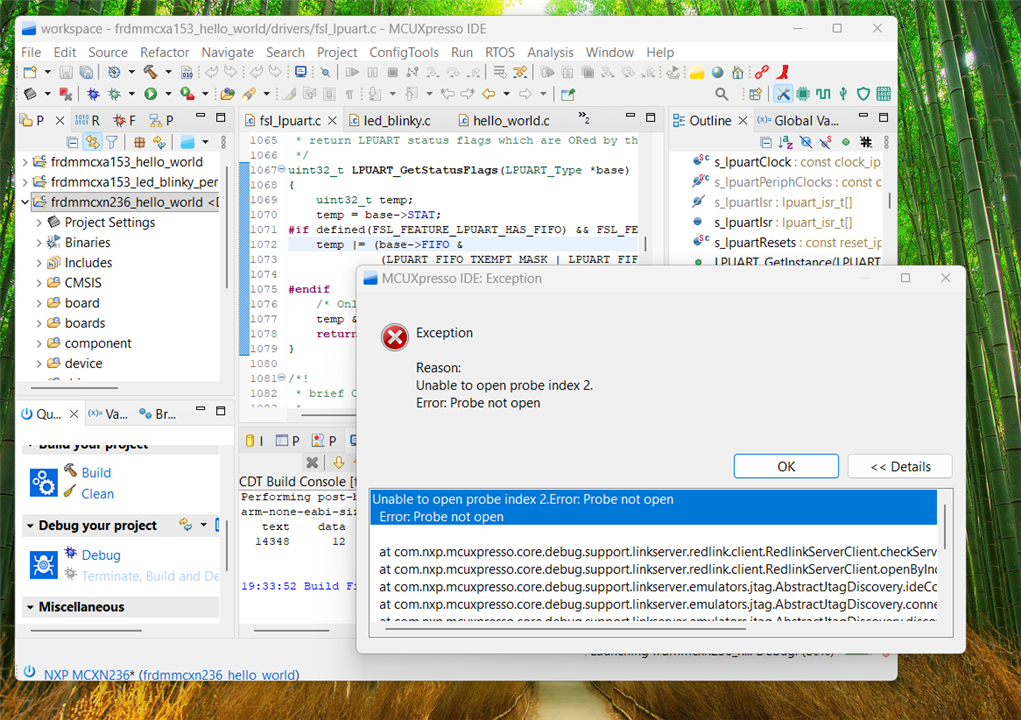
I’m still having problems with the MCXN236 . Can't find the probe 

CONSOLE log:

LinkServer RedlinkMulti Driver v25.6 (Jun 26 2025 19:34:05 - crt_emu_cm_redlink build 1017)
Found chip XML file in C:/nxp/workspace/frdmmcxn236_hello_world/Debug\MCXN236.xml
( 5) Remote configuration complete
Reconnected to the existing LinkServer process.
Connecting to probe 2 core 0 (using server started externally) reports:
'Ee(42). Could not connect to core.'
Retrying...
Reconnected to the existing LinkServer process.
Server OK but no connection to probe 2 core 0 (after 3 attempts) - Ee(42). Could not connect to core.
Failed on connect: Ee(42). Could not connect to core.
No connection to chip's debug port
image

 I'm dead in the water with the MCXN236 and can not develop my project without it Does any one know why thus is happening? Is my board defective? 

any help here would be appreciated.

Thanks 

Steve K

  • Sign in to reply
  • Cancel

Top Replies

  • skruglewicz
    skruglewicz 12 days ago +2 verified
    skruglewicz said: I’m still having problems with the MCXN236 . Can't find the probe CONSOLE log: LinkServer RedlinkMulti Driver v25.6 (Jun 26 2025 19:34:05 - crt_emu_cm_redlink build 1017) Found…
  • balajivan1995
    balajivan1995 28 days ago +1
    1. Close every other projects, and select debug option. 2. Sometimes the IDE will hang trying to open the linkserver. In that case, close the IDE, locate the axf or hex file and flash it using standalone…
  • balajivan1995
    balajivan1995 28 days ago in reply to balajivan1995 +1
    You can close other projects by right clicking on your current project, select "Close unrelated projects".
  • balajivan1995
    0 balajivan1995 28 days ago

    1. Close every other projects, and select debug option.

    2. Sometimes the IDE will hang trying to open the linkserver. In that case, close the IDE, locate the axf or hex file and flash it using standalone link flash application.

    • Cancel
    • Vote Up +1 Vote Down
    • Sign in to reply
    • Verify Answer
    • Cancel
  • balajivan1995
    0 balajivan1995 28 days ago in reply to balajivan1995

    You can close other projects by right clicking on your current project, select "Close unrelated projects".

    • Cancel
    • Vote Up +1 Vote Down
    • Sign in to reply
    • Verify Answer
    • Cancel
  • skruglewicz
    0 skruglewicz 20 days ago in reply to balajivan1995
    balajivan1995 said:
    Close every other projects, and select debug option.
    balajivan1995 said:
    Sometimes the IDE will hang trying to open the linkserver. In that case, close the IDE, locate the axf or hex file and flas

    hello balajivan1995 

    Thanks a lot for your suggestions! I tried closing every other project and selecting the debug option, but unfortunately that did not resolve my connection issue.

    For flashing with standalone link flash—could you clarify how you locate the .axf or .hex file from the IDE? Any tips for using the utility reliably would be great.

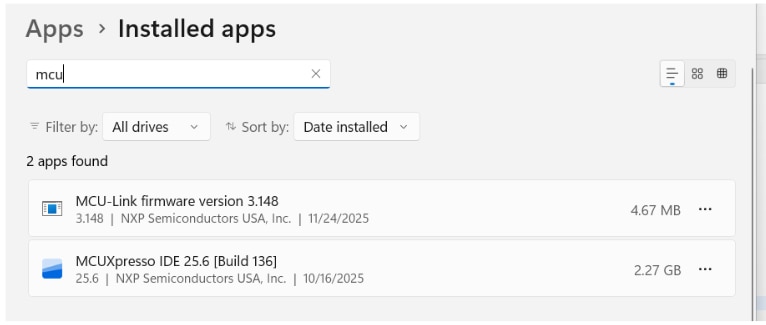
    Also, do you think I need to update the MCU-Link firmware using the firmware update utility for my board? Wondering if that might be causing problems with the debug port not connecting.

    Here is my tool chain: 
    IDE: MCUXpresso IDE V25.6 [Build 136] [2025-06-27]]
    SDKs:
    SDK_2.x_FRDM-MCXA153 SDK Version: 25.09.00 Manifest Version: 3.15.0
    SDK_2.x_FRDM-MCXN236 SDK version: 25.09.00 Manifest Version: 3.15.0

    Thanks again for all your help!

    • Cancel
    • Vote Up 0 Vote Down
    • Sign in to reply
    • Verify Answer
    • Cancel
  • skruglewicz
    0 skruglewicz 19 days ago in reply to balajivan1995
    balajivan1995 said:
    2. Sometimes the IDE will hang trying to open the linkserver. In that case, close the IDE, locate the axf or hex file and flash it using standalone link flash application.

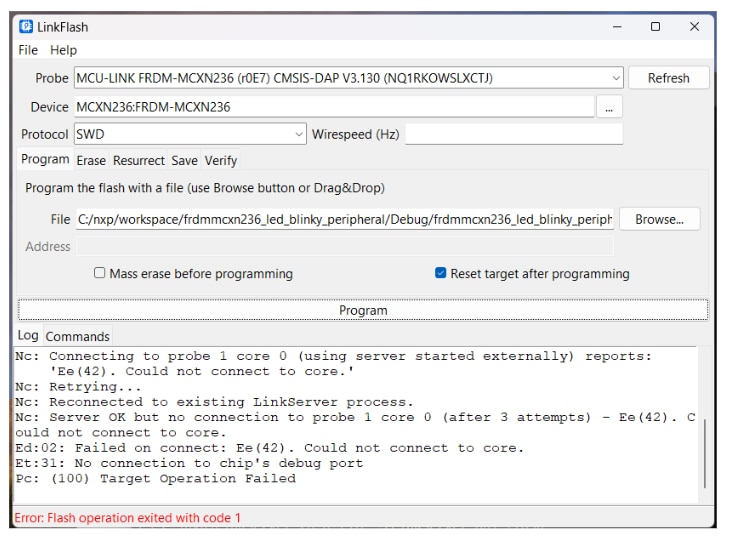
    UPDATE I found the location of the .axf file and ran the LinkfFash and received a similar error

    Nc: Connecting to probe 1 core 0 (using server started externally) reports:

        'Ee(42). Could not connect to core.'

    image

    skruglewicz said:
    Also, do you think I need to update the MCU-Link firmware using the firmware update utility for my board? Wondering if that might be causing problems with the debug port not connecting.

    • Cancel
    • Vote Up 0 Vote Down
    • Sign in to reply
    • Verify Answer
    • Cancel
  • balajivan1995
    0 balajivan1995 19 days ago in reply to skruglewicz

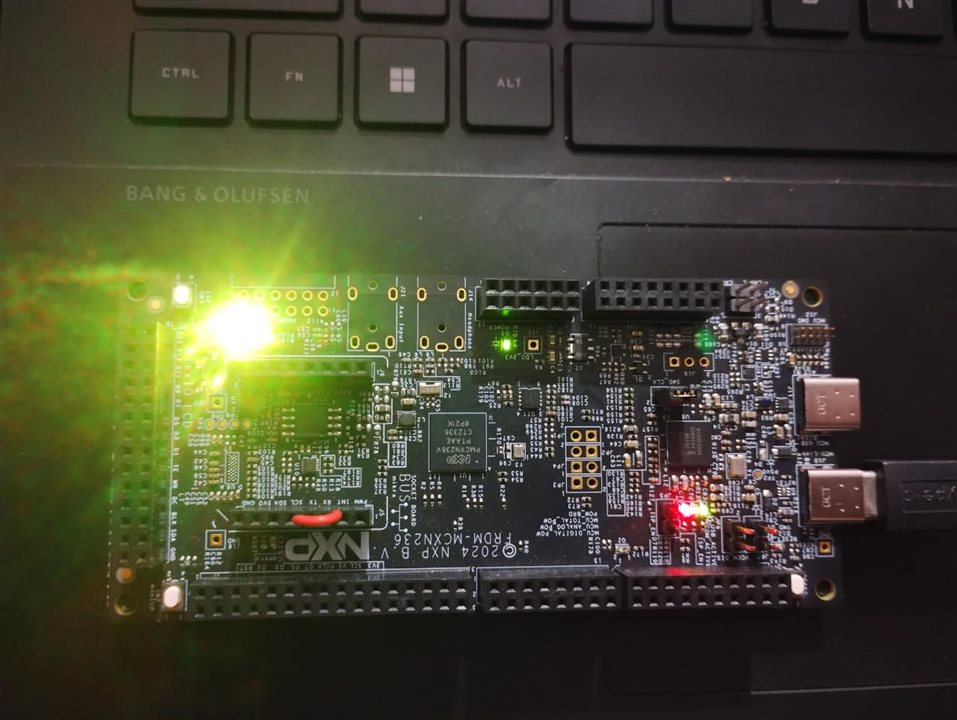
    Hi, sorry for the late reply. I have attached a n236 board project file that will automatically toggle the RGB led. You can compile with your own IDE or use the .axf file directly. Can you please flash with this file?
    n236_led.zip
    Also, please ensure you have connected to the correct USB port.
    image

    • Cancel
    • Vote Up 0 Vote Down
    • Sign in to reply
    • Verify Answer
    • Cancel
  • skruglewicz
    +1 skruglewicz 12 days ago
    skruglewicz said:

    I’m still having problems with the MCXN236 . Can't find the probe 

    CONSOLE log:

    LinkServer RedlinkMulti Driver v25.6 (Jun 26 2025 19:34:05 - crt_emu_cm_redlink build 1017)
    Found chip XML file in C:/nxp/workspace/frdmmcxn236_hello_world/Debug\MCXN236.xml
    ( 5) Remote configuration complete
    Reconnected to the existing LinkServer process.
    Connecting to probe 2 core 0 (using server started externally) reports:
    'Ee(42). Could not connect to core.'
    Retrying...
    Reconnected to the existing LinkServer process.
    Server OK but no connection to probe 2 core 0 (after 3 attempts) - Ee(42). Could not connect to core.
    Failed on connect: Ee(42). Could not connect to core.
    No connection to chip's debug port

    image

     I'm dead in the water with the MCXN236 and can not develop my project without it Does any one know why thus is happening? Is my board defective? 

    any help here would be appreciated.

    Thanks 

    Steve K

    I am currently facing a critical and complete standstill in my project development due to a severe and unresolved issue with the MCXN236 device. To be absolutely clear, this development board or component is entirely non-functional; it is, in effect, a useless brick. All attempts to utilize the device have failed, rendering it completely unusable for its intended purpose. Consequently, I am dead in the water, as the lack of a working MCXN236 has created an insurmountable bottleneck, making any further progression on my project impossible until this fundamental hardware issue is resolved. This is not a minor setback; the device is fundamentally broken and cannot be leveraged for any stage of my necessary development work.

    Here are the four troubleshooting steps I attempted to fix the "No connection to chip's debug port" error with your NXP FRDM-MCXN236 board, along with the reported status for each:

    #

    Task

    Details from Document

    Status

    1

    Close every other project, and select the debug option.

    This step was an initial suggestion to prevent the IDE/LinkServer from hanging or conflicting.

    Attempted, no luck.

    2

    Standalone Flash Tool (LinkFlash)

    Used the LinkFlash utility found in the LinkServer folder of the MCUXpresso installation, including running the command ./LinkServer gui maint.

    Did NOT work. Same Ee(42). Could not connect to core. error.

    3

    Update the firmware

    Both the ISP Jumper Method (A) and the Jumper-less Method (B) (using MCUXpresso IDE v11.10+) were attempted for the MCU-Link debug probe firmware update.

    Did NOT work.

    4

    Boot/ISP jumper using SW3

    Attempted to enter ISP/Bootloader Mode on the FRDM-MCXN236 using the correct button sequence (hold SW3, hold RESET, reconnect USB, release RESET, release SW3) to allow for mass erase or recovery.

    Did NOT work either.

    The persistent error across all attempts was: Ee(42). Could not connect to core. and No connection to the chip's debug port.


    Thanks balajivan1995 or all your suggestions, but unfortunately your suggestions di not fix the problem. 

    I'm closing my question but the debug Probe is still not working. I cannot use the board. 

    • Cancel
    • Vote Up +2 Vote Down
    • Sign in to reply
    • Reject Answer
    • Cancel
element14 Community

element14 is the first online community specifically for engineers. Connect with your peers and get expert answers to your questions.

  • Members
  • Learn
  • Technologies
  • Challenges & Projects
  • Products
  • Store
  • About Us
  • Feedback & Support
  • FAQs
  • Terms of Use
  • Privacy Policy
  • Legal and Copyright Notices
  • Sitemap
  • Cookies

An Avnet Company © 2025 Premier Farnell Limited. All Rights Reserved.

Premier Farnell Ltd, registered in England and Wales (no 00876412), registered office: Farnell House, Forge Lane, Leeds LS12 2NE.

ICP 备案号 10220084.

Follow element14

  • X
  • Facebook
  • linkedin
  • YouTube