


(Complete list of all blog entries in this series)
I already mentioned that I'm on a business trip right now, so progress was quite slow. I did some work on the PCB, more on that later.
Since the trip involved flying over the atlantic ocean, I took only the Pioneer BLE kit with me. The ADXL breakout stayed at home to avoid any confusion at the airport. The goal was to work on the Android application for my phone, to get the BLE connection to he PSoC4 BLE working.
Since I had no real accelerometer, I reverted to generating fake data on the PSoC. I had such code for my first Android experiments, so I took the code and used it on the PSoC. I structured the code to read the ADXL375 so I could easily replace it with the fake data generator, just by setting a preprocessor flag. Having done that I also reworked the whole RRD code so it works with what I wanted to transfer as data. It took me a while to understand how the BLE stack in the PSoC4 BLE sample application worked. (It does some weird stuff to enabled debugging, and to handle client and server in the same codebase, and that makes it more complicated than needed)
It talks!
For testing I used the CySmart BLE dongle that comes with the Pioneer BLE kit. Together with the CySmart application it allows good debugging of a BLE application (after one gets the basic communication going) since it allows looking at the complete GATT data structure, and even sending data to the other side. So I could make sure that data I was providing with the PSoC4 BLE was indeed correct before trying t read on the other end of the connection.
On the Android side I had already worked on the basic application before, working with fake data too. So the goal was to replace the data with what comes from the BLE connection.
First task to do there is retrieving the list of GATT services and their characteristics, to retrieve the characteristics that is really needed. When this is done, the notifications can be enabled (where needed), and the data fields can be read too.
So how does it look like?
When no connections made, the BLE kit happily blinks its LED:
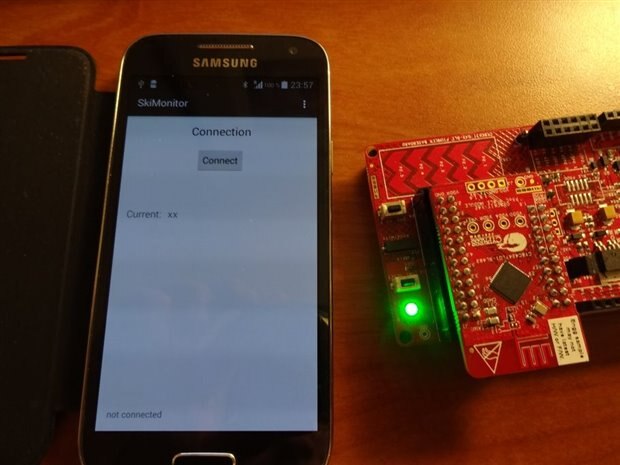
(and I probably should have some other default string for the current acceleration value...)
When the connection is established, the LED goes off, and the App now shows the current acceleration value (which is actually the average acceleration of the last second):
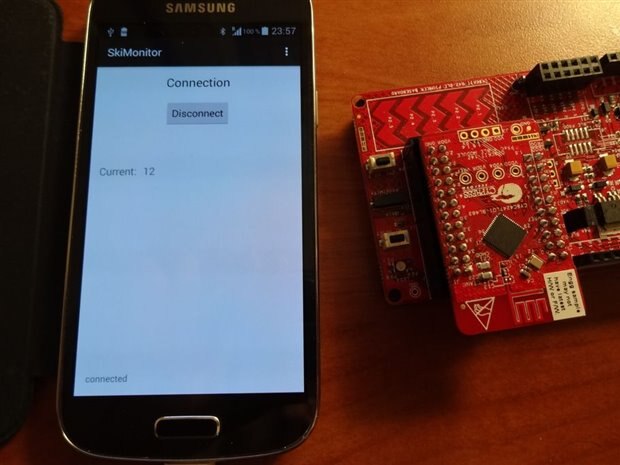
12g are actually a little bit high, but fortunately its just fake data 
Now one can swipe to the next screen, and see an overview of what has happened:

I did not implement the data transfer for alert monitoring yet, so only the average acceleration for the last minute is shown. This graph is refreshed every 10 seconds. I need to change it so it also shows the values for the last hour (which then has a resolution of one minute). One can also swipe to yet another screen which would show even more data.
So thats it for now. I need to finalize a talk to be given tomorrow and the day after I'm heading back home. There the test will be to see real accelerometer data, so maybe I will need to build a test-jig to move it around automatically.
Top Comments
-

e14 Contributor
-
Cancel
-
Vote Up
+1
Vote Down
-
-
Sign in to reply
-
More
-
Cancel
-

hlipka
in reply to e14 Contributor
-
Cancel
-
Vote Up
0
Vote Down
-
-
Sign in to reply
-
More
-
Cancel
Comment-

hlipka
in reply to e14 Contributor
-
Cancel
-
Vote Up
0
Vote Down
-
-
Sign in to reply
-
More
-
Cancel
Children