element14 Community
element14 Community
    Register Log In
  • Site
  • Search
  • Log In Register
  • Community Hub
    Community Hub
    • What's New on element14
    • Feedback and Support
    • Benefits of Membership
    • Personal Blogs
    • Members Area
    • Achievement Levels
  • Learn
    Learn
    • Ask an Expert
    • eBooks
    • element14 presents
    • Learning Center
    • Tech Spotlight
    • STEM Academy
    • Webinars, Training and Events
    • Learning Groups
  • Technologies
    Technologies
    • 3D Printing
    • FPGA
    • Industrial Automation
    • Internet of Things
    • Power & Energy
    • Sensors
    • Technology Groups
  • Challenges & Projects
    Challenges & Projects
    • Design Challenges
    • element14 presents Projects
    • Project14
    • Arduino Projects
    • Raspberry Pi Projects
    • Project Groups
  • Products
    Products
    • Arduino
    • Avnet & Tria Boards Community
    • Dev Tools
    • Manufacturers
    • Multicomp Pro
    • Product Groups
    • Raspberry Pi
    • RoadTests & Reviews
  • About Us
  • Store
    Store
    • Visit Your Store
    • Choose another store...
      • Europe
      •  Austria (German)
      •  Belgium (Dutch, French)
      •  Bulgaria (Bulgarian)
      •  Czech Republic (Czech)
      •  Denmark (Danish)
      •  Estonia (Estonian)
      •  Finland (Finnish)
      •  France (French)
      •  Germany (German)
      •  Hungary (Hungarian)
      •  Ireland
      •  Israel
      •  Italy (Italian)
      •  Latvia (Latvian)
      •  
      •  Lithuania (Lithuanian)
      •  Netherlands (Dutch)
      •  Norway (Norwegian)
      •  Poland (Polish)
      •  Portugal (Portuguese)
      •  Romania (Romanian)
      •  Russia (Russian)
      •  Slovakia (Slovak)
      •  Slovenia (Slovenian)
      •  Spain (Spanish)
      •  Sweden (Swedish)
      •  Switzerland(German, French)
      •  Turkey (Turkish)
      •  United Kingdom
      • Asia Pacific
      •  Australia
      •  China
      •  Hong Kong
      •  India
      • Japan
      •  Korea (Korean)
      •  Malaysia
      •  New Zealand
      •  Philippines
      •  Singapore
      •  Taiwan
      •  Thailand (Thai)
      • Vietnam
      • Americas
      •  Brazil (Portuguese)
      •  Canada
      •  Mexico (Spanish)
      •  United States
      Can't find the country/region you're looking for? Visit our export site or find a local distributor.
  • Translate
  • Profile
  • Settings
Sudden Impact Wearables Design Challenge
  • Challenges & Projects
  • Design Challenges
  • Sudden Impact Wearables Design Challenge
  • More
  • Cancel
Sudden Impact Wearables Design Challenge
Blog Skier impact monitor 11 - When blue teeth start talking
  • Blog
  • Forum
  • Documents
  • Polls
  • Files
  • Events
  • Mentions
  • Sub-Groups
  • Tags
  • More
  • Cancel
  • New
  • Share
  • More
  • Cancel
Group Actions
  • Group RSS
  • More
  • Cancel
Engagement
  • Author Author: hlipka
  • Date Created: 22 Apr 2015 5:03 AM Date Created
  • Views 728 views
  • Likes 1 like
  • Comments 5 comments
  • impact_skiers
  • sudden_impact
Related
Recommended

Skier impact monitor 11 - When blue teeth start talking

hlipka
hlipka
22 Apr 2015

(Complete list of all blog entries in this series)

I already mentioned that I'm on a business trip right now, so progress was quite slow. I did some work on the PCB, more on that later.

Since the trip involved flying over the atlantic ocean, I took only the Pioneer BLE kit with me. The ADXL breakout stayed at home to avoid any confusion at the airport. The goal was to work on the Android application for my phone, to get the BLE connection to he PSoC4 BLE working.

Since I had no real accelerometer, I reverted to generating fake data on the PSoC. I had such code for my first Android experiments, so I took the code and used it on the PSoC. I structured the code to read the ADXL375 so I could easily replace it with the fake data generator, just by setting a preprocessor flag. Having done that I also reworked the whole RRD code so it works with what I wanted to transfer as data. It took me a while to understand how the BLE stack in the PSoC4 BLE sample application worked. (It does some weird stuff to enabled debugging, and to handle client and server in the same codebase, and that makes it more complicated than needed)

It talks!

For testing I used the CySmart BLE dongle that comes with the Pioneer BLE kit. Together with the CySmart application it allows good debugging of a BLE application (after one gets the basic communication going) since it allows looking at the complete GATT data structure, and even sending data to the other side. So I could make sure that data I was providing with the PSoC4 BLE was indeed correct before trying t read on the other end of the connection.

On the Android side I had already worked on the basic application before, working with fake data too. So the goal was to replace the data with what comes from the BLE connection.

First task to do there is retrieving the list of GATT services and their characteristics, to retrieve the characteristics that is really needed. When this is done, the notifications can be enabled (where needed), and the data fields can be read too.

So how does it look like?

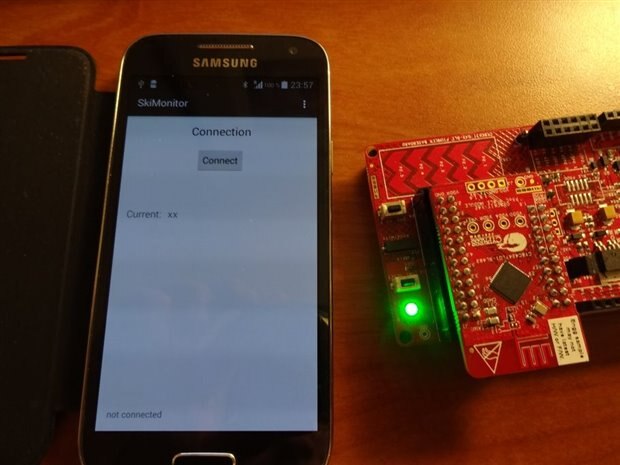
When no connections made, the BLE kit happily blinks its LED:
image

(and I probably should have some other default string for the current acceleration value...)

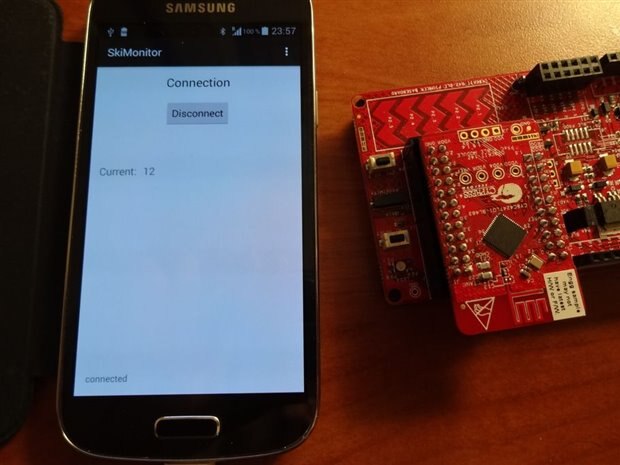
When the connection is established, the LED goes off, and the App now shows the current acceleration value (which is actually the average acceleration of the last second):
image

12g are actually a little bit high, but fortunately its just fake data image

Now one can swipe to the next screen, and see an overview of what has happened:

image

I did not implement the data transfer for alert monitoring yet, so only the average acceleration for the last minute is shown. This graph is refreshed every 10 seconds. I need to change it so it also shows the values for the last hour (which then has a resolution of one minute). One can also swipe to yet another screen which would show even more data.


So thats it for now. I need to finalize a talk to be given tomorrow and the day after I'm heading back home. There the test will be to see real accelerometer data, so maybe I will need to build a test-jig to move it around automatically.

  • Sign in to reply

Top Comments

  • Former Member
    Former Member over 10 years ago +1
    Hi, I'm working on the CY8CKIT-042-BLE for a personnal project, to create a led lighting system wich can be controlled with a phone. Your project and your posts really help me to have a better understanding…
Parents
  • Former Member
    Former Member over 10 years ago

    Hi,


    I'm working on the CY8CKIT-042-BLE for a personnal project, to create a led lighting system wich can be controlled with a phone.

    Your project and your posts really help me to have a better understanding of what is really the BLE!


    But I still have some problem with the Android application. I can find the device but I can't send data to it with my phone.

    I think it's due to the way I'm connecting to the PSoC BLE.


    Before I was using a BLE from RedBearLab and I managed to create an Android application wich can talk to my LED lighting system.

    Do you have some advise to create the Android application for the PSoC BLE?


    Thank you.

    Anthony B.

    • Cancel
    • Vote Up +1 Vote Down
    • Sign in to reply
    • More
    • Cancel
  • hlipka
    hlipka over 10 years ago in reply to Former Member

    What are you using - android or iOS (since you say you cannot send data to your device from your iPhone).

    There are some good AppNote from Cypress regarding BLE application - I suggest looking at AN91162 (using customer profiles) at least. Then you could use the CySmart PC application with your device. It should show your device and its services. Then you can use it to send values (set attributes) there and see whether they do what it should. If not, its a problem with the PSoC4 code. When you get this working, start with you phone application.

    I started with the CySmart Android App. Create a Cypress support case and ask for it. But you also can just look up Android BLE tutorials and start from there. There is no Cypress-specific stuff needed.

    • Cancel
    • Vote Up 0 Vote Down
    • Sign in to reply
    • More
    • Cancel
  • Former Member
    Former Member over 10 years ago in reply to hlipka

    I'm working only on Android. I've already follow the AN91162 and prepare PSoc for my application. I've created my own custom profile and test it with CySmart on Windows (I still have problem with array > 20 bytes) and it works.

    The fact is I'm a begginner with Android development. I have followed tutorial to create simple application working with BLE. Maybe it's due to the UUID. I don't understand why it was working with RedBearLab BLE and here it's not working. I thought it would be easy image I will re-develop my app and see if there is something new!

    • Cancel
    • Vote Up 0 Vote Down
    • Sign in to reply
    • More
    • Cancel
Comment
  • Former Member
    Former Member over 10 years ago in reply to hlipka

    I'm working only on Android. I've already follow the AN91162 and prepare PSoc for my application. I've created my own custom profile and test it with CySmart on Windows (I still have problem with array > 20 bytes) and it works.

    The fact is I'm a begginner with Android development. I have followed tutorial to create simple application working with BLE. Maybe it's due to the UUID. I don't understand why it was working with RedBearLab BLE and here it's not working. I thought it would be easy image I will re-develop my app and see if there is something new!

    • Cancel
    • Vote Up 0 Vote Down
    • Sign in to reply
    • More
    • Cancel
Children
No Data
element14 Community

element14 is the first online community specifically for engineers. Connect with your peers and get expert answers to your questions.

  • Members
  • Learn
  • Technologies
  • Challenges & Projects
  • Products
  • Store
  • About Us
  • Feedback & Support
  • FAQs
  • Terms of Use
  • Privacy Policy
  • Legal and Copyright Notices
  • Sitemap
  • Cookies

An Avnet Company © 2025 Premier Farnell Limited. All Rights Reserved.

Premier Farnell Ltd, registered in England and Wales (no 00876412), registered office: Farnell House, Forge Lane, Leeds LS12 2NE.

ICP 备案号 10220084.

Follow element14

  • X
  • Facebook
  • linkedin
  • YouTube