element14 Community
element14 Community
    Register Log In
  • Site
  • Search
  • Log In Register
  • Community Hub
    Community Hub
    • What's New on element14
    • Feedback and Support
    • Benefits of Membership
    • Personal Blogs
    • Members Area
    • Achievement Levels
  • Learn
    Learn
    • Ask an Expert
    • eBooks
    • element14 presents
    • Learning Center
    • Tech Spotlight
    • STEM Academy
    • Webinars, Training and Events
    • Learning Groups
  • Technologies
    Technologies
    • 3D Printing
    • FPGA
    • Industrial Automation
    • Internet of Things
    • Power & Energy
    • Sensors
    • Technology Groups
  • Challenges & Projects
    Challenges & Projects
    • Design Challenges
    • element14 presents Projects
    • Project14
    • Arduino Projects
    • Raspberry Pi Projects
    • Project Groups
  • Products
    Products
    • Arduino
    • Avnet & Tria Boards Community
    • Dev Tools
    • Manufacturers
    • Multicomp Pro
    • Product Groups
    • Raspberry Pi
    • RoadTests & Reviews
  • About Us
  • Store
    Store
    • Visit Your Store
    • Choose another store...
      • Europe
      •  Austria (German)
      •  Belgium (Dutch, French)
      •  Bulgaria (Bulgarian)
      •  Czech Republic (Czech)
      •  Denmark (Danish)
      •  Estonia (Estonian)
      •  Finland (Finnish)
      •  France (French)
      •  Germany (German)
      •  Hungary (Hungarian)
      •  Ireland
      •  Israel
      •  Italy (Italian)
      •  Latvia (Latvian)
      •  
      •  Lithuania (Lithuanian)
      •  Netherlands (Dutch)
      •  Norway (Norwegian)
      •  Poland (Polish)
      •  Portugal (Portuguese)
      •  Romania (Romanian)
      •  Russia (Russian)
      •  Slovakia (Slovak)
      •  Slovenia (Slovenian)
      •  Spain (Spanish)
      •  Sweden (Swedish)
      •  Switzerland(German, French)
      •  Turkey (Turkish)
      •  United Kingdom
      • Asia Pacific
      •  Australia
      •  China
      •  Hong Kong
      •  India
      • Japan
      •  Korea (Korean)
      •  Malaysia
      •  New Zealand
      •  Philippines
      •  Singapore
      •  Taiwan
      •  Thailand (Thai)
      • Vietnam
      • Americas
      •  Brazil (Portuguese)
      •  Canada
      •  Mexico (Spanish)
      •  United States
      Can't find the country/region you're looking for? Visit our export site or find a local distributor.
  • Translate
  • Profile
  • Settings
Upcycle It
  • Challenges & Projects
  • Design Challenges
  • Upcycle It
  • More
  • Cancel
Upcycle It
Blog PDU #11 - Celebration [Upcycle It Challenge]
  • Blog
  • Forum
  • Documents
  • Polls
  • Files
  • Events
  • Mentions
  • Sub-Groups
  • Tags
  • More
  • Cancel
  • New
  • Share
  • More
  • Cancel
Group Actions
  • Group RSS
  • More
  • Cancel
Engagement
  • Author Author: jasonwier92
  • Date Created: 22 May 2017 3:14 PM Date Created
  • Views 915 views
  • Likes 3 likes
  • Comments 4 comments
  • node-red
  • upcycle it
  • upcycled_pdu
Related
Recommended

PDU #11 - Celebration [Upcycle It Challenge]

jasonwier92
jasonwier92
22 May 2017

A Time to Dance


This is good.  My project has come together and works.  I like it. Now as many have said it is time to add in the extras I wanted to do.  I have decided to put this device in my NEMA box at my 80' tower. Then when I have a problem, I can power cycle items. Another goal will be watchdogs to reboot radios if the tower cannot see inside my network.


Special thanks to Intel!!

image


Ecclesiastes 3:4-6

A time to weep, And a time to laugh; A time to mourn, And a time to dance;

A time to cast away stones, And a time to gather stones; A time to embrace, And a time to refrain from embracing;

A time to gain, And a time to lose; A time to keep, And a time to throw away;


A Time to Throw Away


Okay, I am short one item in my Upcycled PDU that I wanted.  The LCD in he kit was too tall to fit in my box. Not a huge deal as I will use the other Edison to drive the LCD and some other add on items.  I think I will put it in a project box and it will be the part of the project that is shown.


Forward With Time to Keep


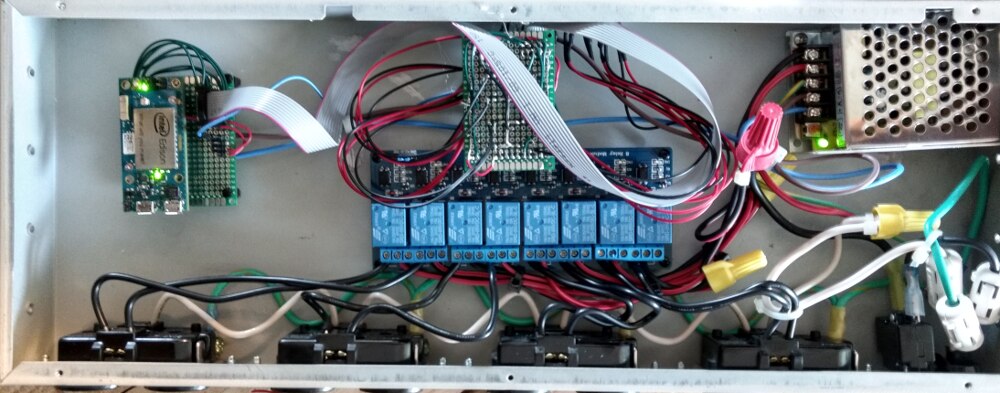
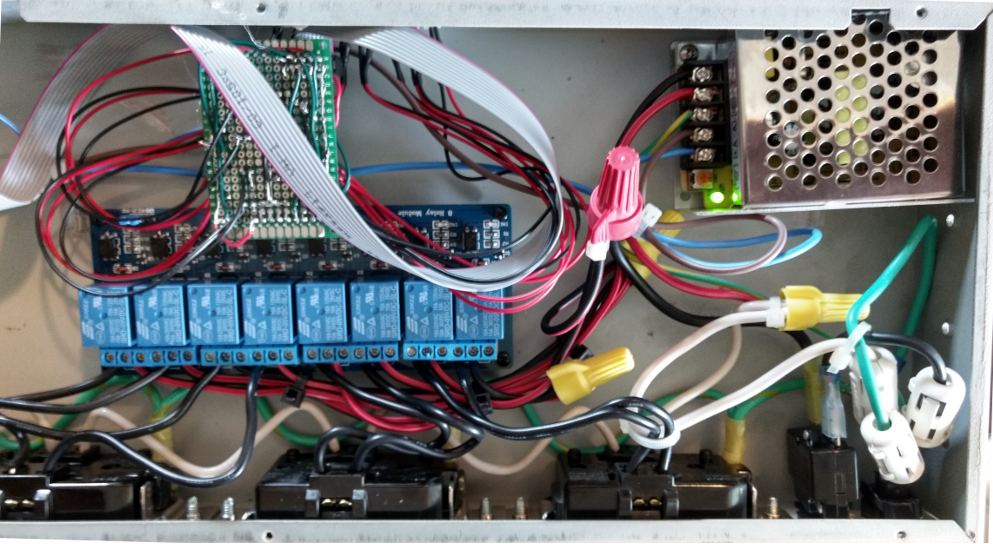
This will be a 10,000 foot view and I will zoom in on parts to follow.  The web interface is working how I want it, but I want to to look good, so I will cover that as I finish it too.  Also the second Edison control and display functions will be covered with the details.


javascript:;{gallery} My Gallery Title

image

Full Inside View

image

Right Side

image

Left Side


First demo showing this working from the web interface.  One button toggles on and off depending on current state.

You don't have permission to edit metadata of this video.
Edit media
x
image
Upload Preview
image


Second demo showing an external source (MQTT) controlling the outlets and web interface updating.

You don't have permission to edit metadata of this video.
Edit media
x
image
Upload Preview
image


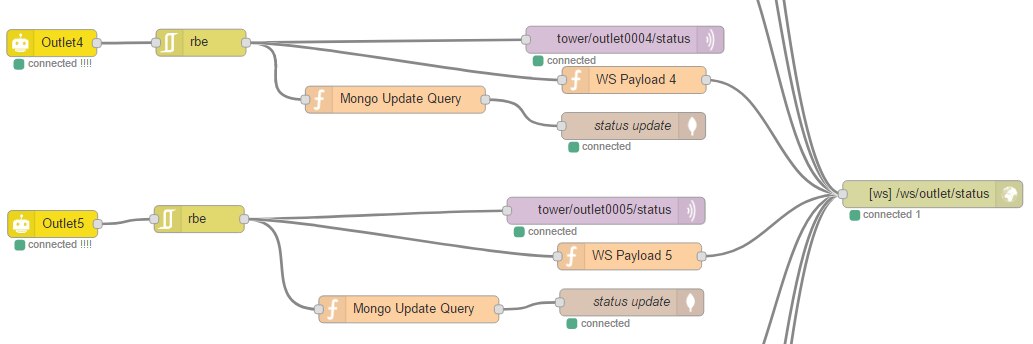
Node-Red Flows!

{gallery} My Gallery Title

image

Incoming WS message for outlet control and MQTT to also control the outlet.  I need to change put a function so that I can send On/Off via MQTT from Home Assistant.

image

Long flow that looks for GPIO status and looks for changes.  Then send out a MQTT message (needs a function also for On/Off from 1/0), function that formats what outlet is sending to a WS, and update MongoDB entry.

image

More detail on the last slide.

image

When there is a new connection or Home Assistant starts up, we need the status of all the outlets.  This flow looks for that query and sends out via MQTT and WS.


Here is what the mongo Collection looks like:

> db.status.find().pretty()
{
  "_id" : ObjectId("5922bedc0d6c8c42b1a16876"),
  "device" : "eddy2",
  "control" : "lcd1",
  "state" : "time",
  "custom" : {
  "msg1" : null,
  "msg2" : null,
  "R" : null,
  "G" : null,
  "B" : null
  }
}
{
  "_id" : ObjectId("5922cc280d6c8c42b1a16877"),
  "device" : "tower00",
  "control" : "outlet1",
  "state" : "off"
}
{
  "_id" : ObjectId("5922ce3f0d6c8c42b1a16878"),
  "device" : "tower00",
  "control" : "outlet2",
  "state" : "off"
}
{
  "_id" : ObjectId("5922da170d6c8c42b1a16879"),
  "device" : "tower00",
  "control" : "outlet4",
  "state" : "off"
}
{
  "_id" : ObjectId("5922dd840d6c8c42b1a1687a"),
  "device" : "tower00",
  "control" : "outlet3",
  "state" : "off"
}
{
  "_id" : ObjectId("5922e3ed0d6c8c42b1a1687b"),
  "device" : "tower00",
  "control" : "outlet5",
  "state" : "off"
}
{
  "_id" : ObjectId("5922e3ee0d6c8c42b1a1687c"),
  "device" : "tower00",
  "control" : "outlet6",
  "state" : "off"
}
{
  "_id" : ObjectId("5922e3f00d6c8c42b1a1687d"),
  "device" : "tower00",
  "control" : "outlet7",
  "state" : "off"
}


Here is my web interface system that interfaces the Node-Red flows and the front end.

GET CODE HERE!!


var express = require('express');
var app = express();
var server = require('http').createServer(app);
var io = require('socket.io')(server);
var port = 3001;


app.use(express.static(__dirname + '/public'));


const WebSocket = require('ws');


//const wss = new WebSocket.Server({ port: 3001 }); 
const wscTemperature = new WebSocket('ws://192.168.2.138:1880/ws/temperature');
const wscButton1 = new WebSocket('ws://192.168.2.138:1880/ws/button1');
const wscTouch1 = new WebSocket('ws://192.168.2.138:1880/ws/touch1');
const wscOutletStatus = new WebSocket('ws://192.168.2.137:1880/ws/outlet/status');


// These are outputs
const wscLED1 = new WebSocket('ws://192.168.2.138:1880/ws/led1');
const wscOutletControl = new WebSocket('ws://192.168.2.137:1880/ws/outlet/control');
const wscLCD1 = new WebSocket('ws://192.168.2.138:1880/ws/lcd');
const wscTowerStatus = new WebSocket('ws://192.168.2.137:1880/ws/status');


io.on('connect', function (socket) {


  wscOutletStatus.on('message', function(data,flags) {
  console.log("Outlet Status Change:", data);
  io.emit('tower00Outlet', {
  event: 'Outlet',
  value: data
  });
  });


  wscButton1.on('message', function(data,flags) {
  console.log("Button1 is: " + data);
  io.emit('eddy2', {
  event: 'Button1',
  value: data
  });
  });


  wscTouch1.on('message', function(data,flags) {
  console.log("Touch1 is: " + data);
  io.emit('eddy2', {
  event: 'Touch1',
  value: data
  });
  });


  wscTemperature.on('message', function(data,flags) {
  //console.log("Data: ",data);
  //console.log("Flags: ",flags);
  //var dataJ = JSON.parse(data);
  //var a = dataJ.payload;
  var a = data;
  //console.log("A: ",a);
  var B = 4275;
  var R = 1023.0/a - 1.0;
  //console.log("R: ",R);
  R *= 100000.0;
  var temperature = 1.0 / (Math.log(R / 100000.0) / B + 1 / 298.15) - 273.15;
  var tempC = Math.round((temperature*100))/100;
  //console.log("temperature: ", tempC);
  var tempF = Math.round((temperature * 9 / 5 + 32) * 100) / 100;
  //console.log("or "+ tempF + " F");
  io.emit('eddy2', {
  event: 'Temperature',
  value: a,
  cel: tempC,
  far: tempF
  });
  });


  socket.on('Tower00OutletStatus', function(data) {
  wscTowerStatus.send("1");
  });


  socket.on('button',function(data) {
  console.log("data: ", data);
  switch (data.button) {
  case 'Tower00Outlet':
  console.log("Tower00Outlet: ", JSON.stringify(data.msg));
  wscOutletControl.send(JSON.stringify(data.msg));
  break;
  case 'led1':
  wscLED1.send(data.msg);
  console.log("LED1: ", data.msg);
  break;
  case 'lcd1Time':
  console.log("Setting LCD1 to Time",data);
  var myMSG = {
  state: "time"
  };
  console.log("sending: ",myMSG);
  wscLCD1.send(JSON.stringify(myMSG));
  break;
  case 'lcd1Temp':
  console.log("Setting LCD1 to Time",data);
  var myMSG = {
  state: "outside temperature"
  };
  console.log("sending: ",myMSG);
  wscLCD1.send(JSON.stringify(myMSG));
  break;
  }
  });


});


server.listen(port, function() {
  console.log('Server listening at port %d', port);
});

  • Sign in to reply

Top Comments

  • DAB
    DAB over 8 years ago +3
    Nice update and well done. Getting a project up and working is always a good feeling. Then you start thinking of all the neat things you can add and its on to the first modification. DAB
  • jasonwier92
    jasonwier92 over 8 years ago in reply to Workshopshed +2
    Yes, the WiFi still worked with the LID on. I have not looked at the signal levels though! My Devices Dot Com looks cool. I will use that idea as a template. I really want to code my own interface and…
  • Workshopshed
    Workshopshed over 8 years ago +1
    Jason it's looking great. If you are looking for a fancy IOT interface you could look at https://mydevices.com/ it's MQTT based so should not be that hard to get wired up. One query, does the Wifi still…
  • mcb1
    mcb1 over 8 years ago

    Good work.


    does the Wifi still work with the lid on?

    There is an external aerial connector if you get stuck.


    I will use the other Edison to drive the LCD and some other add on items

    Nice way to have a remote display.


    Mark

    • Cancel
    • Vote Up +1 Vote Down
    • Sign in to reply
    • More
    • Cancel
  • DAB
    DAB over 8 years ago

    Nice update and well done.


    Getting a project up and working is always a good feeling.


    Then you start thinking of all the neat things you can add and its on to the first modification.


    DAB

    • Cancel
    • Vote Up +3 Vote Down
    • Sign in to reply
    • More
    • Cancel
  • jasonwier92
    jasonwier92 over 8 years ago in reply to Workshopshed

    Yes, the WiFi still worked with the LID on.  I have not looked at the signal levels though!


    My Devices Dot Com looks cool.  I will use that idea as a template.  I really want to code my own interface and keep it responsive.  I will go easy though and use bootstrap.

    • Cancel
    • Vote Up +2 Vote Down
    • Sign in to reply
    • More
    • Cancel
  • Workshopshed
    Workshopshed over 8 years ago

    Jason it's looking great. If you are looking for a fancy IOT interface you could look at https://mydevices.com/  it's MQTT based so should not be that hard to get wired up.


    One query, does the Wifi still work with the lid on?

    • Cancel
    • Vote Up +1 Vote Down
    • Sign in to reply
    • More
    • Cancel
element14 Community

element14 is the first online community specifically for engineers. Connect with your peers and get expert answers to your questions.

  • Members
  • Learn
  • Technologies
  • Challenges & Projects
  • Products
  • Store
  • About Us
  • Feedback & Support
  • FAQs
  • Terms of Use
  • Privacy Policy
  • Legal and Copyright Notices
  • Sitemap
  • Cookies

An Avnet Company © 2025 Premier Farnell Limited. All Rights Reserved.

Premier Farnell Ltd, registered in England and Wales (no 00876412), registered office: Farnell House, Forge Lane, Leeds LS12 2NE.

ICP 备案号 10220084.

Follow element14

  • X
  • Facebook
  • linkedin
  • YouTube