element14 Community
element14 Community
    Register Log In
  • Site
  • Search
  • Log In Register
  • Community Hub
    Community Hub
    • What's New on element14
    • Feedback and Support
    • Benefits of Membership
    • Personal Blogs
    • Members Area
    • Achievement Levels
  • Learn
    Learn
    • Ask an Expert
    • eBooks
    • element14 presents
    • Learning Center
    • Tech Spotlight
    • STEM Academy
    • Webinars, Training and Events
    • Learning Groups
  • Technologies
    Technologies
    • 3D Printing
    • FPGA
    • Industrial Automation
    • Internet of Things
    • Power & Energy
    • Sensors
    • Technology Groups
  • Challenges & Projects
    Challenges & Projects
    • Design Challenges
    • element14 presents Projects
    • Project14
    • Arduino Projects
    • Raspberry Pi Projects
    • Project Groups
  • Products
    Products
    • Arduino
    • Avnet & Tria Boards Community
    • Dev Tools
    • Manufacturers
    • Multicomp Pro
    • Product Groups
    • Raspberry Pi
    • RoadTests & Reviews
  • About Us
  • Store
    Store
    • Visit Your Store
    • Choose another store...
      • Europe
      •  Austria (German)
      •  Belgium (Dutch, French)
      •  Bulgaria (Bulgarian)
      •  Czech Republic (Czech)
      •  Denmark (Danish)
      •  Estonia (Estonian)
      •  Finland (Finnish)
      •  France (French)
      •  Germany (German)
      •  Hungary (Hungarian)
      •  Ireland
      •  Israel
      •  Italy (Italian)
      •  Latvia (Latvian)
      •  
      •  Lithuania (Lithuanian)
      •  Netherlands (Dutch)
      •  Norway (Norwegian)
      •  Poland (Polish)
      •  Portugal (Portuguese)
      •  Romania (Romanian)
      •  Russia (Russian)
      •  Slovakia (Slovak)
      •  Slovenia (Slovenian)
      •  Spain (Spanish)
      •  Sweden (Swedish)
      •  Switzerland(German, French)
      •  Turkey (Turkish)
      •  United Kingdom
      • Asia Pacific
      •  Australia
      •  China
      •  Hong Kong
      •  India
      • Japan
      •  Korea (Korean)
      •  Malaysia
      •  New Zealand
      •  Philippines
      •  Singapore
      •  Taiwan
      •  Thailand (Thai)
      • Vietnam
      • Americas
      •  Brazil (Portuguese)
      •  Canada
      •  Mexico (Spanish)
      •  United States
      Can't find the country/region you're looking for? Visit our export site or find a local distributor.
  • Translate
  • Profile
  • Settings
Upcycle It
  • Challenges & Projects
  • Design Challenges
  • Upcycle It
  • More
  • Cancel
Upcycle It
Blog Sockets In Sockets For My Sockets [Upcycle It #4]
  • Blog
  • Forum
  • Documents
  • Polls
  • Files
  • Events
  • Mentions
  • Sub-Groups
  • Tags
  • More
  • Cancel
  • New
  • Share
  • More
  • Cancel
Group Actions
  • Group RSS
  • More
  • Cancel
Engagement
  • Author Author: jasonwier92
  • Date Created: 20 Apr 2017 11:32 AM Date Created
  • Views 838 views
  • Likes 2 likes
  • Comments 5 comments
  • sockets
  • node-red
  • upcycle it
  • upcycled_pdu
  • javascript
  • pdu
Related
Recommended

Sockets In Sockets For My Sockets [Upcycle It #4]

jasonwier92
jasonwier92
20 Apr 2017

The Design

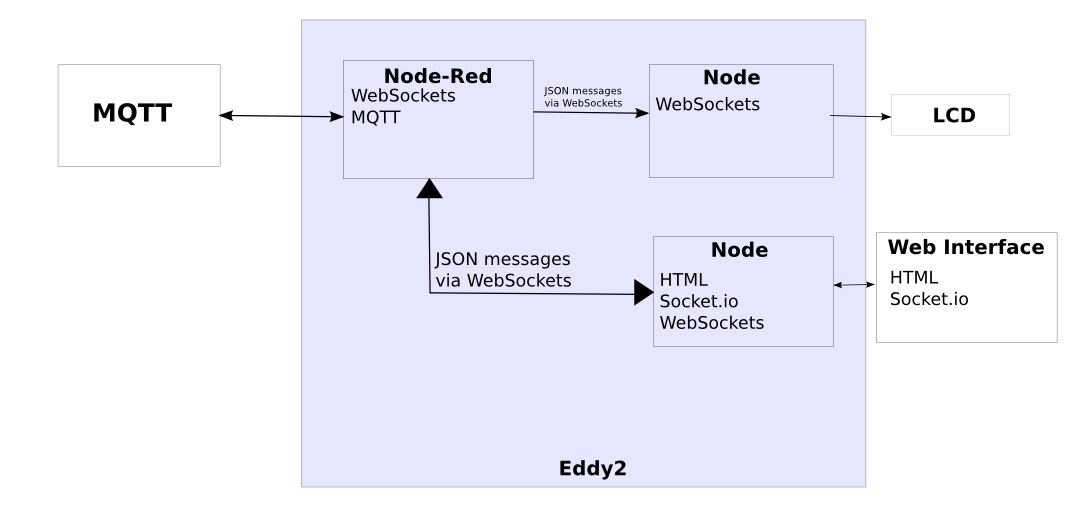
Since one of my goals is to force myself to use Node-Red, I have to work inside the parameters of Node-Red. While I am at it, I want to make something practical, so I am going to write this as being more module so that I could isolate the Edison from the real world. Lets start with a block diagram.
image

Now let me tell you what is happening:

  1. Node-Red is running on the Edison, I call it Eddy2.
    1. This has access to the GPIO
    2. Exposes the GPIO to websockets (WS) and MQTT
    3. Logic to control GPIO without consulting outside sources, but could take input from outside sources. Example right now is if you touch the touch sensor or push the button, the LED lights up. But in the future there could be input via a WS or MQTT that says if the LED is locked out.
    4. Could also use Node-Red as a MQTT to WS bridge.  In the past I have found this to be difficult with Mosquitto, a MQTT broker, as it has to be compiled from source and causes the Mosquitto server to become unstable.
  2. The LCD Node will be a node process that will get messages to be displayed on the LCD.
  3. Web Interface Node will be running Express to be a web server
    1. Receives and sends WS messages from Node-Red
    2. Serves the Web Interface (HTML and Javascript) to the client
    3. Provides Socket.io to the client for two way messages


All of this adds a layer of complexity to the stack, but I think it will be the best solution. Other options that I could have used and why I did not (still could if needed):

  1. Node-Red does all the functions
    1. I have a demo of Node-Red on the Edison running Socket.io and has a chat client and serving the web page, so I know it is all possible, but...
      1. When changes happen in Node-Red with WS and Socket.io, I have found that the sockets are delicate and do not re-connect or the client crashes.
      2. Editing HTML and Javascript in Node-Red is not the best.  This is not a problem when the product is stable.
    2. Scalability: If I add a second PDU or additional controls and I want them all in one interface, then Node-Red would need a bridge to talk to other bridge.
    3. Exposure: If needed I can add a layer of security by moving the node web interface to another device and not expose the PDU Edison to the world
  2. Run all Node.  This would be simpler and something I understand much better, but I need to push myself and use Node-Red.


Proof Of Concept

Lets make sure this is going to work before we get to far down the road. To start with, I want to do a proof of concept that what I layed out above will work.  Will WS messages be received, formated and sent out via Socket.io? I have never tried that before, I have done abstract layers using all Socket.io and this is simple and works well, but I have never even worked with WS before.  I did some experimenting with WS and Node-Red.  I created a topic for the temperature data to be sent out via a WS of /ws/temperature and used "wscat -c eddy2:1880/ws/temperature" to watch the data being sent out and it worked. Then I created more sockets with the same name and could not get them all to work, so I pounded my head against the wall until I decided they needed new names. So I create /ws/led1 and I hook it up to the light output, us wscat to send messages of 0 or 1 to turn the LED off or on. Then I graduate to testing with node and replicate the same results.  This is good.  (More about wscat at the bottom of this BLOG entry)


So now to build my POC to make sure information can flow from start to end nicely.  The following diagram show how I plan to do the POC.  Node-Red will have three items that the information from them will be passed to the web interface. These are the temperature sensor hooked up to A0, touch sensor hooked up to D3, and the button to D4.

image

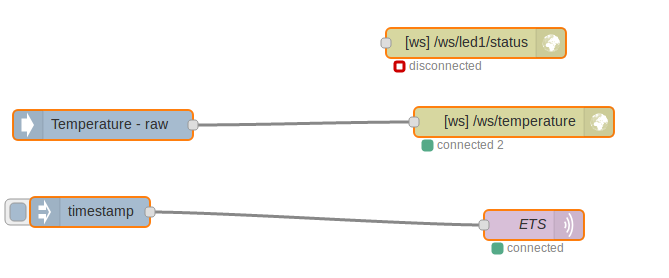
First of all here are two shots of the Node-Red flow:

imageimage


There is both WS and MQTT there.  I have been testing with both and both work great.


Full code is referenced below, but here are some examples of converting from WS to Socket.io.


Setting up WS in node:

const wscTemperature = new WebSocket('ws://192.168.2.138:1880/ws/temperature');
const wscButton1 = new WebSocket('ws://192.168.2.138:1880/ws/button1');
const wscTouch1 = new WebSocket('ws://192.168.2.138:1880/ws/touch1');


Now when message come in on wscButton1, display it on the console of the server, and then emit it via Socket.io with some formatting. Exact same thing with the touch sensor data.

wscButton1.on('message', function(data,flags) {
        console.log("Button1 is: " + data);
        io.emit('eddy2', {
            event: 'Button1',
            value: data
        });
    });


Temperature sensor takes in the raw analog data and outputs the temperature in Celsius and Fahrenheit, like this:

wscTemperature.on('message', function(data,flags) {
        console.log("Data: ",data);
        let a = data;
        let B = 4275;
        let R = 1023.0/a - 1.0;
        R *= 100000.0;
        let temperature = 1.0 / (Math.log(R / 100000.0) / B + 1 / 298.15) - 273.15;
        let tempC = Math.round((temperature*100))/100;
        console.log("temperature: ", tempC);
        let tempF = Math.round((temperature * 9 / 5 + 32) * 100) / 100;
        console.log("or "+ tempF + " F");
        io.emit('eddy2', {
            event: 'Temperature',
            value: a,
            cel: tempC,
            far: tempF
        });
    });


On the web interface there is some javascript to bring connect and listen for Socket.io messages and then update the DOM with that data.

$(function() {
    var socket = io();

    socket.on('eddy2', function (data) {
      addChatMessage(data);
        console.log(data);
    });

});

function addChatMessage (data, options) {
    switch (data.event) {
        case "Temperature":
            $('span#tempC').html(data.cel);
            $('span#tempF').html(data.far);
            break;
        case "Button1":
            var button = "Off";
            if (data.value == "1") button = "On";
            $('span#button1').html(button);
            break;
        case "Touch1":
            var button = "Not Touched";
            if (data.value == "1") button = "Touched";
            $('span#touch1').html(button);
            break;
    }
}


I have put together a short, simple video using the code above to demo the proof of concept works:

You don't have permission to edit metadata of this video.
Edit media
x
image
Upload Preview
image


What's Next?

  • Sockets flowing back to Node-Red and the Edison. Maybe control the LED and a relay via Sockets and MQTT
  • LCD Node controller to be able to send messages from Node-Red
    • Node-Red gets a message from either a sensor input, MQTT, or WS and sends a message to the LCD
    • Mine information in Node-Red as information to be displayed
    • Alerts and alarms with color
    • Maybe this information and color can also be displayed on the web interface
  • Initial state on page load.  I think this will consist of storing this information in Node-Red or reading the state of GPIO
  • Pretty up the web interface


References

  • I used wscat and I found it to be a great tool. If you want to try it, it is easy to install and use.
    • To install type "npm install -g wscat"
    • To use it is just "wscat -c server:port/path/topic"
  • Full code including all the Node-Red flow can be found at this Github repo.


  • Sign in to reply

Top Comments

  • jasonwier92
    jasonwier92 over 8 years ago in reply to Workshopshed +1
    I am using that node-red-node-intel-gpio! I think that was in my last BLOG, so I did not reference it here. Maybe as a groups we should have one Wiki that we are putting all these tips. Yes, mosquitto…
  • Workshopshed
    Workshopshed over 8 years ago in reply to jasonwier92 +1
    >I had to compile a newer version from source That worries me slightly but I've always got Mosca to fall back on. >I am using that node-red-node-intel-gpio! Ah yes, I see now I thought the inputs were…
  • mcb1
    mcb1 over 8 years ago

    Keep at it, eventually you sort out all the bugs for us image


    Maybe as a groups we should have one Wiki that we are putting all these tips.

    We have one called element14       you can find it here.

    www.element14.com/community/community/design-challenges/upcycleit/blog


    Hopefully our friends at Intel will use this and link back from their site.


    Mark

    • Cancel
    • Vote Up 0 Vote Down
    • Sign in to reply
    • More
    • Cancel
  • DAB
    DAB over 8 years ago

    Good update.


    I may finally figure some of this web stuff out.


    DAB

    • Cancel
    • Vote Up 0 Vote Down
    • Sign in to reply
    • More
    • Cancel
  • Workshopshed
    Workshopshed over 8 years ago in reply to jasonwier92

    >I had to compile a newer version from source

    That worries me slightly but I've always got Mosca to fall back on.


    >I am using that node-red-node-intel-gpio!

    Ah yes, I see now I thought the inputs were inject nodes.


    >I do not need two notifications, one will do

    The "rate limit" node is a good one.

    • Cancel
    • Vote Up +1 Vote Down
    • Sign in to reply
    • More
    • Cancel
  • jasonwier92
    jasonwier92 over 8 years ago in reply to Workshopshed

    I am using that node-red-node-intel-gpio!  I think that was in my last BLOG, so I did not reference it here.  Maybe as a groups we should have one Wiki that we are putting all these tips.


    Yes, mosquitto has websockets and I had them enabled.  I had to compile a newer version from source and include a bunch of libraries and special flags and then it just crashed time after time, so I compiled without websocket support and it was stable. Maybe it works better now as I am sure when I was enabling it about a year ago it was very new.


    But it is easy to setup a Node-Red flow to take the MQTT message, filter, store, record and share via WS as needed.  Maybe you want it to look at two items.  One that I use at my house is that I monitor power to my 80' tower, but if power is out to the house, I do not need two notifications, one will do.  So I can have Node-Red take care of that.


    All that said and it is an extra layer that is needed.

    • Cancel
    • Vote Up +1 Vote Down
    • Sign in to reply
    • More
    • Cancel
  • Workshopshed
    Workshopshed over 8 years ago

    Hi Jason, you should be able to access the Edison's GPIO in Node-Red with this flow http://flows.nodered.org/node/node-red-node-intel-gpio


    Also, I believe the latest mosquitto has websockets, I've not yet had chance to play with it on the Edison as I've been looking at motors.

    Jan-Piet Mens :: The Mosquitto MQTT broker gets Websockets support

    Enabling and using WebSockets on Mosquitto – 1001 ways to blink a LED

    • Cancel
    • Vote Up 0 Vote Down
    • Sign in to reply
    • More
    • Cancel
element14 Community

element14 is the first online community specifically for engineers. Connect with your peers and get expert answers to your questions.

  • Members
  • Learn
  • Technologies
  • Challenges & Projects
  • Products
  • Store
  • About Us
  • Feedback & Support
  • FAQs
  • Terms of Use
  • Privacy Policy
  • Legal and Copyright Notices
  • Sitemap
  • Cookies

An Avnet Company © 2025 Premier Farnell Limited. All Rights Reserved.

Premier Farnell Ltd, registered in England and Wales (no 00876412), registered office: Farnell House, Forge Lane, Leeds LS12 2NE.

ICP 备案号 10220084.

Follow element14

  • X
  • Facebook
  • linkedin
  • YouTube