element14 Community
element14 Community
    Register Log In
  • Site
  • Search
  • Log In Register
  • Community Hub
    Community Hub
    • What's New on element14
    • Feedback and Support
    • Benefits of Membership
    • Personal Blogs
    • Members Area
    • Achievement Levels
  • Learn
    Learn
    • Ask an Expert
    • eBooks
    • element14 presents
    • Learning Center
    • Tech Spotlight
    • STEM Academy
    • Webinars, Training and Events
    • Learning Groups
  • Technologies
    Technologies
    • 3D Printing
    • FPGA
    • Industrial Automation
    • Internet of Things
    • Power & Energy
    • Sensors
    • Technology Groups
  • Challenges & Projects
    Challenges & Projects
    • Design Challenges
    • element14 presents Projects
    • Project14
    • Arduino Projects
    • Raspberry Pi Projects
    • Project Groups
  • Products
    Products
    • Arduino
    • Avnet & Tria Boards Community
    • Dev Tools
    • Manufacturers
    • Multicomp Pro
    • Product Groups
    • Raspberry Pi
    • RoadTests & Reviews
  • About Us
    About the element14 Community
  • Store
    Store
    • Visit Your Store
    • Choose another store...
      • Europe
      •  Austria (German)
      •  Belgium (Dutch, French)
      •  Bulgaria (Bulgarian)
      •  Czech Republic (Czech)
      •  Denmark (Danish)
      •  Estonia (Estonian)
      •  Finland (Finnish)
      •  France (French)
      •  Germany (German)
      •  Hungary (Hungarian)
      •  Ireland
      •  Israel
      •  Italy (Italian)
      •  Latvia (Latvian)
      •  
      •  Lithuania (Lithuanian)
      •  Netherlands (Dutch)
      •  Norway (Norwegian)
      •  Poland (Polish)
      •  Portugal (Portuguese)
      •  Romania (Romanian)
      •  Russia (Russian)
      •  Slovakia (Slovak)
      •  Slovenia (Slovenian)
      •  Spain (Spanish)
      •  Sweden (Swedish)
      •  Switzerland(German, French)
      •  Turkey (Turkish)
      •  United Kingdom
      • Asia Pacific
      •  Australia
      •  China
      •  Hong Kong
      •  India
      •  Japan
      •  Korea (Korean)
      •  Malaysia
      •  New Zealand
      •  Philippines
      •  Singapore
      •  Taiwan
      •  Thailand (Thai)
      •  Vietnam
      • Americas
      •  Brazil (Portuguese)
      •  Canada
      •  Mexico (Spanish)
      •  United States
      Can't find the country/region you're looking for? Visit our export site or find a local distributor.
  • Translate
  • Profile
  • Settings
element14's The Ben Heck Show
  • Challenges & Projects
  • element14 presents
  • element14's The Ben Heck Show
  • More
  • Cancel
element14's The Ben Heck Show
Forum Hi Ben, long time watcher of the TBHS. Love it & you. Need Help with Raspberry pi 2 & LCD please!
  • Blog
  • Forum
  • Documents
  • Polls
  • Files
  • Members
  • Mentions
  • Sub-Groups
  • Tags
  • More
  • Cancel
  • New
Join element14's The Ben Heck Show to participate - click to join for free!
Actions
  • Share
  • More
  • Cancel
Forum Thread Details
  • State Suggested Answer
  • Replies 25 replies
  • Answers 5 answers
  • Subscribers 30 subscribers
  • Views 2355 views
  • Users 0 members are here
  • raspberry
  • waveshare
  • lcd
  • spotpear
  • pi
  • 2
  • tft
  • 3.5"
Related

Hi Ben, long time watcher of the TBHS. Love it & you. Need Help with Raspberry pi 2 & LCD please!

Former Member
Former Member over 10 years ago

Super new to the raspberry pi scene been watching you do various projects with them and figured it would be something new and cool to check out. got my noobs installed perfect now running raspbian.

been moving along following different tutorials trying out new things.


I finaly got stuff working on my Raspbian good and I'm starting to get a little more comfortable doing stuff on my Pi like, 1.) Installed apache and MySQL got wordpress working. (been tinkering around with it a little) also got a working copy of minecraft server vrs.1.8.4 working on my Pi.


Recently wanted to make it a bit more portable.

So I bought the 3.5" TFT LCD from Waveshare spotpear.

thought it was a no brainer plug N play with the Gpio

I pretty sure it is. but I cant seem to get or find proper soft ware, & or documentation to easily install it. there was no software when I got my lcd. it told me to go to few sites which were for the older pi.

I've read through few pages of peoples post seems a lot of new and regulars on the  Pi scene are having similar problems with lcd installations.

Currently My pi is running on hdmi to tv.


Best Related web page related info I could find so far Is http://www.wvshare.com/product/3.5inch-RPi-LCD-A.htm
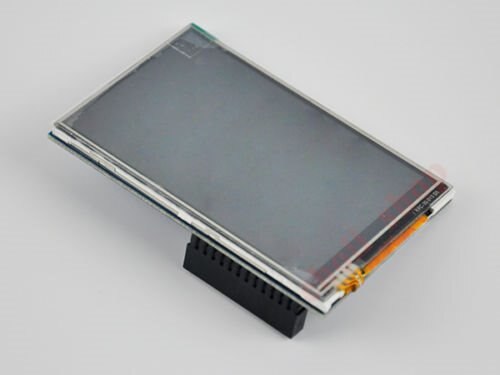
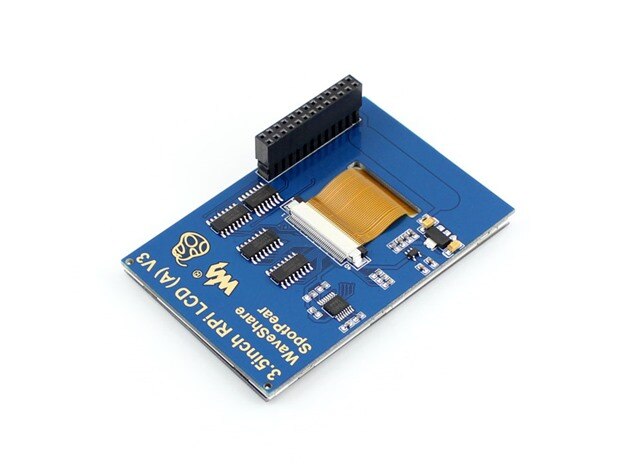
 

image

image


Please say you can help figure this out.


Also, if anyone else who reads this if you also have a raspi2 w/ the 3.5" tft lcd Waveshare Spotpear addon card let us know if you got it working right and if so let  us know what you did or didn't do, please also provide software as I have been unable to find it.

  • Sign in to reply
  • Cancel

Top Replies

  • Former Member
    Former Member over 10 years ago +1 suggested
    I have that same screen, ordered from china off e-mail for around $20. Ill start by saying that you get what you pay for. It is not as easy to install but it works great! These instructions should get…
Parents
  • Former Member
    0 Former Member over 10 years ago

    I have that same screen, ordered from china off e-mail for around $20.


    Ill start by saying that you get what you pay for. It is not as easy to install but it works great!


    These instructions should get it up and running on the Pi.


    However, getting it to rotate was a pain and I ended up using bits and pieces of the Adafruit instructions as well.


    You have to do quite a bit of mucking with the /boot/config.txt to include the fbtft device entries and some work on the X11Config to get it all rotated and the touch working correctly.


    Hope it helps, If not drop me a line and Ill help you get it working.

    • Cancel
    • Vote Up +1 Vote Down
    • Sign in to reply
    • Verify Answer
    • Reject Answer
    • Cancel
  • Former Member
    0 Former Member over 10 years ago in reply to Former Member

    well tried your options, think I'm just not doing something right. As I'm still only getting a white screen. nothing else.

    is it possible for you to zip a fresh image with it all installed. and I can install that image on to my 16gb micro sd class 10 card.

    and see if it at least gets the screen to work?


    ====================================================================================================

    Found someone with same screen (they had a image) but they have old Raspberry pi. Do not know if that matters or not in this case.

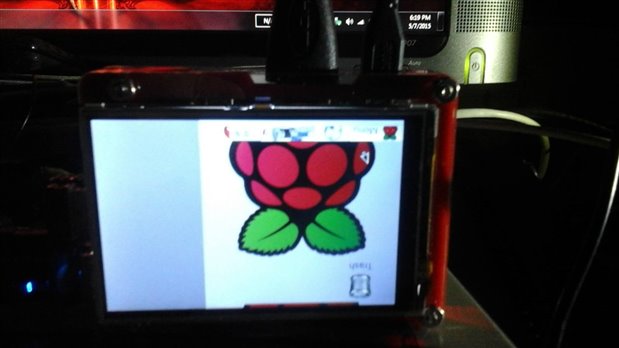
    I had spare micro SD card so I applied the image to it. and it booted right up. not sure how but everything sort of works. But as this is I wont be able to use my own image or fresh copy of raspbian, or Ubuntu if I wanted to. I would not know how to make that work.


    So if I want to use this 3.5" lcd it looks like I'm stuck using this guys image. image

    But image  happy image to find out that the LCD does work so does the tft part. the windows in the desktop environment are really hard to navigate due to resolution not sure how to make the windows

    fit the 320 x 480 resolution.

    Also another bummer with this image is I can not use the HDMI port anymore. image

    not sure how to make both work at same time or if they can even do that.


    Tried to attach the image so you guys could check it out. but the size is over a 1gb even after I Rared it. image


    any ideas on any of these issues would be great. thanks for all the help so far.

    • Cancel
    • Vote Up 0 Vote Down
    • Sign in to reply
    • Verify Answer
    • Cancel
  • Former Member
    0 Former Member over 10 years ago in reply to Former Member

    yeh, my main problem seems to be getting the screen to be right side up yours has mine with cords at the bottom  also the touch screen seems to be off some how.

    I've tried going back through and changing the rotate but only rotate=90 will give me any picture properly and its upside down for me.


    Ideas?

    image

    • Cancel
    • Vote Up 0 Vote Down
    • Sign in to reply
    • Verify Answer
    • Cancel
  • Former Member
    0 Former Member over 10 years ago in reply to Former Member

    There are two rotate points. One in modules and one in the boot config.txt


    If I remember correctly they can be 0, 90, -90, or 180


    I spent a lot of time playing with both for mine the module had to be -90 and the config had to b 90 to get it rotated the correct direction.


    It seems that they would cancel each other out but it actually flips the screen the right direction for me.

    • Cancel
    • Vote Up 0 Vote Down
    • Sign in to reply
    • Verify Answer
    • Cancel
  • Former Member
    0 Former Member over 10 years ago in reply to Former Member

    ok finaly got screen rotated as I wanted, got the touch going in the right x & y axis but the touch does not go to edge of desktop in any direction it is like a half a centimeter short of space in each direction. what do I play with to make it go to edge of screen?


    While I wait for a response I will try to get my IOgear GBU521 adapter running and try to figure out how to make a wireless Bluetooth speaker connect (something I have been unable to do) wish me luck on this.

    • Cancel
    • Vote Up 0 Vote Down
    • Sign in to reply
    • Verify Answer
    • Cancel
  • Former Member
    0 Former Member over 10 years ago in reply to Former Member

    Try running the touch screen calibration


    sudo TSLIB_FBDEVICE=/dev/fb1 TSLIB_TSDEVICE=/dev/input/touchscreen ts_calibrate


    • Cancel
    • Vote Up 0 Vote Down
    • Sign in to reply
    • Verify Answer
    • Reject Answer
    • Cancel
  • Former Member
    0 Former Member over 10 years ago in reply to Former Member

    sudo: ts_calibrate: command not found
    is what i do when i do your command. image

    • Cancel
    • Vote Up 0 Vote Down
    • Sign in to reply
    • Verify Answer
    • Cancel
  • Former Member
    0 Former Member over 10 years ago in reply to Former Member

    will this guide work for the 4 inch waveshare spotpear lcd I ccan get it to work on the supplied image but I want to use my propper pi image

    and I would if attall possible use hdmi and screen and if not is it possible to stop kodi or xbmc going through hdmi and use the touch screen or both

    • Cancel
    • Vote Up 0 Vote Down
    • Sign in to reply
    • Verify Answer
    • Cancel
  • Former Member
    0 Former Member over 10 years ago in reply to Former Member

    I forgot to sayits pi b+ plus what is the comand to just switch outputs manully as the ones supplied dont seem to work hdmi-sys-show or lcd4-sys-show

    • Cancel
    • Vote Up 0 Vote Down
    • Sign in to reply
    • Verify Answer
    • Cancel
  • Former Member
    0 Former Member over 10 years ago in reply to Former Member

    honestly harvey I dont know. I think it will you will have to tinker with res size i think if yours gets a higher res than my 3.5" but it should work I think. as for getting both LCD & HDMI to work i have yet to be able to do that my self. currently still working out kings with the touch as it doesnt quite work yet.


    also failing at getting my bluetooth stuff installed. I think this is probly the number 1 reason most windows users still havent moved to linux is because its not so simple to install stuff on.


    But after all said and done I was so happy to see my screen work at all and even happier when I finaly got it to be in the rotation I wanted. So thank you guys for your help on this.

    • Cancel
    • Vote Up 0 Vote Down
    • Sign in to reply
    • Verify Answer
    • Cancel
  • Former Member
    0 Former Member over 10 years ago in reply to Former Member

    falon wrote:


    sudo: ts_calibrate: command not found
    is what i do when i do your command.

    Did you install the command? You can do an aptitude or apt-get to search the repos and install it. I think it is part of libts-bin.

    • Cancel
    • Vote Up 0 Vote Down
    • Sign in to reply
    • Verify Answer
    • Cancel
  • Former Member
    0 Former Member over 10 years ago in reply to Former Member

    Mathew Harvey wrote:


    will this guide work for the 4 inch waveshare spotpear lcd I ccan get it to work on the supplied image but I want to use my propper pi image

    and I would if attall possible use hdmi and screen and if not is it possible to stop kodi or xbmc going through hdmi and use the touch screen or both

    I have never tried it on a 4in screen and I have seen it reported that xbmc will work with the 3.5". Beyond that I dont know.


    I use this setup (3.5" screen on a r-pi) as stand alone touch controls. For example, the one I am currently doing will be attached to an eggbot as the control panel allowing my wife to simple select the pattern she wants and go. No need for an extra computer.


    They are also used on 3dprinters as the control panel to run pronterface.


    With kdialog or gtkdialog you are write scripts that provide standard buttons on the screen and create the control panels you need for any project.


    As such, once these screens are installed I have no need to switch back and forth between them and the HDMI port. Though digging through google there appears to be ways to do it but you would need to mod the config some.

    • Cancel
    • Vote Up 0 Vote Down
    • Sign in to reply
    • Verify Answer
    • Cancel
Reply
  • Former Member
    0 Former Member over 10 years ago in reply to Former Member

    Mathew Harvey wrote:


    will this guide work for the 4 inch waveshare spotpear lcd I ccan get it to work on the supplied image but I want to use my propper pi image

    and I would if attall possible use hdmi and screen and if not is it possible to stop kodi or xbmc going through hdmi and use the touch screen or both

    I have never tried it on a 4in screen and I have seen it reported that xbmc will work with the 3.5". Beyond that I dont know.


    I use this setup (3.5" screen on a r-pi) as stand alone touch controls. For example, the one I am currently doing will be attached to an eggbot as the control panel allowing my wife to simple select the pattern she wants and go. No need for an extra computer.


    They are also used on 3dprinters as the control panel to run pronterface.


    With kdialog or gtkdialog you are write scripts that provide standard buttons on the screen and create the control panels you need for any project.


    As such, once these screens are installed I have no need to switch back and forth between them and the HDMI port. Though digging through google there appears to be ways to do it but you would need to mod the config some.

    • Cancel
    • Vote Up 0 Vote Down
    • Sign in to reply
    • Verify Answer
    • Cancel
Children
No Data
element14 Community

element14 is the first online community specifically for engineers. Connect with your peers and get expert answers to your questions.

  • Members
  • Learn
  • Technologies
  • Challenges & Projects
  • Products
  • Store
  • About Us
  • Feedback & Support
  • FAQs
  • Terms of Use
  • Privacy Policy
  • Legal and Copyright Notices
  • Sitemap
  • Cookies

An Avnet Company © 2026 Premier Farnell Limited. All Rights Reserved.

Premier Farnell Ltd, registered in England and Wales (no 00876412), registered office: Farnell House, Forge Lane, Leeds LS12 2NE.

ICP 备案号 10220084.

Follow element14

  • X
  • Facebook
  • linkedin
  • YouTube