

Mark builds a desktop minion powered by an ESP32 that combines an animated eye display, temperature and humidity monitoring, audio playback, microphone input, a real-time spectrum analyser, and even a fog-generating humidifier. Along the way he designs a custom PCB, works through a hardware design issue, assembles the electronics, and brings the project to life with plenty of personality. Follow the build to see how the hardware, firmware, and enclosure come together to create a desk companion that watches, listens, reacts
Who Watches the Makers? Watch Now:
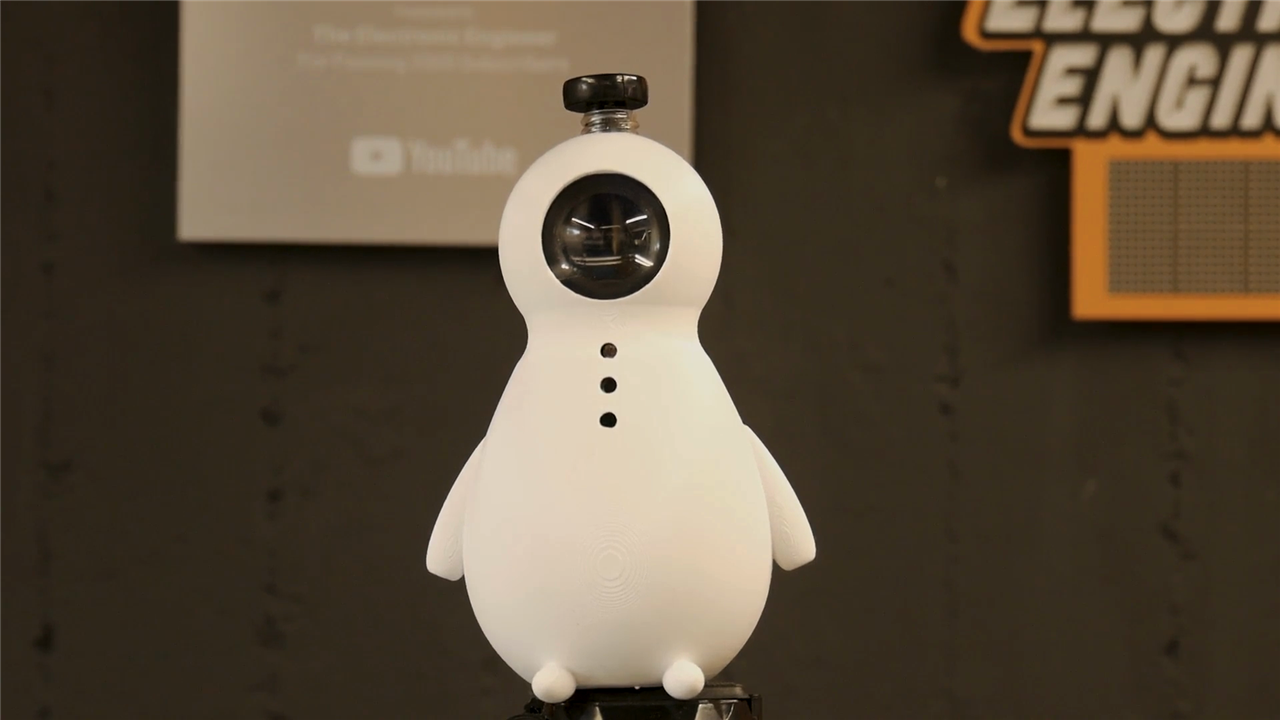
Mark set out to create something that sits somewhere between a desk companion, environmental monitor, and electronic novelty. The result is what he calls a "Desk Pet Minion" a desktop gadget built around an ESP32 that watches the room through an animated eye, measures environmental conditions, listens for noise, produces sound effects, and even emits fog to express its displeasure.
What started as a fun desk ornament quickly became a surprisingly feature-rich embedded project. Along the way, Mark designed custom hardware, assembled a dedicated PCB, integrated multiple sensors and peripherals, and worked through a significant hardware design issue that required an unexpected mid-build correction.
The finished device combines environmental sensing, audio processing, display graphics, and fog generation into a single desktop companion with plenty of room for future expansion.

The Concept
At its core, the project is designed to bring a little personality to the workspace.
The animated eye continuously moves and watches its surroundings, giving the impression that the device is paying attention to activity around the desk. Combined with environmental sensing and sound detection, the minion becomes more than a static display piece.
As Mark explains:
"It displays that well, mimic eye movement so it can stare at you while you're sitting at your desk."
The eye is only part of the personality. A built-in humidifier creates visible fog effects, allowing the minion to react to events and express different moods. Loud noises in the office can trigger both sound and smoke effects, turning the device into a humorous commentary on workplace volume levels.
The project also includes temperature and humidity monitoring, audio playback capabilities, microphone input, and a display mode that functions as a real-time spectrum analyser.
Future expansion was also part of the design from the beginning.
"In the future I might even update it to function as a radio because I'm using an ESP32 and it has onboard Wi-Fi."
That choice of microcontroller leaves plenty of processing power and connectivity available for additional features.

System Architecture
The ESP32 serves as the centre of the entire design, coordinating every subsystem.
Mark's schematic brings together several different hardware functions:
-
ESP32 microcontroller
-
TFT display for eye animation and status screens
-
DHT11 temperature and humidity sensor
-
Light-dependent resistor (LDR)
-
I2S MEMS microphone
-
I2S audio output board
-
Speaker
-
Humidifier module
-
Push-button user interface
-
Volume adjustment potentiometer
-
Power regulation circuitry
One particularly useful feature is the inclusion of ambient light detection. The LDR allows the device to respond to environmental changes.
As Mark describes it:
"I can use that to detect whenever somebody enters the office in the morning and turns on the light."
The push button provides a simple interface for switching between display modes, allowing the animated eye to give way to environmental information when required.

Custom PCB Design
Rather than wiring everything together on perfboard, Mark designed a dedicated PCB specifically for the enclosure.
The custom board serves several purposes:
-
Reduces wiring complexity
-
Improves assembly
-
Ensures all components fit inside the minion housing
-
Provides dedicated connections for audio, sensing, and display hardware
-
Creates a cleaner final installation
The PCB accommodates the ESP32 module, display, microphone, humidity sensor, audio circuitry, power distribution, and humidifier control circuitry.
A dedicated switching circuit drives the humidifier assembly, allowing the ESP32 to enable or disable fog generation under software control.
The humidifier itself consists of a commercially available ultrasonic fog generator module paired with a small water reservoir. A test tube serves as the water container and fits neatly into the enclosure.
The arrangement provides a simple and effective way of generating visible fog without requiring any custom ultrasonic hardware design.

Hardware Assembly
Assembly began with the surface-mount components. Working without solder paste or a reflow setup, Mark manually tinned pads before placing and soldering components individually. After completing the surface-mount work, he inspected the board and moved on to the through-hole components. Like many prototype builds, the finished PCB wasn't cosmetically perfect, but functionally sound.
Mark notes:
"In general when you look closer to this, the soldering looks kind of messy but for prototype it's okay."
He also points out that a quick pass with flux and cleaning solvent would significantly improve the appearance if desired.
Several mechanical decisions were made during assembly to ensure components aligned correctly with openings in the enclosure. The microphone position required particular attention because of the distance between the PCB and the front housing.
The humidity sensor was removed from its original breakout board and mounted directly onto the custom PCB, helping reduce space requirements inside the enclosure.
One of the most useful parts of the build was seeing how Mark handled an unexpected hardware problem. During test fitting he discovered that the display footprint obtained from a standard library had been defined incorrectly.
The display connector arrangement was effectively mirrored, meaning the screen could not be mounted in the intended orientation. As he explains:
"I actually discovered a huge design flaw."
The problem wasn't with the display itself but with the PCB footprint definition. To keep the project moving, Mark physically reversed the assembly orientation and rearranged component placement.
The workaround allowed the prototype to function, but it created new packaging constraints inside the enclosure.
Rather than simply accepting the issue, Mark documented the problem and committed to correcting the design files.
"If you're rebuilding this I will make sure the PCB layout has been corrected."
This kind of design review and iteration is a normal part of hardware development, and documenting these mistakes is often more valuable than hiding them.

Audio Hardware and Signal Processing
Audio is one of the more sophisticated aspects of the project.
The ESP32 interfaces with both an I2S microphone and an I2S audio output stage. Using I2S rather than analogue audio provides a cleaner signal path and simplifies digital processing.
The firmware configuration reveals the audio architecture:
-
INMP441 MEMS microphone input
-
I2S digital audio interface
-
Dedicated speaker output
-
Real-time frequency analysis
-
Volume control support
The software defines 32 frequency bands for spectrum analysis and includes a detailed cutoff table that spans frequencies from approximately 45 Hz to 17.5 kHz.
float FreqBins[32];
int numBands=32;
The project also includes configurable noise thresholds and gain control behaviour.
int NoiseTresshold = 2000;
#define GAIN_DAMPEN 2
Frequency band boundaries are carefully distributed across the audible spectrum.
45, 90, 130, 180,
...
16500, 17000, 17500
This allows the ESP32 to visualise incoming audio as a spectrum display while simultaneously using microphone data as a trigger source for behavioural responses.
The result is a surprisingly capable audio subsystem for what initially appears to be a novelty desk gadget.
Environmental Monitoring
Environmental sensing is handled using a DHT11 temperature and humidity sensor.
The firmware configuration shows the sensor connected directly to the ESP32:
#define DHTPIN 16
#define DHTTYPE DHT11
The device can display:
-
Temperature
-
Relative humidity
-
Humidity index information
These values can be accessed through the display interface, allowing the minion to double as a desktop environmental monitor.
Combined with the LDR input, the system gains awareness of both ambient lighting conditions and room climate.
The Animated Eye
Perhaps the most distinctive feature of the project is the animated eye.
The display uses graphics assets derived from a large eye-rendering system and is configured to use a 240 × 240 pixel display.
The firmware enables both tracking and autonomous blinking behaviour.
#define TRACKING
#define AUTOBLINK
Additional eye behaviour includes dynamic iris adjustment based on ambient light levels.
The software contains configurable parameters for:
-
Iris size
-
Light response curves
-
Ambient light limits
-
Eyelid tracking
-
Autonomous blinking
Together these features create a display that feels surprisingly alive despite being driven by relatively modest hardware.
Rather than functioning as a simple animation loop, the eye reacts to changing environmental conditions and continuously varies its appearance. Once assembly was complete, the firmware was loaded using a browser-based installation process, the project supports direct USB programming through a web interface. This approach lowers the barrier for anyone wanting to reproduce the build. More advanced users can still modify the source code, rebuild the firmware, and upload their own versions, but newcomers can simply connect the hardware and install the firmware directly.
Smoke, Sound and Personality and Future Development
The most entertaining behaviour appears once everything is assembled. The ultrasonic humidifier produces visible fog while the eye tracks movement and the microphone listens to the environment. At its current stage, excessive noise acts as a trigger condition. As Mark describes:
"If your colleagues are too loud in your office then this device will basically say 'Psh'."
The combination of sound effects and fog generation gives the minion a surprisingly expressive personality.
Of course, the development process wasn't entirely smoke-free. During testing, an accidental short circuit generated some very real smoke from the electronics.
Mark jokes:
"I might have jinxed it a bit by trying to add artificial smoke."
Fortunately the issue was corrected and the project survived to reach its final form. Beyond environmental monitoring and animated eye graphics, the display can also switch into a spectrum analyser. This mode makes direct use of the I2S microphone and frequency processing code to create a visual representation of incoming audio.
When demonstrating the feature, Mark jokingly asks:
"Will it run Doom?"
His answer:
"It doesn't run Doom though... but it runs the spectrum analyzer."
While perhaps not as famous as running Doom, a real-time audio analyser is arguably more useful for a device designed to monitor activity in an office environment. Although fully functional, the project clearly has room to grow. Several future directions were identified during development:
-
Wi-Fi connected features
-
Internet radio functionality
-
Additional audio behaviours
-
Expanded environmental responses
-
New display modes
-
Further personality-driven interactions
The ESP32 platform provides ample opportunity for these additions without requiring major hardware redesign.
Because the hardware already includes networking capability, microphone input, audio output, sensing hardware, and a display, much of the infrastructure required for future features is already in place. What began as a playful desktop companion evolved into a surprisingly capable embedded systems project. By combining environmental sensing, digital audio, display graphics, fog generation, and custom hardware design, Mark created something that feels much more interactive than a typical desk ornament. Equally valuable is the transparency shown throughout the build. Design mistakes, assembly challenges, packaging constraints, and debugging setbacks are all part of the story. Those lessons provide useful guidance for anyone planning to recreate or extend the project. The animated eye gives the minion character, the audio processing provides responsiveness, and the fog generator adds an unexpected physical element that makes the device stand out from conventional ESP32 projects.
Most importantly, it succeeds at its original goal: creating something fun that sits on a desk, reacts to its surroundings, and occasionally reminds noisy colleagues to keep the volume down.
Supporting Files and Links
Bill of Materials / Products Used
| Product Name | Manufacturer | Quantity | Buy Kit |
|---|---|---|---|
| MOLEX Pin Header, Wire-to-Board, 2.5 mm, 1 Rows, 2 Contacts, Through Hole Straight, KK 5045 | Molex | 5 | Buy Now |
| ONSEMI Linear Voltage Regulator, 7808, Fixed, Positive, 10V To 35V In, 8V/1A Out, TO-220-3 | Onsemi | 1 | Buy Now |
| KYCON DC Power Connector, Jack, 3.5 A, 2 mm, PCB Mount, Through Hole | KYCON | 1 | Buy Now |
| 10u FECEA1EN100U | Panasonic | 1 | Buy Now |
| 22uF ECEA1EN220X | Panasonic | 2 | Buy Now |
| 10uF CL31A106KBHNNNE | SAMSUNG | 1 | Buy Now |
| 100nF CC0805KRX7R9BB104 | YAGEO(国巨) | 2 | Buy Now |
| FDN340P FDN340P | TECH PUBLIC(台舟) | 1 | Buy Now |
| FDN335N FDN335N | HUASHUO | 1 | Buy Now |
| 10K 0805W8F1002T5E | UniOhm | 3 | Buy Now |
| 10kΩ 3266W-1-103LF | BOURNS | 1 | Buy Now |
| 1K 0805W8F1001T5E | UniOhm | 1 | Buy Now |
| 4.7kΩ 0805W8F4701T5E | UNI-ROYAL(厚声) | 1 | Buy Now |
| 100kΩ 0805W8F1003T5E | UNI-ROYAL(厚声) | 1 | Buy Now |
| 2-1825910-7 | TE | 1 | Buy Now |
| LM1085IT-5.0/NOPB LM1084T-5.0 | HGSEMI(华冠) | 1 | Buy Now |
| 22041021 22041021 | MOLEX | 2 | Buy Now |
| VISATON Speaker, Mini, 2 ", 500 mW, 8 ohm, 83 dB, 250 Hz to 10000 Hz | Visaton | 1 | Buy Now |
| Product Name | Manufacturer | ||
| LCD display | |||
| lens OD43 ID37 H14.5 E2.5 | |||
| I2s Audio Board | |||
| ESP32 Devkit V1.0 | |||
| Power adapter 12V / 1A | |||
| Humidifier Kit | |||
| DHT11 Hum Sensor | |||
| INMP441-MEMS-I2S-MIC-MODULE | |||
| GL5516 GL5516 LDR | gepyun | ||


