element14 Community
element14 Community
    Register Log In
  • Site
  • Search
  • Log In Register
  • Community Hub
    Community Hub
    • What's New on element14
    • Feedback and Support
    • Benefits of Membership
    • Personal Blogs
    • Members Area
    • Achievement Levels
  • Learn
    Learn
    • Ask an Expert
    • eBooks
    • element14 presents
    • Learning Center
    • Tech Spotlight
    • STEM Academy
    • Webinars, Training and Events
    • Learning Groups
  • Technologies
    Technologies
    • 3D Printing
    • FPGA
    • Industrial Automation
    • Internet of Things
    • Power & Energy
    • Sensors
    • Technology Groups
  • Challenges & Projects
    Challenges & Projects
    • Design Challenges
    • element14 presents Projects
    • Project14
    • Arduino Projects
    • Raspberry Pi Projects
    • Project Groups
  • Products
    Products
    • Arduino
    • Avnet & Tria Boards Community
    • Dev Tools
    • Manufacturers
    • Multicomp Pro
    • Product Groups
    • Raspberry Pi
    • RoadTests & Reviews
  • About Us
  • Store
    Store
    • Visit Your Store
    • Choose another store...
      • Europe
      •  Austria (German)
      •  Belgium (Dutch, French)
      •  Bulgaria (Bulgarian)
      •  Czech Republic (Czech)
      •  Denmark (Danish)
      •  Estonia (Estonian)
      •  Finland (Finnish)
      •  France (French)
      •  Germany (German)
      •  Hungary (Hungarian)
      •  Ireland
      •  Israel
      •  Italy (Italian)
      •  Latvia (Latvian)
      •  
      •  Lithuania (Lithuanian)
      •  Netherlands (Dutch)
      •  Norway (Norwegian)
      •  Poland (Polish)
      •  Portugal (Portuguese)
      •  Romania (Romanian)
      •  Russia (Russian)
      •  Slovakia (Slovak)
      •  Slovenia (Slovenian)
      •  Spain (Spanish)
      •  Sweden (Swedish)
      •  Switzerland(German, French)
      •  Turkey (Turkish)
      •  United Kingdom
      • Asia Pacific
      •  Australia
      •  China
      •  Hong Kong
      •  India
      • Japan
      •  Korea (Korean)
      •  Malaysia
      •  New Zealand
      •  Philippines
      •  Singapore
      •  Taiwan
      •  Thailand (Thai)
      • Vietnam
      • Americas
      •  Brazil (Portuguese)
      •  Canada
      •  Mexico (Spanish)
      •  United States
      Can't find the country/region you're looking for? Visit our export site or find a local distributor.
  • Translate
  • Profile
  • Settings
Project14
  • Challenges & Projects
  • More
Project14
Blog PYNQ-Z2 Select Video Source
  • Blog
  • Forum
  • Documents
  • Theme Suggestions
  • Polls
  • Members
  • More
  • Cancel
  • New
Join Project14 to participate - click to join for free!
  • Share
  • More
  • Cancel
Group Actions
  • Group RSS
  • More
  • Cancel
Engagement
  • Author Author: ralphjy
  • Date Created: 7 Jun 2020 12:01 AM Date Created
  • Views 1734 views
  • Likes 3 likes
  • Comments 6 comments
  • pynq-z2
  • pynq workshop
  • pynqhero
  • pynqstarter
Related
Recommended

PYNQ-Z2 Select Video Source

ralphjy
ralphjy
7 Jun 2020

I'm finally getting around to doing my homework from session 3.  I decided to do a simple modification of adding an AXI4-Stream Switch so that I could select between video sources, in this case between the HDMI camera and the TPG (test pattern generator).


I started with the overlay from session 3 and added back the TPG and added an AXI4-Stream Switch.  Seems very straightforward but I encountered a problem that I didn't expect.  The TPG apparently only uses a single clock domain for the AXI control and the video generation.  That meant I had clock conflicts with the frontend implementation which was using a separate video clock and AXI control clock.  Luckily there is an AXI4-Stream Clock Converter that provides syncing across clock domains.  So I added one of those.


Here's the diagram showing the added parts:
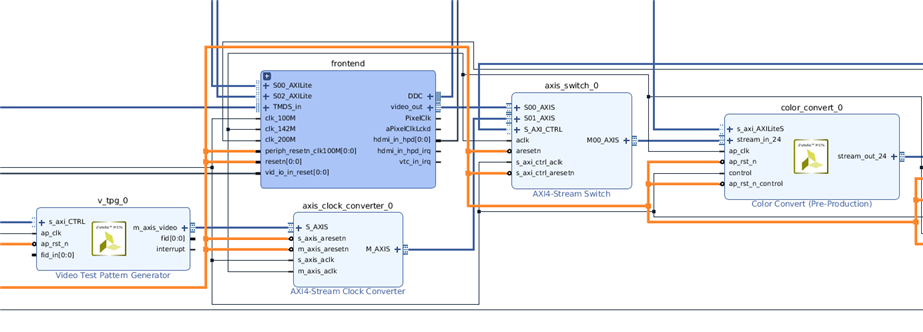
image

I have two slave inputs into the Stream Switch and one master output.  The switch can handle 16 inputs and 16 outputs.


The frontend (HDMI camera) is Slave 0 (SI0) and the TPG is Slave 1 (SI1).


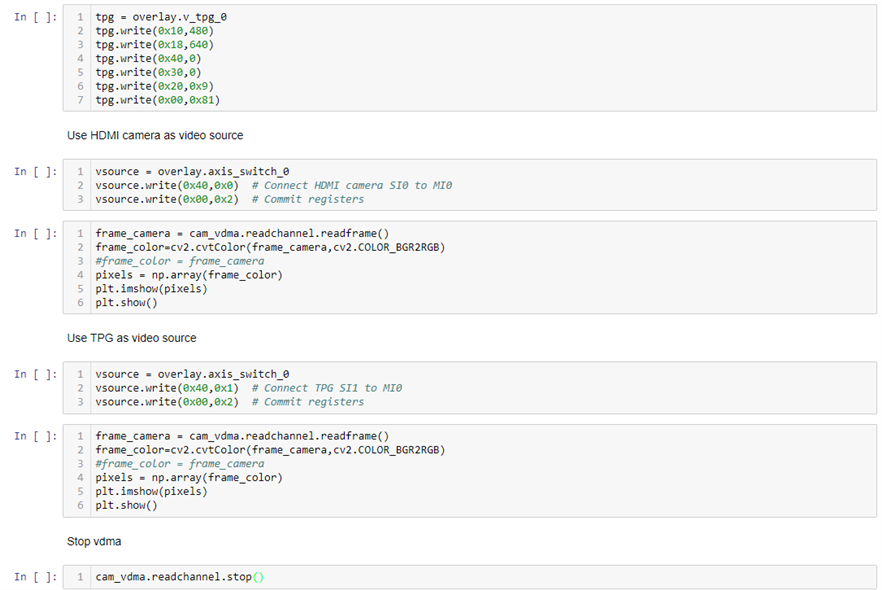
The register offset for the master 0 output (MI0) is 0x40.  The value in the register selects which input is used.


When testing it out I found something I hadn't expected - if I didn't configure the Stream Switch first - the frontend wouldn't start.  Had me baffled for a bit.


Here's the Jupyter notebook:
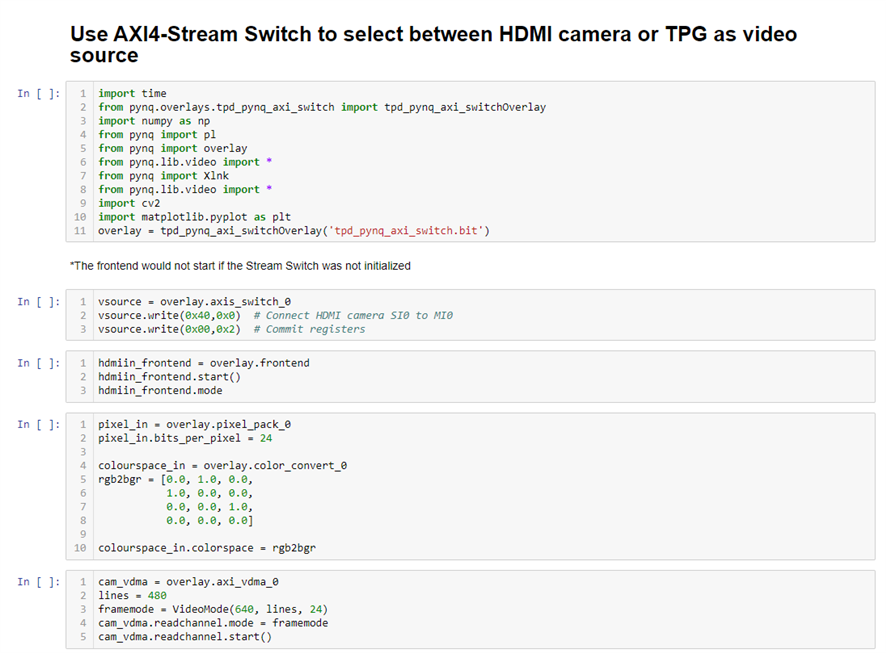
image

image


The color space matrix has an error that I corrected. (Should be a diagonal - fixed it for the video).


And a short video showing it operating:

You don't have permission to edit metadata of this video.
Edit media
x
image
Upload Preview
image

  • Sign in to reply

Top Comments

  • beacon_dave
    beacon_dave over 5 years ago +2
    Excellent work ! Looks like your over halfway there to having an automated video production console to help in making Element 14 project videos ! I've still not got the PYNQ-Z2 to recognise the recommended…
  • Fred27
    Fred27 over 5 years ago +2
    I used a Raspberry Pi and camera instead of the recommended one. I have a Zybo Z7 and a Pcam 5C from a previous road test, so I'm currently looking at building PYNQ for that (and disappearing down a rabbit…
  • beacon_dave
    beacon_dave over 5 years ago in reply to ralphjy +2
    "...I’ve been trying to figure out where the hdmi_out_hpd_irq should go for the constraints file..." The TUL pynq-z2_v1.0xdc lists the hot plug detect input as being: #set_property -dict { PACKAGE_PIN…
  • ralphjy
    ralphjy over 5 years ago in reply to Fred27

    I know what you mean about rabbit holes.  I just spent a day trying to build OpenVINO for the PYNQ-Z2 and still haven't succeeded.  I think I'm close but don't really understand CMake so having problems figuring out the error.  Unfortunately build instructions don't work when files get moved or version dependencies get changed.  Hopefully someone who knows how to build OpenVINO will be able to help me out.

    • Cancel
    • Vote Up +1 Vote Down
    • Sign in to reply
    • More
    • Cancel
  • ralphjy
    ralphjy over 5 years ago in reply to beacon_dave

    Thanks.  I should RTFM.  I was looking at the constraints file from the PYNQ-Z2 build for the Base overlay.  I've downloaded the file from TUL.

    • Cancel
    • Vote Up +1 Vote Down
    • Sign in to reply
    • More
    • Cancel
  • beacon_dave
    beacon_dave over 5 years ago in reply to ralphjy

    "...I’ve been trying to figure out where the hdmi_out_hpd_irq should go for the constraints file..."


    The TUL pynq-z2_v1.0xdc lists the hot plug detect input as being:


    #set_property -dict { PACKAGE_PIN R19   IOSTANDARD LVCMOS33 } [get_ports { hdmi_tx_hpdn }]; #IO_0_34 Sch=hdmi_tx_hpdn

    • Cancel
    • Vote Up +2 Vote Down
    • Sign in to reply
    • More
    • Cancel
  • Fred27
    Fred27 over 5 years ago

    I used a Raspberry Pi and camera instead of the recommended one. I have a Zybo Z7 and a Pcam 5C from a previous road test, so I'm currently looking at building PYNQ for that (and disappearing down a rabbit hole of a getting a build machine with Petalinux 2019.1 up and running).

    • Cancel
    • Vote Up +2 Vote Down
    • Sign in to reply
    • More
    • Cancel
  • ralphjy
    ralphjy over 5 years ago in reply to beacon_dave

    Someone needs to figure out what’s up with those cameras....


    I should have thought about scanning the canned goods image.


    I’ll watch for your blog.  Have you figured out where to find the pin assignments for the board?  I’ve been trying to figure out where the hdmi_out_hpd_irq should go for the constraints file.

    • Cancel
    • Vote Up +1 Vote Down
    • Sign in to reply
    • More
    • Cancel
>
element14 Community

element14 is the first online community specifically for engineers. Connect with your peers and get expert answers to your questions.

  • Members
  • Learn
  • Technologies
  • Challenges & Projects
  • Products
  • Store
  • About Us
  • Feedback & Support
  • FAQs
  • Terms of Use
  • Privacy Policy
  • Legal and Copyright Notices
  • Sitemap
  • Cookies

An Avnet Company © 2025 Premier Farnell Limited. All Rights Reserved.

Premier Farnell Ltd, registered in England and Wales (no 00876412), registered office: Farnell House, Forge Lane, Leeds LS12 2NE.

ICP 备案号 10220084.

Follow element14

  • X
  • Facebook
  • linkedin
  • YouTube