


Intro
I have been having fun dabbling with MIDI electronics for quite a while. I'm no kind of musician, but I still find it fun to fool around with the technology. This project is a MIDI controller, specifically a MIDI controller that can convert electronic drum pad signals into MIDI data.
The idea is to design some drum pads that use piezo disks to sense drum stick hits and a microcontroller to perform digital signal processing to translate the signals into valid MIDI data. Any drum pad can be assigned to sound like any percussion instrument.
There is also a metronome that can be turned on or off and it can also sound like any percussion instrument, so it could sound like a foot pedal bass drum. (Which I am not coordinated enough to handle with my foot) The Interface card does have 2 separate inputs for foot pedals though.
The drum pads are made using PCBs so the signals can be conditioned right on the card to keep the signals compatible with the MCU voltages.
Video & Demo
Here is a video outlining where the project stands.
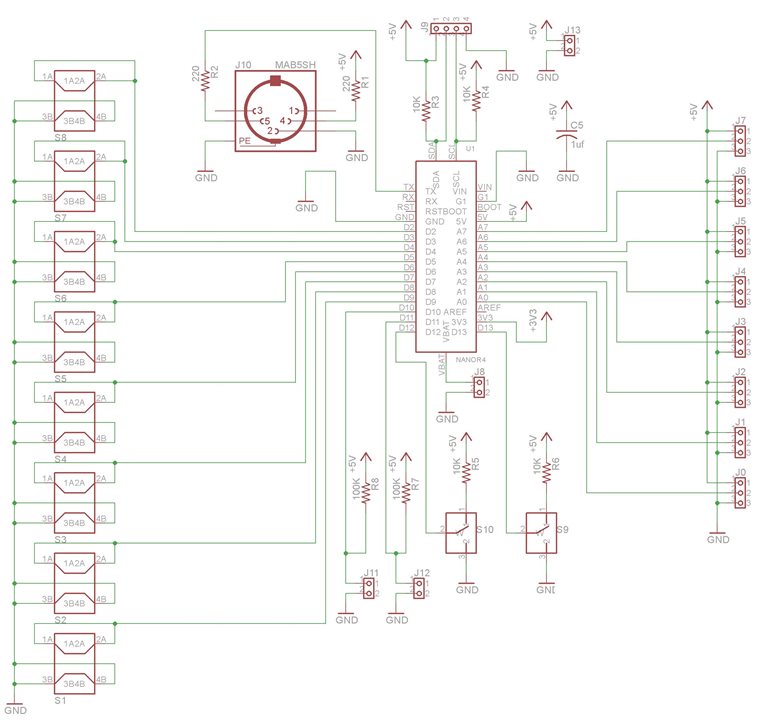
Schematic
Software
/*
  MIDI Percussion Controller for Arduino Nano and Nano R4
  - 8 analog drum pads on A0–A7
  - 1 metronome “channel”
  - 4x20 I2C LCD
  - 4 buttons for channel/instrument selection
  - Metronome on/off and rate select switches
  - MIDI over UART (Serial) on channel 10 - the percussion channel

  by Doug Wong 2026
*/

#include <Wire.h>
#include <LiquidCrystal_I2C.h>

// -------------------- LCD CONFIG --------------------
#define LCD_ADDR 0x27        // Change if your LCD uses a different I2C address
#define LCD_COLS 20
#define LCD_ROWS 4
// LiquidCrystal_I2C lcd(LCD_ADDR, LCD_COLS, LCD_ROWS, &Wire1); Nano R4
LiquidCrystal_I2C lcd(LCD_ADDR, LCD_COLS, LCD_ROWS);

// -------------------- PADS & METRONOME --------------------
const uint8_t NUM_PADS = 4;       // change to 8 for Nano R4
const uint8_t NUM_CHANNELS = 9;   // 8 pads + 1 metronome (index 8)

// Analog inputs for pads
// const uint8_t padPins[NUM_PADS] = {A0, A1, A2, A3, A4, A5, A6, A7};  // Nano R4
const uint8_t padPins[NUM_PADS] = {A0, A1, A2, A3};

// Metronome control pins
const uint8_t METRONOME_ON_PIN   = 12;   //13 digital input: HIGH = on, LOW = off (use pullup or external)
const uint8_t METRONOME_RATE_PIN = 13;   //12 digital input: LOW = 1.0s, HIGH = 0.5s (or vice versa)

// -------------------- BUTTONS ------------ --------
// Use INPUT_PULLUP; buttons active LOW
const uint8_t BTN_CH_UP_PIN   = 8;  //8
const uint8_t BTN_CH_DOWN_PIN = 6;  //6
const uint8_t BTN_INST_UP_PIN = 9;  //9
const uint8_t BTN_INST_DOWN_PIN = 7;  //7

// -------------------- MIDI CONFIG --------------------
const uint32_t MIDI_BAUD = 31250;
const uint8_t MIDI_CHANNEL = 9;   // Channel 10 (0-based in status byte)

// General MIDI percussion note numbers range for selection
const uint8_t MIDI_NOTE_MIN = 35;
const uint8_t MIDI_NOTE_MAX = 81;

// -------------------- TRIGGER / TIMING --------------------
const float   VREF = 5.0;
const float   TRIGGER_VOLTAGE = 0.3;  // volts
const uint16_t ADC_MAX = 1023;

// Convert trigger voltage to ADC counts
const uint16_t TRIGGER_LEVEL = (uint16_t)((TRIGGER_VOLTAGE / VREF) * ADC_MAX + 0.5);

// Lockout and amplitude timing (ms)
const uint16_t LOCKOUT_MS = 40;
const uint16_t AMP_SAMPLE_DELAY_MS = 1;

// Metronome periods (ms)
const uint16_t METRONOME_PERIOD_SLOW = 1000;
const uint16_t METRONOME_PERIOD_FAST = 500;

// -------------------- STATE STRUCTS --------------------
struct ChannelState {
  bool lockedOut;
  uint32_t lockoutStartMs;

  bool pendingAmpSample;
  uint32_t ampSampleTimeMs;

  uint16_t lastRaw;      // last raw ADC value (pads only)
  uint8_t lastAmplitude; // 1–255
};

ChannelState channels[NUM_CHANNELS];

// Instrument (MIDI note) assigned to each channel (8 pads + 1 metronome)
uint8_t channelNote[NUM_CHANNELS];

// Metronome timing
uint32_t lastMetronomeMs = 0;

// UI state
uint8_t currentChannelIndex = 0;  // 0–8 (8 = metronome)

// Button debouncing
bool lastBtnState[4] = {HIGH, HIGH, HIGH, HIGH};
uint32_t lastBtnChangeMs[4] = {0, 0, 0, 0};
const uint16_t BTN_DEBOUNCE_MS = 30;

// -------------------- GM PERCUSSION NAMES (35–81) --------------------
// Names truncated to fit 20-char LCD line when combined with other info.
const char *gmPercNames[] = {
  "Acoustic Bass Drum",   // 35
  "Bass Drum 1",          // 36
  "Side Stick",           // 37
  "Acoustic Snare",       // 38
  "Hand Clap",            // 39
  "Electric Snare",       // 40
  "Low Floor Tom",        // 41
  "Closed Hi-Hat",        // 42
  "High Floor Tom",       // 43
  "Pedal Hi-Hat",         // 44
  "Low Tom",              // 45
  "Open Hi-Hat",          // 46
  "Low-Mid Tom",          // 47
  "Hi-Mid Tom",           // 48
  "Crash Cymbal 1",       // 49
  "High Tom",             // 50
  "Ride Cymbal 1",        // 51
  "Chinese Cymbal",       // 52
  "Ride Bell",            // 53
  "Tambourine",           // 54
  "Splash Cymbal",        // 55
  "Cowbell",              // 56
  "Crash Cymbal 2",       // 57
  "Vibra Slap",           // 58
  "Ride Cymbal 2",        // 59
  "Hi Bongo",             // 60
  "Low Bongo",            // 61
  "Mute Hi Conga",        // 62
  "Open Hi Conga",        // 63
  "Low Conga",            // 64
  "High Timbale",         // 65
  "Low Timbale",          // 66
  "High Agogo",           // 67
  "Low Agogo",            // 68
  "Cabasa",               // 69
  "Maracas",              // 70
  "Short Whistle",        // 71
  "Long Whistle",         // 72
  "Short Guiro",          // 73
  "Long Guiro",           // 74
  "Claves",               // 75
  "Hi Wood Block",        // 76
  "Low Wood Block",       // 77
  "Mute Cuica",           // 78
  "Open Cuica",           // 79
  "Mute Triangle",        // 80
  "Open Triangle"         // 81
};

const char* getNoteName(uint8_t note) {
  if (note < MIDI_NOTE_MIN || note > MIDI_NOTE_MAX) return "Unknown";
  return gmPercNames[note - MIDI_NOTE_MIN];
}

// -------------------- MIDI HELPERS --------------------
void sendMidiNoteOn(uint8_t note, uint8_t velocity) {
  Serial.write(0x90 | (MIDI_CHANNEL & 0x0F)); // Note On, channel 10
  Serial.write(note);
  Serial.write(velocity);
}

void sendMidiNoteOff(uint8_t note) {
  Serial.write(0x80 | (MIDI_CHANNEL & 0x0F)); // Note Off, channel 10
  Serial.write(note);
  Serial.write((uint8_t)0);
}

// -------------------- UI / LCD --------------------
void updateLCD() {
  lcd.clear();

  // Line 0: Channel info
  lcd.setCursor(0, 0);
  if (currentChannelIndex < NUM_PADS) {
  //  lcd.print("Pad ");
    lcd.print(currentChannelIndex);
  } else {
    lcd.print("M");   // metronome
  }

  uint8_t note = channelNote[currentChannelIndex];
  // lcd.print(" N:");
  // lcd.print(note);
  lcd.print(" ");

  const char* name = getNoteName(note);
  // Truncate if needed to fit line
  char buf[21];
  strncpy(buf, name, 20);
  buf[20] = '\0';
  lcd.print(buf);

  // Line 1: Channel type
//  lcd.setCursor(0, 1);
//  if (currentChannelIndex < NUM_PADS) {
//    lcd.print("Analog pad input");
//  } else {
//    lcd.print("Metronome channel");
//  }

  // Line 2: Metronome status
  lcd.setCursor(0, 2);
  bool metroOn = digitalRead(METRONOME_ON_PIN) == HIGH;
  bool fast = digitalRead(METRONOME_RATE_PIN) == HIGH;
  lcd.print("Metro: ");
  lcd.print(metroOn ? "ON " : "OFF");
  lcd.print(" Pace: ");
  lcd.print(fast ? "2" : "1");

  // Line 3: Last amplitude
  lcd.setCursor(0, 3);
  lcd.print("Volume: ");
  uint8_t amp = channels[currentChannelIndex].lastAmplitude;
  lcd.print(amp);
}

// -------------------- BUTTON HANDLING --------------------
bool readButton(uint8_t index, uint8_t pin) {
  bool raw = digitalRead(pin);
  uint32_t now = millis();

  if (raw != lastBtnState[index]) {
    if (now - lastBtnChangeMs[index] > BTN_DEBOUNCE_MS) {
      lastBtnChangeMs[index] = now;
      lastBtnState[index] = raw;
      // Return true on falling edge (pressed, since INPUT_PULLUP)
      if (raw == LOW) return true;
    }
  }
  return false;
}

void handleButtons() {
  // Channel up
  if (readButton(0, BTN_CH_UP_PIN)) {
    if (currentChannelIndex < NUM_CHANNELS - 1) currentChannelIndex++;
    else currentChannelIndex = 0;
    updateLCD();
  }

  // Channel down
  if (readButton(1, BTN_CH_DOWN_PIN)) {
    if (currentChannelIndex > 0) currentChannelIndex--;
    else currentChannelIndex = NUM_CHANNELS - 1;
    updateLCD();
  }

  // Instrument up
  if (readButton(2, BTN_INST_UP_PIN)) {
    uint8_t note = channelNote[currentChannelIndex];
    if (note < MIDI_NOTE_MAX) note++;
    else note = MIDI_NOTE_MIN;
    channelNote[currentChannelIndex] = note;
    updateLCD();
  }

  // Instrument down
  if (readButton(3, BTN_INST_DOWN_PIN)) {
    uint8_t note = channelNote[currentChannelIndex];
    if (note > MIDI_NOTE_MIN) note--;
    else note = MIDI_NOTE_MAX;
    channelNote[currentChannelIndex] = note;
    updateLCD();
  }
}

// -------------------- PAD PROCESSING --------------------
void processPads() {
  uint32_t nowMs = millis();

  for (uint8_t i = 0; i < NUM_PADS; i++) {
    ChannelState &ch = channels[i];

    // Handle pending amplitude sample
    if (ch.pendingAmpSample && (int32_t)(nowMs - ch.ampSampleTimeMs) >= 0) {
      int raw = analogRead(padPins[i]);
      raw = raw * 10;
      ch.lastRaw = raw;

      int16_t delta = raw - TRIGGER_LEVEL;
      if (delta < 1) delta = 1;
      if (delta > (int16_t)(ADC_MAX - TRIGGER_LEVEL)) delta = (ADC_MAX - TRIGGER_LEVEL);

      uint8_t amplitude = map(delta, 1, (int16_t)(ADC_MAX - TRIGGER_LEVEL), 1, 255);
      if (amplitude < 55) amplitude = 55;
      ch.lastAmplitude = amplitude;

      uint8_t note = channelNote[i];
      sendMidiNoteOn(note, amplitude);
      delay(10);
      sendMidiNoteOff(note);  // short note

      ch.pendingAmpSample = false;

      // If this is the currently displayed channel, update amplitude line
      if (currentChannelIndex == i) {
        lcd.setCursor(0, 3);
        lcd.print("Last amp: ");
        lcd.print((int)amplitude);
        lcd.print("      ");
      }
    }

    // Lockout handling
    if (ch.lockedOut) {
      if (nowMs - ch.lockoutStartMs >= LOCKOUT_MS) {
        ch.lockedOut = false;
      } else {
        continue; // still locked out
      }
    }

    // Trigger detection
    int raw = analogRead(padPins[i]);
    ch.lastRaw = raw;

    if (raw > TRIGGER_LEVEL) {
      // Start lockout and schedule amplitude sample
      ch.lockedOut = true;
      ch.lockoutStartMs = nowMs;
      ch.pendingAmpSample = true;
      ch.ampSampleTimeMs = nowMs + AMP_SAMPLE_DELAY_MS;
    }
  }
}

// -------------------- METRONOME PROCESSING --------------------
void processMetronome() {
  uint8_t idx = NUM_CHANNELS - 1; // metronome channel index 8
  ChannelState &ch = channels[idx];

  bool metroOn = digitalRead(METRONOME_ON_PIN) == HIGH;
  bool fast = digitalRead(METRONOME_RATE_PIN) == HIGH;
  uint16_t period = fast ? METRONOME_PERIOD_FAST : METRONOME_PERIOD_SLOW;

  uint32_t nowMs = millis();

  if (!metroOn) {
    lastMetronomeMs = nowMs;
    return;
  }

  if (nowMs - lastMetronomeMs >= period) {
    lastMetronomeMs = nowMs;

    uint8_t note = channelNote[idx];
    uint8_t amplitude = 55; // fixed velocity for metronome

    ch.lastAmplitude = amplitude;

    sendMidiNoteOn(note, amplitude);
    sendMidiNoteOff(note);

    // If metronome is selected, update amplitude line
    if (currentChannelIndex == idx) {
      lcd.setCursor(0, 3);
      lcd.print("Last amp: ");
      lcd.print((int)amplitude);
   //   lcd.print((int)period);
      lcd.print("      ");
    }
  }
}

// -------------------- SETUP --------------------
void setup() {
  // Serial for MIDI
  Serial.begin(MIDI_BAUD);

  // LCD
  lcd.begin();
  lcd.backlight();
  lcd.clear();
  lcd.setCursor(0, 0);
  lcd.print("MIDI DRUM MACHINE");
  delay(400);

  // Buttons
  pinMode(BTN_CH_UP_PIN, INPUT_PULLUP);
  pinMode(BTN_CH_DOWN_PIN, INPUT_PULLUP);
  pinMode(BTN_INST_UP_PIN, INPUT_PULLUP);
  pinMode(BTN_INST_DOWN_PIN, INPUT_PULLUP);

  // Metronome control pins
  pinMode(METRONOME_ON_PIN, INPUT_PULLUP);
  pinMode(METRONOME_RATE_PIN, INPUT_PULLUP);

  // Initialize channel notes (default mapping: just spread across range)
  for (uint8_t i = 0; i < NUM_CHANNELS; i++) {
    channelNote[i] = MIDI_NOTE_MIN + (i % (MIDI_NOTE_MAX - MIDI_NOTE_MIN + 1));
  }

  // Initialize channel states
  for (uint8_t i = 0; i < NUM_CHANNELS; i++) {
    channels[i].lockedOut = false;
    channels[i].lockoutStartMs = 0;
    channels[i].pendingAmpSample = false;
    channels[i].ampSampleTimeMs = 0;
    channels[i].lastRaw = 0;
    channels[i].lastAmplitude = 0;
  }

  updateLCD();
}

// -------------------- MAIN LOOP --------------------
void loop() {
  handleButtons();
  processPads();
  processMetronome();
}
Discussion
It is fun to play with designing MIDI instrumentation and this latest project provides lots of scope to experiment with various aspects of drum pads, digital signal processing and MIDI controllers.
Links
How to Enter the Fun & Games Competition and When to Post By!


