
element14 Community
element14 Community
    Register Log In
  • Site
  • Search
  • Log In Register
  • Community Hub
    Community Hub
    • What's New on element14
    • Feedback and Support
    • Benefits of Membership
    • Personal Blogs
    • Members Area
    • Achievement Levels
  • Learn
    Learn
    • Ask an Expert
    • eBooks
    • element14 presents
    • Learning Center
    • Tech Spotlight
    • STEM Academy
    • Webinars, Training and Events
    • Learning Groups
  • Technologies
    Technologies
    • 3D Printing
    • FPGA
    • Industrial Automation
    • Internet of Things
    • Power & Energy
    • Sensors
    • Technology Groups
  • Challenges & Projects
    Challenges & Projects
    • Design Challenges
    • element14 presents Projects
    • Project14
    • Arduino Projects
    • Raspberry Pi Projects
    • Project Groups
  • Products
    Products
    • Arduino
    • Avnet & Tria Boards Community
    • Dev Tools
    • Manufacturers
    • Multicomp Pro
    • Product Groups
    • Raspberry Pi
    • RoadTests & Reviews
  • About Us
    About the element14 Community
  • Store
    Store
    • Visit Your Store
    • Choose another store...
      • Europe
      •  Austria (German)
      •  Belgium (Dutch, French)
      •  Bulgaria (Bulgarian)
      •  Czech Republic (Czech)
      •  Denmark (Danish)
      •  Estonia (Estonian)
      •  Finland (Finnish)
      •  France (French)
      •  Germany (German)
      •  Hungary (Hungarian)
      •  Ireland
      •  Israel
      •  Italy (Italian)
      •  Latvia (Latvian)
      •  
      •  Lithuania (Lithuanian)
      •  Netherlands (Dutch)
      •  Norway (Norwegian)
      •  Poland (Polish)
      •  Portugal (Portuguese)
      •  Romania (Romanian)
      •  Russia (Russian)
      •  Slovakia (Slovak)
      •  Slovenia (Slovenian)
      •  Spain (Spanish)
      •  Sweden (Swedish)
      •  Switzerland(German, French)
      •  Turkey (Turkish)
      •  United Kingdom
      • Asia Pacific
      •  Australia
      •  China
      •  Hong Kong
      •  India
      •  Japan
      •  Korea (Korean)
      •  Malaysia
      •  New Zealand
      •  Philippines
      •  Singapore
      •  Taiwan
      •  Thailand (Thai)
      •  Vietnam
      • Americas
      •  Brazil (Portuguese)
      •  Canada
      •  Mexico (Spanish)
      •  United States
      Can't find the country/region you're looking for? Visit our export site or find a local distributor.
  • Translate
  • Profile
  • Settings
Test Instrumentation
  • Challenges & Projects
  • Project14
  • Test Instrumentation
  • More
  • Cancel
Test Instrumentation
Blog µBOSS .... Test Instrumentation ... micro:bit
  • Blog
  • Forum
  • Documents
  • Events
  • Polls
  • Files
  • Members
  • Mentions
  • Sub-Groups
  • Tags
  • More
  • Cancel
  • New
Join Test Instrumentation to participate - click to join for free!
  • Share
  • More
  • Cancel
Group Actions
  • Group RSS
  • More
  • Cancel
Engagement
  • Author Author: dougw
  • Date Created: 12 Oct 2018 12:05 AM Date Created
  • Views 5781 views
  • Likes 15 likes
  • Comments 33 comments
  • doug wong
  • micro:bit of sense system
  • bbc micro:bit
  • advanced micro:bit projects
  • microbit projects
  • microbit
  • µboss
  • advanced_microbit_projects
  • diytestinstruch
Related
Recommended

µBOSS .... Test Instrumentation ... micro:bit

dougw
dougw
12 Oct 2018
image

Test Instrumentation

Enter Your Electronics & Design Project for a chance to win a Grand Prize for Originality, a Tool Set, and a $100 Shopping Cart!

Back to The Project14 homepage image

Project14 Home
Monthly Themes
Monthly Theme Poll


This Project14 blog is about turning a BBC micro:bit into a test instrument. I call this a micro:bit of sense system or µBOSS.

The micro:bit already has a nice set of sensors but they aren't very easy to read on the built in LED display, so I thought I would display all the sensor readings on an LCD, turning it into a test instrument that has the following capabilities:

  • Thermometer
  • Volt Meter
  • Compass
  • Digital Level

Additional features include a lithium-polymer battery and a rectangular 3D printed case that allows flat surfaces to be measured for levelness.

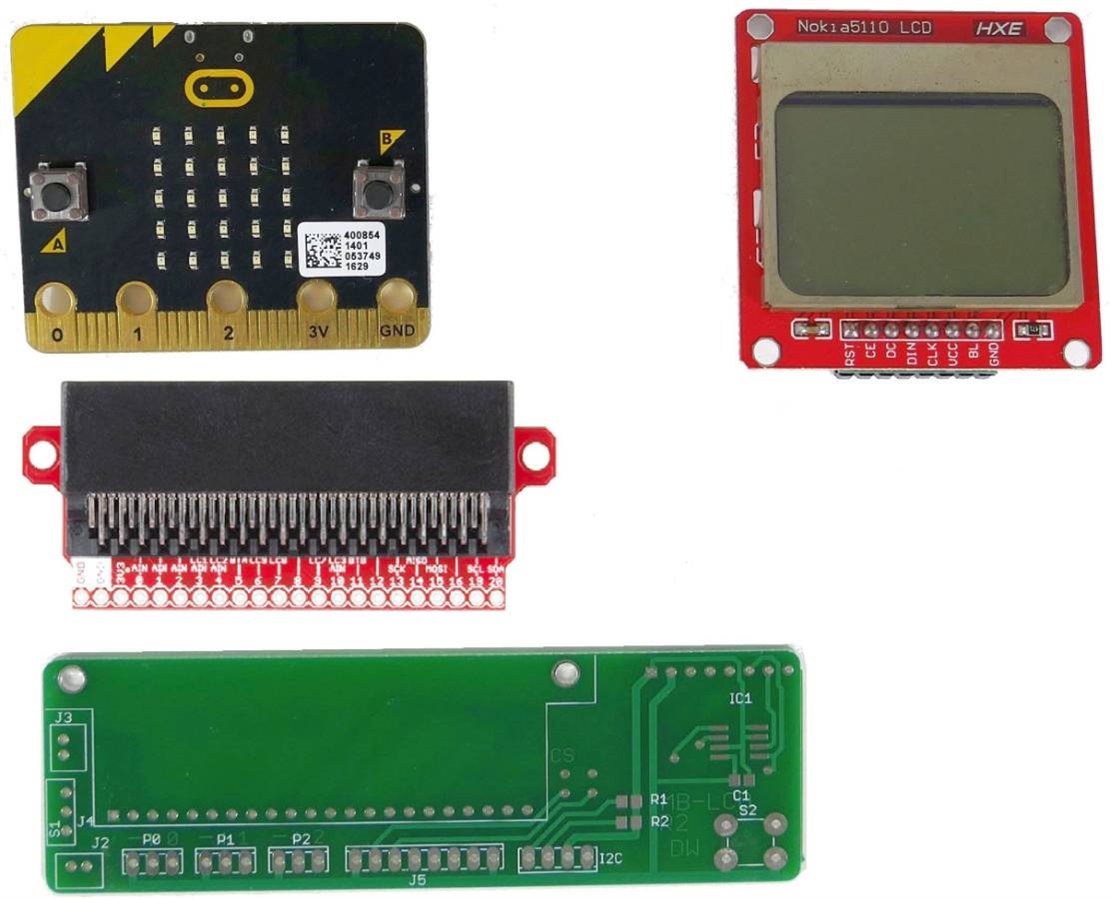
The electronic design is based on a custom interconnect PCB that hosts a micro:bit connector, an LCD footprint, a power switch, a analog input connector and a charging connector.

The main parts look like this:
image

The micro:bit is programmed to display 6 sensed parameters on 6 lines of text.

Here is a video demonstrating the completed system:

You don't have permission to edit metadata of this video.
Edit media
x
image
Upload Preview
image


The LCD really allows the micro:bit built-in sensors to be fully displayed.

I have been perfecting the the connection and programming of an LCD with a micro:bit and this project is a good way to demonstrate the potential of an LCD to enhance a micro:bit.

There is a deceptive amount of work involved in getting everything connected properly, programmed properly and fit properly in a slim package, but that also makes it more satisfying when it all works.


This short video shows the charging module in action:

You don't have permission to edit metadata of this video.
Edit media
x
image
Upload Preview
image


beacon_dave made cool suggestion to use the LEDs as a bubble level - so here is single axis level with LEDs ....

You don't have permission to edit metadata of this video.
Edit media
x
image
Upload Preview
image


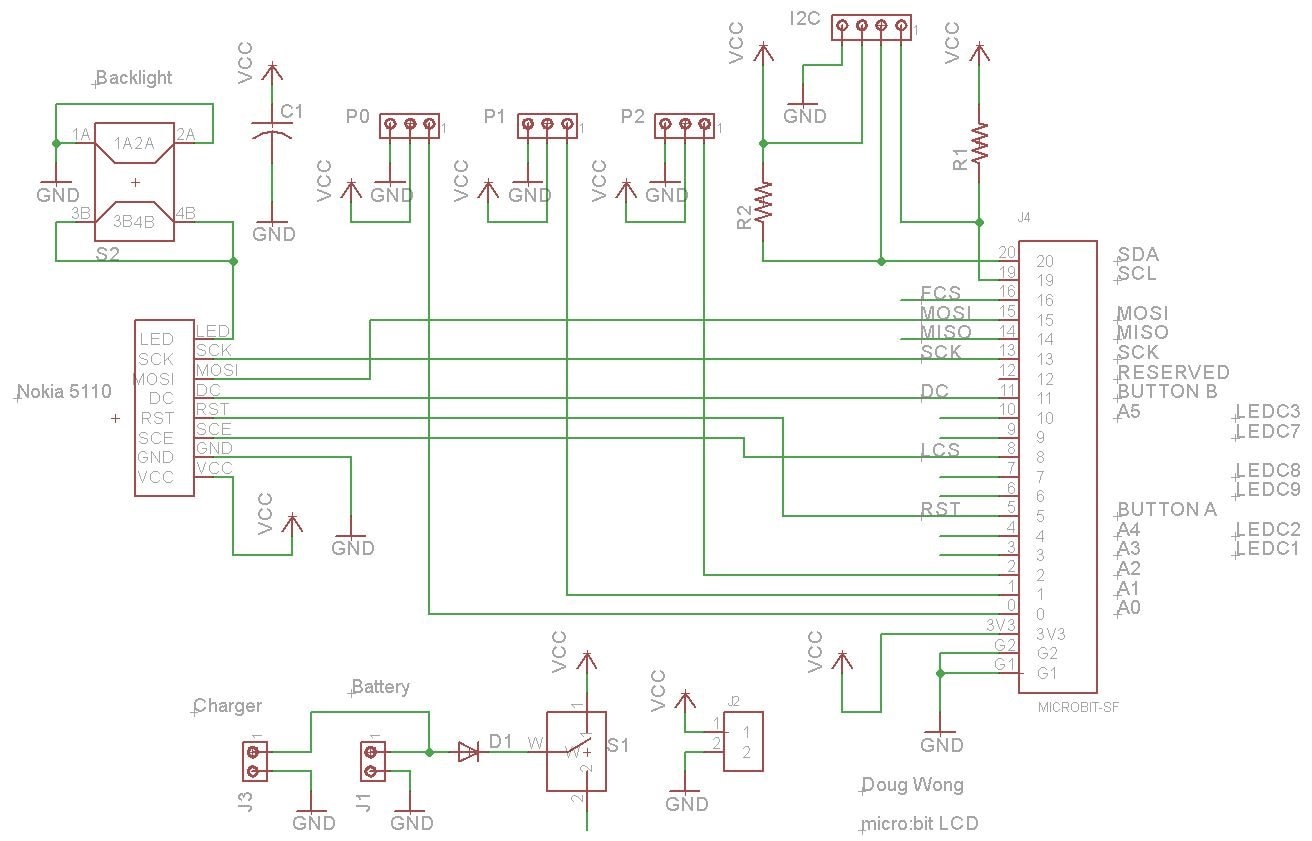
This is the schematic for those that would like to make one of these for themselves:
 

image


Note there are 2 different pinouts for Nokia 5110 LCDs - I have an adapter card that allows either to be used, but the pinout should be checked if you are going to try this.

Here is the code to display all the sensors on the LCD:


from microbit import *
# Program to display BBC micro:bit sensor data on a Nokia 5110 LCD
# by Doug Wong
# 2018


spi.init(baudrate=1000000, bits=8, mode=0, sclk=pin13, mosi=pin15, miso=pin14) # setup for SPI communication with LCD
#lcdinit = [33, 184, 4, 20, 32, 12]  # HEX 21 B8 04 14 20 0C


pin8.write_digital(1)   # disable LCD
pin1.write_digital(0)  # reset LCD
pin1.write_digital(1)  # release reset pin
pin8.write_digital(0)   # enable LCD
pin2.write_digital(0)  # select command mode
spi.write(b'\x21\xb8\x04\x14\x20\x0c')  #LCD init
pin2.write_digital(1)  # select data mode


display.scroll ("BOSS")  #splash screen


def lcd(kb):            # funtion to convert ascii characters to 56 pixel LCD representations and display
                        # each character is made up of 7 bytes where each byte is 8 vertical pixels
    if kb >= " ":
            if kb < "[":
                if kb < "!":
                    spi.write(b'\x00\x00\x00\x00\x00\x00\x00')  #space
    if kb > " ":
        if kb < "[":
            if kb < "#":
                spi.write(b'\x00\x00\x00\xbe\x00\x00\x00')  #!
            elif kb < "$":
                spi.write(b'\x00\x48\xfe\x48\xfe\x48\x00')  ##
            elif kb < "%":
                spi.write(b'\x00\x048\x54\xfe\x54\x24\x00')  #$
            elif kb < "&":
                spi.write(b'\x00\x46\x26\x10\xc8\xc4\x00')  #%
            elif kb < "'":
                spi.write(b'\x00\x6c\x92\xaa\x44\xc0\x00')  #&
            elif kb < ")":
                spi.write(b'\x00\x00\x38\x44\x82\x00\x00')  #(
            elif kb < "*":
                spi.write(b'\x00\x00\x82\x44\x38\x00\x00')  #)
            elif kb < "+":
                spi.write(b'\x00\x28\x10\x2c\x10\x28\x00')  #*
            elif kb < "-":
                spi.write(b'\x00\x00\xa0\x60\x00\x00\x00')  #,
            elif kb < ".":
                spi.write(b'\x00\x10\x10\x10\x10\x00\x00')  #-
            elif kb < "/":
                spi.write(b'\x00\x00\x60\x60\x00\x00\x00')  #.
            elif kb < "1":
                spi.write(b'\x00\x78\xa2\x92\x8a\x74\x00')  #0
            elif kb < "2":
                spi.write(b'\x00\x00\x84\xfe\x80\x00\x00')  #1
            elif kb < "3":
                spi.write(b'\x00\x44\xc2\xa0\x92\x8c\x00')  #2
            elif kb < "4":
                spi.write(b'\x00\x44\x82\x92\x92\x6e\x00')  #3
            elif kb < "5":
                spi.write(b'\x00\x30\x28\x24\xfe\x20\x00')  #4
            elif kb < "6":
                spi.write(b'\x00\x4e\x8a\x8a\x8a\x70\x00')  #5
            elif kb < "7":
                spi.write(b'\x00\x78\x94\x92\x92\x40\x00')  #6
            elif kb < "8":
                spi.write(b'\x00\x02\xc2\x12\x0a\x06\x00')  #7
            elif kb < "9":
                spi.write(b'\x00\x6c\x92\x92\x92\x6c\x00')  #8
            elif kb < ":":
                spi.write(b'\x00\x0c\x92\x92\x52\x3c\x00')  #9
            elif kb < ";":
                spi.write(b'\x00\x00\x6c\x6c\x00\x00\x00')  #:
            elif kb < "@":
                spi.write(b'\x00\x04\x02\xa2\x12\x0c\x00')  #?
            elif kb < "A":
                spi.write(b'\x00\x44\xa2\xc2\x82\x7c\x00')  #@
            elif kb < "B":
                spi.write(b'\x00\xfc\x12\x12\x12\xfc\x00')  #A
            elif kb < "C":
                spi.write(b'\x00\xfe\x92\x92\x92\x6c\x00')  #B
            elif kb < "D":
                spi.write(b'\x00\x7c\x82\x82\x82\x44\x00')  #C
            elif kb < "E":
                spi.write(b'\x00\xfe\x82\x82\x82\x7c\x00')  #D
            elif kb < "F":
                spi.write(b'\x00\xfe\x92\x92\x92\x82\x00')  #E
            elif kb < "G":
                spi.write(b'\x00\xfe\x12\x12\x12\x02\x00')  #F
            elif kb < "H":
                spi.write(b'\x00\x7c\x82\x82\xa2\x64\x00')  #G
            elif kb < "I":
                spi.write(b'\x00\xfe\x10\x10\x10\xfe\x00')  #H
            elif kb < "J":
                spi.write(b'\x00\x00\x82\xfe\x82\x00\x00')  #I
            elif kb < "K":
                spi.write(b'\x00\xe0\x82\x82\xfe\x02\x00')  #J
            elif kb < "L":
                spi.write(b'\x00\xfe\x10\x28\x44\x82\x00')  #K
            elif kb < "M":
                spi.write(b'\x00\xfe\x80\x80\x80\x80\x00')  #L
            elif kb < "N":
                spi.write(b'\x00\xfe\x02\x3c\x02\xfe\x00')  #M
            elif kb < "O":
                spi.write(b'\x00\xfe\x04\x38\x40\xfe\x00')  #N
            elif kb < "P":
                spi.write(b'\x00\x7c\x82\x82\x82\x7c\x00')  #O
            elif kb < "Q":
                spi.write(b'\x00\xfe\x22\x22\x22\x1c\x00')  #P
            elif kb < "R":
                spi.write(b'\x00\x7c\x82\xa2\x42\x7c\x00')  #Q
            elif kb < "S":
                spi.write(b'\x00\xfc\x22\x22\x52\x8c\x00')  #R
            elif kb < "T":
                spi.write(b'\x00\x4c\x92\x92\x92\x64\x00')  #S
            elif kb < "U":
                spi.write(b'\x00\x02\x02\xfe\x02\x02\x00')  #T
            elif kb < "V":
                spi.write(b'\x00\x7e\x80\x80\x80\x7e\x00')  #U
            elif kb < "W":
                spi.write(b'\x00\x3e\x40\x80\x40\x3e\x00')  #V
            elif kb < "X":
                spi.write(b'\x00\x7e\x80\x70\x80\x7e\x00')  #W
            elif kb < "Y":
                spi.write(b'\x00\xc6\x28\x10\x28\xc6\x00')  #X
            elif kb < "Z":
                spi.write(b'\x00\x06\x08\xf0\x08\x06\x00')  #Y
            elif kb < "[":
                spi.write(b'\x00\xc2\xa2\x92\x8a\x86\x00')  #Z
            elif kb < "_":
                spi.write(b'\x00\x10\x08\x04\x08\x10\x00')  #^
            else:
                spi.write(b'\x00\x00\x00\x00\x00\x00\x00')  #.


def dl():                                                   # funtion to display a line
    for i in range(0, 12):                                  # loop through 1 line of characters
        c = l[i]                                            # get next character in the line
        lcd(c)                                              # display the character
    
while True:
    
    l = "TEMP : " + str(temperature() - 4) + "           "          # compose temperature line
    dl()                                                            # display line of text
    l = "VOLT : " + str(pin0.read_analog() * .0031) + "           " # compose voltage line
    dl()                                                            # display line of text
    l = "HEAD : " + str(compass.heading()) + "            "         # compose compass heading line
    dl()                                                            # display line of text
    l = "X ACC: " + str(accelerometer.get_x()) + "           "      # compose X acceleration line
    dl()                                                            # display line of text
    l = "Y ACC: " + str(accelerometer.get_y()) + "           "      # compose Y acceleration line
    dl()                                                            # display line of text
    l = "Z ACC: " + str(accelerometer.get_z()) + "           "      # compose Z acceleration line
    dl()                                                            # display line of text


    sleep(350)                                                  # wait 350 ms before displaying another set of readings


Relevant Links:

Test Instrumentation

Project14 | Test Instrumentation: Tool Kit Prizes: micro:bits for Testing Tool: bits!


This project won some loot from element14 which is shown here:

  • Sign in to reply

Top Comments

  • shabaz
    shabaz over 7 years ago +6
    Hi Doug, Very cool : ) Impressive work integrating it all. It's easy to forget there are so many sensors on micro:bit, it's great to see them all brought out onto a status display!!
  • beacon_dave
    beacon_dave over 7 years ago in reply to shabaz +6
    I always rotate the spirit level through 180degrees before using it. If you get two different readings then the bubble vial isn't true to the edge. Ironically the last time I found one that was very badly…
  • jw0752
    jw0752 over 7 years ago in reply to beacon_dave +6
    Hi Dave, This is a simple and effective technique that I had to learn the hard way. I was a technician with a mission trip to Nicaragua where I had the job of mounting a dental x-ray machine to a concrete…
Parents
  • jw0752
    jw0752 over 7 years ago

    Hi Doug,

    Excellent project. You always do such a nice job with the custom cases for your projects. Thank you for sharing the build.

    John

    • Cancel
    • Vote Up +5 Vote Down
    • Sign in to reply
    • More
    • Cancel
  • dougw
    dougw over 7 years ago in reply to jw0752

    Thanks jw0752

    I always challenge myself to get the design right on the first print, whether it is a PCB or a 3D case. This works out well, but it means I spend a lot of time  measuring and calculating and tweaking before committing to print.

    Ironically, I don't get to do detailed design at work anymore, so I'm the only one that benefits from this meticulous detailed design philosophy.

    Tedious work not only makes for poor blogging material, it also takes away time that could be spent on blogging, so I sometimes tend to show finished work instead of trying to document all the tedium. A lot of time (perhaps most of the time) is spent in pure thought, visualizing the design, but this is also impractical to document.

    • Cancel
    • Vote Up +3 Vote Down
    • Sign in to reply
    • More
    • Cancel
  • jw0752
    jw0752 over 7 years ago in reply to dougw

    Hi Doug,

    I make it a point not to blog before I am done with a project. I do try to take a lot of pictures as I go but even this gets in the way of linear concentration. Once I get focused in on a project I stay on it. I have found it productive to take a walk or even a forced break as my mind will solve problems and suggest improvements when I am away from the bench but still working on the design in my head. I never test a finished segment of the project after midnight. If I test it and there is a problem I can kiss a good nights sleep goodbye. Better to tell myself that all is well, get some sleep and then perform the smoke, fire, and tears procedure in the morning. I do not attempt to produce an assembly manual in my blog but rather just hit the high points and the problems that were encountered. I would gladly supply any detail requested if someone did want to build something similar but most of the time an idea is all that is needed with this group to send them off to build something even better than what I can cobble together. Element 14 and the guys on this site are like a fountain of information and inspiration. It has totally improved my creativity and the success rate I have had with my builds.

    John

    • Cancel
    • Vote Up +4 Vote Down
    • Sign in to reply
    • More
    • Cancel
  • dougw
    dougw over 7 years ago in reply to jw0752

    Well put jw0752,

    "A good nights sleep"? What is that? Is that like a long blink?

    The part about visualizing solutions at quiet times really resonates - I often do that instead of sleeping. And I don't mind, if I have an interesting design taking shape, I just go with it. Who needs sleep? image

    I usually work on a problem or project until I achieve a milestone before hitting the sack, but this often means a very late night. So I always apply power on as soon as the build is to that stage, no matter how late it is. I am definitely not saying it is a better practice, but I haven't had a chance to forget what I just did in the build - and I can't stand the suspense of waiting.

    By the way, your projects occupy a unique and interesting facet of this forum not inhabited by anyone else - and they have real utility. I enjoy them and I know they are good because I always get this little pang of jealously - like how come I'm not doing that project instead of John? or gee that has to go on my project bucket list.

    • Cancel
    • Vote Up +1 Vote Down
    • Sign in to reply
    • More
    • Cancel
  • mcb1
    mcb1 over 7 years ago in reply to dougw

    You and jw0752 have very different build styles and it might be worth a separate conversation.


    Personally I have to either start falling asleep, or reach a certain point where I know I'm not going to continue thinking about it instead of sleeping.

    The Design Challenges are a little different, and blogs tend to be created and added to as it goes along, then a final edit before publishing.


    For my magazine articles I tend to do as John does and take the pictures I think it needs, making sure that I get the detail required before moving onto the next stage, then afterwards do the text for the article.

    Since we humans tend to be pictorial in learning, this sometimes means the text explains the pictures, or the picture helps with the text.


    It must be working as one of my colleges said he found them interesting and couldn't understand how I could write them so clearly ... I said I agree neither do I.


    Mark

    • Cancel
    • Vote Up +3 Vote Down
    • Sign in to reply
    • More
    • Cancel
Comment
  • mcb1
    mcb1 over 7 years ago in reply to dougw

    You and jw0752 have very different build styles and it might be worth a separate conversation.


    Personally I have to either start falling asleep, or reach a certain point where I know I'm not going to continue thinking about it instead of sleeping.

    The Design Challenges are a little different, and blogs tend to be created and added to as it goes along, then a final edit before publishing.


    For my magazine articles I tend to do as John does and take the pictures I think it needs, making sure that I get the detail required before moving onto the next stage, then afterwards do the text for the article.

    Since we humans tend to be pictorial in learning, this sometimes means the text explains the pictures, or the picture helps with the text.


    It must be working as one of my colleges said he found them interesting and couldn't understand how I could write them so clearly ... I said I agree neither do I.


    Mark

    • Cancel
    • Vote Up +3 Vote Down
    • Sign in to reply
    • More
    • Cancel
Children
  • dougw
    dougw over 7 years ago in reply to mcb1

    That is good advice. I can probably manage pictures. Somehow I have to figure out how to take video of the build process.

    • Cancel
    • Vote Up +1 Vote Down
    • Sign in to reply
    • More
    • Cancel
element14 Community

element14 is the first online community specifically for engineers. Connect with your peers and get expert answers to your questions.

  • Members
  • Learn
  • Technologies
  • Challenges & Projects
  • Products
  • Store
  • About Us
  • Feedback & Support
  • FAQs
  • Terms of Use
  • Privacy Policy
  • Legal and Copyright Notices
  • Sitemap
  • Cookies

An Avnet Company © 2026 Premier Farnell Limited. All Rights Reserved.

Premier Farnell Ltd, registered in England and Wales (no 00876412), registered office: Farnell House, Forge Lane, Leeds LS12 2NE.

ICP 备案号 10220084.

Follow element14

  • X
  • Facebook
  • linkedin
  • YouTube