element14 Community
element14 Community
    Register Log In
  • Site
  • Search
  • Log In Register
  • Community Hub
    Community Hub
    • What's New on element14
    • Feedback and Support
    • Benefits of Membership
    • Personal Blogs
    • Members Area
    • Achievement Levels
  • Learn
    Learn
    • Ask an Expert
    • eBooks
    • element14 presents
    • Learning Center
    • Tech Spotlight
    • STEM Academy
    • Webinars, Training and Events
    • Learning Groups
  • Technologies
    Technologies
    • 3D Printing
    • FPGA
    • Industrial Automation
    • Internet of Things
    • Power & Energy
    • Sensors
    • Technology Groups
  • Challenges & Projects
    Challenges & Projects
    • Design Challenges
    • element14 presents Projects
    • Project14
    • Arduino Projects
    • Raspberry Pi Projects
    • Project Groups
  • Products
    Products
    • Arduino
    • Avnet & Tria Boards Community
    • Dev Tools
    • Manufacturers
    • Multicomp Pro
    • Product Groups
    • Raspberry Pi
    • RoadTests & Reviews
  • About Us
  • Store
    Store
    • Visit Your Store
    • Choose another store...
      • Europe
      •  Austria (German)
      •  Belgium (Dutch, French)
      •  Bulgaria (Bulgarian)
      •  Czech Republic (Czech)
      •  Denmark (Danish)
      •  Estonia (Estonian)
      •  Finland (Finnish)
      •  France (French)
      •  Germany (German)
      •  Hungary (Hungarian)
      •  Ireland
      •  Israel
      •  Italy (Italian)
      •  Latvia (Latvian)
      •  
      •  Lithuania (Lithuanian)
      •  Netherlands (Dutch)
      •  Norway (Norwegian)
      •  Poland (Polish)
      •  Portugal (Portuguese)
      •  Romania (Romanian)
      •  Russia (Russian)
      •  Slovakia (Slovak)
      •  Slovenia (Slovenian)
      •  Spain (Spanish)
      •  Sweden (Swedish)
      •  Switzerland(German, French)
      •  Turkey (Turkish)
      •  United Kingdom
      • Asia Pacific
      •  Australia
      •  China
      •  Hong Kong
      •  India
      • Japan
      •  Korea (Korean)
      •  Malaysia
      •  New Zealand
      •  Philippines
      •  Singapore
      •  Taiwan
      •  Thailand (Thai)
      • Vietnam
      • Americas
      •  Brazil (Portuguese)
      •  Canada
      •  Mexico (Spanish)
      •  United States
      Can't find the country/region you're looking for? Visit our export site or find a local distributor.
  • Translate
  • Profile
  • Settings
STEM Academy
  • Learn
  • Learning Center
  • STEM Academy
  • More
  • Cancel
STEM Academy
Blog Raspberry Pi - Blink
  • Blog
  • Forum
  • Documents
  • Events
  • Polls
  • Files
  • Members
  • Mentions
  • Sub-Groups
  • Tags
  • More
  • Cancel
  • New
Join STEM Academy to participate - click to join for free!
  • Share
  • More
  • Cancel
Group Actions
  • Group RSS
  • More
  • Cancel
Engagement
  • Author Author: ntewinkel
  • Date Created: 20 Nov 2014 5:45 AM Date Created
  • Views 1028 views
  • Likes 5 likes
  • Comments 5 comments
  • python
  • led
  • raspberrypi
  • blink
  • stem space
Related
Recommended

Raspberry Pi - Blink

ntewinkel
ntewinkel
20 Nov 2014

Hi all,


In this blog post, I go through the basic steps required to blink an LED on a Raspberry Pi - the basic microprocessor way of saying "Hello World!" image


In case you missed it and need help getting started on the basics of writing and running a Python program on the Raspberry Pi, my previous blog post goes into a lot more detail of those first steps: Raspberry Pi - HelloWorld


For this tutorial, I am using:

1x Raspberry Pi Model B+ running Raspbian (other models should work fine too)

1x breadboard to make the connections

1x LED

1x 470Ω resistor (the precise value is not important)

2x M-F jumper wires


One of the great features of the Raspberry Pi is that it includes IO pins which, like an Arduino, allow you to connect it to other bits of hardware.

But, unfortunately, the default installation does not allow access to the IO pins, so the first step here is to change things so that we do have access.


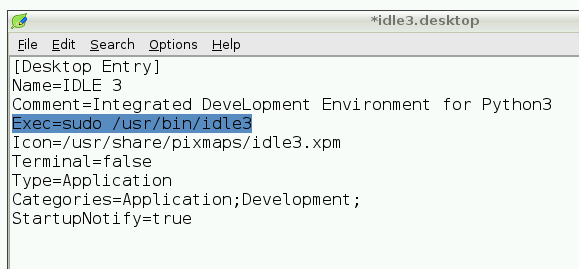
Thankfully this can be done very easily by just changing the settings of the "IDLE 3" desktop icon.

To do this, simply right-click on the IDLE 3 icon, then choose "Open With...", toggle to see Accessories, and then select Leafpad and click OK.

This pops up an editor showing several lines of text.

For the line that starts with "Exec", after the = sign add "sudo " (just the part within the quotation marks, including the space)

This will run the Python IDE as "root", giving it full access to the machine.

Now save and exit, and you are ready to blink the LED!

image


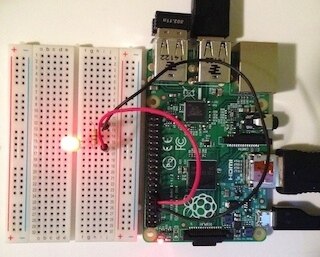
To connect the LED:

- put the LED into the breadboard

- connect one side of the 470Ω resistor to the short lead of the LED

- connect a wire from the long lead of the LED to pin 11 (GPIO17) on the Raspberry Pi

- connect a wire from the other side of the 470Ω resistor to pin 9 (GND) on the Raspberry Pi.


Now the fun begins!

You can open up a new window and try this yourself, or just download the attached blink.py example and open it.


To use the GPIO pins, you will need to import the correct library:

import RPi.GPIO as GPIO


Then you need to get the GPIO system set up:

GPIO.setmode(GPIO.BOARD)


And the output pin has to be set up as output:

GPIO.setup(11, GPIO.OUT)


After that basic setup you can then send a high or low value to the pin:

GPIO.output(11, GPIO.HIGH)

and

GPIO.output(11, GPIO.LOW)


When the script finishes, remember to clean up:

GPIO.cleanup()


In my example I use a little loop and a timer to turn the LED on and off 10 times.
image


It's actually quite easy to use once you know the basics image


ps, I've given a bit less detail in the steps than in my last post, as that would make this a very long post, but please feel free to ask questions if any of it is unclear.


edit: Here is a picture of how the IO pins are arranged for the B+


Next: Raspberry Pi - DS18B20 Temperature Sensor


Edit: This has been tested and works on both the RPi model B+ and the RPi 2 model B.


Cheers,

-Nico

Attachments:
blink.py.zip
  • Sign in to reply

Top Comments

  • mconners
    mconners over 11 years ago +1
    Also well done.
  • dragonstyne
    dragonstyne over 11 years ago +1
    Bravo Nico, wonderfully presented. I like the bit about adding sudo to the code to set root access. I like the layout of your blogs. -Steve ps. its early and my brain has not yet obtained it's required…
  • johnbeetem
    johnbeetem over 11 years ago +1
    Nice tutorial, Nico. Is that resistor 470K or 470Ω?
  • DAB
    DAB over 11 years ago

    Good post Nico.


    DAB

    • Cancel
    • Vote Up +1 Vote Down
    • Sign in to reply
    • More
    • Cancel
  • ntewinkel
    ntewinkel over 11 years ago in reply to johnbeetem

    Oops! Good catch, thanks John! It totally is supposed to be 470Ω image

    • Cancel
    • Vote Up +1 Vote Down
    • Sign in to reply
    • More
    • Cancel
  • johnbeetem
    johnbeetem over 11 years ago

    Nice tutorial, Nico.  Is that resistor 470K or 470Ω?

    • Cancel
    • Vote Up +1 Vote Down
    • Sign in to reply
    • More
    • Cancel
  • dragonstyne
    dragonstyne over 11 years ago

    Bravo Nico,  wonderfully presented.

    I like the bit about adding sudo to the code to set root access.

    I like the layout of your blogs.


    -Steve

    ps. its early and my brain has not yet obtained  it's required consumption level of caffeine. image

    • Cancel
    • Vote Up +1 Vote Down
    • Sign in to reply
    • More
    • Cancel
  • mconners
    mconners over 11 years ago

    Also well done.

    • Cancel
    • Vote Up +1 Vote Down
    • Sign in to reply
    • More
    • Cancel
element14 Community

element14 is the first online community specifically for engineers. Connect with your peers and get expert answers to your questions.

  • Members
  • Learn
  • Technologies
  • Challenges & Projects
  • Products
  • Store
  • About Us
  • Feedback & Support
  • FAQs
  • Terms of Use
  • Privacy Policy
  • Legal and Copyright Notices
  • Sitemap
  • Cookies

An Avnet Company © 2025 Premier Farnell Limited. All Rights Reserved.

Premier Farnell Ltd, registered in England and Wales (no 00876412), registered office: Farnell House, Forge Lane, Leeds LS12 2NE.

ICP 备案号 10220084.

Follow element14

  • X
  • Facebook
  • linkedin
  • YouTube