element14 Community
element14 Community
    Register Log In
  • Site
  • Search
  • Log In Register
  • Community Hub
    Community Hub
    • What's New on element14
    • Feedback and Support
    • Benefits of Membership
    • Personal Blogs
    • Members Area
    • Achievement Levels
  • Learn
    Learn
    • Ask an Expert
    • eBooks
    • element14 presents
    • Learning Center
    • Tech Spotlight
    • STEM Academy
    • Webinars, Training and Events
    • Learning Groups
  • Technologies
    Technologies
    • 3D Printing
    • FPGA
    • Industrial Automation
    • Internet of Things
    • Power & Energy
    • Sensors
    • Technology Groups
  • Challenges & Projects
    Challenges & Projects
    • Design Challenges
    • element14 presents Projects
    • Project14
    • Arduino Projects
    • Raspberry Pi Projects
    • Project Groups
  • Products and Partners
    Products and Partners
    • Arduino
    • Avnet & Tria Boards Community
    • Dev Tools
    • Manufacturers
    • Multicomp Pro
    • Product Groups
    • Raspberry Pi
    • RoadTests & Reviews
  • About Us
    About the element14 Community
  • Store
    Store
    • Visit Your Store
    • Choose another store...
      • Europe
      •  Austria (German)
      •  Belgium (Dutch, French)
      •  Bulgaria (Bulgarian)
      •  Czech Republic (Czech)
      •  Denmark (Danish)
      •  Estonia (Estonian)
      •  Finland (Finnish)
      •  France (French)
      •  Germany (German)
      •  Hungary (Hungarian)
      •  Ireland
      •  Israel
      •  Italy (Italian)
      •  Latvia (Latvian)
      •  
      •  Lithuania (Lithuanian)
      •  Netherlands (Dutch)
      •  Norway (Norwegian)
      •  Poland (Polish)
      •  Portugal (Portuguese)
      •  Romania (Romanian)
      •  Russia (Russian)
      •  Slovakia (Slovak)
      •  Slovenia (Slovenian)
      •  Spain (Spanish)
      •  Sweden (Swedish)
      •  Switzerland(German, French)
      •  Turkey (Turkish)
      •  United Kingdom
      • Asia Pacific
      •  Australia
      •  China
      •  Hong Kong
      •  India
      •  Japan
      •  Korea (Korean)
      •  Malaysia
      •  New Zealand
      •  Philippines
      •  Singapore
      •  Taiwan
      •  Thailand (Thai)
      •  Vietnam
      • Americas
      •  Brazil (Portuguese)
      •  Canada
      •  Mexico (Spanish)
      •  United States
      Can't find the country/region you're looking for? Visit our export site or find a local distributor.
  • Translate
  • Profile
  • Settings
Community Hub
Community Hub
Member's Forum Iphone charging...
  • Blog
  • Forum
  • Documents
  • Quiz
  • Events
  • Leaderboard
  • Polls
  • Files
  • Members
  • Mentions
  • Sub-Groups
  • Tags
  • More
  • Cancel
  • New
Join Community Hub to participate - click to join for free!
Actions
  • Share
  • More
  • Cancel
Forum Thread Details
  • State Not Answered
  • Replies 60 replies
  • Subscribers 634 subscribers
  • Views 6076 views
  • Users 0 members are here
  • usb
  • 5vdc
  • iphone
Related

Iphone charging...

e14 Contributor
e14 Contributor over 11 years ago

Hello, my name is Martin
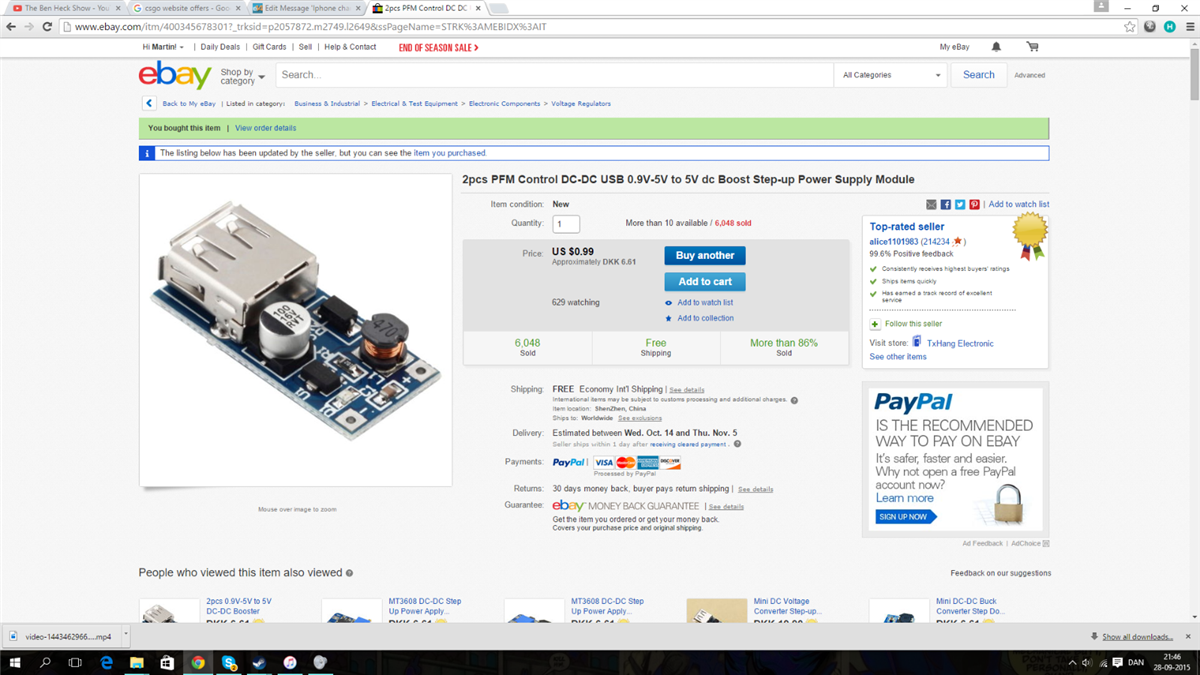
I have a very big problem with a 5v usb boost circuit. When i connect the circuit to the power, the led lights up, but no power... to iphones... everything else works, just not iphones. i already tried shorting the data ports with the 5v pin, AND THAT USED TO WORK, but not now!!!??

PLEASE HELP

I have now tried with adding some resistors to data+ and minus, still nothing image


HELP!!!


image

  • Sign in to reply
  • Cancel
  • mcb1
    0 mcb1 over 10 years ago in reply to gadget.iom

    Pin 1 voltage levels from 4.5V to 5.25V, the actual current drawn by the device varies


    Silicon chip ran an article (August 2013 ??) on the voltages required on both USB pins to make the various Apple products draw their full capability.

    It seems that unless the Apple device sees that voltage, it won't use the full current draw of the supplying device (ie 5v x amp supply)


    It was quite interesting because the ratios of resistors required was not simple.


    Mark

    • Cancel
    • Vote Up 0 Vote Down
    • Sign in to reply
    • Verify Answer
    • Cancel
  • gadget.iom
    0 gadget.iom over 10 years ago in reply to shabaz

    shabaz wrote:


    Also, it is only intended for 500-600mA at best (and possibly less), so I don't get why you think this would be useful to charge an iphone in the first place - would take many hours and probably not healthy for your

    expensive iphone in the long run.

    This is a $0.99 circuit, not really designed for iphone charging although it might get you some charging with the relevant resistors and confirmation that the voltage is accurate as

    advised.


    If you want to do it properly, there are tools to help you design the desired output voltage and current capability and build your own circuit but you'd need to be prepared to solder the parts up yourself (some parts may be surface-mount).

    But for a one-off, purchased parts will cost far more than an off-the-shelf iphone charger.


    You could try looking for an alternative module from ebay but this $0.99 one is pretty poor for what you're trying to achieve.


    Fully agree with these points. I'm very doubtful that you will get the stated power output with this module anyway. An official Apple charger typically outputs 5W (1A) of power.

    • Cancel
    • Vote Up 0 Vote Down
    • Sign in to reply
    • Verify Answer
    • Cancel
  • shabaz
    0 shabaz over 10 years ago

    Also, judging from that photo in your first post, it looks like there is a tiny capacitor (maybe 100nF?!) on the output, so the output may not even be very clean. Could cause issues.

    [EDIT - sorry - looks like there is a 100uF cap on that thing on the output side - I was accidentally looking at the input side in the photo].


    Also, it is only intended for 500-600mA at best (and possibly less), so I don't get why you think this would be useful to charge an iphone in the first place - would take many hours and probably not healthy for your

    expensive iphone in the long run.

    This is a $0.99 circuit, not really designed for iphone charging although it might get you some charging with the relevant resistors and confirmation that the voltage is accurate as

    advised.


    If you want to do it properly, there are tools to help you design the desired output voltage and current capability and build your own circuit but you'd need to be prepared to solder the parts up yourself (some parts may be surface-mount).

    But for a one-off, purchased parts will cost far more than an off-the-shelf iphone charger.


    You could try looking for an alternative module from ebay but this $0.99 one is pretty poor for what you're trying to achieve.

    • Cancel
    • Vote Up +1 Vote Down
    • Sign in to reply
    • Verify Answer
    • Cancel
  • gadget.iom
    0 gadget.iom over 10 years ago in reply to e14 Contributor

    Check your voltages:

    A general observation with the Apple products is that they will attempt to draw the maximum current if and only if the voltage level on Pin 1 with respect to the current draw remains constant between 5 and 5.25 volts.  Often, if a charger is unable to supply the proper amount of current the voltage output will drop.  For instance, a 5.25V 1A power supply may only output to 4.5V when under a 2A load.  For Apple products, when a device is presented with any one of the voltage configurations (500mA, 1A, or 2A) and then presented with a range of Pin 1 voltage levels from 4.5V to 5.25V, the actual current drawn by the device varies.  In our tests, we found that when the voltage sent to the iPad 2 was 4.5V, the iPad 2 drew only about 1A, but steadily scaled up the current to 2A as the voltage was incrementally increased to 5V.  Additionally, we noted Apple devices will not accept charge from power supplies with Pin 1 voltages of less than 4.5V or greater than 5.5V.


    Extract from Peri's link: http://www.voltaicsystems.com/blog/choosing-usb-pin-voltages-for-iphones-and-ipads/

    • Cancel
    • Vote Up +1 Vote Down
    • Sign in to reply
    • Verify Answer
    • Cancel
  • e14 Contributor
    0 e14 Contributor over 10 years ago in reply to e14 Contributor

    i have tried 2,75, 2,8, everything now... NOTHING it still says accesory not supported! i've even tried with 2.0 v on both data + and data -, and nothing. PLEASE HELP! i initially thought this was THE ANSWER but nope, not really, still doesnt work. help... please, im losing hope here.

    • Cancel
    • Vote Up 0 Vote Down
    • Sign in to reply
    • Verify Answer
    • Cancel
  • e14 Contributor
    0 e14 Contributor over 10 years ago

    http://www.voltaicsystems.com/blog/choosing-usb-pin-voltages-for-iphones-and-ipads/

    Seems that different iphone versions behave differently. Quite picky about voltages at datalines. 2.75V D- and 2.00V D+ seems to work best.

    PS3 controller is even worse: It needs to negotiate with a host to initiate charging. I used a ATTiny45 and V-USB, but it works.

    • Cancel
    • Vote Up 0 Vote Down
    • Sign in to reply
    • Verify Answer
    • Cancel
  • gadget.iom
    0 gadget.iom over 11 years ago

    This article may help.

    https://learn.adafruit.com/minty-boost/icharging


    They seem to be trying to achieve exactly the same goal you are.

    • Cancel
    • Vote Up +2 Vote Down
    • Sign in to reply
    • Verify Answer
    • Cancel
  • e14 Contributor
    0 e14 Contributor over 11 years ago in reply to e14 Contributor

    Now that i applied resistors the phone says "this accesory may not be supported " please help!

    • Cancel
    • Vote Up 0 Vote Down
    • Sign in to reply
    • Verify Answer
    • Cancel
  • e14 Contributor
    0 e14 Contributor over 11 years ago in reply to e14 Contributor

    *kinda

    • Cancel
    • Vote Up 0 Vote Down
    • Sign in to reply
    • Verify Answer
    • Cancel
  • e14 Contributor
    0 e14 Contributor over 11 years ago in reply to shabaz

    Well yeah, i Linda figured that wasnt alot, so im asking. Should i go for 3aa's? 4? And should i connect Them in series like they usually are or in parallel?

    • Cancel
    • Vote Up 0 Vote Down
    • Sign in to reply
    • Verify Answer
    • Cancel
<>
element14 Community

element14 is the first online community specifically for engineers. Connect with your peers and get expert answers to your questions.

  • Members
  • Learn
  • Technologies
  • Challenges & Projects
  • Products
  • Store
  • About Us
  • Feedback & Support
  • FAQs
  • Terms of Use
  • Privacy Policy
  • Legal and Copyright Notices
  • Sitemap
  • Cookies

An Avnet Company © 2026 Premier Farnell Limited. All Rights Reserved.

Premier Farnell Ltd, registered in England and Wales (no 00876412), registered office: Farnell House, Forge Lane, Leeds LS12 2NE.

Follow element14

  • X
  • Facebook
  • linkedin
  • YouTube