element14 Community
element14 Community
    Register Log In
  • Site
  • Search
  • Log In Register
  • Community Hub
    Community Hub
    • What's New on element14
    • Feedback and Support
    • Benefits of Membership
    • Personal Blogs
    • Members Area
    • Achievement Levels
  • Learn
    Learn
    • Ask an Expert
    • eBooks
    • element14 presents
    • Learning Center
    • Tech Spotlight
    • STEM Academy
    • Webinars, Training and Events
    • Learning Groups
  • Technologies
    Technologies
    • 3D Printing
    • FPGA
    • Industrial Automation
    • Internet of Things
    • Power & Energy
    • Sensors
    • Technology Groups
  • Challenges & Projects
    Challenges & Projects
    • Design Challenges
    • element14 presents Projects
    • Project14
    • Arduino Projects
    • Raspberry Pi Projects
    • Project Groups
  • Products
    Products
    • Arduino
    • Avnet & Tria Boards Community
    • Dev Tools
    • Manufacturers
    • Multicomp Pro
    • Product Groups
    • Raspberry Pi
    • RoadTests & Reviews
  • About Us
  • Store
    Store
    • Visit Your Store
    • Choose another store...
      • Europe
      •  Austria (German)
      •  Belgium (Dutch, French)
      •  Bulgaria (Bulgarian)
      •  Czech Republic (Czech)
      •  Denmark (Danish)
      •  Estonia (Estonian)
      •  Finland (Finnish)
      •  France (French)
      •  Germany (German)
      •  Hungary (Hungarian)
      •  Ireland
      •  Israel
      •  Italy (Italian)
      •  Latvia (Latvian)
      •  
      •  Lithuania (Lithuanian)
      •  Netherlands (Dutch)
      •  Norway (Norwegian)
      •  Poland (Polish)
      •  Portugal (Portuguese)
      •  Romania (Romanian)
      •  Russia (Russian)
      •  Slovakia (Slovak)
      •  Slovenia (Slovenian)
      •  Spain (Spanish)
      •  Sweden (Swedish)
      •  Switzerland(German, French)
      •  Turkey (Turkish)
      •  United Kingdom
      • Asia Pacific
      •  Australia
      •  China
      •  Hong Kong
      •  India
      • Japan
      •  Korea (Korean)
      •  Malaysia
      •  New Zealand
      •  Philippines
      •  Singapore
      •  Taiwan
      •  Thailand (Thai)
      • Vietnam
      • Americas
      •  Brazil (Portuguese)
      •  Canada
      •  Mexico (Spanish)
      •  United States
      Can't find the country/region you're looking for? Visit our export site or find a local distributor.
  • Translate
  • Profile
  • Settings
Personal Blogs
  • Community Hub
  • More
Personal Blogs
Legacy Personal Blogs Cypress USB 3.0 SuperSpeed Explorer Kit - Measure Data Throughput
  • Blog
  • Documents
  • Mentions
  • Sub-Groups
  • Tags
  • More
  • Cancel
  • New
  • Share
  • More
  • Cancel
Group Actions
  • Group RSS
  • More
  • Cancel
Engagement
  • Author Author: Jan Cumps
  • Date Created: 27 Apr 2015 8:17 AM Date Created
  • Views 933 views
  • Likes 2 likes
  • Comments 3 comments
  • usb3
  • ez-usb
  • usb
  • cypress
Related
Recommended

Cypress USB 3.0 SuperSpeed Explorer Kit - Measure Data Throughput

Jan Cumps
Jan Cumps
27 Apr 2015

Cypress released an evaluation kit for their USB 3.0 device EZ-USB FX3.

Their Quick Start Guide steps you through a very useful exersise.

You can measure throughput and compare USB 3.0 with 2.0.
 

image


Detecting USB Version


The default application that's loaded on the kit has two functions. It serves as a mass traffic generator, and USB version indicator.

When you plug the board in a USB connector, you can see the version of that port.

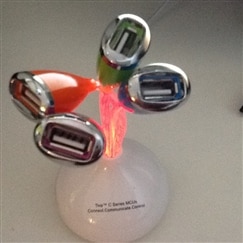
If the blue led is steady on, you are connected to USB 2.0. If it blinks fast, you plugged it into a USB 3.0 port.

I used a mini desktop USB hub for 2.0. All ports on my desktop pc are 3.0, and putting the hub in between magically transforms the port to a USB 2.0 HUB.
 

image


Measure Throughput of USB 3.0 and 2.0


This video is unavailable.
You don't have permission to edit metadata of this video.


The kit comes with a Streamer application (+ source code!).
This app will try to stream data as fast as it can via the USB connection. It shows the transfer rate.

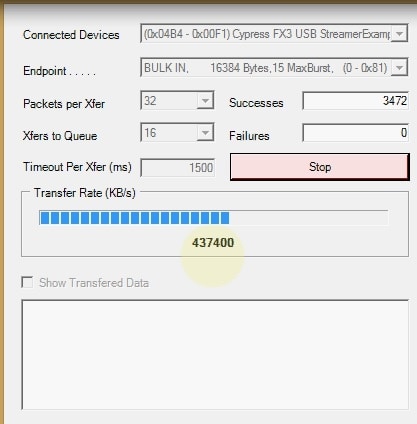
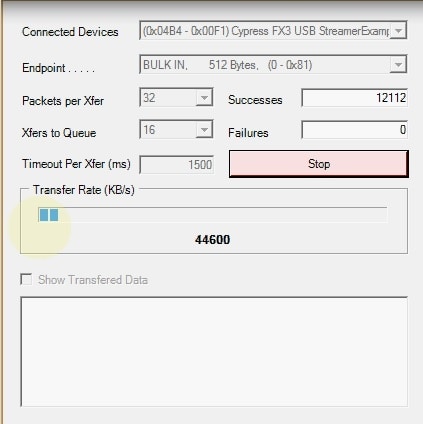
On my PC, with 32 packages per transfer and a queue of 16 transfers, I get 440.000 KB/s for USB 3.0, and 44.000 for USB 3.0.


USB 3.0USB 2.0
imageimage


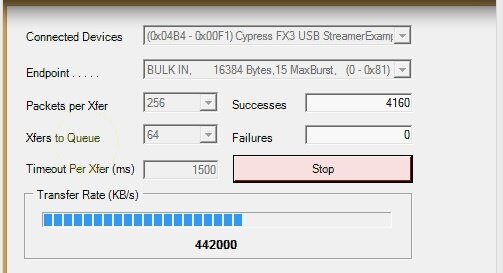
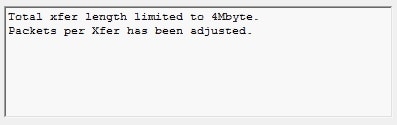
You can play with packet and queue size to check if it affects the rate, as long as the total package size stays under 4 MB.

If your settings exceed this limit, the Streamer will automatically adjust the number of packages to keep you within bounds.

The following warning is displayed:

image


What's Next?


When you install the software for this kit, you get enough information to keep you busy for a while.

Next to the Quick Start Guide, you have the User Guide, and the full EZ-USB F3 SDK (built around Eclipse IDE) to explore.

  • Sign in to reply
Parents
  • clem57
    clem57 over 10 years ago

    I like the kit. Where did you get this may I ask?

    Thanks,

    Clem

    • Cancel
    • Vote Up 0 Vote Down
    • Sign in to reply
    • More
    • Cancel
Comment
  • clem57
    clem57 over 10 years ago

    I like the kit. Where did you get this may I ask?

    Thanks,

    Clem

    • Cancel
    • Vote Up 0 Vote Down
    • Sign in to reply
    • More
    • Cancel
Children
No Data
element14 Community

element14 is the first online community specifically for engineers. Connect with your peers and get expert answers to your questions.

  • Members
  • Learn
  • Technologies
  • Challenges & Projects
  • Products
  • Store
  • About Us
  • Feedback & Support
  • FAQs
  • Terms of Use
  • Privacy Policy
  • Legal and Copyright Notices
  • Sitemap
  • Cookies

An Avnet Company © 2025 Premier Farnell Limited. All Rights Reserved.

Premier Farnell Ltd, registered in England and Wales (no 00876412), registered office: Farnell House, Forge Lane, Leeds LS12 2NE.

ICP 备案号 10220084.

Follow element14

  • X
  • Facebook
  • linkedin
  • YouTube