element14 Community
element14 Community
    Register Log In
  • Site
  • Search
  • Log In Register
  • Community Hub
    Community Hub
    • What's New on element14
    • Feedback and Support
    • Benefits of Membership
    • Personal Blogs
    • Members Area
    • Achievement Levels
  • Learn
    Learn
    • Ask an Expert
    • eBooks
    • element14 presents
    • Learning Center
    • Tech Spotlight
    • STEM Academy
    • Webinars, Training and Events
    • Learning Groups
  • Technologies
    Technologies
    • 3D Printing
    • FPGA
    • Industrial Automation
    • Internet of Things
    • Power & Energy
    • Sensors
    • Technology Groups
  • Challenges & Projects
    Challenges & Projects
    • Design Challenges
    • element14 presents Projects
    • Project14
    • Arduino Projects
    • Raspberry Pi Projects
    • Project Groups
  • Products
    Products
    • Arduino
    • Avnet & Tria Boards Community
    • Dev Tools
    • Manufacturers
    • Multicomp Pro
    • Product Groups
    • Raspberry Pi
    • RoadTests & Reviews
  • About Us
  • Store
    Store
    • Visit Your Store
    • Choose another store...
      • Europe
      •  Austria (German)
      •  Belgium (Dutch, French)
      •  Bulgaria (Bulgarian)
      •  Czech Republic (Czech)
      •  Denmark (Danish)
      •  Estonia (Estonian)
      •  Finland (Finnish)
      •  France (French)
      •  Germany (German)
      •  Hungary (Hungarian)
      •  Ireland
      •  Israel
      •  Italy (Italian)
      •  Latvia (Latvian)
      •  
      •  Lithuania (Lithuanian)
      •  Netherlands (Dutch)
      •  Norway (Norwegian)
      •  Poland (Polish)
      •  Portugal (Portuguese)
      •  Romania (Romanian)
      •  Russia (Russian)
      •  Slovakia (Slovak)
      •  Slovenia (Slovenian)
      •  Spain (Spanish)
      •  Sweden (Swedish)
      •  Switzerland(German, French)
      •  Turkey (Turkish)
      •  United Kingdom
      • Asia Pacific
      •  Australia
      •  China
      •  Hong Kong
      •  India
      • Japan
      •  Korea (Korean)
      •  Malaysia
      •  New Zealand
      •  Philippines
      •  Singapore
      •  Taiwan
      •  Thailand (Thai)
      • Vietnam
      • Americas
      •  Brazil (Portuguese)
      •  Canada
      •  Mexico (Spanish)
      •  United States
      Can't find the country/region you're looking for? Visit our export site or find a local distributor.
  • Translate
  • Profile
  • Settings
Arduino
  • Products
  • More
Arduino
Arduino Forum I killed a mouse
  • Blog
  • Forum
  • Documents
  • Quiz
  • Events
  • Polls
  • Files
  • Members
  • Mentions
  • Sub-Groups
  • Tags
  • More
  • Cancel
  • New
Join Arduino to participate - click to join for free!
Actions
  • Share
  • More
  • Cancel
Forum Thread Details
  • Replies 7 replies
  • Subscribers 403 subscribers
  • Views 707 views
  • Users 0 members are here
Related

I killed a mouse

chgus
chgus over 14 years ago

Hi,


I recently gave some advice in another thread on reading the wheel from a wheel mouse (i think). Since I have seen no confirmation that my advice actually worked I went ahead and killed a wheel mouse, found and extracted the wheel encoder. This is how and what I did to read the wheel encoder from the mouse.


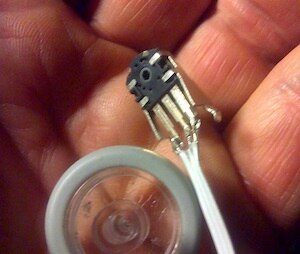
The wheel encoder from the dead mouse.
image

I made a small breadboard setup just to connect the wheel encoder and the arduino. I have no documentation of any kind on this part. After a short study of how it was connected on the original mouse PCB I had a theory. I named the connectors from left to right "B" "A" and "GND". The orientation of the wheel encoder in my hand matches the three round connections on the drawing below. In my test i used capacitors 1uF, but they seem to be a bit large. The reason for the capacitors is debouncing.


image

The waveform that i see when slowly turning the wheel looks like this:


image

So, if you trigger an interrupt on changes on the upper signal "A" while also reading "B" in the interrupt routine, You can determine both motion and what direction.


How do I determine direction? Turning the wheel is like moving the vertical bar left or right over the waveforms. Every time the upper wave "A" changes level, i also look at "B"  and compare them. If I move right (turn wheel clockwise) I see "B" at the same logic level as "A". If i move left (turn wheel counterclockwise) I will always find "B" at opposite logic level from "A" when "A" changes. Hence the code for this:


  a=digitalRead(2);

  b=digitalRead(3);

  if(a==b){

    wheel++;

  } else {

    wheel--;

  }


My code deliver this output, new line every second. The wheel was turned slowly clockvise.


Wheel position: 0

Wheel position: 0

Wheel position: 2

Wheel position: 5

Wheel position: 3

Wheel position: 7

Wheel position: 11

Wheel position: 14

Wheel position: 16

Wheel position: 18

Wheel position: 16

Wheel position: 16

Wheel position: 16


This is the code in my Arduino UNO:
// wheel has 3 connectors
// one connects to ground
// the two others connect to digital pin 2,3

// variable to hold wheel position
volatile int wheel=0;

void setup() {
  pinMode(2,INPUT);
  // internal pull up
  digitalWrite(2,HIGH);
  pinMode(3,INPUT);
  // internal pull up
  digitalWrite(3,HIGH);
  attachInterrupt(0,moved,CHANGE);
  Serial.begin(9600);
}

void loop(){
  int a,b;
  Serial.print("Wheel position: ");
  Serial.println(wheel,DEC);
  delay(1000);
}

// interrupt handler
void moved(){
  int a,b;
  a=digitalRead(2);
  b=digitalRead(3);
  if(a==b){
    wheel++;
  } else {
    wheel--;
  }
}

Enjoy!


Wheel position: 0
Wheel position: 0
Wheel position: 2
Wheel position: 5
Wheel position: 3
Wheel position: 7
Wheel position: 11
Wheel position: 14
Wheel position: 16
Wheel position: 18
Wheel position: 16
Wheel position: 16
Wheel position: 16
  • Sign in to reply
  • Cancel
Parents
  • Former Member
    Former Member over 14 years ago

    Sorry, I think it was my post. I have been buisy and hade some issues with my Arduino I will try this when I get some spare time. Thanks for the post!

    • Cancel
    • Vote Up 0 Vote Down
    • Sign in to reply
    • Cancel
  • chgus
    chgus over 14 years ago in reply to Former Member

    No problem, just that curiosity got the better of me ...  image

    • Cancel
    • Vote Up 0 Vote Down
    • Sign in to reply
    • Cancel
  • coolbots7
    coolbots7 over 14 years ago in reply to chgus

    I wasn't thingking of using capacitors does that make a difference?

    • Cancel
    • Vote Up 0 Vote Down
    • Sign in to reply
    • Cancel
Reply
  • coolbots7
    coolbots7 over 14 years ago in reply to chgus

    I wasn't thingking of using capacitors does that make a difference?

    • Cancel
    • Vote Up 0 Vote Down
    • Sign in to reply
    • Cancel
Children
  • chgus
    chgus over 14 years ago in reply to coolbots7

    Yes, the interrupt response is so quick it will pick up the slightest noise. From my initial test i would say it find 50 false transitions with every true one. It might be better if it was an optical sensor. From the waveform i had above You may see that it raises very slow, so 1uF might be 2-5 times the value you actually should use.

    • Cancel
    • Vote Up 0 Vote Down
    • Sign in to reply
    • Cancel
element14 Community

element14 is the first online community specifically for engineers. Connect with your peers and get expert answers to your questions.

  • Members
  • Learn
  • Technologies
  • Challenges & Projects
  • Products
  • Store
  • About Us
  • Feedback & Support
  • FAQs
  • Terms of Use
  • Privacy Policy
  • Legal and Copyright Notices
  • Sitemap
  • Cookies

An Avnet Company © 2025 Premier Farnell Limited. All Rights Reserved.

Premier Farnell Ltd, registered in England and Wales (no 00876412), registered office: Farnell House, Forge Lane, Leeds LS12 2NE.

ICP 备案号 10220084.

Follow element14

  • X
  • Facebook
  • linkedin
  • YouTube