


Hi,
I recently gave some advice in another thread on reading the wheel from a wheel mouse (i think). Since I have seen no confirmation that my advice actually worked I went ahead and killed a wheel mouse, found and extracted the wheel encoder. This is how and what I did to read the wheel encoder from the mouse.
The wheel encoder from the dead mouse.
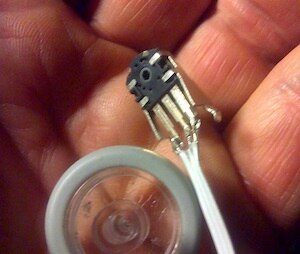
I made a small breadboard setup just to connect the wheel encoder and the arduino. I have no documentation of any kind on this part. After a short study of how it was connected on the original mouse PCB I had a theory. I named the connectors from left to right "B" "A" and "GND". The orientation of the wheel encoder in my hand matches the three round connections on the drawing below. In my test i used capacitors 1uF, but they seem to be a bit large. The reason for the capacitors is debouncing.

The waveform that i see when slowly turning the wheel looks like this:

So, if you trigger an interrupt on changes on the upper signal "A" while also reading "B" in the interrupt routine, You can determine both motion and what direction.
How do I determine direction? Turning the wheel is like moving the vertical bar left or right over the waveforms. Every time the upper wave "A" changes level, i also look at "B" and compare them. If I move right (turn wheel clockwise) I see "B" at the same logic level as "A". If i move left (turn wheel counterclockwise) I will always find "B" at opposite logic level from "A" when "A" changes. Hence the code for this:
a=digitalRead(2);
b=digitalRead(3);
if(a==b){
wheel++;
} else {
wheel--;
}
My code deliver this output, new line every second. The wheel was turned slowly clockvise.
Wheel position: 0
Wheel position: 0
Wheel position: 2
Wheel position: 5
Wheel position: 3
Wheel position: 7
Wheel position: 11
Wheel position: 14
Wheel position: 16
Wheel position: 18
Wheel position: 16
Wheel position: 16
Wheel position: 16


