element14 Community
element14 Community
    Register Log In
  • Site
  • Search
  • Log In Register
  • Community Hub
    Community Hub
    • What's New on element14
    • Feedback and Support
    • Benefits of Membership
    • Personal Blogs
    • Members Area
    • Achievement Levels
  • Learn
    Learn
    • Ask an Expert
    • eBooks
    • element14 presents
    • Learning Center
    • Tech Spotlight
    • STEM Academy
    • Webinars, Training and Events
    • Learning Groups
  • Technologies
    Technologies
    • 3D Printing
    • FPGA
    • Industrial Automation
    • Internet of Things
    • Power & Energy
    • Sensors
    • Technology Groups
  • Challenges & Projects
    Challenges & Projects
    • Design Challenges
    • element14 presents Projects
    • Project14
    • Arduino Projects
    • Raspberry Pi Projects
    • Project Groups
  • Products
    Products
    • Arduino
    • Avnet & Tria Boards Community
    • Dev Tools
    • Manufacturers
    • Multicomp Pro
    • Product Groups
    • Raspberry Pi
    • RoadTests & Reviews
  • About Us
  • Store
    Store
    • Visit Your Store
    • Choose another store...
      • Europe
      •  Austria (German)
      •  Belgium (Dutch, French)
      •  Bulgaria (Bulgarian)
      •  Czech Republic (Czech)
      •  Denmark (Danish)
      •  Estonia (Estonian)
      •  Finland (Finnish)
      •  France (French)
      •  Germany (German)
      •  Hungary (Hungarian)
      •  Ireland
      •  Israel
      •  Italy (Italian)
      •  Latvia (Latvian)
      •  
      •  Lithuania (Lithuanian)
      •  Netherlands (Dutch)
      •  Norway (Norwegian)
      •  Poland (Polish)
      •  Portugal (Portuguese)
      •  Romania (Romanian)
      •  Russia (Russian)
      •  Slovakia (Slovak)
      •  Slovenia (Slovenian)
      •  Spain (Spanish)
      •  Sweden (Swedish)
      •  Switzerland(German, French)
      •  Turkey (Turkish)
      •  United Kingdom
      • Asia Pacific
      •  Australia
      •  China
      •  Hong Kong
      •  India
      • Japan
      •  Korea (Korean)
      •  Malaysia
      •  New Zealand
      •  Philippines
      •  Singapore
      •  Taiwan
      •  Thailand (Thai)
      • Vietnam
      • Americas
      •  Brazil (Portuguese)
      •  Canada
      •  Mexico (Spanish)
      •  United States
      Can't find the country/region you're looking for? Visit our export site or find a local distributor.
  • Translate
  • Profile
  • Settings
Arduino
  • Products
  • More
Arduino
Arduino Forum Programing issue
  • Blog
  • Forum
  • Documents
  • Quiz
  • Events
  • Polls
  • Files
  • Members
  • Mentions
  • Sub-Groups
  • Tags
  • More
  • Cancel
  • New
Join Arduino to participate - click to join for free!
Actions
  • Share
  • More
  • Cancel
Forum Thread Details
  • State Suggested Answer
  • Replies 37 replies
  • Answers 3 answers
  • Subscribers 405 subscribers
  • Views 3520 views
  • Users 0 members are here
  • programing
  • arduino
Related

Programing issue

dirtdiver
dirtdiver over 14 years ago

Hi,

so I have a dc motor and a servo each controlled with a different potentiometer.First I made two separate codes and all works fine, but when I combine the two codes the servo starts getting readings from both pots.Here are the working codes


int motorPin = 9;                                          

int potpin = 0;

int val;   


void setup()

{

  pinMode(potpin,INPUT);

pinMode(motorPin, OUTPUT);

}


void loop()

{

  val = analogRead(potpin);        

  val = map(val, 0, 1023, 0, 255);   


analogWrite(motorPin, val); 

  delay(15);                         

}


AND


#include <Servo.h>


Servo myservo; 


int potpin = 5; 

int val;   


void setup()

{

  myservo.attach(3); 

}


void loop()

{

  val = analogRead(potpin);           

  if (val<300){

  myservo.write(67);

  }else if (val<600){

  myservo.write(89);

  } else {

    myservo.write(109);

  }


delay(15);                          

}


Heres the combined code that doesnt work.If you see whats wrong please reply, couse I cant find the mistake here.


#include <Servo.h>

Servo myservo;  // create servo object to control a servo

int motorPin = 9;

int potpin1 = 5;  // GEARS

int potpin = 0;  // SPEED

int val;    // variable to read the value from the analog pin


void setup()

{

  pinMode(potpin1,INPUT);                //GEARS

  pinMode(potpin,INPUT);                 //SPEED

pinMode(motorPin, OUTPUT);

myservo.attach(3);  // attaches the servo on pin 9 to the servo object

}


void loop()

{


  val = analogRead(potpin);           //SPEED

  val= map(val, 0, 1023, 0, 255); 


analogWrite(motorPin, val); 

  delay(15);                         


  val = analogRead(potpin1);            //   GEARS

  if (val<300){

  myservo.write(130);

  }else if (val<600){

  myservo.write(110);

  } else {

    myservo.write(90);

  }


delay(15);

}


int motorPin = 9;
int potpin = 0;  // analog pin used to connect the potentiometer
int val;    // variable to read the value from the analog pin
void setup()
{
  pinMode(potpin,INPUT);
pinMode(motorPin, OUTPUT);
}
void loop()
{
  val = analogRead(potpin);        
  val = map(val, 0, 1023, 0, 255);   
analogWrite(motorPin, val); 
  delay(15);                         
}

ALSO HERES A VIDEO SHOWING THE APLICATION OF THE FIRST TWO CODES  

http://www.youtube.com/watch?v=MrHqeFmT6DU

  • Sign in to reply
  • Cancel

Top Replies

  • dmaruska
    dmaruska over 14 years ago in reply to dirtdiver +1
    Most welcome...
Parents
  • cookieglitch
    0 cookieglitch over 14 years ago

    Have you tried writing the pot values to the serial line to see what they are reading when you change them?


    Does the code work when the outputs are connected to LEDs rather than the servo and motor? If it works (with a couple of minor software changes for the servo), it may be that the motors are trying to draw too much power. Hard to say however  with schematics etc.

    • Cancel
    • Vote Up 0 Vote Down
    • Sign in to reply
    • Verify Answer
    • Cancel
Reply
  • cookieglitch
    0 cookieglitch over 14 years ago

    Have you tried writing the pot values to the serial line to see what they are reading when you change them?


    Does the code work when the outputs are connected to LEDs rather than the servo and motor? If it works (with a couple of minor software changes for the servo), it may be that the motors are trying to draw too much power. Hard to say however  with schematics etc.

    • Cancel
    • Vote Up 0 Vote Down
    • Sign in to reply
    • Verify Answer
    • Cancel
Children
  • dirtdiver
    0 dirtdiver over 14 years ago in reply to cookieglitch

    Yes, both post work fine.

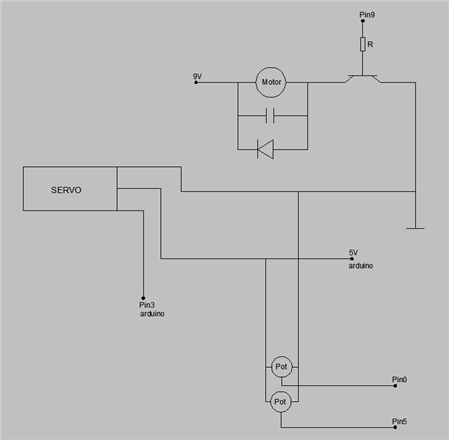
    Heres how its all hooked up

    image

    • Cancel
    • Vote Up 0 Vote Down
    • Sign in to reply
    • Verify Answer
    • Cancel
  • dirtdiver
    0 dirtdiver over 14 years ago in reply to cookieglitch

    I also tried that one (with two vars , but it still doesnt work)


    #include <Servo.h>

    Servo myservo; 

    int motorPin = 9;

    int potpin1 = 5;  // GEARS

    int potpin = 0;  // SPEED

    int val;  

    int val2;


    void setup()

    {

      pinMode(potpin1,INPUT);                //GEARS

      pinMode(potpin,INPUT);                 //SPEED

    pinMode(motorPin, OUTPUT);

    myservo.attach(3); 

    }


    void loop()

    {


      val = analogRead(potpin);           //SPEED

      val= map(val, 0, 1023, 0, 255);


    analogWrite(motorPin, val);

      delay(15);                        


      val2 = analogRead(potpin1);            //   GEARS

      if (val2<300){

      myservo.write(130);

      }else if (val2<600){

      myservo.write(110);

      } else {

        myservo.write(90);

      }


    delay(15);

    }


    I just cant see whats wrong with it..

    • Cancel
    • Vote Up 0 Vote Down
    • Sign in to reply
    • Verify Answer
    • Cancel
  • dirtdiver
    0 dirtdiver over 14 years ago in reply to cookieglitch

    "with a couple of minor software changes for the servo"

    like what , couse I want to try it, nothing else seems to work

    • Cancel
    • Vote Up 0 Vote Down
    • Sign in to reply
    • Verify Answer
    • Cancel
  • cookieglitch
    0 cookieglitch over 14 years ago in reply to dirtdiver

    To test it using LEDs rather than the motors,, you'll need to change the servo code so it is doing it with analogWrite much like you have with the other motor. Just comment out the servo code and replace it so you know what has changed. If you can get the LED to dim etc as you change it, you may know whether it is a power issue or a code issue.

    • Cancel
    • Vote Up 0 Vote Down
    • Sign in to reply
    • Verify Answer
    • Cancel
  • Former Member
    0 Former Member over 14 years ago in reply to dirtdiver

    In your combined code, add


    void loop() {


    val = analogRead(potPin);     //Pot Pin

    Serial.print("Value Read = ");

    Serial.println(val);

    val = map(val, 0, 1023, 0, 255);

    Serial.print("Value Mapped = ");

    Serial.println(val);


    //You will know what you are Reading and What you are writing to your motorPin. It may be the sorce of your problem.

    //You will need something like this: val = map(readVal, 0, 1023, 0, 255);

    //I faced the same problem and made it to work just by making these changes...


    //Also, in your setup() function...Add the following line

    Serial.begin(9600); // for seeing the values on your serial monitor

    • Cancel
    • Vote Up 0 Vote Down
    • Sign in to reply
    • Verify Answer
    • Cancel
  • dmaruska
    0 dmaruska over 14 years ago in reply to dirtdiver

    Hi,  Can I ask, what is the end result of this project.  What is the servo doing and what is the motor doing? Just trying to understand the end result?  Thanks...

    • Cancel
    • Vote Up 0 Vote Down
    • Sign in to reply
    • Verify Answer
    • Reject Answer
    • Cancel
  • dirtdiver
    0 dirtdiver over 14 years ago in reply to Former Member

    Thanks I will give it a try and report back to you image

    • Cancel
    • Vote Up 0 Vote Down
    • Sign in to reply
    • Verify Answer
    • Cancel
  • dirtdiver
    0 dirtdiver over 14 years ago in reply to dmaruska

    Its supposed to be a mini car throttle control - reverse and forward

    • Cancel
    • Vote Up 0 Vote Down
    • Sign in to reply
    • Verify Answer
    • Cancel
  • dmaruska
    0 dmaruska over 14 years ago in reply to dirtdiver

    What is the Servo for?

    • Cancel
    • Vote Up 0 Vote Down
    • Sign in to reply
    • Verify Answer
    • Cancel
  • dirtdiver
    0 dirtdiver over 14 years ago in reply to dmaruska

    changing the motor's rotation direction

    • Cancel
    • Vote Up 0 Vote Down
    • Sign in to reply
    • Verify Answer
    • Cancel
element14 Community

element14 is the first online community specifically for engineers. Connect with your peers and get expert answers to your questions.

  • Members
  • Learn
  • Technologies
  • Challenges & Projects
  • Products
  • Store
  • About Us
  • Feedback & Support
  • FAQs
  • Terms of Use
  • Privacy Policy
  • Legal and Copyright Notices
  • Sitemap
  • Cookies

An Avnet Company © 2025 Premier Farnell Limited. All Rights Reserved.

Premier Farnell Ltd, registered in England and Wales (no 00876412), registered office: Farnell House, Forge Lane, Leeds LS12 2NE.

ICP 备案号 10220084.

Follow element14

  • X
  • Facebook
  • linkedin
  • YouTube