element14 Community
element14 Community
    Register Log In
  • Site
  • Search
  • Log In Register
  • Community Hub
    Community Hub
    • What's New on element14
    • Feedback and Support
    • Benefits of Membership
    • Personal Blogs
    • Members Area
    • Achievement Levels
  • Learn
    Learn
    • Ask an Expert
    • eBooks
    • element14 presents
    • Learning Center
    • Tech Spotlight
    • STEM Academy
    • Webinars, Training and Events
    • Learning Groups
  • Technologies
    Technologies
    • 3D Printing
    • FPGA
    • Industrial Automation
    • Internet of Things
    • Power & Energy
    • Sensors
    • Technology Groups
  • Challenges & Projects
    Challenges & Projects
    • Design Challenges
    • element14 presents Projects
    • Project14
    • Arduino Projects
    • Raspberry Pi Projects
    • Project Groups
  • Products
    Products
    • Arduino
    • Avnet & Tria Boards Community
    • Dev Tools
    • Manufacturers
    • Multicomp Pro
    • Product Groups
    • Raspberry Pi
    • RoadTests & Reviews
  • About Us
    About the element14 Community
  • Store
    Store
    • Visit Your Store
    • Choose another store...
      • Europe
      •  Austria (German)
      •  Belgium (Dutch, French)
      •  Bulgaria (Bulgarian)
      •  Czech Republic (Czech)
      •  Denmark (Danish)
      •  Estonia (Estonian)
      •  Finland (Finnish)
      •  France (French)
      •  Germany (German)
      •  Hungary (Hungarian)
      •  Ireland
      •  Israel
      •  Italy (Italian)
      •  Latvia (Latvian)
      •  
      •  Lithuania (Lithuanian)
      •  Netherlands (Dutch)
      •  Norway (Norwegian)
      •  Poland (Polish)
      •  Portugal (Portuguese)
      •  Romania (Romanian)
      •  Russia (Russian)
      •  Slovakia (Slovak)
      •  Slovenia (Slovenian)
      •  Spain (Spanish)
      •  Sweden (Swedish)
      •  Switzerland(German, French)
      •  Turkey (Turkish)
      •  United Kingdom
      • Asia Pacific
      •  Australia
      •  China
      •  Hong Kong
      •  India
      •  Japan
      •  Korea (Korean)
      •  Malaysia
      •  New Zealand
      •  Philippines
      •  Singapore
      •  Taiwan
      •  Thailand (Thai)
      •  Vietnam
      • Americas
      •  Brazil (Portuguese)
      •  Canada
      •  Mexico (Spanish)
      •  United States
      Can't find the country/region you're looking for? Visit our export site or find a local distributor.
  • Translate
  • Profile
  • Settings
Arduino
  • Products
  • More
Arduino
Arduino Forum question on wireless using two Xbees
  • Blog
  • Forum
  • Documents
  • Quiz
  • Events
  • Polls
  • Files
  • Members
  • Mentions
  • Sub-Groups
  • Tags
  • More
  • Cancel
  • New
Join Arduino to participate - click to join for free!
Actions
  • Share
  • More
  • Cancel
Forum Thread Details
  • State Suggested Answer
  • Replies 9 replies
  • Answers 2 answers
  • Subscribers 419 subscribers
  • Views 781 views
  • Users 0 members are here
Related

question on wireless using two Xbees

kjhart0133
kjhart0133 over 13 years ago

Hello all,


I am using two Xbee S2 modules to remotely sample analog data from a potentiometer.  Here is my configuration.


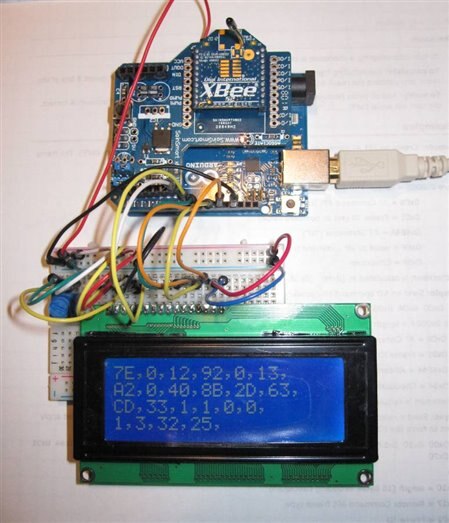
The local Xbee is mounted to an Xbee shield on an Arduino Uno.
 

image

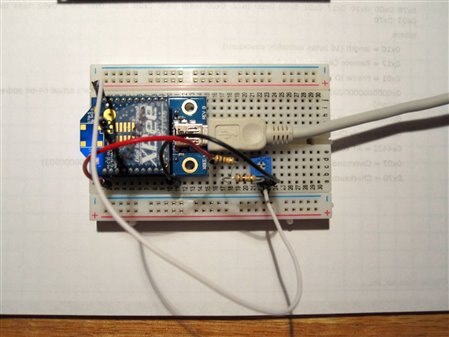
The remote Xbee has a potentiometer feeding voltage (0 to 1.2V) to Analog Input Zero on the Xbee (pin 20.)  The USB cable is just for 5V power.
 

image

The code is listed below.  The problem is that many of the data frames (frame type 0x92) that I get back from the remote are corrupted or otherwise wrong.  I can use the checksum to drop the bogus frames on the floor, but they do make up about 50% of the frames I receive.  Are other frames being sent by the remote Xbee, i.e. status or error frames, or something else?  Is this normal?


The local XBee (coordinator) is programmed separately in API mode; the remote XBee is programmed separately in Transparent mode (AT commands.)  Since I do get occasional correct frames of data, I think the XBees are programmed correctly


When I do get a good frame, the data in it is correct as you can see in the first picture [Ref. 2, pg. 114].


Can anyone help me out with this?


Thanks,


Kevin H.


References:


1.  Building Wireless Sensor Networks: with ZigBee, XBee, Arduino, and Processing, Robert Faludi, O'Reilly Press, 2010.

2.  XBee/XBee-Pro ZB RF Modules, Data Sheet, Digi International, Inc, November 2010.


Here is my code:


/*

This sketch reads ADI0 from the remote Xbee using a local (coordinator)

Xbee.  The input to the remote ADI0 is a potentiometer set from 0 to 1.2V


Kevin Hartnett, April 2013

Based on sample code from Building Wireless Networks: with Zigbee, Xbee,

  Arduino, and Processing, Robert Faludi, O'Reilly Press, 2010.


*** CONFIGURATION ***


SENDER: (REMOTE SENSOR RADIO)

ATID3456 (PAN ID)

ATDH -> set to SH of partner radio

ATDL  -> set to SL of partner radio

ATJV1 -> rejoin with coordinator on startup

ATD02  pin 0 in analog in mode

ATIR64 sample rate 100 millisecs (hex 64)


* THE LOCAL RADIO _MUST_ BE IN API MODE *


RECEIVER: (LOCAL RADIO)

ATID3456 (PAN ID)

ATDH -> set to SH of partner radio

ATDL  -> set to SL of partner radio


*/


#include <LiquidCrystal.h>

LiquidCrystal lcd(7,8,9,10,11,12);


int debugLED = 13;

int analogValue = 0;

byte dataArray[40];  //set aside 40 bytes for data from sending unit

int length;

int i;

byte chksum;


void setup() {

  pinMode(debugLED, OUTPUT);

  Serial.begin(9600);

  lcd.begin(20, 4);

  lcd.clear();

  lcd.setCursor(0, 0);

}


void loop() {


  // make sure everything we need is in the buffer

  if (Serial.available() >= 21) {

    // look for the start byte

    dataArray[0] = Serial.read();


    if (dataArray[0] == 0x7E) {

      //blink debug LED to indicate when data is received

      digitalWrite(debugLED, HIGH);

      delay(10);

      digitalWrite(debugLED, LOW);

      //get length

      dataArray[1] = Serial.read();  //read msb of length

      dataArray[2] = Serial.read();  //read lsb of length

      length = dataArray[1]*256 + dataArray[2];

      dataArray[3] = Serial.read();  //read frame type


      if(dataArray[3] == 0x92){      //0x92 means I/O data sample frame

        //read the rest of the buffer and calcutate checksum

        chksum = dataArray[3];  //begin checksum with frame type


        for (i = 4; i <= length+3; i++) {

          dataArray[i] = Serial.read();

          chksum = chksum + dataArray[i];  //add to checksum

        }


        chksum = 0xFF - chksum;  //should equal zero if data is good


        //print dataArray to lcd if chksum == 0

        if (!chksum){           //if chksum result is zero, continue

          analogValue = dataArray[19]*256 + dataArray[20];

          lcd.clear();

          lcd.setCursor(0,0);

          //lcd.print(chksum, HEX);   //for debug


          for (int k = 0; k <= length+3; k++){

            if(k == 6)  {lcd.setCursor(0,1);}

            if(k == 12) {lcd.setCursor(0,2);}

            if(k == 18) {lcd.setCursor(0,3);}

            lcd.print(dataArray[k], HEX);

            lcd.print(",");

          }

        }

      }

      delay(2000);  //slow things down so you can read displayed data

    }

  }

}

  • Sign in to reply
  • Cancel
Parents
  • fidelsalinas
    0 fidelsalinas over 13 years ago

    Try updating to the latest digi firmware, then flash both xbees with the same firmware (API Mode Parameter D1 to D2 and Parmeter IR to "1000"  which will broadcast every 4096ms.


    Fidel Salinas

    • Cancel
    • Vote Up 0 Vote Down
    • Sign in to reply
    • Verify Answer
    • Reject Answer
    • Cancel
  • kjhart0133
    0 kjhart0133 over 13 years ago in reply to fidelsalinas

    Nate and Fidel,


    Thanks for the replies.  Unfortunately I got very busy recently and haven't had a chance to mess around with my Arduinos.  As soon as I can get back to the wireless issue, I'll try your suggestions and let you both know what I find.  Probably sometime next week.


    Thanks again,


    Kevin H.

    • Cancel
    • Vote Up 0 Vote Down
    • Sign in to reply
    • Verify Answer
    • Cancel
  • kjhart0133
    0 kjhart0133 over 13 years ago in reply to kjhart0133

    Nate and Fidel,


    Well, here it is six weeks later.  I just recently had some time to mess around with the XBees -- with disastrous results, I'm afraid.


    I was going to check the baud rates and update the firmway as you all suggested.  First to review my setup: I'm programming the XBees with a Parallax XBee USB adaptor connected to my Windows PC running Windows 7 and X-UTC.  In the past I've had some problems programming the XBees in AT command mode.  Sometimes it runs smoothly, other times not.  This could have been due to mismatched baud rates, I dunno.  Restarting Windows seems to help, but it's a tedious process


    So, I observe that the router XBee seems to be set to 1200 baud.  Hmm.  I try to change it to 9600 baud and that's where the problems begin.  I set the baud rate to 9600, then go back, read the XBee config data and see that it's still 1200 baud.  This goes on for a while, then I can't read the XBee.  I restart Windows, which usually gets me back to where I can read the XBee.  But the process repeats and I end up restarting Windows several times.  Noticing the message I get on X-CTU to activate the reset pin, I try grounding the reset pin on the Parallax adapter and this helps, briefly.  After the second or third reset, the XBee appears dead!!  Nothing works anymore.  I repeat the whole process with the controller XBee and it too dies after only a few resets.  Now I've got two dead XBees it seems.


    Before I go out and buy a couple more XBees ($40) do either of you have any advice?  Is there some way to tell if the XBees are really dead?  Are the XBees really that sensitive to the reset pin gettting grounded???


    Any help will be appreciated.


    btw, do you know what baud rate a new-out-of-the-box XBee defaults to on power up?


    Thanks,


    Kevin H.


    Message was edited by: Kevin Hartnett

    • Cancel
    • Vote Up 0 Vote Down
    • Sign in to reply
    • Verify Answer
    • Cancel
Reply
  • kjhart0133
    0 kjhart0133 over 13 years ago in reply to kjhart0133

    Nate and Fidel,


    Well, here it is six weeks later.  I just recently had some time to mess around with the XBees -- with disastrous results, I'm afraid.


    I was going to check the baud rates and update the firmway as you all suggested.  First to review my setup: I'm programming the XBees with a Parallax XBee USB adaptor connected to my Windows PC running Windows 7 and X-UTC.  In the past I've had some problems programming the XBees in AT command mode.  Sometimes it runs smoothly, other times not.  This could have been due to mismatched baud rates, I dunno.  Restarting Windows seems to help, but it's a tedious process


    So, I observe that the router XBee seems to be set to 1200 baud.  Hmm.  I try to change it to 9600 baud and that's where the problems begin.  I set the baud rate to 9600, then go back, read the XBee config data and see that it's still 1200 baud.  This goes on for a while, then I can't read the XBee.  I restart Windows, which usually gets me back to where I can read the XBee.  But the process repeats and I end up restarting Windows several times.  Noticing the message I get on X-CTU to activate the reset pin, I try grounding the reset pin on the Parallax adapter and this helps, briefly.  After the second or third reset, the XBee appears dead!!  Nothing works anymore.  I repeat the whole process with the controller XBee and it too dies after only a few resets.  Now I've got two dead XBees it seems.


    Before I go out and buy a couple more XBees ($40) do either of you have any advice?  Is there some way to tell if the XBees are really dead?  Are the XBees really that sensitive to the reset pin gettting grounded???


    Any help will be appreciated.


    btw, do you know what baud rate a new-out-of-the-box XBee defaults to on power up?


    Thanks,


    Kevin H.


    Message was edited by: Kevin Hartnett

    • Cancel
    • Vote Up 0 Vote Down
    • Sign in to reply
    • Verify Answer
    • Cancel
Children
  • eatojg
    0 eatojg over 13 years ago in reply to kjhart0133

    Kevin


    I have been in this situation several times, if you Google 'bricked XBee' you will find a couple of ways to restore communication.

    I have never had XBee that would not restore.

    Best of luck


    John

    • Cancel
    • Vote Up 0 Vote Down
    • Sign in to reply
    • Verify Answer
    • Cancel
  • kjhart0133
    0 kjhart0133 over 13 years ago in reply to eatojg

    John,


    Wow!  Thanks for the great tip.  It worked.  I was able to restore both XBees.  It took a couple of tries, but my XBees are now up and running again.  Why, I wonder, is programming these XBees so tedious?  Sometimes it works, sometimes it doesn't.  And then, like you and me, sometimes the XBee goes south.  Is it Windows, X-CTU, the XBee itself, or some combination of these.  Do a lot of XBee users have similar problems.  Just thinking out loud here, not expecting any real answers.


    Thanks again for the tip.


    Kevin H.

    • Cancel
    • Vote Up 0 Vote Down
    • Sign in to reply
    • Verify Answer
    • Cancel
  • eatojg
    0 eatojg over 13 years ago in reply to kjhart0133

    Kevin

    Very pleased you are back in business. The XBee can be tricky when you first start, but once you have mastered them they are as solid as a rock. I have had 4 running now for about a year without a single comms failure. (That I have detected!) I found Robert Faludi's book Building Wireless Sensor Networks a great help.


    John

    • Cancel
    • Vote Up 0 Vote Down
    • Sign in to reply
    • Verify Answer
    • Cancel
element14 Community

element14 is the first online community specifically for engineers. Connect with your peers and get expert answers to your questions.

  • Members
  • Learn
  • Technologies
  • Challenges & Projects
  • Products
  • Store
  • About Us
  • Feedback & Support
  • FAQs
  • Terms of Use
  • Privacy Policy
  • Legal and Copyright Notices
  • Sitemap
  • Cookies

An Avnet Company © 2026 Premier Farnell Limited. All Rights Reserved.

Premier Farnell Ltd, registered in England and Wales (no 00876412), registered office: Farnell House, Forge Lane, Leeds LS12 2NE.

Follow element14

  • X
  • Facebook
  • linkedin
  • YouTube