element14 Community
element14 Community
    Register Log In
  • Site
  • Search
  • Log In Register
  • Community Hub
    Community Hub
    • What's New on element14
    • Feedback and Support
    • Benefits of Membership
    • Personal Blogs
    • Members Area
    • Achievement Levels
  • Learn
    Learn
    • Ask an Expert
    • eBooks
    • element14 presents
    • Learning Center
    • Tech Spotlight
    • STEM Academy
    • Webinars, Training and Events
    • Learning Groups
  • Technologies
    Technologies
    • 3D Printing
    • FPGA
    • Industrial Automation
    • Internet of Things
    • Power & Energy
    • Sensors
    • Technology Groups
  • Challenges & Projects
    Challenges & Projects
    • Design Challenges
    • element14 presents Projects
    • Project14
    • Arduino Projects
    • Raspberry Pi Projects
    • Project Groups
  • Products
    Products
    • Arduino
    • Avnet & Tria Boards Community
    • Dev Tools
    • Manufacturers
    • Multicomp Pro
    • Product Groups
    • Raspberry Pi
    • RoadTests & Reviews
  • About Us
    About the element14 Community
  • Store
    Store
    • Visit Your Store
    • Choose another store...
      • Europe
      •  Austria (German)
      •  Belgium (Dutch, French)
      •  Bulgaria (Bulgarian)
      •  Czech Republic (Czech)
      •  Denmark (Danish)
      •  Estonia (Estonian)
      •  Finland (Finnish)
      •  France (French)
      •  Germany (German)
      •  Hungary (Hungarian)
      •  Ireland
      •  Israel
      •  Italy (Italian)
      •  Latvia (Latvian)
      •  
      •  Lithuania (Lithuanian)
      •  Netherlands (Dutch)
      •  Norway (Norwegian)
      •  Poland (Polish)
      •  Portugal (Portuguese)
      •  Romania (Romanian)
      •  Russia (Russian)
      •  Slovakia (Slovak)
      •  Slovenia (Slovenian)
      •  Spain (Spanish)
      •  Sweden (Swedish)
      •  Switzerland(German, French)
      •  Turkey (Turkish)
      •  United Kingdom
      • Asia Pacific
      •  Australia
      •  China
      •  Hong Kong
      •  India
      •  Japan
      •  Korea (Korean)
      •  Malaysia
      •  New Zealand
      •  Philippines
      •  Singapore
      •  Taiwan
      •  Thailand (Thai)
      •  Vietnam
      • Americas
      •  Brazil (Portuguese)
      •  Canada
      •  Mexico (Spanish)
      •  United States
      Can't find the country/region you're looking for? Visit our export site or find a local distributor.
  • Translate
  • Profile
  • Settings
Arduino
  • Products
  • More
Arduino
Arduino Forum Help, my Processing code is restarting my Arduino code
  • Blog
  • Forum
  • Documents
  • Quiz
  • Events
  • Polls
  • Files
  • Members
  • Mentions
  • Sub-Groups
  • Tags
  • More
  • Cancel
  • New
Join Arduino to participate - click to join for free!
Actions
  • Share
  • More
  • Cancel
Forum Thread Details
  • State Verified Answer
  • Replies 35 replies
  • Answers 1 answer
  • Subscribers 421 subscribers
  • Views 4050 views
  • Users 0 members are here
Related

Help, my Processing code is restarting my Arduino code

kjhart0133
kjhart0133 over 12 years ago

Hello all,

I'm developing some Arduino code using XBees to sense environmental data at a remote location. My Arduino code is working great and I'm now ready to upload my remotely acquired data to my computer so that I can parse the data and send it via an SMS message to my smart phone. This way I can monitor my remote location from anywhere.

I'm using a chunk of code I got from the "Getting Started with Processing" book by Reas and Fry. I am able to get the Arduino/XBee data into my computer this way, but I have a problem/issue:

The Arduino code loops continually, but each time I start the Processing Code, it restarts (resets?) the Arduino code. The Arduino code starts over from the beginning going through setup and then into the loop. I have no idea why this is happening. Here is the Processing code I'm using:

// Based on Example 11-07 from "Getting Started with Processing"

// by Reas & Fry. O'Reilly / Make 2010

// This sketch, as modified by kjh, reads data from an Arduino, stores it in an array

// then saves the data to a file on disk.


import processing.serial.*;


Serial port;                     // Create object from Serial class

int asize = 8;                 // define size of data array

byte[] val = new byte[asize];    // Data received from the serial port

                                 // representing the setting of the pot

int i = 0;                       // array index

int x;                           // scratch value

float y;


void setup() {

  //size(440, 220);

  // IMPORTANT NOTE:

  // The first serial port retrieved by Serial.list()

  // should be your Arduino. If not, uncomment the next

  // line by deleting the // before it. Run the sketch

  // again to see a list of serial ports. Then, change

  // the 0 in between [ and ] to the number of the port

  // that your Arduino is connected to.

  println(Serial.list());

  String arduinoPort = Serial.list()[2];

  port = new Serial(this, arduinoPort, 9600);

}


void draw() {

    if (port.available() > 0) {        // If data is available,

      x = port.read();        // read it and store it in val

      val[i] = byte(x);

      y =  float(x);

      //println(y);

      println(val[i]);

      //val = map(val, 0, 255, 0, height);  // Convert the value

      i++;

    }

    if (i > asize-1){

      saveBytes("arduino_data.dat", val);

      println("Data written.");

      exit();

    }

}

My Arduino code does not read data from the computer or Processing, it only sends data to Processing. The Arduino code is quite long and involved using a fair amount of XBee interface code so I didn't include it here. But, as I said, it is running fine except for being restarted each time I run the Processing code.  I'm using an Mega Arduino board connected to my PC via the USB cable. 

I greatly appreciate any assistance on this.

Thanks,

Kevin H.

  • Sign in to reply
  • Cancel

Top Replies

  • kjhart0133
    kjhart0133 over 12 years ago in reply to mcb1 +1
    Success!! After trying a number of different things without solving the problem, I finally cut the jumper on the reset line between the USART and the Mega chip and this did the trick. These forums are…
  • kjhart0133
    kjhart0133 over 12 years ago in reply to kjhart0133 +1
    To solve the problem of now not being able to upload sketches, I soldered a wire to each of the reset line solder pads and wired an SPST switch across the two solder pads. This works perfectly (so far…
  • kjhart0133
    kjhart0133 over 12 years ago in reply to Robert Peter Oakes +1
    Peter, That's great info about the ports. I'm learning a lot in this thread. Here's a block diagram of my system that shows all the components. I run Processing code in the PC that uploads data from the…
Parents
  • e14 Contributor
    0 e14 Contributor over 12 years ago

    With Singh's helpful post to guide me, I managed to track down a blog where someone else fixed this issue.

    Take a read and see if it helps you:

    Random Stuff - Adventures in Nerd Land: XBee woes..


    The important snippet is:

    "Anyway, turns out the solution for Annoyance #1, Mysteriously Resetting Arduino is also extremely simple. When using X-CTU to configure your EndDevice, simply set IOD7=0 (or use ATD7=0, same thing). The XBee will no longer reset your Arduino simply because it wants to sleep."

    • Cancel
    • Vote Up 0 Vote Down
    • Sign in to reply
    • Verify Answer
    • Cancel
  • mcb1
    0 mcb1 over 12 years ago in reply to e14 Contributor

    Kevin

    If the FTDI chip is doing the resetting you can either cut the jumper show on the schematic, use a smaller value resitor between the Vcc and reset pin,.

    FTDI have free software to configure the chip which should allow you to reconfigure/disable the DTR (on my schematic) line.


    Warning either of these means you need to press the reset button before an upload.


    Mark

    • Cancel
    • Vote Up 0 Vote Down
    • Sign in to reply
    • Verify Answer
    • Cancel
  • kjhart0133
    0 kjhart0133 over 12 years ago in reply to mcb1

    Success!!


    After trying a number of different things without solving the problem, I finally cut the jumper on the reset line between the USART and the Mega chip and this did the trick.  These forums are such a wealth of information.


    Mark: you mention needing to press the reset button before an upload now that I've cut the jumper.  Do I just press and release the reset button on the Mega and then click the Upload icon on the Arduino IDE?


    Mr. Singh: thanks for pointing me in the right direction, though it wasn't the CTS on the XBee causing the issue, it was the reset line on the Mega.


    On to the next problem.


    Kevin

    • Cancel
    • Vote Up +1 Vote Down
    • Sign in to reply
    • Verify Answer
    • Cancel
  • ipv1
    0 ipv1 over 12 years ago in reply to kjhart0133

    Glad I could help.

    • Cancel
    • Vote Up 0 Vote Down
    • Sign in to reply
    • Verify Answer
    • Cancel
  • kjhart0133
    0 kjhart0133 over 12 years ago in reply to mcb1

    Mark,


    I no longer have a problem with the Processing code but now I can't upload sketches to the Mega.  An internet search gave me a couple of techniques, but I wonder if you know of any specific technique now that I've severed the reset line between the USART and the Mega.  I can always re-connect the two solder pads to restore the reset line and try one of the techniques I found on the net.


    Any advice?


    Thanks,


    Kevin

    • Cancel
    • Vote Up 0 Vote Down
    • Sign in to reply
    • Verify Answer
    • Cancel
  • ipv1
    0 ipv1 over 12 years ago in reply to kjhart0133

    Two suggested solutions.

    1. When you click upload and the ide goes from compiling to uploading, press the reset button.

    Or

    2. Reconnect the reset pin to it's original state and inside the device manager of your windows PC, find the ftdi device under communication ports, click properties, advanced settings and then deselect assert DTC, CTS.


    I prefer option 1 and the instructions in option two might need you to improvise since I'm writing this from what I remember.


    If this does not help, please draw your circuit configuration on a paper, take a snap and share. Its easier to isolate the problem that way.


    Hope this helps,

    IP

    • Cancel
    • Vote Up 0 Vote Down
    • Sign in to reply
    • Verify Answer
    • Cancel
Reply
  • ipv1
    0 ipv1 over 12 years ago in reply to kjhart0133

    Two suggested solutions.

    1. When you click upload and the ide goes from compiling to uploading, press the reset button.

    Or

    2. Reconnect the reset pin to it's original state and inside the device manager of your windows PC, find the ftdi device under communication ports, click properties, advanced settings and then deselect assert DTC, CTS.


    I prefer option 1 and the instructions in option two might need you to improvise since I'm writing this from what I remember.


    If this does not help, please draw your circuit configuration on a paper, take a snap and share. Its easier to isolate the problem that way.


    Hope this helps,

    IP

    • Cancel
    • Vote Up 0 Vote Down
    • Sign in to reply
    • Verify Answer
    • Cancel
Children
  • kjhart0133
    0 kjhart0133 over 12 years ago in reply to ipv1

    Mr. Singh,


    1.  I had no luck using the technique of holding down the reset button and trying to release it at just the right moment.  Never could get that to work.


    2.  re: disabling DTR/CTS in the Device Manager.  I followed your instructions but didn't find any popup that allowed access to DTR/CTS control.  I'm using Windows 7.


    I continue to fool around with this, but for now I just installed a switch across the reset solder pads and it seems to work.


    Thanks,


    Kevin H.

    • Cancel
    • Vote Up 0 Vote Down
    • Sign in to reply
    • Verify Answer
    • Cancel
  • ipv1
    0 ipv1 over 12 years ago in reply to kjhart0133

    The reset when uploading should have worked but no issue.

    Fullscreen contentimage_182457.html Download
    <html><head><title>Jive SBS</title></head>
    <body><font face="arial,helvetica,sans-serif">
    <b>Error</b><br><font size="-1">
    An general error occurred while processing your request.
    </font></font></body></html>
    

    In device manager-> Ports- > {USB Serial Port COM X} -> right click -> properties-> [TAB] Port Settings -> [BUTTON] Advanced Settings-> Set RTS on close.

    Should solve your problem.


    On the other hand, the solution you have is pretty decent as well. If it not broke, don't fix it!

    Hope this helps.

    Cheers

    IP

    • Cancel
    • Vote Up 0 Vote Down
    • Sign in to reply
    • Verify Answer
    • Cancel
  • kjhart0133
    0 kjhart0133 over 12 years ago in reply to ipv1

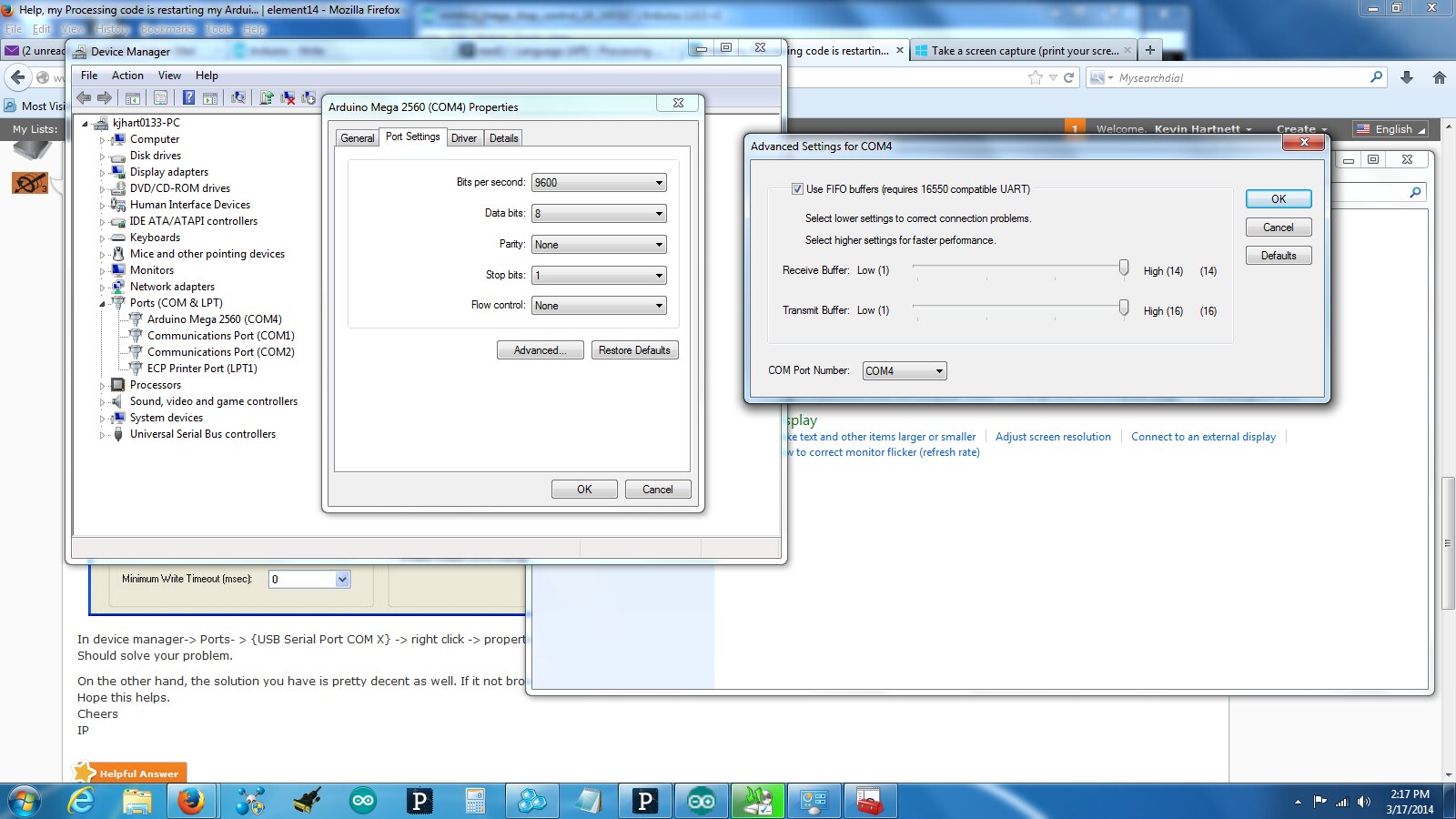
    Sorry, IP, we must have different versions of Windows.  I don't see the screens you show.  I'm using Windows 7 and I get the following screens when I follow the path you indicate.  I hope you can read it, but it doesn't provide any control of the serial functions I'd need.  There's surely another way, but everything is working well now, so I'll probably leave well enough alone.

    Kevin

    image

    • Cancel
    • Vote Up 0 Vote Down
    • Sign in to reply
    • Verify Answer
    • Cancel
  • mcb1
    0 mcb1 over 12 years ago in reply to kjhart0133

    Kevin

    That's weird as i have Win7 64 bit.

    I get this when plugged into an Arduino (Seeedunio 3).


    Fullscreen contentimage_182459.html Download
    <html><head><title>Jive SBS</title></head>
    <body><font face="arial,helvetica,sans-serif">
    <b>Error</b><br><font size="-1">
    An general error occurred while processing your request.
    </font></font></body></html>


    it seems to use the FTDI driver.

    Fullscreen contentimage_182460.html Download
    <html><head><title>Jive SBS</title></head>
    <body><font face="arial,helvetica,sans-serif">
    <b>Error</b><br><font size="-1">
    An general error occurred while processing your request.
    </font></font></body></html>


    At least you've found a workable solution.

    I seem to recall the Picaxe 08M needed to have the jumper in when programming, so operating a switch isn't much different.


    Sorting out the auto-reset can come later.


    Cheers

    Mark

    • Cancel
    • Vote Up 0 Vote Down
    • Sign in to reply
    • Verify Answer
    • Cancel
  • kjhart0133
    0 kjhart0133 over 12 years ago in reply to mcb1

    Mark,


    Very odd indeed.  I use the 32 bit version of Windows 7, but that really shouldn't matter.  I'll hack around with this some more.


    Kevin

    • Cancel
    • Vote Up 0 Vote Down
    • Sign in to reply
    • Verify Answer
    • Cancel
  • mcb1
    0 mcb1 over 12 years ago in reply to kjhart0133

    Kevin

    The later R3 is not using the FTDI chip, and will show some things differently.

    There is a utility around for talking to these, but I didn't check what functions you can change.


    I think your current method of the switch is probably the easiest solution.


    Mark

    • Cancel
    • Vote Up 0 Vote Down
    • Sign in to reply
    • Verify Answer
    • Cancel
element14 Community

element14 is the first online community specifically for engineers. Connect with your peers and get expert answers to your questions.

  • Members
  • Learn
  • Technologies
  • Challenges & Projects
  • Products
  • Store
  • About Us
  • Feedback & Support
  • FAQs
  • Terms of Use
  • Privacy Policy
  • Legal and Copyright Notices
  • Sitemap
  • Cookies

An Avnet Company © 2026 Premier Farnell Limited. All Rights Reserved.

Premier Farnell Ltd, registered in England and Wales (no 00876412), registered office: Farnell House, Forge Lane, Leeds LS12 2NE.

Follow element14

  • X
  • Facebook
  • linkedin
  • YouTube