element14 Community
element14 Community
    Register Log In
  • Site
  • Search
  • Log In Register
  • Community Hub
    Community Hub
    • What's New on element14
    • Feedback and Support
    • Benefits of Membership
    • Personal Blogs
    • Members Area
    • Achievement Levels
  • Learn
    Learn
    • Ask an Expert
    • eBooks
    • element14 presents
    • Learning Center
    • Tech Spotlight
    • STEM Academy
    • Webinars, Training and Events
    • Learning Groups
  • Technologies
    Technologies
    • 3D Printing
    • FPGA
    • Industrial Automation
    • Internet of Things
    • Power & Energy
    • Sensors
    • Technology Groups
  • Challenges & Projects
    Challenges & Projects
    • Design Challenges
    • element14 presents Projects
    • Project14
    • Arduino Projects
    • Raspberry Pi Projects
    • Project Groups
  • Products
    Products
    • Arduino
    • Avnet & Tria Boards Community
    • Dev Tools
    • Manufacturers
    • Multicomp Pro
    • Product Groups
    • Raspberry Pi
    • RoadTests & Reviews
  • About Us
  • Store
    Store
    • Visit Your Store
    • Choose another store...
      • Europe
      •  Austria (German)
      •  Belgium (Dutch, French)
      •  Bulgaria (Bulgarian)
      •  Czech Republic (Czech)
      •  Denmark (Danish)
      •  Estonia (Estonian)
      •  Finland (Finnish)
      •  France (French)
      •  Germany (German)
      •  Hungary (Hungarian)
      •  Ireland
      •  Israel
      •  Italy (Italian)
      •  Latvia (Latvian)
      •  
      •  Lithuania (Lithuanian)
      •  Netherlands (Dutch)
      •  Norway (Norwegian)
      •  Poland (Polish)
      •  Portugal (Portuguese)
      •  Romania (Romanian)
      •  Russia (Russian)
      •  Slovakia (Slovak)
      •  Slovenia (Slovenian)
      •  Spain (Spanish)
      •  Sweden (Swedish)
      •  Switzerland(German, French)
      •  Turkey (Turkish)
      •  United Kingdom
      • Asia Pacific
      •  Australia
      •  China
      •  Hong Kong
      •  India
      • Japan
      •  Korea (Korean)
      •  Malaysia
      •  New Zealand
      •  Philippines
      •  Singapore
      •  Taiwan
      •  Thailand (Thai)
      • Vietnam
      • Americas
      •  Brazil (Portuguese)
      •  Canada
      •  Mexico (Spanish)
      •  United States
      Can't find the country/region you're looking for? Visit our export site or find a local distributor.
  • Translate
  • Profile
  • Settings
Avnet Boards Forums
  • Products
  • Dev Tools
  • Avnet & Tria Boards Community
  • Avnet Boards Forums
  • More
  • Cancel
Avnet Boards Forums
Avnet Boards General opencv example application
  • Forum
  • Documents
  • Members
  • Mentions
  • Sub-Groups
  • Tags
  • More
  • Cancel
  • New
Join Avnet Boards Forums to participate - click to join for free!
Actions
  • Share
  • More
  • Cancel
Forum Thread Details
  • State Not Answered
  • Replies 6 replies
  • Subscribers 355 subscribers
  • Views 660 views
  • Users 0 members are here
Related

opencv example application

Former Member
Former Member over 9 years ago

Hello,

I'm trying to run the example OpenCV application in the SDK on zedboard. But when I'm trying to run it , there is an error.

error: while loading shared libraries: libavformat.so.54: cannot open shared object file: No such file or directory

By following the below link

https://www.xilinx.com/support/documentation/sw_manuals/xilinx14_7/SDK_Doc/tasks/sdk_t_opencv_template.htm

I use the setenv  LD_LIBRARY_PATH = /usr/lib/opencv and try to run, error is

setenv: not found

Then I've copied the opencv libraries from the sdk's opencv to SD card from SSH terminal, mounted the sd card on to /mnt folder and given the below command in the Run configuration dialog box

export LD_LIBRARY_PATH = /mnt/opencv   then it says

export: : bad variable name


Does any one have an idea how to solve this ?

Regards

  • Sign in to reply
  • Cancel
  • albertabeef
    0 albertabeef over 9 years ago

    You need the opencv libraries on your development PC, as well as on the embedded Zynq platform.

    I would recommend looking at the following Xiinx Base TRD design for more details:

       http://www.wiki.xilinx.com/Zynq+Base+TRD+2015.4

    What tool version are you using ?

    What hardware are you targetting ?

    If you are using ZedBoard, you can also consult the following design, which is a port of the Xilinx Base TRD to ZedBoard.

       ZedBoard + FMC-HDMI-CAM + PYTHON-1300-C Vivado HLS Reference Design, Vivado 2015.4

          http://zedboard.org/sites/default/files/design/FMCHC_PYTHON1300C_HLS_2015_4_02_zedboard.zip 

    Regards,

    Mario.

    • Cancel
    • Vote Up 0 Vote Down
    • Sign in to reply
    • Verify Answer
    • Cancel
  • Former Member
    0 Former Member over 9 years ago

    Thanks Alberta for the reply.

    I'm using 2015.2 version.

    And targeting Zedboard.

    From the ug1144 , Pg:62 I tried to add the opencv libraries from SDK folder.

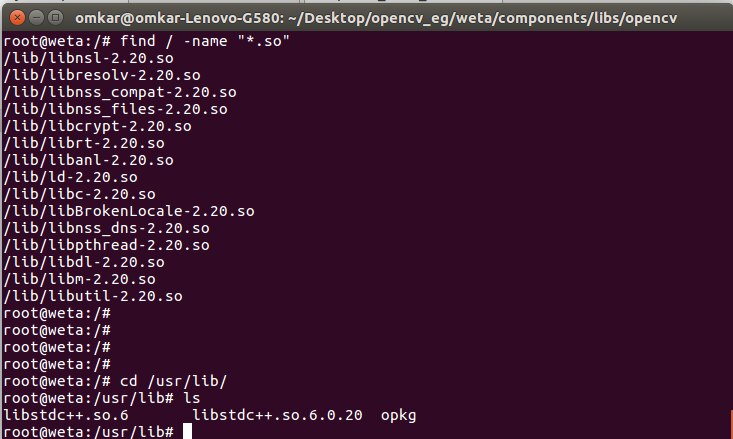
    Now I used 'find' to know if the libraries are included in the newly built petalinux. Including the screenshot below


    image

    When I run,

    error: while loading shared libraries: libavformat.so.54: cannot open shared object file: No such file or directory

    Also I edited the makefile accordingly while adding the libraries. 

    Also I'm looking into the links you've provided and will revert back if there is any progress

    Regards 

    • Cancel
    • Vote Up 0 Vote Down
    • Sign in to reply
    • Verify Answer
    • Cancel
  • Former Member
    0 Former Member over 9 years ago

    I've used the TRD uImage to run the example application and it worked fine. But for my application, it is not working. Error is

    OpenCV Error: Unspecified error (The function is not implemented. Rebuild the library with Windows, GTK+ 2.x or Carbon support. 
     
    So, I'm again trying to add OpenCV libraries to petalinux. Rather than ug1144 can anyone suggest a more detailed user guide
     
    Regards
    • Cancel
    • Vote Up 0 Vote Down
    • Sign in to reply
    • Verify Answer
    • Cancel
  • albertabeef
    0 albertabeef over 9 years ago in reply to Former Member

    Try using a utility like "ldd" to find the shared libary dependencies of your application.

    Based on your findings, you can install the missing packages.

    Regards,

    Mario.

    • Cancel
    • Vote Up 0 Vote Down
    • Sign in to reply
    • Verify Answer
    • Cancel
  • zedhed
    0 zedhed over 9 years ago

    Hi omkar,

    I was able to run the following command on my PetaLinux build without seeing an error:

    export LD_LIBRARY_PATH='/mnt/opencv'

    Adding spaces into that command will cause it to have an error.

    I think that PetaLinux is using a BusyBox shell environment so it does not have all the full features that a full desktop Linux system has so you may still have trouble with LD seeing the new libraries.

    I know that perhaps this is not an elegant solution, but it may get you past this hurdle. By default the LD search path is supposed to look in /lib first.  Can you simply copy all of your opencv libraries into there?

    Regards,

    -Kevin

    • Cancel
    • Vote Up 0 Vote Down
    • Sign in to reply
    • Verify Answer
    • Cancel
  • Former Member
    0 Former Member over 9 years ago

    Hi Kevin & Mario,

    [1] while using ldd, a message saying that "it is not a dynamic executable" so I tried using readelf and... all the shared libraries are present in the image created

    [2] While building petalinux again, this error is coming. "[ALL  ] /opt/pkg/petalinux-v2015.2.1-final/components/linux-kernel/xlnx-3.19/Makefile:925: recipe for target 'vmlinux' failed

    [ERROR] make[4]: *** [vmlinux] Error 1" I've searched and found to disable docsrc in kernel. But it is already disabled. Also i've tried to disable the advanced bootable images storage settings in auto hardware settings from petalinx-config. But no use. Can you please say me how to solve this ?

    • Cancel
    • Vote Up 0 Vote Down
    • Sign in to reply
    • Verify Answer
    • Cancel
element14 Community

element14 is the first online community specifically for engineers. Connect with your peers and get expert answers to your questions.

  • Members
  • Learn
  • Technologies
  • Challenges & Projects
  • Products
  • Store
  • About Us
  • Feedback & Support
  • FAQs
  • Terms of Use
  • Privacy Policy
  • Legal and Copyright Notices
  • Sitemap
  • Cookies

An Avnet Company © 2026 Premier Farnell Limited. All Rights Reserved.

Premier Farnell Ltd, registered in England and Wales (no 00876412), registered office: Farnell House, Forge Lane, Leeds LS12 2NE.

ICP 备案号 10220084.

Follow element14

  • X
  • Facebook
  • linkedin
  • YouTube