element14 Community
element14 Community
    Register Log In
  • Site
  • Search
  • Log In Register
  • Community Hub
    Community Hub
    • What's New on element14
    • Feedback and Support
    • Benefits of Membership
    • Personal Blogs
    • Members Area
    • Achievement Levels
  • Learn
    Learn
    • Ask an Expert
    • eBooks
    • element14 presents
    • Learning Center
    • Tech Spotlight
    • STEM Academy
    • Webinars, Training and Events
    • Learning Groups
  • Technologies
    Technologies
    • 3D Printing
    • FPGA
    • Industrial Automation
    • Internet of Things
    • Power & Energy
    • Sensors
    • Technology Groups
  • Challenges & Projects
    Challenges & Projects
    • Design Challenges
    • element14 presents Projects
    • Project14
    • Arduino Projects
    • Raspberry Pi Projects
    • Project Groups
  • Products
    Products
    • Arduino
    • Avnet & Tria Boards Community
    • Dev Tools
    • Manufacturers
    • Multicomp Pro
    • Product Groups
    • Raspberry Pi
    • RoadTests & Reviews
  • About Us
  • Store
    Store
    • Visit Your Store
    • Choose another store...
      • Europe
      •  Austria (German)
      •  Belgium (Dutch, French)
      •  Bulgaria (Bulgarian)
      •  Czech Republic (Czech)
      •  Denmark (Danish)
      •  Estonia (Estonian)
      •  Finland (Finnish)
      •  France (French)
      •  Germany (German)
      •  Hungary (Hungarian)
      •  Ireland
      •  Israel
      •  Italy (Italian)
      •  Latvia (Latvian)
      •  
      •  Lithuania (Lithuanian)
      •  Netherlands (Dutch)
      •  Norway (Norwegian)
      •  Poland (Polish)
      •  Portugal (Portuguese)
      •  Romania (Romanian)
      •  Russia (Russian)
      •  Slovakia (Slovak)
      •  Slovenia (Slovenian)
      •  Spain (Spanish)
      •  Sweden (Swedish)
      •  Switzerland(German, French)
      •  Turkey (Turkish)
      •  United Kingdom
      • Asia Pacific
      •  Australia
      •  China
      •  Hong Kong
      •  India
      • Japan
      •  Korea (Korean)
      •  Malaysia
      •  New Zealand
      •  Philippines
      •  Singapore
      •  Taiwan
      •  Thailand (Thai)
      • Vietnam
      • Americas
      •  Brazil (Portuguese)
      •  Canada
      •  Mexico (Spanish)
      •  United States
      Can't find the country/region you're looking for? Visit our export site or find a local distributor.
  • Translate
  • Profile
  • Settings
Single-Board Computers
  • Products
  • Dev Tools
  • Single-Board Computers
  • More
  • Cancel
Single-Board Computers
Blog Try out C++20 Preview: set up a development environment
  • Blog
  • Forum
  • Documents
  • Files
  • Members
  • Mentions
  • Sub-Groups
  • Tags
  • More
  • Cancel
  • New
Join Single-Board Computers to participate - click to join for free!
  • Share
  • More
  • Cancel
Group Actions
  • Group RSS
  • More
  • Cancel
Engagement
  • Author Author: Jan Cumps
  • Date Created: 26 Oct 2020 11:09 AM Date Created
  • Views 6121 views
  • Likes 11 likes
  • Comments 26 comments
  • c++20
Related
Recommended

Try out C++20 Preview: set up a development environment

Jan Cumps
Jan Cumps
26 Oct 2020

C++ is regularly revised. The current set of proposals are under review. They are called C++20.

There are a few of the proposals that I'd like to try out.

Some simplify object handling. Other move algorithms from run-time to compile time solve.


Microsoft and GCC (and others) released a compiler that supports many of the preview options.

Check here for an overview of which compiler supports what.


Visual Studio 2019 Community Edition comes with the compiler built-in, if you select the Desktop Development with C++ workload.

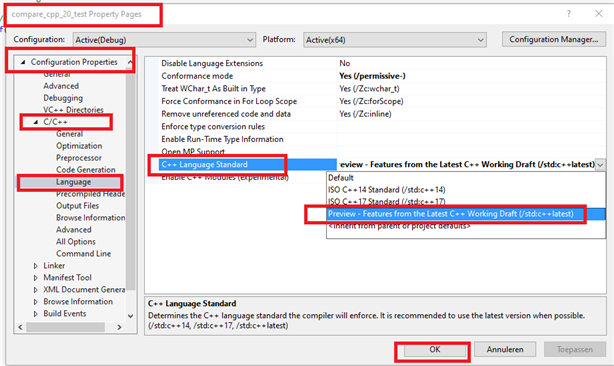
By default, the preview options are disabled. Yoou can enable them by selecting your project properties, and navigate to:

Configuration Properties -> C/C++ / Language -> C++ Language Standard.

Then select Preview.
image


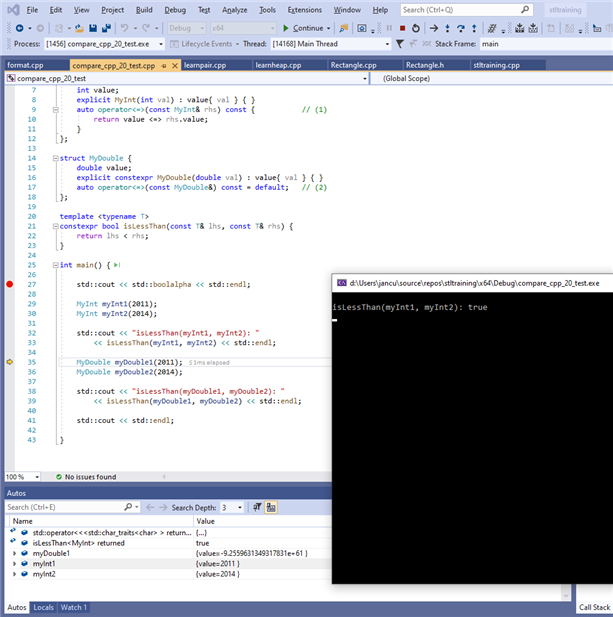
That's it. You can now write programs that use C++20 constructs.
image


For GCC, I used Eclipse 2020-12 for C/C++ developers as IDE and GCC 10.2.0 running in Cygwin64.

To install Eclipse, you download the zip and extract it.

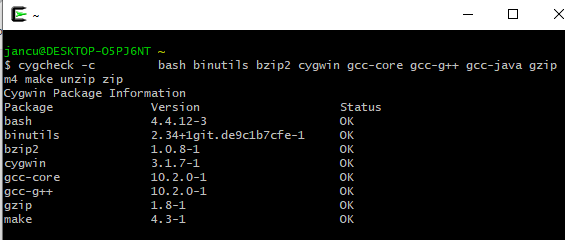
To install the latest GCC in Cygwin, run its Setup program. Select GCC, then proceed to install version 10.2.0.

You can check the results:

$ cygcheck -c gcc-core gcc-g++
 

image


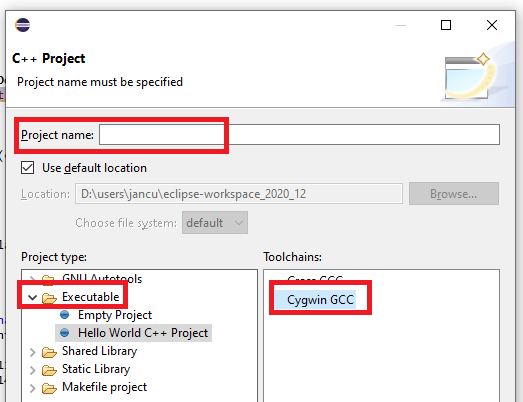
Start Eclipse, and create a new C++ Managed Build project.
image

For the first project, check the Cygwin settings.
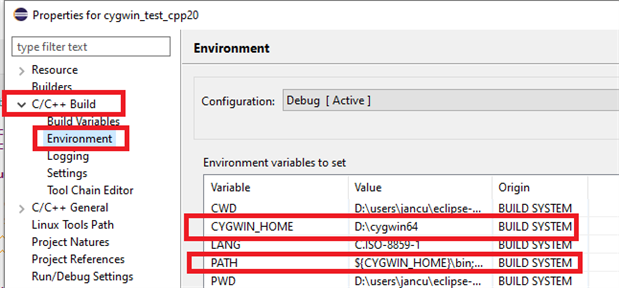
image


Same as in Visual Studio, the C++20 constructs are disabled by default.

Navigate to Project - C/C++ Builod -> Settings -> Tool Settings -> Cygwin C++ Compiler -> Dialect.

Select ISO C++ 20
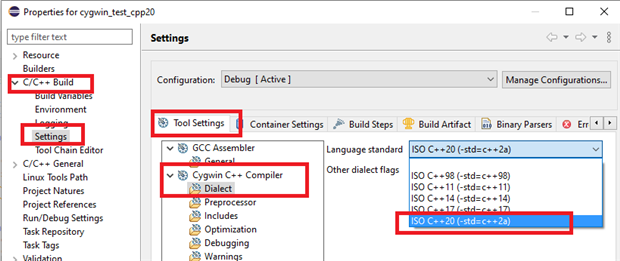
image

You can now write and debug code with the C++20 options.

Eclipse 2020-12 is not officially released. I witnessed some bugs:

- the editor screen sometimes shows warnings and errors while the compilation and build is clean.

- when debugging, at the end of the main program the debugger is somewhat confused if you step beyond the return().

None of these impact the fun.
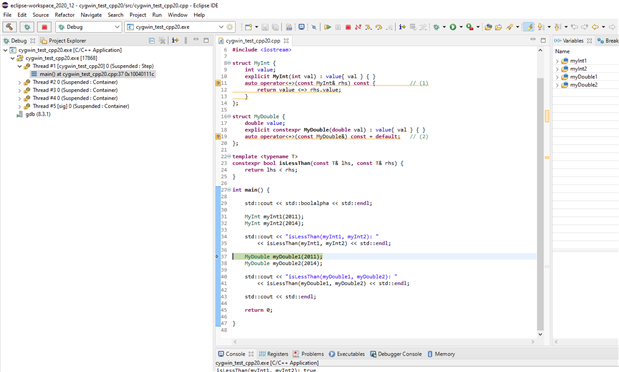
image


There are more options that the two setups that I tried.


For the Raspberry Pi, BeagleBoard, Harting Mica, AVNET IIOT GateWay, ...  fanboys


The GCC version 10 Windows cross-compiler that supports C++ 20 is now available:

https://developer.arm.com/tools-and-software/open-source-software/developer-tools/gnu-toolchain/gnu-a/downloads


Select this package: Windows (mingw-w64-i686) hosted cross compilers -> AArch32 target with hard float (arm-none-linux-gnueabihf).

Unzip it on your development windows PC, running the extractor program as administrator (so that symbolic links are properly replicated).

Then: build and debug your first GCC 10 Arm program from Windows and Eclipse.
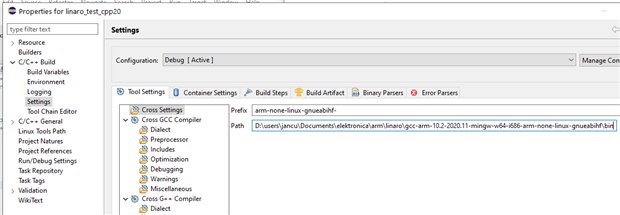
 

image


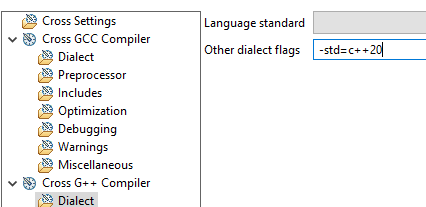
In G++ Dialect, enable the c++20 options
image


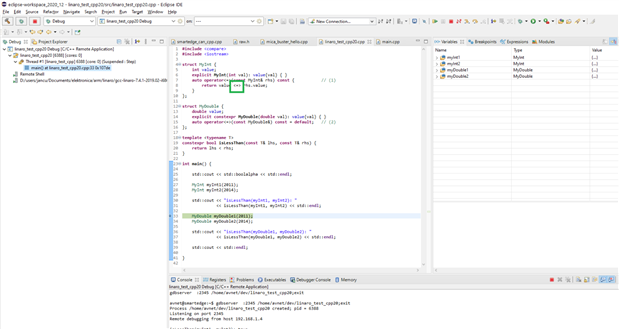
You can now compile c++20 programs for your Raspberry Pi, BeagleBone, ...
 

image

image: a c++20 program running on the AVNET SmartEdge IIOT Garteway


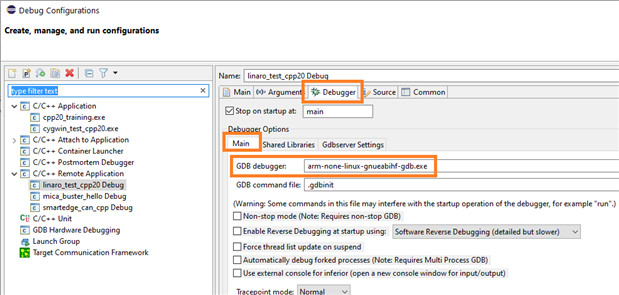
Set the appropriate debugger executable in the debug configuration:
image


Voila.

  • Sign in to reply

Top Comments

  • Jan Cumps
    Jan Cumps over 5 years ago +3
    I'm trying some things out on a Pi now. I don't have an arm-linux GCC version 10 cross-compiler, last one released is 9. That gives access to some of the new options. ARM normally releases a next toolchain…
  • Jan Cumps
    Jan Cumps over 5 years ago in reply to Jan Cumps +2
    I have the native build on Raspberry Pi working. Cross-compilation for version 9 works too, but I haven't been able to run a successful remote debug session yet ...
  • shabaz
    shabaz over 5 years ago in reply to Jan Cumps +2
    You're absolutely right, and good to call out the supplier like this. To shout out a good supplier - in the UK there's a chain store called John Lewis, and while it costs more to buy from there, they are…
  • Jan Cumps
    Jan Cumps over 5 years ago in reply to Andrew J

    The GCC version 10 Windows cross-compiler that supports C++ 20 is now available:

    https://developer.arm.com/tools-and-software/open-source-software/developer-tools/gnu-toolchain/gnu-a/downloads


    Select this package: AArch32 target with hard float (arm-none-linux-gnueabihf)


    image


    In G++ Dialect, enable the c++20 options

    image


    You can now compile c++20 programs for your Raspberry Pi, BeagleBone, ...

    • Cancel
    • Vote Up 0 Vote Down
    • Sign in to reply
    • More
    • Cancel
  • Andrew J
    Andrew J over 5 years ago in reply to Andrew J

    So I downgraded GDB to the same version as you Jan and it works fine.  Obviously V10.1 isn't ready to play with Eclipse yet.

    • Cancel
    • Vote Up +1 Vote Down
    • Sign in to reply
    • More
    • Cancel
  • Andrew J
    Andrew J over 5 years ago in reply to Jan Cumps

    Here you go. 


    image

    image


    Different version of GDB.  runs ok from the command line though:

    image

    I was hoping it was something obvious like a badly set environment variable - although, I've checked all those and they seem fine.  Eclipse seems to be bolting the path together in a strange way. 

    • Cancel
    • Vote Up 0 Vote Down
    • Sign in to reply
    • More
    • Cancel
  • Jan Cumps
    Jan Cumps over 5 years ago in reply to Andrew J

    Most likely a GDB thing.


    Can you show your Run -> Debug Configurations -> Your Project -> Debug form?


    And in cygwin64 terminal:

    $ g++ --version
    
    $ gdb --version


    Here are mine:


    image

    image

    • Cancel
    • Vote Up +1 Vote Down
    • Sign in to reply
    • More
    • Cancel
  • Andrew J
    Andrew J over 5 years ago

    Hi Jan Cumps


    slightly off-topic but I'm hoping you can help.  I've installed Eclipse 2020-09, with Cygwin64 and packaged gcc-core 10.2.0-1; gcc-g++ 10.2.0-1.  I have a very simple helloworld program which compiles and runs in Eclipse, outputting "hello world!" on the console.  When I try to debug this, I get a gdb error which I can't fathom

    image

    The path looks strange to me so that's my suspicion but I can't work out (a) how it derived that; (b) how I can change it!  There's nothing that points to an issue in the debug configuration which points to the correct helloworld.exe.  Do you have any ideas?


    If I run gdb from the command line in the HelloWorld\Debug directory - gdb .\HelloWorld.exe - it works fine and I get "hello world!" output


    Thanks

    • Cancel
    • Vote Up 0 Vote Down
    • Sign in to reply
    • More
    • Cancel
<>
element14 Community

element14 is the first online community specifically for engineers. Connect with your peers and get expert answers to your questions.

  • Members
  • Learn
  • Technologies
  • Challenges & Projects
  • Products
  • Store
  • About Us
  • Feedback & Support
  • FAQs
  • Terms of Use
  • Privacy Policy
  • Legal and Copyright Notices
  • Sitemap
  • Cookies

An Avnet Company © 2026 Premier Farnell Limited. All Rights Reserved.

Premier Farnell Ltd, registered in England and Wales (no 00876412), registered office: Farnell House, Forge Lane, Leeds LS12 2NE.

ICP 备案号 10220084.

Follow element14

  • X
  • Facebook
  • linkedin
  • YouTube