element14 Community
element14 Community
    Register Log In
  • Site
  • Search
  • Log In Register
  • Community Hub
    Community Hub
    • What's New on element14
    • Feedback and Support
    • Benefits of Membership
    • Personal Blogs
    • Members Area
    • Achievement Levels
  • Learn
    Learn
    • Ask an Expert
    • eBooks
    • element14 presents
    • Learning Center
    • Tech Spotlight
    • STEM Academy
    • Webinars, Training and Events
    • Learning Groups
  • Technologies
    Technologies
    • 3D Printing
    • FPGA
    • Industrial Automation
    • Internet of Things
    • Power & Energy
    • Sensors
    • Technology Groups
  • Challenges & Projects
    Challenges & Projects
    • Design Challenges
    • element14 presents Projects
    • Project14
    • Arduino Projects
    • Raspberry Pi Projects
    • Project Groups
  • Products
    Products
    • Arduino
    • Avnet & Tria Boards Community
    • Dev Tools
    • Manufacturers
    • Multicomp Pro
    • Product Groups
    • Raspberry Pi
    • RoadTests & Reviews
  • About Us
    About the element14 Community
  • Store
    Store
    • Visit Your Store
    • Choose another store...
      • Europe
      •  Austria (German)
      •  Belgium (Dutch, French)
      •  Bulgaria (Bulgarian)
      •  Czech Republic (Czech)
      •  Denmark (Danish)
      •  Estonia (Estonian)
      •  Finland (Finnish)
      •  France (French)
      •  Germany (German)
      •  Hungary (Hungarian)
      •  Ireland
      •  Israel
      •  Italy (Italian)
      •  Latvia (Latvian)
      •  
      •  Lithuania (Lithuanian)
      •  Netherlands (Dutch)
      •  Norway (Norwegian)
      •  Poland (Polish)
      •  Portugal (Portuguese)
      •  Romania (Romanian)
      •  Russia (Russian)
      •  Slovakia (Slovak)
      •  Slovenia (Slovenian)
      •  Spain (Spanish)
      •  Sweden (Swedish)
      •  Switzerland(German, French)
      •  Turkey (Turkish)
      •  United Kingdom
      • Asia Pacific
      •  Australia
      •  China
      •  Hong Kong
      •  India
      •  Japan
      •  Korea (Korean)
      •  Malaysia
      •  New Zealand
      •  Philippines
      •  Singapore
      •  Taiwan
      •  Thailand (Thai)
      •  Vietnam
      • Americas
      •  Brazil (Portuguese)
      •  Canada
      •  Mexico (Spanish)
      •  United States
      Can't find the country/region you're looking for? Visit our export site or find a local distributor.
  • Translate
  • Profile
  • Settings
BeagleBoard
  • Products
  • Dev Tools
  • Single-Board Computers
  • BeagleBoard
  • More
  • Cancel
BeagleBoard
Forum Forget my beaglebone password - unable to login
  • Blog
  • Forum
  • Documents
  • Quiz
  • Polls
  • Files
  • Members
  • Mentions
  • Sub-Groups
  • Tags
  • More
  • Cancel
  • New
Join BeagleBoard to participate - click to join for free!
Actions
  • Share
  • More
  • Cancel
Forum Thread Details
  • State Suggested Answer
  • Replies 43 replies
  • Answers 2 answers
  • Subscribers 104 subscribers
  • Views 10507 views
  • Users 0 members are here
Related

Forget my beaglebone password - unable to login

Coder
Coder over 2 years ago

Hello guys - I forgot my Beaglebone password so I am unable to login in .Help would be appreciated.

  • Sign in to reply
  • Cancel

Top Replies

  • Fred27
    Fred27 over 2 years ago in reply to Coder +3 suggested
    Unless there's something on the board that you need, you can reflash a new OS onto a micro SD card (using your PC) and start from scratch. You can download either an image that runs from the SD card or…
  • dougw
    dougw over 2 years ago +2 suggested
    Does this help? https://mmmsoftware.blogspot.com/2014/01/recovering-root-password-on-beaglebone.html
  • Fred27
    Fred27 over 2 years ago +1
    Apologies if I'm stating the obvious and you've already thought of these, but I'll post them anyway. The default username and password is debian/temppwd. Whilst we should change this, I suspect most…
Parents
  • Fred27
    0 Fred27 over 2 years ago

    Apologies if I'm stating the obvious and you've already thought of these, but I'll post them anyway.

    • The default username and password is debian/temppwd. Whilst we should change this, I suspect most people don't.
    • Is there anything on there you need? If not, it may be easier to just reflash the OS. It's probably been updated since you last looked too.
    • Cancel
    • Vote Up +1 Vote Down
    • Sign in to reply
    • Verify Answer
    • Cancel
  • Coder
    0 Coder over 2 years ago in reply to Fred27

    Fred27 - I would have changed my password - initially had the temppwd but that will not work now.Are you suggesting get an sd - get the new os - attach sd to board and connect to pc with the usb cable ?

    • Cancel
    • Vote Up 0 Vote Down
    • Sign in to reply
    • Verify Answer
    • Cancel
  • Fred27
    0 Fred27 over 2 years ago in reply to Coder

    Unless there's something on the board that you need, you can reflash a new OS onto a micro SD card (using your PC) and start from scratch. You can download either an image that runs from the SD card or one that will copy itself over to the on-board eMMC from here:
    https://www.beagleboard.org/distros

    The latest image will give you Debian 11 rather than the older version that was probably pre-installed on the board. I think you have to hold down a button on boot to run from SD card rather than on-board flash.

    • Cancel
    • Vote Up +3 Vote Down
    • Sign in to reply
    • Verify Answer
    • Reject Answer
    • Cancel
  • Coder
    0 Coder over 2 years ago in reply to Fred27

    Fred27 - I am contemplating getting the correct wifi adapter to use with this board - present status is that I only have the usb and the board so i need to get a power supply 5V 2A ,SD card reader /writer  and wifi adapter - tried to source before but had a hard time finding the wifi adapter i.e when I was able to login - I think this is why I didn't pursue this board more because I got stuck in not finding a wifi adapter and now i just ended up forgetting my login password . What will debian 11 be compatible with wifi adapter wise ? I recall using lsb_release then to check version then comparing against a list for wifi adapters. I wish beagle had more easily accessible accessories.

    • Cancel
    • Vote Up 0 Vote Down
    • Sign in to reply
    • Verify Answer
    • Cancel
  • shabaz
    0 shabaz over 2 years ago in reply to Coder

    Hi, You may be better off simply buying a Pi, rather than spending on a WiFi adapter and so on. Is there a definite reason you still require the BBB? (it's a decade old).

    Just a personal perspective, Pi 3B+ is a good all-rounder (works with most USB power supplies, and has WiFi, and most examples tend to work with it, plus it's a bit cheaper than Pi 4 or 5, and is still generally more powerful than BBB (unless some specific BBB features are being used). And it has way better support too.

    • Cancel
    • Vote Up 0 Vote Down
    • Sign in to reply
    • Verify Answer
    • Cancel
  • mp2100
    0 mp2100 over 2 years ago in reply to Coder

    You can use an ethernet cable instead of buying a wifi adapter . "All" beaglebones have an rj45 cable port. 

    And I agree with fred. Reflash a bbb debian image if you don't have something important on your beaglebone. 

    • Cancel
    • Vote Up 0 Vote Down
    • Sign in to reply
    • Verify Answer
    • Cancel
  • Coder
    0 Coder over 2 years ago in reply to mp2100

    Hello - so I have ordered the power adapter 5V 2A for the Beaglebone ,uSD to do the reflash however to reflash now and get a wifi adapter that is easily accessible in the market what specific os release will suffice? In terms of using ethernet with the Beagle - that would entail connecting to my pc and enable share wifi ? I get your comment on using a Pi but I would have spent money on the Beagle - just want to make use of it.

    • Cancel
    • Vote Up 0 Vote Down
    • Sign in to reply
    • Verify Answer
    • Cancel
  • Fred27
    0 Fred27 over 2 years ago in reply to Coder

    I've never used a WiFi adapter with the BeagleBone, but I'd have thought any reasonably common one would do.

    What exactly are you trying to achieve with it? If you just want to explore, then connecting your BeagleBone to your PC with the supplied miniUSB cable will not only power it but also have it visible (to that PC only) as 192.168.7.2. It's quite useful for getting started quickly - or at the very least setting the WiFi access point to use.

    This getting started guide is useful: docs.beagleboard.org/.../ch03.html

    • Cancel
    • Vote Up +1 Vote Down
    • Sign in to reply
    • Verify Answer
    • Cancel
Reply
  • Fred27
    0 Fred27 over 2 years ago in reply to Coder

    I've never used a WiFi adapter with the BeagleBone, but I'd have thought any reasonably common one would do.

    What exactly are you trying to achieve with it? If you just want to explore, then connecting your BeagleBone to your PC with the supplied miniUSB cable will not only power it but also have it visible (to that PC only) as 192.168.7.2. It's quite useful for getting started quickly - or at the very least setting the WiFi access point to use.

    This getting started guide is useful: docs.beagleboard.org/.../ch03.html

    • Cancel
    • Vote Up +1 Vote Down
    • Sign in to reply
    • Verify Answer
    • Cancel
Children
  • Coder
    0 Coder over 2 years ago in reply to Fred27

    Fred27 - my objective is to keep these boards remote from my pc. I feel more ease if they are not connected in any physical way to my pc. Raspberry pi works fine but I guess the Beaglebone poses a challenge.Reason behind this is because I want to follow a course using the Beaglebone - more linked to embedded Linux.

    • Cancel
    • Vote Up 0 Vote Down
    • Sign in to reply
    • Verify Answer
    • Cancel
  • Fred27
    0 Fred27 over 2 years ago in reply to Coder

    If you want to keep the BeagleBone remote from your PC then I'd suggest you flash it with an image that included a graphical desktop. Then connect a  monitor, keyboard and mouse. The monitor connection is mini (or maybe micro) HDMI.

    Depending on the course, you might even manage to avoid giving it a network connection at all. You could transfer any files over on a USB stick.

    • Cancel
    • Vote Up 0 Vote Down
    • Sign in to reply
    • Verify Answer
    • Cancel
  • Jan Cumps
    0 Jan Cumps over 2 years ago in reply to Fred27

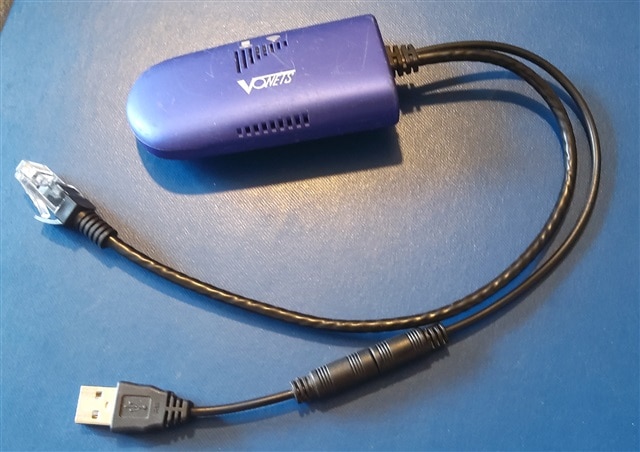
    another option is to use a wifi to network gizmo (I use a Vonets VAP.11G):

    image

    If the device is known to work with a wired network (say: the above beaglebone), you are set.

    No connection to the PC. Can be powered from the BBs USB. And no drivers or config with the usual linux images.

    • Cancel
    • Vote Up 0 Vote Down
    • Sign in to reply
    • Verify Answer
    • Cancel
  • Coder
    0 Coder over 2 years ago in reply to Jan Cumps

    Hmm - thanks for sharing this info - never knew of this product.

    • Cancel
    • Vote Up 0 Vote Down
    • Sign in to reply
    • Verify Answer
    • Cancel
  • Coder
    0 Coder over 2 years ago in reply to Jan Cumps

    Jan Campus - I have checked my local best buy and staples but they don' carry this gadget - I will source from some third party online.

    • Cancel
    • Vote Up 0 Vote Down
    • Sign in to reply
    • Verify Answer
    • Cancel
  • Coder
    0 Coder over 2 years ago in reply to Jan Cumps

    Jan Cumps - finally got this wifi repeater - I have not connected it up as yet .

    • Cancel
    • Vote Up +1 Vote Down
    • Sign in to reply
    • Verify Answer
    • Cancel
element14 Community

element14 is the first online community specifically for engineers. Connect with your peers and get expert answers to your questions.

  • Members
  • Learn
  • Technologies
  • Challenges & Projects
  • Products
  • Store
  • About Us
  • Feedback & Support
  • FAQs
  • Terms of Use
  • Privacy Policy
  • Legal and Copyright Notices
  • Sitemap
  • Cookies

An Avnet Company © 2026 Premier Farnell Limited. All Rights Reserved.

Premier Farnell Ltd, registered in England and Wales (no 00876412), registered office: Farnell House, Forge Lane, Leeds LS12 2NE.

Follow element14

  • X
  • Facebook
  • linkedin
  • YouTube