element14 Community
element14 Community
    Register Log In
  • Site
  • Search
  • Log In Register
  • Community Hub
    Community Hub
    • What's New on element14
    • Feedback and Support
    • Benefits of Membership
    • Personal Blogs
    • Members Area
    • Achievement Levels
  • Learn
    Learn
    • Ask an Expert
    • eBooks
    • element14 presents
    • Learning Center
    • Tech Spotlight
    • STEM Academy
    • Webinars, Training and Events
    • Learning Groups
  • Technologies
    Technologies
    • 3D Printing
    • FPGA
    • Industrial Automation
    • Internet of Things
    • Power & Energy
    • Sensors
    • Technology Groups
  • Challenges & Projects
    Challenges & Projects
    • Design Challenges
    • element14 presents Projects
    • Project14
    • Arduino Projects
    • Raspberry Pi Projects
    • Project Groups
  • Products
    Products
    • Arduino
    • Avnet & Tria Boards Community
    • Dev Tools
    • Manufacturers
    • Multicomp Pro
    • Product Groups
    • Raspberry Pi
    • RoadTests & Reviews
  • About Us
  • Store
    Store
    • Visit Your Store
    • Choose another store...
      • Europe
      •  Austria (German)
      •  Belgium (Dutch, French)
      •  Bulgaria (Bulgarian)
      •  Czech Republic (Czech)
      •  Denmark (Danish)
      •  Estonia (Estonian)
      •  Finland (Finnish)
      •  France (French)
      •  Germany (German)
      •  Hungary (Hungarian)
      •  Ireland
      •  Israel
      •  Italy (Italian)
      •  Latvia (Latvian)
      •  
      •  Lithuania (Lithuanian)
      •  Netherlands (Dutch)
      •  Norway (Norwegian)
      •  Poland (Polish)
      •  Portugal (Portuguese)
      •  Romania (Romanian)
      •  Russia (Russian)
      •  Slovakia (Slovak)
      •  Slovenia (Slovenian)
      •  Spain (Spanish)
      •  Sweden (Swedish)
      •  Switzerland(German, French)
      •  Turkey (Turkish)
      •  United Kingdom
      • Asia Pacific
      •  Australia
      •  China
      •  Hong Kong
      •  India
      • Japan
      •  Korea (Korean)
      •  Malaysia
      •  New Zealand
      •  Philippines
      •  Singapore
      •  Taiwan
      •  Thailand (Thai)
      • Vietnam
      • Americas
      •  Brazil (Portuguese)
      •  Canada
      •  Mexico (Spanish)
      •  United States
      Can't find the country/region you're looking for? Visit our export site or find a local distributor.
  • Translate
  • Profile
  • Settings
RIoTboard
  • Products
  • Dev Tools
  • Single-Board Computers
  • RIoTboard
  • More
  • Cancel
RIoTboard
Blog RIoTBoard Android app: IO and LEDs
  • Blog
  • Forum
  • Documents
  • Files
  • Members
  • Mentions
  • Sub-Groups
  • Tags
  • More
  • Cancel
  • New
Join RIoTboard to participate - click to join for free!
  • Share
  • More
  • Cancel
Group Actions
  • Group RSS
  • More
  • Cancel
Engagement
  • Author Author: ntewinkel
  • Date Created: 1 Sep 2014 9:38 PM Date Created
  • Views 1959 views
  • Likes 0 likes
  • Comments 9 comments
  • android
  • riotboard
  • app
Related
Recommended

RIoTBoard Android app: IO and LEDs

ntewinkel
ntewinkel
1 Sep 2014

I had some time to work with the RIoTBoard again last week, and decided to build a little app to try blinking the LEDs.


As I mentioned in previous blog posts, the fact that RIoTBoard runs Android is one of the reasons I'm interested in it. So to be clear, this is all on Android, not on Linux as many others are choosing to do.


For app development you need Android Developer Tools, and Sagar does a great job describing how to get all of that set up in his blog posts, starting with Part 1: Build an Android app on RIoTBoard .


As I write Android apps for my work, I already had all of that set up, saving me a lot of effort - yay! image


So I wrote a little app with two checkboxes to control the 2 pre-defined LEDs: D45 and D46.

This is what it looks like when it is running on the RIoTBoard on my TV:

image

(Note: RIoTBoard is in "landscape mode" for apps)


There is one little trick to keep in mind when you go to connect to the RIoTBoard for the first time. To be able to connect to it from ADT you need to enable Debugging mode first. And this can be tricky, as "Developer Options" doesn't show up unless you perform a little bit of magic first: you need to tap "build number" 7 times (in "About Tablet"). This is an Android thing, not just RIoTBoard.
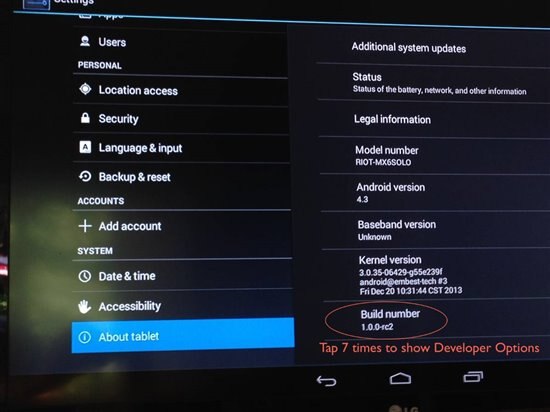
image


So once that's done and the board is connected to ADT, it's easy to run the app and see the debug information.

At this point you can pretty much write and run regular Android apps, but seeing as we have all those IO pins, the fun part is to have an app that can take advantage of those.


The app runs well, but sadly the LEDs do exactly nothing!


This is the error I'm getting, and I'm pretty sure it's related to permissions in Android, as it's generally not a good idea to allow an app to go writing to system files all willy nilly.

08-27 01:48:01.603: E/Exception(3243): File write failed: java.io.FileNotFoundException: /sys/class/leds/sys_led/brightness: open failed: EACCES (Permission denied)


Note the little "Permission denied" bit at the end.


Does anyone know how this can be done? I mean without hacking the whole system? Given that the IO pins are part of the RIoTBoard the way it's shipped, I would expect the supplied Android image to handle the IO pins through app code somehow.


The key code in my app is this:


      try {

          FileOutputStream ioFile = new FileOutputStream(new File(pin_file));

          OutputStreamWriter outputStreamWriter = new OutputStreamWriter(ioFile);

          outputStreamWriter.write(high?"1":"0");

          outputStreamWriter.close();

      }

      catch (IOException e) {

          Log.e("Exception", "File write failed: " + e.toString());

      }


"pin_file" is either "/sys/class/leds/user_led/brightness" (LED D45) or "/sys/class/leds/sys_led/brightness" (LED D46).

"high" is a boolean variable.


Has anyone tried using an Android app to access the IO pins yet? tusharp maybe?


edit: ps, to connect the RIoTBoard for ADT, plug the usb cable into the port closest to ethernet port


Cheers,

-Nico

  • Sign in to reply

Top Comments

  • tusharp
    tusharp over 11 years ago +1
    hi nico, I have tried io pins on linux, android not yet . otto got some rooting stuff done : Rooting Android for the RIoTBoard I am sure that provides root access. you code seems fine, just root access…
  • ntewinkel
    ntewinkel over 11 years ago in reply to radiatortwo

    Yeah, wishful thinking on my part.

    I find it very disappointing that the RIoTBoard ships with an Android image that is not capable of accessing the IO pins.

    Fingers crossed for the next release to have something!


    I'll try rooting the system once I have more time for that.


    Cheers,

    -Nico

    • Cancel
    • Vote Up 0 Vote Down
    • Sign in to reply
    • More
    • Cancel
  • radiatortwo
    radiatortwo over 11 years ago in reply to ntewinkel

    Yeah I thought that wouldn´t work that easily.


    That´s about the same as you would type su into the terminal emulator app.

    Like this you can test if root is working. But you won´t get root access just like that.


    I´m no Android Developer and can´t tell for sure, but as far as I know all the functions to control leds in Android devices, are coming from the kernel.

    The Linux mainline kernel (Not Android) for example has a heartbeat function to let one of the leds on the riotboard blink when the kernel is up and running.


    You´d have to provide some sort of api from the kernel to get access without root permissions then.

    • Cancel
    • Vote Up 0 Vote Down
    • Sign in to reply
    • More
    • Cancel
  • ntewinkel
    ntewinkel over 11 years ago in reply to ntewinkel

    Alright, I just tried this from the above example:

          process = Runtime.getRuntime().exec("su");


    And it looks like I do have to root the system first. blah.

    01-02 00:00:56.840: E/Exception(3090): setupIO failed: java.io.IOException: Error running exec(). Command: [su] Working Directory: null Environment: null

    • Cancel
    • Vote Up 0 Vote Down
    • Sign in to reply
    • More
    • Cancel
  • DAB
    DAB over 11 years ago

    Hi Nico,


    Good update.

    I am still at the preload stage, plus the lack of a clean workspace.

    One of these days though, I will get to it.


    DAB

    • Cancel
    • Vote Up 0 Vote Down
    • Sign in to reply
    • More
    • Cancel
  • ntewinkel
    ntewinkel over 11 years ago in reply to tusharp

    ps, can I request, for the next Android image and if necessary to make it work, that e14 also supply an image that's already rooted and ready for IO ports to be used from an app?

    Thanks!

    • Cancel
    • Vote Up 0 Vote Down
    • Sign in to reply
    • More
    • Cancel
>
element14 Community

element14 is the first online community specifically for engineers. Connect with your peers and get expert answers to your questions.

  • Members
  • Learn
  • Technologies
  • Challenges & Projects
  • Products
  • Store
  • About Us
  • Feedback & Support
  • FAQs
  • Terms of Use
  • Privacy Policy
  • Legal and Copyright Notices
  • Sitemap
  • Cookies

An Avnet Company © 2025 Premier Farnell Limited. All Rights Reserved.

Premier Farnell Ltd, registered in England and Wales (no 00876412), registered office: Farnell House, Forge Lane, Leeds LS12 2NE.

ICP 备案号 10220084.

Follow element14

  • X
  • Facebook
  • linkedin
  • YouTube