element14 Community
element14 Community
    Register Log In
  • Site
  • Search
  • Log In Register
  • Community Hub
    Community Hub
    • What's New on element14
    • Feedback and Support
    • Benefits of Membership
    • Personal Blogs
    • Members Area
    • Achievement Levels
  • Learn
    Learn
    • Ask an Expert
    • eBooks
    • element14 presents
    • Learning Center
    • Tech Spotlight
    • STEM Academy
    • Webinars, Training and Events
    • Learning Groups
  • Technologies
    Technologies
    • 3D Printing
    • FPGA
    • Industrial Automation
    • Internet of Things
    • Power & Energy
    • Sensors
    • Technology Groups
  • Challenges & Projects
    Challenges & Projects
    • Design Challenges
    • element14 presents Projects
    • Project14
    • Arduino Projects
    • Raspberry Pi Projects
    • Project Groups
  • Products
    Products
    • Arduino
    • Avnet & Tria Boards Community
    • Dev Tools
    • Manufacturers
    • Multicomp Pro
    • Product Groups
    • Raspberry Pi
    • RoadTests & Reviews
  • About Us
    About the element14 Community
  • Store
    Store
    • Visit Your Store
    • Choose another store...
      • Europe
      •  Austria (German)
      •  Belgium (Dutch, French)
      •  Bulgaria (Bulgarian)
      •  Czech Republic (Czech)
      •  Denmark (Danish)
      •  Estonia (Estonian)
      •  Finland (Finnish)
      •  France (French)
      •  Germany (German)
      •  Hungary (Hungarian)
      •  Ireland
      •  Israel
      •  Italy (Italian)
      •  Latvia (Latvian)
      •  
      •  Lithuania (Lithuanian)
      •  Netherlands (Dutch)
      •  Norway (Norwegian)
      •  Poland (Polish)
      •  Portugal (Portuguese)
      •  Romania (Romanian)
      •  Russia (Russian)
      •  Slovakia (Slovak)
      •  Slovenia (Slovenian)
      •  Spain (Spanish)
      •  Sweden (Swedish)
      •  Switzerland(German, French)
      •  Turkey (Turkish)
      •  United Kingdom
      • Asia Pacific
      •  Australia
      •  China
      •  Hong Kong
      •  India
      •  Japan
      •  Korea (Korean)
      •  Malaysia
      •  New Zealand
      •  Philippines
      •  Singapore
      •  Taiwan
      •  Thailand (Thai)
      •  Vietnam
      • Americas
      •  Brazil (Portuguese)
      •  Canada
      •  Mexico (Spanish)
      •  United States
      Can't find the country/region you're looking for? Visit our export site or find a local distributor.
  • Translate
  • Profile
  • Settings
Autodesk EAGLE
  • Products
  • More
Autodesk EAGLE
Blog EAGLE ULPs Every User Should Know
  • Blog
  • Forum
  • Documents
  • Events
  • Polls
  • Files
  • Members
  • Mentions
  • Sub-Groups
  • Tags
  • More
  • Cancel
  • New
Join Autodesk EAGLE to participate - click to join for free!
  • Share
  • More
  • Cancel
Group Actions
  • Group RSS
  • More
  • Cancel
Engagement
  • Author Author: DaveYoung
  • Date Created: 19 Jan 2015 5:39 PM Date Created
  • Views 32687 views
  • Likes 5 likes
  • Comments 10 comments
  • eagle
  • autodesk eagle
  • ulp
  • pcb
  • cad
  • eagle ulp
  • dyoung
Related
Recommended

EAGLE ULPs Every User Should Know

DaveYoung
DaveYoung
19 Jan 2015

A ULP (User Language Program) is a feature designed into EAGLE to allow users to generate their own processes to automate tasks that would otherwise be tedious and time consuming. While most users know that this functionality exists, very few want to write their own script. A casual user would have to dump far more time learning the system and designing/testing their code than just completing the task at hand.image

 

Many EAGLE users don't know that there are many ULPs that have been written by the pros at CadSoft waiting to be discovered.  These are tried and true ways to get things done quickly without having to bother writing the ULP from scratch. So give the intern an interesting project to take on and start using tools! Note that this article is written based on EAGLE v7.1.


Mountsmd.ulp: Create a Component Placement List (CPL) for pick-and-place programming.

A heavily-used ULP, this takes what would be a very tedious task and automates it reliably. Any contract manufacturer will need to know where each component needs to be mounted and its rotation so they can program their pick-and-place machine. This ULP outputs 2 files: one describing top side SMD parts, and the other describing bottom side SMD parts. Note it doesn’t call out through-hole parts (but Mount.ulp does). You will also want to import the data into a spreadsheet and label each column. It is best to generate this anytime gerbers are generated to be sure it is accurate.

How to Use:

In the layout editor, click the ‘ULP’ button and select Mountsmd.ulp. Enter a path and filename, and a semicolon-separated-values document is created.


Ref Desx (mm)y (mm)RotationValuePackage
C512.2314.56010uC0805
D116.0114.54180LED0603DIODE0603
Q15.3220.95180AO6604TSOP-6
Q25.3215.87180AO6604TSOP-6
Q35.3210.79180AO6604TSOP-6
Q624.259.3990AO6604TSOP-6
Q724.2514.4790AO6604TSOP-6
Q824.2519.5590AO6604TSOP-6
Q911.724.70NTGS3443TSOP-6
R47.96.91010kR0603
R11110.221.7600R0603
R11318.7514.0790330R0603
U117.9618.97180MCP1702SOT23
U213.910.5270G2X[0/1]1---PW14PW14


BOM.ULP: Generate a BOM based on component data

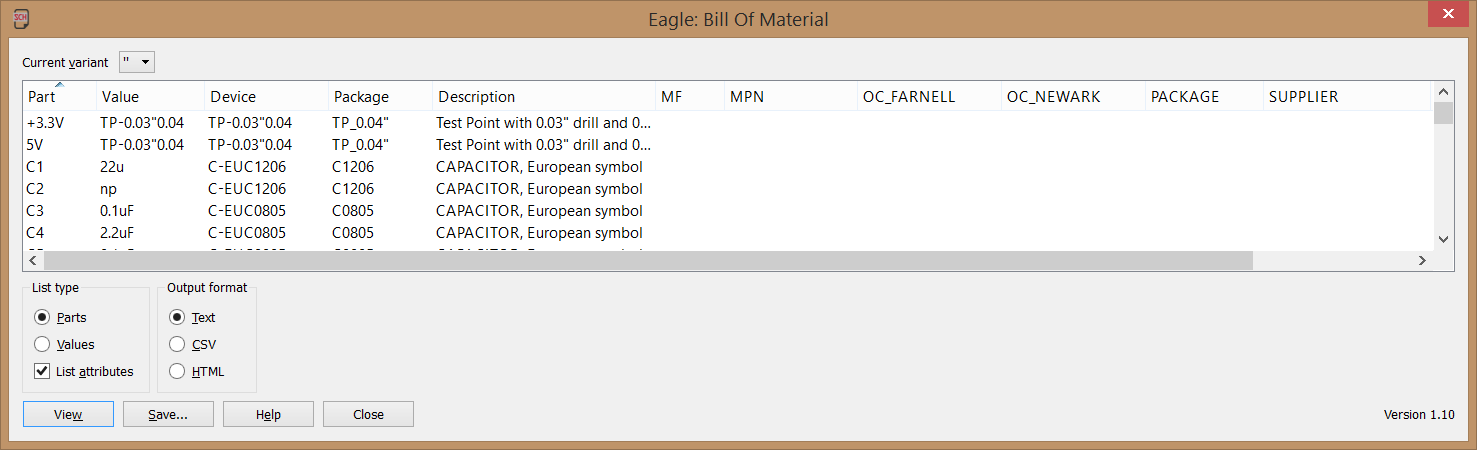
EAGLE is capable of maintaining manufacturer and part number for each part so the schematic can be the controlled document for manufacturing information. The BOM.ulp is there to output this data in a format that manufacturing can easily read.

How to Use:

In the schematic editor, click the ‘ULP’ button and select ‘bom.ulp’. Review for accuracy, and then save it in the desired format.

image


billy-eicher-parks-and-rec-w724.jpgNormalize-text.ulp: Force all of the text on silkscreen layers to be of unified size and thickness.

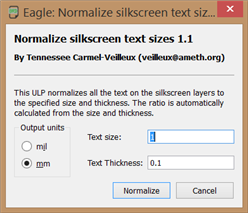
Even among my component library there is wide variation on silkscreen text size. Reading the text reminds me of Craig Middlebrooks on the TV show ‘Parks and Recreation.’ It takes a lot of clicking to manually change the size, and I always miss one. Instead, this ULP takes care of it in one click. Although make sure you do this before placing the silkscreen text as they will need to be repositioned!

How to Use:

Determine the desired silkscreen text size and thickness. In the layout editor, click the ‘ULP’ button and select ‘normalize-text.ulp’. Enter your desired text size and thickness, and hit OK.
image


Exp-Lbr.ulp: Build a component library from a design.

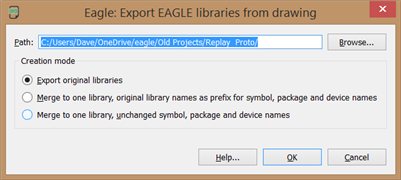
As a consultant, I am always careful to keep each client’s design files separate. When a client wants the EAGLE library to be included when I send them documentation it would be inappropriate an unwieldy to give them libraries that may include components designed for other clients. This ULP is great for saving a library to accompany design documentation so another engineer can easily modify a component’s details without having to create it from scratch. I’ve used it before with great success!

How to Use:

This ULP has a nice shortcut found in File>Export>libraries
image


Statistic-brd.ulp:  Details some standard stats about the board.

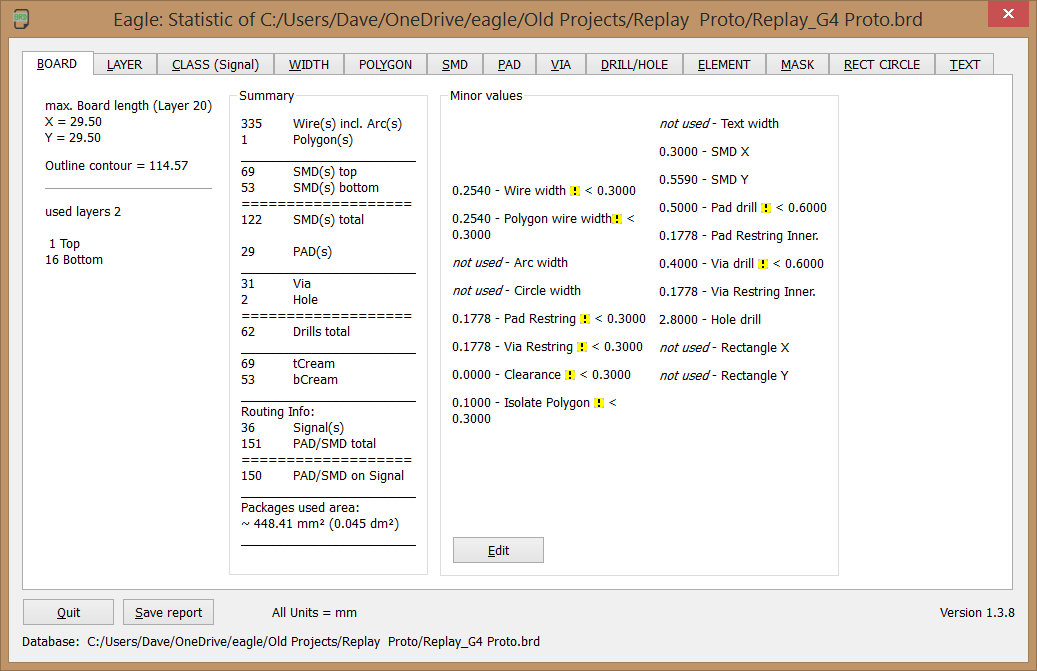
I’ve added this to my standard PCB review process. It takes about 30 seconds, but going through all of the board stats can have something stick out like a sore thumb. I’ve found myself saying, ‘I don’t remember creating a hole of that size’ or ‘There shouldn’t be a trace that fat in there’ which uncovered an error.

How to Use:

In the layout editor, click the ‘ULP’ button and select Statistic-brd.ulp. Click through the resulting data.
image


This short list of ULPs has saved me hours of work, but I still don’t trust them any more than I would a downloaded component library. Always be sure to double check anything they do, and never run a ULP after your review process has started. It’s never fun when an automated feature causes more errors than it saves!

  • Sign in to reply

Top Comments

  • Joop14
    Joop14 over 11 years ago +1
    diff-sch-lbr.ulp: look for differences between schematic and the libraries. Checks also for missing libraries. Something that Cadsoft should have implemented many years ago. It's crazy that Eagle only…
  • DaveYoung
    DaveYoung over 9 years ago in reply to steve@teradiode.com

    Great point! Thanks for letting us know!

    • Cancel
    • Vote Up 0 Vote Down
    • Sign in to reply
    • More
    • Cancel
  • steve@teradiode.com
    steve@teradiode.com over 9 years ago

    Eagle Version 7.6 has a “mount-smd-tht.ulp” that will generate a file containing both SMD and through-hole with option to have them as separate files or together in one file.

    • Cancel
    • Vote Up 0 Vote Down
    • Sign in to reply
    • More
    • Cancel
  • Former Member
    Former Member over 10 years ago

    Any intern keen on writing a ULP  to design a PCB based Rogowski coil?

    Should look similar to this

    http://www.element14.com/community/message/165968/l/pcb-based-rogowski-coil-design-software#165968

    • Cancel
    • Vote Up 0 Vote Down
    • Sign in to reply
    • More
    • Cancel
  • Joop14
    Joop14 over 11 years ago

    diff-sch-lbr.ulp: look for differences between schematic and the libraries. Checks also for missing libraries.


    Something that Cadsoft should have implemented many years ago. It's crazy that Eagle only offers the option to update from libraries without telling you what is going to happen or has happened. In case it updates your schematic, you are completely in the dark about what happened.

    This ulp solves that problem.

    • Cancel
    • Vote Up +1 Vote Down
    • Sign in to reply
    • More
    • Cancel
  • Workshopshed
    Workshopshed over 11 years ago

    Dave, those are some good utilities. I was just reading about the DXF import and create drill line array ULPs this afternoon.


    [HELP]How can I arrange components into heart form or other form in EAGLE?

    • Cancel
    • Vote Up 0 Vote Down
    • Sign in to reply
    • More
    • Cancel
<
element14 Community

element14 is the first online community specifically for engineers. Connect with your peers and get expert answers to your questions.

  • Members
  • Learn
  • Technologies
  • Challenges & Projects
  • Products
  • Store
  • About Us
  • Feedback & Support
  • FAQs
  • Terms of Use
  • Privacy Policy
  • Legal and Copyright Notices
  • Sitemap
  • Cookies

An Avnet Company © 2026 Premier Farnell Limited. All Rights Reserved.

Premier Farnell Ltd, registered in England and Wales (no 00876412), registered office: Farnell House, Forge Lane, Leeds LS12 2NE.

ICP 备案号 10220084.

Follow element14

  • X
  • Facebook
  • linkedin
  • YouTube