Hi There
I'm new to eagle and I am using Eagle Ver 5.6.0
When I try to save my layout into pdf format using the print command I found some artifacts like those shown in the next test layout picture taken from the pdf file
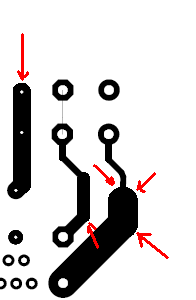
Any Advice to smooth them ?
Hi There
I'm new to eagle and I am using Eagle Ver 5.6.0
When I try to save my layout into pdf format using the print command I found some artifacts like those shown in the next test layout picture taken from the pdf file
Any Advice to smooth them ?
Thanks for this detailed explanation
Any way I am going to print it on a laser printer , and I hope this pixelation won't show up
Thanks Michael for your kind help
When you saved it as a PDF file it changed the format. It was a .brd file and you expoted it to a .pdf file thus changing the format. Eagle took the information it had and converted it into a document. In the process some information was altered or wasn't transfered over exactly. Its nothing you did wrong and nothing you can fix cause there is nothing to fix. Its just the best the program could do to get all the data changed over to the differnt format.
Here is a good and easy example to demonstrate the lose of data from a format change. If your on a windows system open up MS paint. Draw some things and save the file. The file is saved as a .bmp file or bitmap file. Now click on File and go to Save as and in teh dropdown menu next to Save As Type select JPEG. You will notice the picture changes ever so slightly. Open up the original image you saved as a .bmp file and compair the images. Instead of a solid color in the .bmp file its now several shades of the color that blends into the background a bit. JPEG files are a compressed file format compared to .bmp. When the file is saved as a JPEG a little bit of the data is dropped to make the file size smaller.
Hi Michael ,
Thanks for clarifying things to me.
but what is format change? is this something wrong I did when converting to pdf ? and that pixilation is it also normal?
All your seeing is a bit of pixilation in the image as a result of the format change. It looks bad on screen but you won't notice it once you print it. Assuming your going to print it to transfer and etch your own board. Either way if you etch it yourself or send it off to be manufactured tiny details like that won't show up or effect performance of the board.
Please update eagle to at least the latest 5.x. Also, your image cannot be
viewed, maybe try repost.
--
Web access to CadSoft support forums at www.eaglecentral.ca. Where the CadSoft EAGLE community meets.