Hi There
I'm new to eagle and I am using Eagle Ver 5.6.0
When I try to save my layout into pdf format using the print command I found some artifacts like those shown in the next test layout picture taken from the pdf file
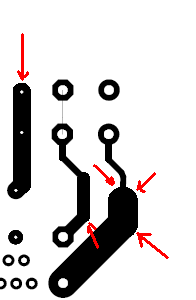
Any Advice to smooth them ?
Hi There
I'm new to eagle and I am using Eagle Ver 5.6.0
When I try to save my layout into pdf format using the print command I found some artifacts like those shown in the next test layout picture taken from the pdf file
Any Advice to smooth them ?
All your seeing is a bit of pixilation in the image as a result of the format change. It looks bad on screen but you won't notice it once you print it. Assuming your going to print it to transfer and etch your own board. Either way if you etch it yourself or send it off to be manufactured tiny details like that won't show up or effect performance of the board.
Hi Michael ,
Thanks for clarifying things to me.
but what is format change? is this something wrong I did when converting to pdf ? and that pixilation is it also normal?