element14 Community
element14 Community
    Register Log In
  • Site
  • Search
  • Log In Register
  • Community Hub
    Community Hub
    • What's New on element14
    • Feedback and Support
    • Benefits of Membership
    • Personal Blogs
    • Members Area
    • Achievement Levels
  • Learn
    Learn
    • Ask an Expert
    • eBooks
    • element14 presents
    • Learning Center
    • Tech Spotlight
    • STEM Academy
    • Webinars, Training and Events
    • Learning Groups
  • Technologies
    Technologies
    • 3D Printing
    • FPGA
    • Industrial Automation
    • Internet of Things
    • Power & Energy
    • Sensors
    • Technology Groups
  • Challenges & Projects
    Challenges & Projects
    • Design Challenges
    • element14 presents Projects
    • Project14
    • Arduino Projects
    • Raspberry Pi Projects
    • Project Groups
  • Products
    Products
    • Arduino
    • Avnet & Tria Boards Community
    • Dev Tools
    • Manufacturers
    • Multicomp Pro
    • Product Groups
    • Raspberry Pi
    • RoadTests & Reviews
  • About Us
  • Store
    Store
    • Visit Your Store
    • Choose another store...
      • Europe
      •  Austria (German)
      •  Belgium (Dutch, French)
      •  Bulgaria (Bulgarian)
      •  Czech Republic (Czech)
      •  Denmark (Danish)
      •  Estonia (Estonian)
      •  Finland (Finnish)
      •  France (French)
      •  Germany (German)
      •  Hungary (Hungarian)
      •  Ireland
      •  Israel
      •  Italy (Italian)
      •  Latvia (Latvian)
      •  
      •  Lithuania (Lithuanian)
      •  Netherlands (Dutch)
      •  Norway (Norwegian)
      •  Poland (Polish)
      •  Portugal (Portuguese)
      •  Romania (Romanian)
      •  Russia (Russian)
      •  Slovakia (Slovak)
      •  Slovenia (Slovenian)
      •  Spain (Spanish)
      •  Sweden (Swedish)
      •  Switzerland(German, French)
      •  Turkey (Turkish)
      •  United Kingdom
      • Asia Pacific
      •  Australia
      •  China
      •  Hong Kong
      •  India
      • Japan
      •  Korea (Korean)
      •  Malaysia
      •  New Zealand
      •  Philippines
      •  Singapore
      •  Taiwan
      •  Thailand (Thai)
      • Vietnam
      • Americas
      •  Brazil (Portuguese)
      •  Canada
      •  Mexico (Spanish)
      •  United States
      Can't find the country/region you're looking for? Visit our export site or find a local distributor.
  • Translate
  • Profile
  • Settings
Autodesk EAGLE
  • Products
  • More
Autodesk EAGLE
EAGLE User Support (English) Gerber files and Pick and place file
  • Blog
  • Forum
  • Documents
  • Events
  • Polls
  • Files
  • Members
  • Mentions
  • Sub-Groups
  • Tags
  • More
  • Cancel
  • New
Join Autodesk EAGLE to participate - click to join for free!
Actions
  • Share
  • More
  • Cancel
Forum Thread Details
  • Replies 2 replies
  • Subscribers 179 subscribers
  • Views 1057 views
  • Users 0 members are here
Related

Gerber files and Pick and place file

jboavida
jboavida over 12 years ago

Hello,


I generate the top layer gerber file (using the standard Job gerb274x with offset zero) and the pick and place file using the mountsmd.ulp. No problems here.

But when I load them in my pick and place machine, there is a offset.

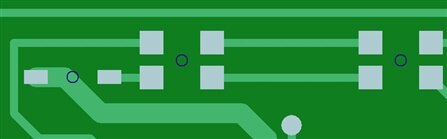
The pick and place coordinates are correct, but the gerber is off center (around 0.4mm in x and y)


image

What i'm doing wrong?

The problem is not the machine, because files generated with other software (tested with  some Protel files) display ok.


Thanks in advance


Joaquim

  • Sign in to reply
  • Cancel
  • dukepro
    dukepro over 12 years ago

    On 03/26/2013 08:23 AM, Joaquim Boavida wrote:

    Hello,


    I generate the top layer gerber file (using the standard Job gerb274x

    with offset zero) and the pick and place file using the mountsmd.ulp. No

    problems here.

    But when I load them in my pick and place machine, there is a offset.

    The pick and place coordinates are correct, but the gerber is off center

    (around 0.4mm in x and y)


    In each of your CAM job sections, make sure the "pos. Coord" checkbox is

    clear.  Here's why...


    With "pos. Coord" checked, the CAM Processor will add an offset such

    that all features included in that gerber file are in Quadrant 1, i.e.

    all features have positive coordinates.


    My guess is that you have copper trace around the perimeter of your

    board that's about 0.8 mm wide.  Thus half of the vertical trace is to

    the left of X=0, and half of the horizontal trace is below Y=0.  It

    doesn't have to be a trace - it could be any object or part thereof.

    After the CAM Processor adds offsets, the edge of the trace will be on

    an axis.


    This can cascade into an alignment problem between layers.  For

    instance, if you had such a perimeter trace on the bottom layer, but not

    the top, then the bottom would be offset to make sure the entire trace

    is in Quadrant 1, but the top layer would not have such an offset.  This

    potential pitfall can surface in any layer - mask, inner layers, silk

    screen, etc.


    You can explore this a bit by placing an arbitrary trace on one layer

    that's well to the left of the vertical axis, run the CAM Processor,

    then look at the gerber file.  Try this with "pos. Coord" turn on, then

    again with it turned off.


    As you noted, the pick-and-place coordinates are correct because they

    were obtained through a means other than the CAM Processor.


    HTH,

        - Chuck


    • Cancel
    • Vote Up 0 Vote Down
    • Sign in to reply
    • Cancel
  • jboavida
    jboavida over 12 years ago in reply to dukepro

    Chuck,


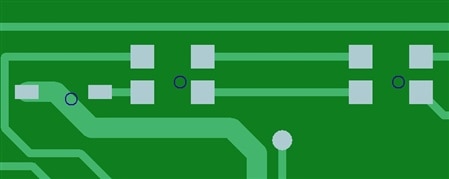
    Bullseye !!  Thank you very much!


    image

    Joaquim

    • Cancel
    • Vote Up 0 Vote Down
    • Sign in to reply
    • Cancel
element14 Community

element14 is the first online community specifically for engineers. Connect with your peers and get expert answers to your questions.

  • Members
  • Learn
  • Technologies
  • Challenges & Projects
  • Products
  • Store
  • About Us
  • Feedback & Support
  • FAQs
  • Terms of Use
  • Privacy Policy
  • Legal and Copyright Notices
  • Sitemap
  • Cookies

An Avnet Company © 2026 Premier Farnell Limited. All Rights Reserved.

Premier Farnell Ltd, registered in England and Wales (no 00876412), registered office: Farnell House, Forge Lane, Leeds LS12 2NE.

ICP 备案号 10220084.

Follow element14

  • X
  • Facebook
  • linkedin
  • YouTube