element14 Community
element14 Community
    Register Log In
  • Site
  • Search
  • Log In Register
  • Community Hub
    Community Hub
    • What's New on element14
    • Feedback and Support
    • Benefits of Membership
    • Personal Blogs
    • Members Area
    • Achievement Levels
  • Learn
    Learn
    • Ask an Expert
    • eBooks
    • element14 presents
    • Learning Center
    • Tech Spotlight
    • STEM Academy
    • Webinars, Training and Events
    • Learning Groups
  • Technologies
    Technologies
    • 3D Printing
    • FPGA
    • Industrial Automation
    • Internet of Things
    • Power & Energy
    • Sensors
    • Technology Groups
  • Challenges & Projects
    Challenges & Projects
    • Design Challenges
    • element14 presents Projects
    • Project14
    • Arduino Projects
    • Raspberry Pi Projects
    • Project Groups
  • Products
    Products
    • Arduino
    • Avnet & Tria Boards Community
    • Dev Tools
    • Manufacturers
    • Multicomp Pro
    • Product Groups
    • Raspberry Pi
    • RoadTests & Reviews
  • About Us
  • Store
    Store
    • Visit Your Store
    • Choose another store...
      • Europe
      •  Austria (German)
      •  Belgium (Dutch, French)
      •  Bulgaria (Bulgarian)
      •  Czech Republic (Czech)
      •  Denmark (Danish)
      •  Estonia (Estonian)
      •  Finland (Finnish)
      •  France (French)
      •  Germany (German)
      •  Hungary (Hungarian)
      •  Ireland
      •  Israel
      •  Italy (Italian)
      •  Latvia (Latvian)
      •  
      •  Lithuania (Lithuanian)
      •  Netherlands (Dutch)
      •  Norway (Norwegian)
      •  Poland (Polish)
      •  Portugal (Portuguese)
      •  Romania (Romanian)
      •  Russia (Russian)
      •  Slovakia (Slovak)
      •  Slovenia (Slovenian)
      •  Spain (Spanish)
      •  Sweden (Swedish)
      •  Switzerland(German, French)
      •  Turkey (Turkish)
      •  United Kingdom
      • Asia Pacific
      •  Australia
      •  China
      •  Hong Kong
      •  India
      • Japan
      •  Korea (Korean)
      •  Malaysia
      •  New Zealand
      •  Philippines
      •  Singapore
      •  Taiwan
      •  Thailand (Thai)
      • Vietnam
      • Americas
      •  Brazil (Portuguese)
      •  Canada
      •  Mexico (Spanish)
      •  United States
      Can't find the country/region you're looking for? Visit our export site or find a local distributor.
  • Translate
  • Profile
  • Settings
Autodesk EAGLE
  • Products
  • More
Autodesk EAGLE
EAGLE User Support (English) Split ground planes
  • Blog
  • Forum
  • Documents
  • Events
  • Polls
  • Files
  • Members
  • Mentions
  • Sub-Groups
  • Tags
  • More
  • Cancel
  • New
Join Autodesk EAGLE to participate - click to join for free!
Actions
  • Share
  • More
  • Cancel
Forum Thread Details
  • Replies 5 replies
  • Subscribers 178 subscribers
  • Views 712 views
  • Users 0 members are here
Related

Split ground planes

Former Member
Former Member over 11 years ago

I've been watching and reading a lot on creating ground planes on the TOP and BOTTOM layers.

How about if I want middle layers to be ground? Polygon pours done give me a way to tie a net to it.

So this is what i want to do in a stack up:


TOP

TOP_GND

MID1 (for signal routing)

BOT_GND

BOTTOM


TOP is running digital signals and BOTTOM is running analog signals and I want their grounds separated.

Does someone have an method to do this?

  • Sign in to reply
  • Cancel
  • Former Member
    Former Member over 11 years ago

    I have also noticed Layers 2-15 are inner layers but not available.

    I can access them or rename them, yet they are signal layers and not viewable from the Layer menu

    • Cancel
    • Vote Up 0 Vote Down
    • Sign in to reply
    • Cancel
  • geralds
    geralds over 11 years ago in reply to Former Member

    I think you have a little bit more thinking about.

    It's better, you use even number of sides. e.g. 2,4,6,8...

    because they are matched in mirrors together.

    1 - 16; or  1 - 2, 3 - 4, .... 15 - 16; .....

    Then you can better use some layer as a split gnd plane.

    In the globals you can specify, which layer will be a power layer.

    This layer can be a split power plane.


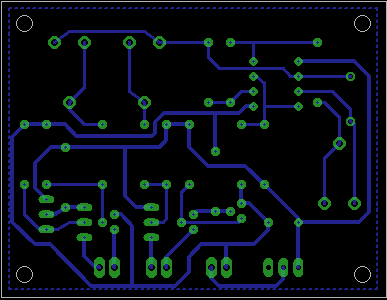
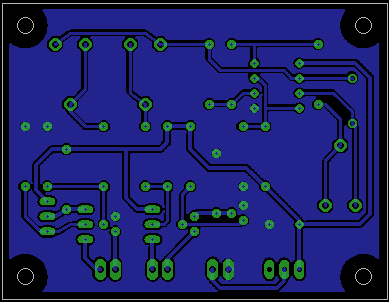
    If you want grounding a signal layer, this can be make by drawing a

    polygon around the board an then use "NAME" to connect to GND-Signal.

    Then click the button "Ratsnest" so then all signal wires will be

    isolate into the GND-polygon. e.g. isolate > 0,5mm, or so -> voltage!


    This looks like this:

    imageimage

    After them, if you have to do something, you can do, but you have to click the button "Ratsnest".

    Then the polygon redraw.  Unroute (hide) the polygon by click on the polygon and then click

    the button "Ripup". Redraw  again -> "Ratsnest".


    Regards

    Gerald

    ---

    • Cancel
    • Vote Up 0 Vote Down
    • Sign in to reply
    • Cancel
  • Former Member
    Former Member over 11 years ago in reply to geralds

    Hi Gerald:


    I might have another issue related to the software. When I pull down the layer window, I only see this. I purchased a Hobbist License (which is a Standard Edition) but looks like the PCB tool is running like a Lite version. I only have access to two (2) layers. When I type at the command line, LAYER 2, it replies back Layer 2 is not available! So that could have answered why I cannot create inner ground layers and why my previous attempts failed. They were created on layers 113, 114 and 115.


    image


    Regarding your reply; what if you wanted your pads around you mounting holes to have thermals and tied to ground?

    • Cancel
    • Vote Up 0 Vote Down
    • Sign in to reply
    • Cancel
  • autodeskguest
    autodeskguest over 11 years ago in reply to Former Member

    On 7/09/2014 1:34 p.m., darryl tamura wrote:

    Hi Gerald:


    I might have another issue related to the software. When I pull down the

    layer window, I only see this. I purchased a Hobbist License (which is a

    Standard Edition) but looks like the PCB tool is running like a Lite

    version. I only have access to two (2) layers. When I type at the

    command line, LAYER 2, it replies back Layer 2 is not available! So that

    could have answered why I cannot create inner ground layers and why my

    previous attempts failed. They were created on layers 113, 114 and 115.


    Have a read of the manual. It's in the DOC folder of your installation


    The part of interest to you will be for the std license


    A maximum number of 6 signal layers are allowed (Top, Route2,

    Route3, Route14, Route15, Bottom).


    These are the copper/signal  layers you can use.

    The ones above 100 the you define will not behave like the copper layers.


    To activate the layers 2,3 14, 15, 16  you have to define this in the

    DRC. By default it defines a two layer board.


    Again from the manual "The DISPLAY menu shows only those layers defined

    in the Layer Setup of the Design Rules! "


    HTH

    Warren


    • Cancel
    • Vote Up 0 Vote Down
    • Sign in to reply
    • Cancel
  • Former Member
    Former Member over 11 years ago in reply to autodeskguest

    Thanks Warren for you reply.


    I eventually did find tidbits of info online, which lead to others until finally ... the manual.

    And to make it difficult, the manual is not located from HELP but from the Eagle directory.

    So I have been looking at the DRC menu for over a week, never realizing that to activate

    your other layers, it is done here. Never bothered to look at the manual since I was looking

    for a "Getting Started" pathway.


    The frustration of it all...

    • Cancel
    • Vote Up 0 Vote Down
    • Sign in to reply
    • Cancel
element14 Community

element14 is the first online community specifically for engineers. Connect with your peers and get expert answers to your questions.

  • Members
  • Learn
  • Technologies
  • Challenges & Projects
  • Products
  • Store
  • About Us
  • Feedback & Support
  • FAQs
  • Terms of Use
  • Privacy Policy
  • Legal and Copyright Notices
  • Sitemap
  • Cookies

An Avnet Company © 2026 Premier Farnell Limited. All Rights Reserved.

Premier Farnell Ltd, registered in England and Wales (no 00876412), registered office: Farnell House, Forge Lane, Leeds LS12 2NE.

ICP 备案号 10220084.

Follow element14

  • X
  • Facebook
  • linkedin
  • YouTube