element14 Community
element14 Community
    Register Log In
  • Site
  • Search
  • Log In Register
  • Community Hub
    Community Hub
    • What's New on element14
    • Feedback and Support
    • Benefits of Membership
    • Personal Blogs
    • Members Area
    • Achievement Levels
  • Learn
    Learn
    • Ask an Expert
    • eBooks
    • element14 presents
    • Learning Center
    • Tech Spotlight
    • STEM Academy
    • Webinars, Training and Events
    • Learning Groups
  • Technologies
    Technologies
    • 3D Printing
    • FPGA
    • Industrial Automation
    • Internet of Things
    • Power & Energy
    • Sensors
    • Technology Groups
  • Challenges & Projects
    Challenges & Projects
    • Design Challenges
    • element14 presents Projects
    • Project14
    • Arduino Projects
    • Raspberry Pi Projects
    • Project Groups
  • Products
    Products
    • Arduino
    • Avnet & Tria Boards Community
    • Dev Tools
    • Manufacturers
    • Multicomp Pro
    • Product Groups
    • Raspberry Pi
    • RoadTests & Reviews
  • About Us
  • Store
    Store
    • Visit Your Store
    • Choose another store...
      • Europe
      •  Austria (German)
      •  Belgium (Dutch, French)
      •  Bulgaria (Bulgarian)
      •  Czech Republic (Czech)
      •  Denmark (Danish)
      •  Estonia (Estonian)
      •  Finland (Finnish)
      •  France (French)
      •  Germany (German)
      •  Hungary (Hungarian)
      •  Ireland
      •  Israel
      •  Italy (Italian)
      •  Latvia (Latvian)
      •  
      •  Lithuania (Lithuanian)
      •  Netherlands (Dutch)
      •  Norway (Norwegian)
      •  Poland (Polish)
      •  Portugal (Portuguese)
      •  Romania (Romanian)
      •  Russia (Russian)
      •  Slovakia (Slovak)
      •  Slovenia (Slovenian)
      •  Spain (Spanish)
      •  Sweden (Swedish)
      •  Switzerland(German, French)
      •  Turkey (Turkish)
      •  United Kingdom
      • Asia Pacific
      •  Australia
      •  China
      •  Hong Kong
      •  India
      • Japan
      •  Korea (Korean)
      •  Malaysia
      •  New Zealand
      •  Philippines
      •  Singapore
      •  Taiwan
      •  Thailand (Thai)
      • Vietnam
      • Americas
      •  Brazil (Portuguese)
      •  Canada
      •  Mexico (Spanish)
      •  United States
      Can't find the country/region you're looking for? Visit our export site or find a local distributor.
  • Translate
  • Profile
  • Settings
Autodesk EAGLE
  • Products
  • More
Autodesk EAGLE
EAGLE User Support (English) Via size when switching layer
  • Blog
  • Forum
  • Documents
  • Events
  • Polls
  • Files
  • Members
  • Mentions
  • Sub-Groups
  • Tags
  • More
  • Cancel
  • New
Join Autodesk EAGLE to participate - click to join for free!
Actions
  • Share
  • More
  • Cancel
Forum Thread Details
  • Replies 5 replies
  • Subscribers 178 subscribers
  • Views 729 views
  • Users 0 members are here
  • board
  • pad
  • eagle
  • pcb
  • layer
Related

Via size when switching layer

bhodder
bhodder over 11 years ago

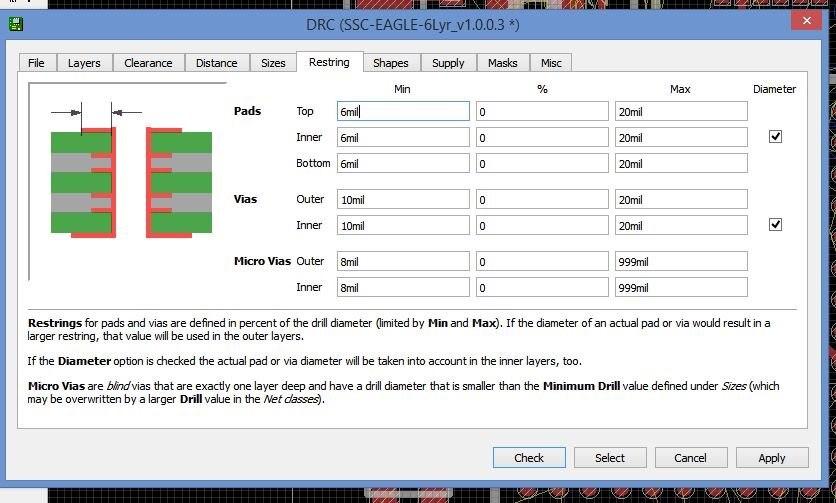
I am currently routing a project and have run into an issue. I have set my drill hole to 6 mil and diameter to 10 mil as well as adjust the restring to 10 mil 0% inner and outer. However, once the via is created it creats as an inner and outer diameter of 26 mil. How do I stop this from happening? This hinders my project as it prevents me from routing the BGA chip.


Thanks,

Blake

  • Sign in to reply
  • Cancel
  • autodeskguest
    autodeskguest over 11 years ago

    On 27/09/2014 7:50 a.m., Blake Hodder wrote:

    I am currently routing a project and have run into an issue. I have set

    my drill hole to 6 mil and diameter to 10 mil as well as adjust the

    restring to 10 mil 0% inner and outer. However, once the via is created

    it creats as an inner and outer diameter of 26 mil. How do I stop this

    from happening? This hinders my project as it prevents me from routing

    the BGA chip.


    Thanks,

    Blake
     

    --

    To view any images and attachments in this post, visit:

    http://www.element14.com/community/message/127277


    Would have helped if you posted a screen shot of your DRC > Restring

    settings.


    I'm guessing you have 10mil set for the minimum hence you get 10 + 6 +

    10 = 26

    If so make the minimum 0 along with 0%


    Your drill hole of 6 mil and diameter of 10 mil will give a restring of

    2mil which is small. Check with your board house what their minimums

    are. Once you know that you can set the restring minimum to that and

    have the DRC assist by creating restrings of that size, ensuring you

    don't go below that figure


    HTH Warren


    • Cancel
    • Vote Up 0 Vote Down
    • Sign in to reply
    • Cancel
  • bhodder
    bhodder over 11 years ago in reply to autodeskguest

    Hi Warren,


    Sorry, attached is picture of my DRC. I will try what you have stated now. How does the calculation occur that would turn my minimum into much larger?


    Blake

    image

    • Cancel
    • Vote Up 0 Vote Down
    • Sign in to reply
    • Cancel
  • autodeskguest
    autodeskguest over 11 years ago in reply to bhodder

    On 27/09/2014 9:17 a.m., Blake Hodder wrote:

    Hi Warren,


    Sorry, attached is picture of my DRC. I will try what you have stated

    now. How does the calculation occur that would turn my minimum into much

    larger?


    Its a two step deduction.

    First the drill diameter is taken and the specified percentage of that

    is used to reach an intermediate figure. With 0% that result is zero. so

    the hole at this point has no surrounding copper.


    Then, depending on whether you have specified a diameter for the via or

    left the setting at 'auto' a result is reached.


    With 'auto' set, the intermediate result is compared with the minimum

    and maximum values set in the DRC. If smaller than minimum the value is

    increased to be the minimum value. If larger than maximum the value is

    reduced to be the value of the maximum seting.


    With a diameter specified, the same happens as above for minimum but for

    maximum the larger of the intermediate or maximum setting is used.


    Remember the rest ring is a width not a diameter. it goes around the

    hole so you get that width on both sides of the hole so the diameter of

    the via is restring width + drill diameter + restring width.


    It all in the manual and help and the image you posted


    HTH

    Warren


    • Cancel
    • Vote Up 0 Vote Down
    • Sign in to reply
    • Cancel
  • bhodder
    bhodder over 11 years ago in reply to autodeskguest

    Hi Warren,


    Interesting, it does not work the way I expected it to work. Please correct me if I am wrong. When you set the diameter then you are actually setting the rest ring width not the the diameter of the over all PAD. This does aid in setting the DRC. I do have my DFM settings from the manufacture and will be putting these in. But if I understand correctly I will have to modify the min values to handle that it is the ring width not the diameter.


    Thanks,

    Blake

    • Cancel
    • Vote Up 0 Vote Down
    • Sign in to reply
    • Cancel
  • autodeskguest
    autodeskguest over 11 years ago in reply to bhodder

    On 29/09/2014 6:07 a.m., Blake Hodder wrote:

    Hi Warren,


    Interesting, it does not work the way I expected it to work. Please

    correct me if I am wrong. When you set the diameter then you are

    actually setting the rest ring width not the the diameter of the over

    all PAD. This does aid in setting the DRC. I do have my DFM settings

    from the manufacture and will be putting these in. But if I understand

    correctly I will have to modify the min values to handle that it is the

    ring width not the diameter.


    Thanks,

    Blake


    --

    To view any images and attachments in this post, visit:

    http://www.element14.com/community/message/127361


    Many have a problem accepting how this works.


    You are specifying your desired diameter but you don't get it

    unconditionally.


    Like I wrote earlier, if you don't specify a diameter and leave it as

    Auto then the design rules will calculate a restring width and that

    constrained by the max and min settings and combined with the drill size

    will result in a pad diameter.


    If you specify a diameter for your pad rather than leave it set to Auto,

    you will get that diameter if it is larger than the calculated diameter.

    If the calculation is larger you will get that diameter, not the one you

    specified.


    So for those that always want to specify their pad diameter, they should

    ensure the calculated one is always going to be smaller than what they

    specify, for all drill sizes on the board.


    HTH

    Warren


    • Cancel
    • Vote Up 0 Vote Down
    • Sign in to reply
    • Cancel
element14 Community

element14 is the first online community specifically for engineers. Connect with your peers and get expert answers to your questions.

  • Members
  • Learn
  • Technologies
  • Challenges & Projects
  • Products
  • Store
  • About Us
  • Feedback & Support
  • FAQs
  • Terms of Use
  • Privacy Policy
  • Legal and Copyright Notices
  • Sitemap
  • Cookies

An Avnet Company © 2025 Premier Farnell Limited. All Rights Reserved.

Premier Farnell Ltd, registered in England and Wales (no 00876412), registered office: Farnell House, Forge Lane, Leeds LS12 2NE.

ICP 备案号 10220084.

Follow element14

  • X
  • Facebook
  • linkedin
  • YouTube