element14 Community
element14 Community
    Register Log In
  • Site
  • Search
  • Log In Register
  • Community Hub
    Community Hub
    • What's New on element14
    • Feedback and Support
    • Benefits of Membership
    • Personal Blogs
    • Members Area
    • Achievement Levels
  • Learn
    Learn
    • Ask an Expert
    • eBooks
    • element14 presents
    • Learning Center
    • Tech Spotlight
    • STEM Academy
    • Webinars, Training and Events
    • Learning Groups
  • Technologies
    Technologies
    • 3D Printing
    • FPGA
    • Industrial Automation
    • Internet of Things
    • Power & Energy
    • Sensors
    • Technology Groups
  • Challenges & Projects
    Challenges & Projects
    • Design Challenges
    • element14 presents Projects
    • Project14
    • Arduino Projects
    • Raspberry Pi Projects
    • Project Groups
  • Products
    Products
    • Arduino
    • Avnet & Tria Boards Community
    • Dev Tools
    • Manufacturers
    • Multicomp Pro
    • Product Groups
    • Raspberry Pi
    • RoadTests & Reviews
  • About Us
  • Store
    Store
    • Visit Your Store
    • Choose another store...
      • Europe
      •  Austria (German)
      •  Belgium (Dutch, French)
      •  Bulgaria (Bulgarian)
      •  Czech Republic (Czech)
      •  Denmark (Danish)
      •  Estonia (Estonian)
      •  Finland (Finnish)
      •  France (French)
      •  Germany (German)
      •  Hungary (Hungarian)
      •  Ireland
      •  Israel
      •  Italy (Italian)
      •  Latvia (Latvian)
      •  
      •  Lithuania (Lithuanian)
      •  Netherlands (Dutch)
      •  Norway (Norwegian)
      •  Poland (Polish)
      •  Portugal (Portuguese)
      •  Romania (Romanian)
      •  Russia (Russian)
      •  Slovakia (Slovak)
      •  Slovenia (Slovenian)
      •  Spain (Spanish)
      •  Sweden (Swedish)
      •  Switzerland(German, French)
      •  Turkey (Turkish)
      •  United Kingdom
      • Asia Pacific
      •  Australia
      •  China
      •  Hong Kong
      •  India
      • Japan
      •  Korea (Korean)
      •  Malaysia
      •  New Zealand
      •  Philippines
      •  Singapore
      •  Taiwan
      •  Thailand (Thai)
      • Vietnam
      • Americas
      •  Brazil (Portuguese)
      •  Canada
      •  Mexico (Spanish)
      •  United States
      Can't find the country/region you're looking for? Visit our export site or find a local distributor.
  • Translate
  • Profile
  • Settings
Autodesk EAGLE
  • Products
  • More
Autodesk EAGLE
EAGLE User Support (English) Eagle 7.2.0: "Esc" after "Add" does nothing (I don't get back the Add dialog)
  • Blog
  • Forum
  • Documents
  • Events
  • Polls
  • Files
  • Members
  • Mentions
  • Sub-Groups
  • Tags
  • More
  • Cancel
  • New
Join Autodesk EAGLE to participate - click to join for free!
Actions
  • Share
  • More
  • Cancel
Forum Thread Details
  • Replies 9 replies
  • Subscribers 178 subscribers
  • Views 977 views
  • Users 0 members are here
  • bug
  • schematic
Related

Eagle 7.2.0: "Esc" after "Add" does nothing (I don't get back the Add dialog)

Former Member
Former Member over 10 years ago

I had reported this bug earlier (Eagle 6.5 on Debian 7.4, freezes on 'Esc' and on tool switch.).

I'm on: Debian 7.7 Linux deathstar 3.2.0-4-amd64 #1 SMP Debian 3.2.63-2+deb7u2 x86_64 GNU/Linux

ldd reports no missing libraries.


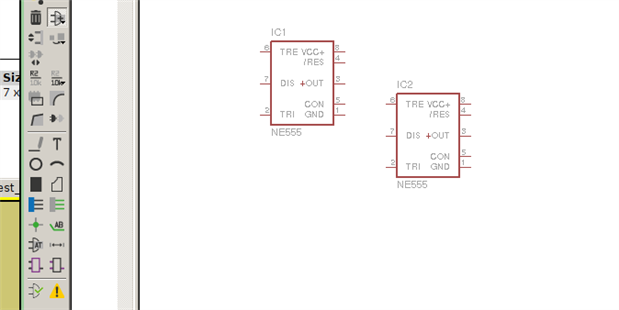
1. I click 'Add'->'Search' then select my part and place it on the schematic sheet (first Image).

2. I hit 'Esc' and the part-outline disappears but I don't get back my 'Add' dialog (second Image). Note that the 'Add' Icon is still selected, but clicking does absolutely nothing. The cursor shape is still a cross-hair.

3. I have to Ctrl-C and exit Eagle completely (third image).

imageimage

image

  • Sign in to reply
  • Cancel
  • autodeskguest
    autodeskguest over 10 years ago

    On 27/03/15 03:44, Veek M wrote:

    I had reported this bug earlier. I'm on:

    Debian 7.7 Linux deathstar 3.2.0-4-amd64 #1 SMP Debian 3.2.63-2+deb7u2

    x86_64 GNU/Linux

    ldd reports no missing libraries.


    1. I click 'Add'->'Search' then select my part and place it on the

    schematic sheet (first Image).

    2. I hit 'Esc' and the part-outline disappears but I don't get back my

    'Add' dialog (second Image). Note that the 'Add' Icon is still selected,

    but clicking does absolutely nothing. The cursor shape is still a

    cross-hair.


    Are you sure your window manager hasn't done something stupid like bring

    the add dialogue back up behind one of the other windows?


    • Cancel
    • Vote Up 0 Vote Down
    • Sign in to reply
    • Cancel
  • Former Member
    Former Member over 10 years ago in reply to autodeskguest

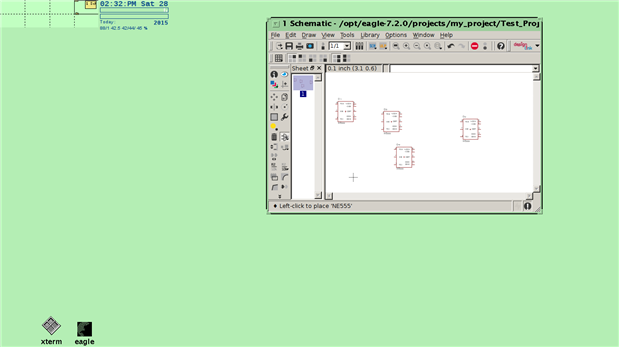
    I closed all my windows, started Xterm, started eagle (control panel), started Schematic Editor, then minimized Control Panel and Xterm and this is what it looks like after I add NE 555 and hit Esc. As you can see, none of the virtual-desktops (1,2,3,5,6,7,8) have an open window The two minimized windows show up as 2xtiny squares in virtual desktop-4. Is there a way to detect if a window if off-screen? I'll try to paste strace output..

    image

    • Cancel
    • Vote Up 0 Vote Down
    • Sign in to reply
    • Cancel
  • Former Member
    Former Member over 10 years ago in reply to Former Member

    [Did some further testing]

    This is with Schematic open (just two eagle 'clients'):

    deathstar> xlsclients|grep -i eagle

    deathstar  /opt/eagle-7.2.0/bin/eagle

    deathstar  /opt/eagle-7.2.0/bin/eagle


    This is with Schematic-->AddPart after 'OK'

    This is odd because apparently, the window goes into the background (disappears) when you select NE 555 and click okay vs getting killed off.

    deathstar> xlsclients|grep -i eagle

    deathstar  /opt/eagle-7.2.0/bin/eagle

    deathstar  /opt/eagle-7.2.0/bin/eagle

    deathstar  /opt/eagle-7.2.0/bin/eagle


    And this is with Schematic-->after 'Esc'

    deathstar> xlsclients|grep -i eagle

    deathstar  /opt/eagle-7.2.0/bin/eagle

    deathstar  /opt/eagle-7.2.0/bin/eagle

    deathstar  /opt/eagle-7.2.0/bin/eagle


    So the problem seems to be with bringing the hidden window back.. when you hit 'Esc' and perhaps whatever Eagle is doing to to bring back the hidden window is not enough..

    • Cancel
    • Vote Up 0 Vote Down
    • Sign in to reply
    • Cancel
  • autodeskguest
    autodeskguest over 10 years ago in reply to Former Member

    On 28/03/15 09:15, Veek M wrote:

    perhaps you are correct - as in, the window could be opening completely

    off screen (for some mysterious reason). I'm not able to "Quit"

    Right-click on window>Menu>Quit, however every other GTK/QT app

    works (GIMP, K3B, Nautilius, Dolphin and Wine-apps)  so..


    Strangely, this post doesn't appear on the Element14 site but something

    totally different does! Did you perhaps go back and edit after

    submitting? If so, it's a bad idea, because Element14 is only one of

    three portals backed by the same NNTP feed that many of the older, more

    experienced users access directly (as I do). Retrospective edits don't

    propagate.


    Anyway, as an occasional GUI programmer, I can certainly see reasons for

    the add dialog to be merely hidden while you're placing the part, as it

    should then be easier to re-show it when you hit escape. However, that

    process relies on Eagle calling a QT (third-party GUI library) function

    that passes a request to your window manager to re-shuffle the window

    stack. Some WMs are better than others at actually obeying such

    requests. I don't recognise your desktop. I can say that I've never had

    any problem with this on XFCE, IceWM, Gnome or LXDE. If you can, try

    switching to a different desktop/WM and see if the problem goes away for

    you. If so, you need to be looking for settings that might affect it on

    your preferred WM.


    Cheers,

    Rob


    • Cancel
    • Vote Up 0 Vote Down
    • Sign in to reply
    • Cancel
  • Former Member
    Former Member over 10 years ago in reply to autodeskguest

    @Rob Oh! i had no idea - are you guys on USENET (google groups) - that works using NNTP? Yep, I made a post, then edited it after some extra testing - thought this was all via http.


    Re the Qt thing, I don't think that's true because Eagle doesn't seem to be using Qt at all! I've pasted by ldd listing so as you can see, there's no Qt anywhere, whereas with k3b (KDE app) you'll see something like

    libQtCore.so.4 => /usr/lib/x86_64-linux-gnu/libQtCore.so.4 (0x00007f97c6357000)


    I'm using Olvwm (https://en.wikipedia.org/wiki/Olwm), and I'd like to reiterate that every other app works!

    The problem here is that, Eagle is interfacing with X11 directly using 'native' libraries and they *may* have got it wrong, perhaps.


    deathstar> ldd /opt/eagle-7.2.0/bin/eagle

            linux-gate.so.1 =>  (0xf77ae000)

            libXrender.so.1 => /usr/lib/i386-linux-gnu/libXrender.so.1 (0xf777f000)

            libXrandr.so.2 => /usr/lib/i386-linux-gnu/libXrandr.so.2 (0xf7777000)

            libXcursor.so.1 => /usr/lib/i386-linux-gnu/libXcursor.so.1 (0xf776c000)

            libfreetype.so.6 => /usr/lib/i386-linux-gnu/libfreetype.so.6 (0xf76d0000)

            libfontconfig.so.1 => /usr/lib/i386-linux-gnu/libfontconfig.so.1 (0xf769a000)

            libXext.so.6 => /usr/lib/i386-linux-gnu/libXext.so.6 (0xf7688000)

            libX11.so.6 => /usr/lib/i386-linux-gnu/libX11.so.6 (0xf7550000)

            libdl.so.2 => /lib/i386-linux-gnu/i686/cmov/libdl.so.2 (0xf754b000)

            libXi.so.6 => /usr/lib/i386-linux-gnu/libXi.so.6 (0xf753c000)

            libpthread.so.0 => /lib/i386-linux-gnu/i686/cmov/libpthread.so.0 (0xf7523000)

            librt.so.1 => /lib/i386-linux-gnu/i686/cmov/librt.so.1 (0xf751a000)

            libssl.so.1.0.0 => /usr/lib/i386-linux-gnu/i686/cmov/libssl.so.1.0.0 (0xf74c1000)

            libcrypto.so.1.0.0 => /usr/lib/i386-linux-gnu/i686/cmov/libcrypto.so.1.0.0 (0xf7302000)

            libz.so.1 => /lib/i386-linux-gnu/libz.so.1 (0xf72e9000)

            libm.so.6 => /lib/i386-linux-gnu/i686/cmov/libm.so.6 (0xf72c3000)

            libgcc_s.so.1 => /lib/i386-linux-gnu/libgcc_s.so.1 (0xf72a6000)

            libc.so.6 => /lib/i386-linux-gnu/i686/cmov/libc.so.6 (0xf7141000)

            /lib/ld-linux.so.2 (0xf77af000)

            libXfixes.so.3 => /usr/lib/i386-linux-gnu/libXfixes.so.3 (0xf713a000)

            libexpat.so.1 => /lib/i386-linux-gnu/libexpat.so.1 (0xf7112000)

            libxcb.so.1 => /usr/lib/i386-linux-gnu/libxcb.so.1 (0xf70ef000)

            libXau.so.6 => /usr/lib/i386-linux-gnu/libXau.so.6 (0xf70ec000)

            libXdmcp.so.6 => /usr/lib/i386-linux-gnu/libXdmcp.so.6 (0xf70e5000)

    • Cancel
    • Vote Up 0 Vote Down
    • Sign in to reply
    • Cancel
  • autodeskguest
    autodeskguest over 10 years ago in reply to Former Member

    On 28/03/15 14:51, Veek M wrote:

    Re the Qt thing, I don't think that's true because Eagle doesn't seem to

    be using Qt at all! I've pasted by ldd listing so as you can see,

    there's no Qt anywhere, whereas with k3b (KDE app) you'll see something

    like

    libQtCore.so.4 => /usr/lib/x86_64-linux-gnu/libQtCore.so.4

    (0x00007f97c6357000)


    I'm using Olvwm (https://en.wikipedia.org/wiki/Olwm), and I'd like to

    reiterate that every other app works!

    The problem here is that, Eagle is interfacing with X11 directly using

    'native' libraries and they may have got it wrong, perhaps.


    No, Eagle uses Qt (this has been confirmed many times by the developers)

    but for various reasons (to do with portability on varied platforms)

    it's a statically linked copy. Those ldd results you got are mostly the

    dependencies of Qt. KDE apps would never need to do that because they

    are KDE apps and expect to have KDE, which is built on Qt, so the shared

    objects are "always" there.


    I would not be in the slightest bit surprised to find that an obscure WM

    like olvwm has a bug, nor that it doesn't often get exposed by other

    software. This is the nature of such things. The author may even have

    considered it a great feature, without ever considering the unfortunate

    result in a case his usual set of applications don't use. It certainly

    wouldn't be the first time!


    • Cancel
    • Vote Up 0 Vote Down
    • Sign in to reply
    • Cancel
  • Former Member
    Former Member over 10 years ago in reply to autodeskguest

    Ah.. hmm.. yes they use Qt statically, i ran 'strings' on the binary and..

    /home/cs/qt/x11/qt-x11-commercial-src-4.8.6.002/include/Qt/../QtCore/../../../../qt-all-commercial-src-4.8.6.002/src/corelib/thread/qmutex.h


    It's an ICCCM compliant WM, but it doesn't seem to support EWMH because I cannot pull that window to the front manually using 'wmctrl'. I'll test on another WM and see.

    • Cancel
    • Vote Up 0 Vote Down
    • Sign in to reply
    • Cancel
  • Former Member
    Former Member over 10 years ago in reply to Former Member

    tested and eagle works nicely on twm (which does not support EWMH) so.. as you said, probably a bug/'feature'.

    • Cancel
    • Vote Up 0 Vote Down
    • Sign in to reply
    • Cancel
  • Former Member
    Former Member over 10 years ago in reply to Former Member

    I posted to stackoverflow and did some debugging of X-window protocol. I do not think my Window Manager is at fault here. Eagle is doing some kind of detection of window managers and not doing so properly, hence the problem.


    Eagle's behavior wrt OLVWM is different from when it is run under TWM. Under TWM it generates a proper MapNotify and Reparent thus displaying the hidden window, but under OLVWM this is not done. In fact, I can manually have that hidden Eagle window display using xdotools windowmap <window-id> in OLVWM.


    The reason I am so sure is because, under X, one can spy on the application and see what requests are being generated by the application and getting sent to the X-server.

    linux - X11, OLVWM - window manager: Eagle window not appearing - Stack Overflow

    • Cancel
    • Vote Up 0 Vote Down
    • Sign in to reply
    • Cancel
element14 Community

element14 is the first online community specifically for engineers. Connect with your peers and get expert answers to your questions.

  • Members
  • Learn
  • Technologies
  • Challenges & Projects
  • Products
  • Store
  • About Us
  • Feedback & Support
  • FAQs
  • Terms of Use
  • Privacy Policy
  • Legal and Copyright Notices
  • Sitemap
  • Cookies

An Avnet Company © 2026 Premier Farnell Limited. All Rights Reserved.

Premier Farnell Ltd, registered in England and Wales (no 00876412), registered office: Farnell House, Forge Lane, Leeds LS12 2NE.

ICP 备案号 10220084.

Follow element14

  • X
  • Facebook
  • linkedin
  • YouTube