element14 Community
element14 Community
    Register Log In
  • Site
  • Search
  • Log In Register
  • Community Hub
    Community Hub
    • What's New on element14
    • Feedback and Support
    • Benefits of Membership
    • Personal Blogs
    • Members Area
    • Achievement Levels
  • Learn
    Learn
    • Ask an Expert
    • eBooks
    • element14 presents
    • Learning Center
    • Tech Spotlight
    • STEM Academy
    • Webinars, Training and Events
    • Learning Groups
  • Technologies
    Technologies
    • 3D Printing
    • FPGA
    • Industrial Automation
    • Internet of Things
    • Power & Energy
    • Sensors
    • Technology Groups
  • Challenges & Projects
    Challenges & Projects
    • Design Challenges
    • element14 presents Projects
    • Project14
    • Arduino Projects
    • Raspberry Pi Projects
    • Project Groups
  • Products
    Products
    • Arduino
    • Avnet & Tria Boards Community
    • Dev Tools
    • Manufacturers
    • Multicomp Pro
    • Product Groups
    • Raspberry Pi
    • RoadTests & Reviews
  • About Us
    About the element14 Community
  • Store
    Store
    • Visit Your Store
    • Choose another store...
      • Europe
      •  Austria (German)
      •  Belgium (Dutch, French)
      •  Bulgaria (Bulgarian)
      •  Czech Republic (Czech)
      •  Denmark (Danish)
      •  Estonia (Estonian)
      •  Finland (Finnish)
      •  France (French)
      •  Germany (German)
      •  Hungary (Hungarian)
      •  Ireland
      •  Israel
      •  Italy (Italian)
      •  Latvia (Latvian)
      •  
      •  Lithuania (Lithuanian)
      •  Netherlands (Dutch)
      •  Norway (Norwegian)
      •  Poland (Polish)
      •  Portugal (Portuguese)
      •  Romania (Romanian)
      •  Russia (Russian)
      •  Slovakia (Slovak)
      •  Slovenia (Slovenian)
      •  Spain (Spanish)
      •  Sweden (Swedish)
      •  Switzerland(German, French)
      •  Turkey (Turkish)
      •  United Kingdom
      • Asia Pacific
      •  Australia
      •  China
      •  Hong Kong
      •  India
      •  Japan
      •  Korea (Korean)
      •  Malaysia
      •  New Zealand
      •  Philippines
      •  Singapore
      •  Taiwan
      •  Thailand (Thai)
      •  Vietnam
      • Americas
      •  Brazil (Portuguese)
      •  Canada
      •  Mexico (Spanish)
      •  United States
      Can't find the country/region you're looking for? Visit our export site or find a local distributor.
  • Translate
  • Profile
  • Settings
Autodesk EAGLE
  • Products
  • More
Autodesk EAGLE
EAGLE User Support (English) bPlace wrong position
  • Blog
  • Forum
  • Documents
  • Events
  • Polls
  • Files
  • Members
  • Mentions
  • Sub-Groups
  • Tags
  • More
  • Cancel
  • New
Join Autodesk EAGLE to participate - click to join for free!
Actions
  • Share
  • More
  • Cancel
Forum Thread Details
  • State Verified Answer
  • Replies 14 replies
  • Answers 5 answers
  • Subscribers 190 subscribers
  • Views 2074 views
  • Users 0 members are here
Related

bPlace wrong position

dave.calaway
dave.calaway over 8 years ago

Hi everybody,

the first image is my pcb on eagle - board layout -, but when i generate the Gerbel file, the bPlace was in a wrong position - second image.

I use this guide to add the "Silk Screen SOL": https://goo.gl/ujCzQc   - third image - .


Someone can help me?

image

image

image

  • Sign in to reply
  • Cancel
  • Jorge_Garcia
    0 Jorge_Garcia over 8 years ago in reply to dave.calaway

    Hello Dave,


    I hope you're doing well. No worries, using either extension set will work just fine for any gerber viewer. Since the gerber standard never specified extensions gerber viewers can adapt.


    Please let me know if there's anything else I can do for you.


    Best Regards,

    Jorge Garcia

    • Cancel
    • Vote Up 0 Vote Down
    • Sign in to reply
    • Verify Answer
    • Cancel
  • dave.calaway
    0 dave.calaway over 8 years ago in reply to Jorge_Garcia

    Thx you for your help, now it's works.

    All the new gerber output are create in X2 format.


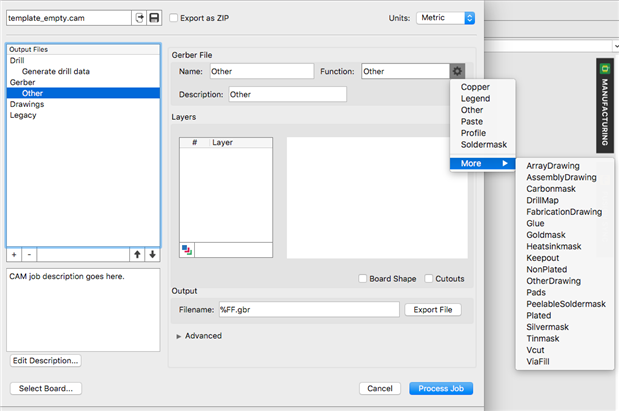
    I seen that the extension is always x.gbr in X2, but when i convert the legacy files it remain the old extension. If i left the new x.gbr extension, the gerber viewer can will have some problem?

    Could you explain me the parameters in the last pic?

    image

    image

    • Cancel
    • Vote Up 0 Vote Down
    • Sign in to reply
    • Verify Answer
    • Cancel
  • Jorge_Garcia
    0 Jorge_Garcia over 8 years ago in reply to rachaelp

    We're on it.


    Best Regards,

    Jorge Garcia

    • Cancel
    • Vote Up 0 Vote Down
    • Sign in to reply
    • Verify Answer
    • Cancel
  • rachaelp
    0 rachaelp over 8 years ago in reply to Jorge_Garcia

    Jorge_Garcia  wrote:


    Alternatively, you can have everything using the legacy system. That will also work, the key here is that you don't want to mix them.


    Might I suggest that the CAM tell you this rather than letting people do it? A message saying that in order to add a new X2 layer then the legacy job must be converted and offer to convert it to the new format at that point.


    Best Regards,


    Rachael

    • Cancel
    • Vote Up 0 Vote Down
    • Sign in to reply
    • Verify Answer
    • Cancel
  • Jorge_Garcia
    0 Jorge_Garcia over 8 years ago

    Hi Dave,


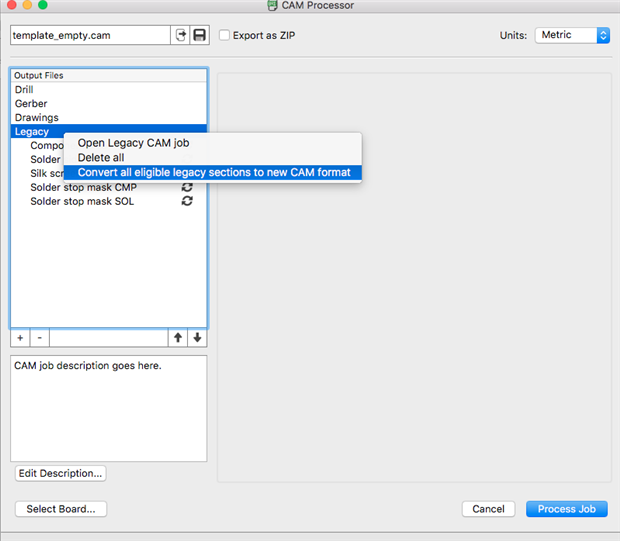
    I hope your doing well. The main issue here appears to be that you have mixed a legacy CAM job with the new Gerber file format. The offsets are calculated differently in each system so you shouldn't mix them. The recommended solution is to convert all of your legacy sections to the new format and export the gerbers then. You can do this easily by right clicking the word Legacy and you'll see an option to convert all of the sections to GerberX2.


    Alternatively, you can have everything using the legacy system. That will also work, the key here is that you don't want to mix them.


    Please let me know if there's anything else I can do for you.


    Best Regards,

    Jorge Garcia

    Autodesk Support

    • Cancel
    • Vote Up +1 Vote Down
    • Sign in to reply
    • Verify Answer
    • Reject Answer
    • Cancel
  • rachaelp
    0 rachaelp over 8 years ago in reply to dave.calaway

    dave.calaway  wrote:


    Works on the 8.5.2!


    Right, I see it was a typo which you've now updated image


    I'm sure somebody from Autodesk will see this and will take a look at what's going on. They are very responsive with fixing bugs these days so I would expect they will be all over this.


    Best Regards,


    Rachael

    • Cancel
    • Vote Up 0 Vote Down
    • Sign in to reply
    • Verify Answer
    • Reject Answer
    • Cancel
  • rachaelp
    0 rachaelp over 8 years ago in reply to dave.calaway

    dave.calaway  wrote:


    Works on the 5.3.2!


    Right ok, it would be interesting to know if it works on 8.5.2 though to be 100% sure it's an issue specific to the new CAM processor rather than in any other change between 5.3.2 and 8.6.0.


    5.3.2 is very old and there are no doubt lots of changes went in between that and the latest version, a good number of them by CADSoft rather than Autodesk.


    Best Regards,


    Rachael

    • Cancel
    • Vote Up 0 Vote Down
    • Sign in to reply
    • Verify Answer
    • Reject Answer
    • Cancel
  • dave.calaway
    0 dave.calaway over 8 years ago in reply to autodeskguest

    The offset is ok image

    • Cancel
    • Vote Up 0 Vote Down
    • Sign in to reply
    • Verify Answer
    • Cancel
  • autodeskguest
    0 autodeskguest over 8 years ago

    On 31.01.2018 14:13, Dave Calaway wrote:

    Hi everybody,

    the first image is my pcb on eagle - board layout -, but when i generate the Gerbel file, the bPlace was in a wrong position - second image.

    I use this guide to add the "Silk Screen SOL": https://goo.gl/ujCzQc  (https://goo.gl/ujCzQc)  - third image - .


    Someone can help me?


    --


    Check if the "offset" checkbox is ticked (or not) at all jobs.

    If not, you may get skew..


    • Cancel
    • Vote Up 0 Vote Down
    • Sign in to reply
    • Verify Answer
    • Cancel
  • dave.calaway
    0 dave.calaway over 8 years ago

    rachaelp

    Works on the 8.5.2!

    @Autodesk fail this time.

    image

    • Cancel
    • Vote Up +1 Vote Down
    • Sign in to reply
    • Verify Answer
    • Reject Answer
    • Cancel
>
element14 Community

element14 is the first online community specifically for engineers. Connect with your peers and get expert answers to your questions.

  • Members
  • Learn
  • Technologies
  • Challenges & Projects
  • Products
  • Store
  • About Us
  • Feedback & Support
  • FAQs
  • Terms of Use
  • Privacy Policy
  • Legal and Copyright Notices
  • Sitemap
  • Cookies

An Avnet Company © 2026 Premier Farnell Limited. All Rights Reserved.

Premier Farnell Ltd, registered in England and Wales (no 00876412), registered office: Farnell House, Forge Lane, Leeds LS12 2NE.

Follow element14

  • X
  • Facebook
  • linkedin
  • YouTube