
element14 Community
element14 Community
    Register Log In
  • Site
  • Search
  • Log In Register
  • Community Hub
    Community Hub
    • What's New on element14
    • Feedback and Support
    • Benefits of Membership
    • Personal Blogs
    • Members Area
    • Achievement Levels
  • Learn
    Learn
    • Ask an Expert
    • eBooks
    • element14 presents
    • Learning Center
    • Tech Spotlight
    • STEM Academy
    • Webinars, Training and Events
    • Learning Groups
  • Technologies
    Technologies
    • 3D Printing
    • FPGA
    • Industrial Automation
    • Internet of Things
    • Power & Energy
    • Sensors
    • Technology Groups
  • Challenges & Projects
    Challenges & Projects
    • Design Challenges
    • element14 presents Projects
    • Project14
    • Arduino Projects
    • Raspberry Pi Projects
    • Project Groups
  • Products
    Products
    • Arduino
    • Avnet & Tria Boards Community
    • Dev Tools
    • Manufacturers
    • Multicomp Pro
    • Product Groups
    • Raspberry Pi
    • RoadTests & Reviews
  • About Us
    About the element14 Community
  • Store
    Store
    • Visit Your Store
    • Choose another store...
      • Europe
      •  Austria (German)
      •  Belgium (Dutch, French)
      •  Bulgaria (Bulgarian)
      •  Czech Republic (Czech)
      •  Denmark (Danish)
      •  Estonia (Estonian)
      •  Finland (Finnish)
      •  France (French)
      •  Germany (German)
      •  Hungary (Hungarian)
      •  Ireland
      •  Israel
      •  Italy (Italian)
      •  Latvia (Latvian)
      •  
      •  Lithuania (Lithuanian)
      •  Netherlands (Dutch)
      •  Norway (Norwegian)
      •  Poland (Polish)
      •  Portugal (Portuguese)
      •  Romania (Romanian)
      •  Russia (Russian)
      •  Slovakia (Slovak)
      •  Slovenia (Slovenian)
      •  Spain (Spanish)
      •  Sweden (Swedish)
      •  Switzerland(German, French)
      •  Turkey (Turkish)
      •  United Kingdom
      • Asia Pacific
      •  Australia
      •  China
      •  Hong Kong
      •  India
      •  Japan
      •  Korea (Korean)
      •  Malaysia
      •  New Zealand
      •  Philippines
      •  Singapore
      •  Taiwan
      •  Thailand (Thai)
      •  Vietnam
      • Americas
      •  Brazil (Portuguese)
      •  Canada
      •  Mexico (Spanish)
      •  United States
      Can't find the country/region you're looking for? Visit our export site or find a local distributor.
  • Translate
  • Profile
  • Settings
Autodesk EAGLE
  • Products
  • More
Autodesk EAGLE
EAGLE User Support (English) Connect 'Source' signal name to 'GND'
  • Blog
  • Forum
  • Documents
  • Events
  • Polls
  • Files
  • Members
  • Mentions
  • Sub-Groups
  • Tags
  • More
  • Cancel
  • New
Join Autodesk EAGLE to participate - click to join for free!
Actions
  • Share
  • More
  • Cancel
Forum Thread Details
  • State Suggested Answer
  • Replies 12 replies
  • Answers 2 answers
  • Subscribers 188 subscribers
  • Views 3569 views
  • Users 0 members are here
Related

Connect 'Source' signal name to 'GND'

dhofer
dhofer over 8 years ago

image

Hello,

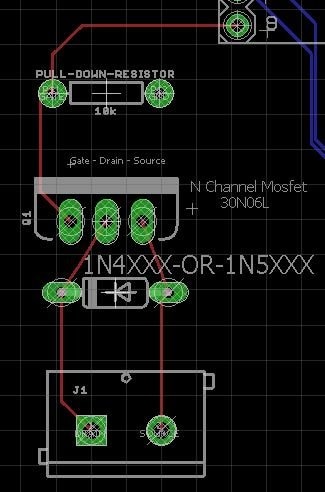
I need to attach the 'Source' on the this diode to GND without changing its name but Eagle will not allow me to do so.  I've found older threads that mention creating a 'short' type part to do this.

But, I am wondering if this is made easier with newer version of Eagle?  I'm a maker who has managed to create 2 PCB with Eagle that actually work, but still consider myself an extreme newbie. 

Any guidance would be greatly appreciated.


Dave

  • Sign in to reply
  • Cancel
Parents
  • autodeskguest
    0 autodeskguest over 8 years ago

    Am 09.04.2018 um 14:25 schrieb dave hofer:


    Hello,

    I need to attach the 'Source' on the this diode to GND without changing its name but Eagle will not allow me to do so.  I've found older threads that mention creating a 'short' type part to do this.

    But, I am wondering if this is made easier with newer version of Eagle?  I'm a maker who has managed to create 2 PCB with Eagle that actually work, but still consider myself an extreme newbie.

    Any guidance would be greatly appreciated.


    Dave


    --

    To view any images and attachments in this post, visit:

    https://www.element14.com/community/message/238103


    Hi,

    you want to connect the "anode" to GND?

    You have to do it in schmeatic.

    If you want to connect to the Copper-plate(polygone) you have to

    name the Polygone as GND.

    But in your pic there is a net connected to the anode. What is the name

    of this?

    GND? N$xx?


    Werner


    • Cancel
    • Vote Up 0 Vote Down
    • Sign in to reply
    • Verify Answer
    • Cancel
Reply
  • autodeskguest
    0 autodeskguest over 8 years ago

    Am 09.04.2018 um 14:25 schrieb dave hofer:


    Hello,

    I need to attach the 'Source' on the this diode to GND without changing its name but Eagle will not allow me to do so.  I've found older threads that mention creating a 'short' type part to do this.

    But, I am wondering if this is made easier with newer version of Eagle?  I'm a maker who has managed to create 2 PCB with Eagle that actually work, but still consider myself an extreme newbie.

    Any guidance would be greatly appreciated.


    Dave
     

    --

    To view any images and attachments in this post, visit:

    https://www.element14.com/community/message/238103


    Hi,

    you want to connect the "anode" to GND?

    You have to do it in schmeatic.

    If you want to connect to the Copper-plate(polygone) you have to

    name the Polygone as GND.

    But in your pic there is a net connected to the anode. What is the name

    of this?

    GND? N$xx?


    Werner


    • Cancel
    • Vote Up 0 Vote Down
    • Sign in to reply
    • Verify Answer
    • Cancel
Children
  • dhofer
    0 dhofer over 8 years ago in reply to autodeskguest

    Werner,


    I've added a bit more detail from my board layout.  Pin 9 is from an arduino pro mini (for reference) and all I am doing here is trigger a MOSFET.  Since the device being turned on/off via the MOSFET could have an electric motor, I added the Diode to reduce the power feedback when the motor stopped.  Without the diode, my arduino was resetting each time the motor was powered down (pin 9 pulled low).  I also discovered that this would not work unless I also connected the anode side of the diode to ground.


    I do have a ground plane defined and it is named GND.


    The signal name for the Anode is 'SOURCE' and it's net class is '0 default.'


    I had a few of these built by Seeed Studio and they work fine when I solder a jumper wire from the Anode of the Diode to the GND pin of the pull down resistor.  My challenge is replacing that jumper wire with GND connection to the anode of the diode.


    image

    • Cancel
    • Vote Up 0 Vote Down
    • Sign in to reply
    • Verify Answer
    • Cancel
element14 Community

element14 is the first online community specifically for engineers. Connect with your peers and get expert answers to your questions.

  • Members
  • Learn
  • Technologies
  • Challenges & Projects
  • Products
  • Store
  • About Us
  • Feedback & Support
  • FAQs
  • Terms of Use
  • Privacy Policy
  • Legal and Copyright Notices
  • Sitemap
  • Cookies

An Avnet Company © 2026 Premier Farnell Limited. All Rights Reserved.

Premier Farnell Ltd, registered in England and Wales (no 00876412), registered office: Farnell House, Forge Lane, Leeds LS12 2NE.

Follow element14

  • X
  • Facebook
  • linkedin
  • YouTube