I am starting an electronics workshop for young kids, primarily revolving around microcontrollers, using SMD components with a 1.27mm pitch. As part of the program I will be introducing them to PCB software. The youngsters are eager, impatient and intuitive. I downloaded Eagle 6.2.0/Lite and tried a simple design and here are my experiences.
I worked with Eagle 4.0 more than 10 years ago and have forgotten nearly everything so this will be a trip through memory lane, so practically I am novice with deja vu.
The test design consists of a PIC16F648A-E/PPIC16F648A-E/P, 10 Leds, 2 Hall detectors, a bunch of resistors and a 6 pin connector.
- Placing the main component was straight forward. Also the power supply lines and symbols.
- Next I want to place the leds and bump into the first serious problem. The led is SMD with a 2mm by 1.25mm package.
The add component displays a staggering amount of candidates, this was to be expected. What was not to be expected that it is virtually impossible to make a generic selection. The selection box is very manufacture/part-number orientated. I miss a couple of section options including package type. I randomly browse through the list, and see "0805". I associate this with a resistor package and assume it is correct.
- Next I place the resistors. After some tries, I notice that the magic search string is "*0805*".
- Next I need to place the Hall detectors. I browse through the list and find the SIP3 package.
- Next I need to place the connector.
The connector is a single row, 1.27mm pitch 6 pin connector. I type "connector" in the search. The list is too long to work with. I do not have a brand name or part number to narrow the selection. After a couple of minutes I abandon randomly walking through the list and decide to browse through all the library components for a visual match. Some are good candidates but as there are no dimensions in the description. Selecting a few show that they are all the wrong size. Abandoning that I go to my component suppliers site to search for a matching
manufacture/part-number. None are present in the library, After more than 30 minutes I give up and just select one, knowing that the size is incorrect.
- I complete the schematic and switch to the board component placer.
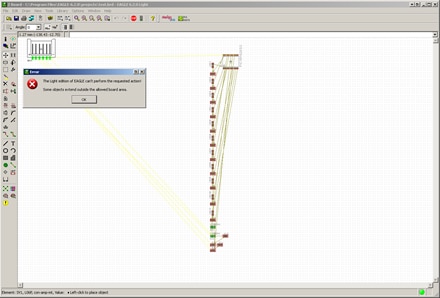
- All the components are located under each other.
I pick up the first to move to a better location and get:
"The light edition of Eagle cannot perform action. Some objects extend outside allowed board area".
No board edge is shown so I do not know where the boundary lies.
I assume you need to set the board size somewhere, but I cannot find any menu item that suggests this.
The help does not offer any solution.
After a two hour session I give up and start writing this posting.
I truly admire Eagle and the capabilities. I do not understand why I cannot place the components on the board in the Lite version. But the component selection screen lacks too many selection tools -- In this case being package type, dimension sizes, pitch, and for the #rows/#pins. I get my stuff from RS-components/Mouser and Farnell, they have the selection tools I was expecting to see. There are just too many components to select on manufacture/part-number/description only, especially when they are incomplete.
The controls of Eagle are reasonably intuitive. But sadly, at this moment I cannot use Eagle for the PCB workshop. Placing of the components is locked, I was not able to try the auto-router, and I cannot expect the kids to spend ages just on finding and selecting the components.