element14 Community
element14 Community
    Register Log In
  • Site
  • Search
  • Log In Register
  • Community Hub
    Community Hub
    • What's New on element14
    • Feedback and Support
    • Benefits of Membership
    • Personal Blogs
    • Members Area
    • Achievement Levels
  • Learn
    Learn
    • Ask an Expert
    • eBooks
    • element14 presents
    • Learning Center
    • Tech Spotlight
    • STEM Academy
    • Webinars, Training and Events
    • Learning Groups
  • Technologies
    Technologies
    • 3D Printing
    • FPGA
    • Industrial Automation
    • Internet of Things
    • Power & Energy
    • Sensors
    • Technology Groups
  • Challenges & Projects
    Challenges & Projects
    • Design Challenges
    • element14 presents Projects
    • Project14
    • Arduino Projects
    • Raspberry Pi Projects
    • Project Groups
  • Products
    Products
    • Arduino
    • Avnet & Tria Boards Community
    • Dev Tools
    • Manufacturers
    • Multicomp Pro
    • Product Groups
    • Raspberry Pi
    • RoadTests & Reviews
  • About Us
  • Store
    Store
    • Visit Your Store
    • Choose another store...
      • Europe
      •  Austria (German)
      •  Belgium (Dutch, French)
      •  Bulgaria (Bulgarian)
      •  Czech Republic (Czech)
      •  Denmark (Danish)
      •  Estonia (Estonian)
      •  Finland (Finnish)
      •  France (French)
      •  Germany (German)
      •  Hungary (Hungarian)
      •  Ireland
      •  Israel
      •  Italy (Italian)
      •  Latvia (Latvian)
      •  
      •  Lithuania (Lithuanian)
      •  Netherlands (Dutch)
      •  Norway (Norwegian)
      •  Poland (Polish)
      •  Portugal (Portuguese)
      •  Romania (Romanian)
      •  Russia (Russian)
      •  Slovakia (Slovak)
      •  Slovenia (Slovenian)
      •  Spain (Spanish)
      •  Sweden (Swedish)
      •  Switzerland(German, French)
      •  Turkey (Turkish)
      •  United Kingdom
      • Asia Pacific
      •  Australia
      •  China
      •  Hong Kong
      •  India
      • Japan
      •  Korea (Korean)
      •  Malaysia
      •  New Zealand
      •  Philippines
      •  Singapore
      •  Taiwan
      •  Thailand (Thai)
      • Vietnam
      • Americas
      •  Brazil (Portuguese)
      •  Canada
      •  Mexico (Spanish)
      •  United States
      Can't find the country/region you're looking for? Visit our export site or find a local distributor.
  • Translate
  • Profile
  • Settings
Autodesk EAGLE
  • Products
  • More
Autodesk EAGLE
EAGLE User Support (English) TSSOP 38 routing problems
  • Blog
  • Forum
  • Documents
  • Events
  • Polls
  • Files
  • Members
  • Mentions
  • Sub-Groups
  • Tags
  • More
  • Cancel
  • New
Join Autodesk EAGLE to participate - click to join for free!
Actions
  • Share
  • More
  • Cancel
Forum Thread Details
  • State Suggested Answer
  • Replies 16 replies
  • Answers 1 answer
  • Subscribers 181 subscribers
  • Views 2224 views
  • Users 0 members are here
  • problems
  • tssop
  • autoroute
Related

TSSOP 38 routing problems

BigJon
BigJon over 13 years ago

Hi,


I've created a dozen or so through hole boards with Eagle (mostly Arduino shields), but I need to create a surface mount board. The DAC I need to use is a TSSOP 38 package (AD5348).


I created a custom library following an online tutorial for the DAC and copied the TSSOP 38 package for a different existing library.


I laid out the board (with the DAC and some op-amps) but the auto route couldnt get past about 75%.


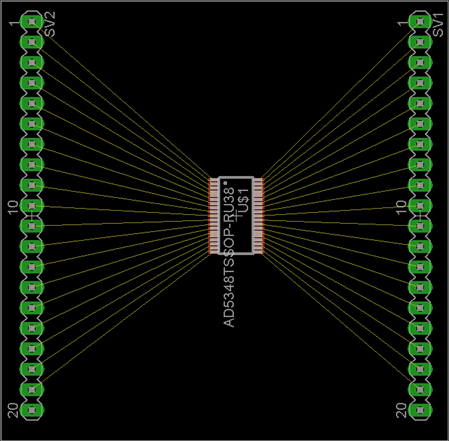
I played for a while, but couldn’t get any further. So, I thought I'd test the part with a simple breakout board. I created a board with just the TSSOP 38 device, fanned out to 0.1" headers.


However, to my surprise, the auto route failed to route this simple board as well. See below. Why would the auto route not be able to fan out this simple board ?


What am I doing wrong ? Or am I expecting too much ?


I'm using the free version of Eagle v6.3.0 with a two layer board.


Thanks.


Jon.
 

image


image

  • Sign in to reply
  • Cancel
Parents
  • BigJon
    0 BigJon over 12 years ago

    Hi,


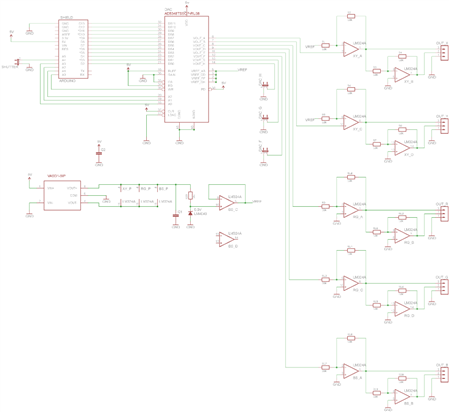
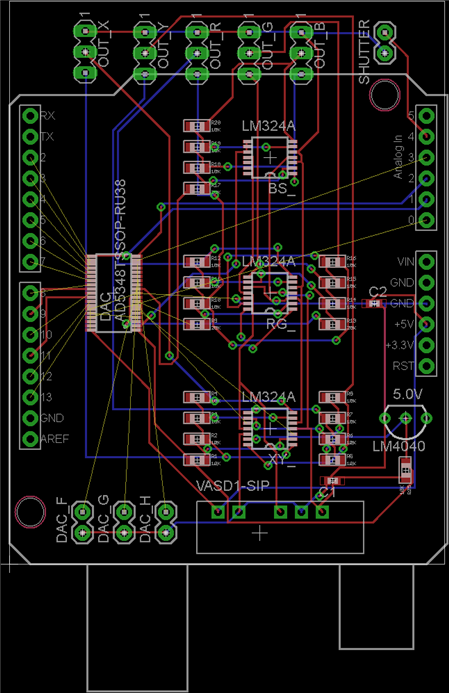
    Thanks for the all the advice. My board still won’t route and my hand routing sucks. If I upload the files, does anyone fancy telling me if it’s possible to get the auto router to work ? And what setting I need to have to do that ... ?


    I've got other changes / iterations I want to make to the board, and don’t want to have to keep hand routing it (badly :-)


    Thanks.


    Jon.


    image


    image

    • Cancel
    • Vote Up 0 Vote Down
    • Sign in to reply
    • Verify Answer
    • Cancel
  • Former Member
    0 Former Member over 12 years ago in reply to BigJon

    Jon Russell wrote:

    Hi,


    Thanks for the all the advise. My board still wont route and my hand

    routing sucks. If I upload the files, does anyone fancy telling me if

    its possible to get the quto router to work ? And what setting I need

    to have to do that ... ?


    I've got other changes / iterations I want to make to the board, and

    dont want to have to keep hand routing it (badly image


    Thanks.


    Jon.

    Image:DACShield-sch.png


    Image:DACShield-brd.png


    Sure,  upload the files.

    I'm faily sure you will run into the size limitation, which for the

    newsgroup and Eagle Central is around 40k   You will likely have to deposit

    them out there on the web somewhere for people to grab.


    Warren


    --

    Viewed / responded via the newsgroup at

    news.cadsoft.de


    • Cancel
    • Vote Up 0 Vote Down
    • Sign in to reply
    • Verify Answer
    • Cancel
  • fustiniadmin
    0 fustiniadmin over 12 years ago in reply to Former Member

    Hello - I'd like to announce that posts exported to the CadSoft NNTP server from element14 Community will now have a footer containing a link to the post on element14.  This solution addresses the problem of missing inline images and file attachments for posts created on element14.  The URL in the footer doesn't require any registration or login to view.  Please contact me with any issues regarding the new footer.


    Thank You,

    Drew Fustini

    element14 Community Dev Team

    • Cancel
    • Vote Up 0 Vote Down
    • Sign in to reply
    • Verify Answer
    • Cancel
  • Former Member
    0 Former Member over 12 years ago in reply to fustiniadmin

    Drew Fustini (admin) schrieb:


    Hello - I'd like to announce that posts exported to the CadSoft NNTP

    server from element14 Community will now have a footer containing a

    link to the post on element14.  This solution addresses the problem

    of missing inline images and file attachments for posts created on

    element14.  The URL in the footer doesn't require any registration or

    login to view.  Please contact me with any issues regarding the new

    footer.


    Thanks for finally addressing this.


    Two comments:

    1. Please modify that link to display the particular post, not the

       start of the thread.

    2. Once this problem is fixed, please correct the line wrap problem

       which is about the same age.

       (Your post, for example, consists of one single line!)


    Tilmann


    • Cancel
    • Vote Up 0 Vote Down
    • Sign in to reply
    • Verify Answer
    • Cancel
  • Former Member
    0 Former Member over 12 years ago in reply to fustiniadmin

    Drew Fustini (admin) wrote:

    Hello - I'd like to announce that posts exported to the CadSoft NNTP

    server from element14 Community will now have a footer containing a

    link to the post on element14. This solution addresses the problem of

    missing inline images and file attachments for posts created on

    element14. The URL in the footer doesn't require any registration or

    login to view. Please contact me with any issues regarding the new

    footer.


    Thank You,

    Drew Fustini

    element14 Community Dev Team


    --

    To view any images and attachments in this post, visit:


    http://www.element14.com/community/message/69093#69093/l/re-tssop-38-routing-problems


    I can't agree that it solves the issue. Sure it's a short cut to the E14

    postings, and I  that will help, should people get  really curious about an

    image someone has posted.

    For me the Element14 site is a bad experience to this side of the world so I

    endeavour to keep away from it. You will appreciate this helps very little.


    A similar but better solution would be to provide a link to the image files

    somewhere at Element14 and not burdon us with the bloated web pages.

    I have been watching your tests and they  promised a solution better than

    this.


    Thanks for trying

    Sorry no prize.

    Warren

    --

    Viewed / responded via the newsgroup at

    news.cadsoft.de


    • Cancel
    • Vote Up 0 Vote Down
    • Sign in to reply
    • Verify Answer
    • Cancel
  • Former Member
    0 Former Member over 12 years ago in reply to Former Member

    On 02/06/2013 02:02 AM, Tilmann Reh wrote:

    Thanks for finally addressing this.


    Two comments: 1. Please modify that link to display the particular

    post, not the start of the thread.


    Thanks for your comments, Tilmann.  I agree the link should point to

    the particular post and will work on correcting that for our next

    release which is March 12th.


    2. Once this problem is fixed, please correct the line wrap problem

    which is about the same age. (Your post, for example, consists of one

    single line!)


    I recently started working on the line wrapping issue again, and it

    will be included in our next release (March 12th).  It will wrap at 72

    characters.


    I appreciate your feedback.  I had posted in this thread as the topic

    of images from element14 had come up.  I'm happy to have further

    discussion in a new thread if needed (maybe in userchat?).  I can also

    be reached directly at afustini@element14.com with any questions or

    concerns.


    Thanks,

    Drew


    • Cancel
    • Vote Up 0 Vote Down
    • Sign in to reply
    • Verify Answer
    • Cancel
  • fustiniadmin
    0 fustiniadmin over 12 years ago in reply to Former Member

    BEGIN PGP SIGNED MESSAGE-----

    Hash: SHA1


    On 02/06/2013 04:33 PM, Drew NNTP Test wrote:

    Thanks for your comments, Tilmann.  I agree the link should point

    to the particular post and will work on correcting that for our

    next release which is March 12th.


    I also wanted to note that I'll shorten the footer URL for the next

    release too as it is currently longer than necessary and goes beyond

    the typical line length.


    Thanks,

    Drew

    -


    BEGIN PGP SIGNATURE-----

    Version: GnuPG v1.4.11 (GNU/Linux)

    Comment: Using GnuPG with undefined - http://www.enigmail.net/


    iQEcBAEBAgAGBQJREtsCAAoJEPlceExUBUNXmaYH/2WMXwxdeYISY606vSIPx7t1

    KvGTEVYGeVqGKknEulXr7ukbL4aTS0YobyVpHPmegMBidWKnyoxlSpfZD4z9MZyM

    flSV44X6qoQVnF1AE4wTgxd7UfsK60GLyvTFXr60JxLRRIbUcdJqeUbTlGQbYA2/

    wAwkkxGtdszt19Jtzj9m74Q68BUhvEt6Bx8B8aAHyVdKmeP+fRo8Q2hBwvc1ScMF

    uAHfCnQk6yIxtnge5Xpz3OsxU6bFoXtIZQuCrV3nW/SRJ1MFzVcfhn0lu5A1UJlV

    yRIdbPVRnSYVvLjtkSJPEmcERK3bX2C65do2UYqIMbxm1iJkxNIPuFslijaTAtM=

    =ueBP

    -


    END PGP SIGNATURE-----


    • Cancel
    • Vote Up 0 Vote Down
    • Sign in to reply
    • Verify Answer
    • Cancel
  • fustiniadmin
    0 fustiniadmin over 12 years ago in reply to Former Member

    On 02/06/2013 03:13 AM, Warren Brayshaw wrote:

    I can't agree that it solves the issue. Sure it's a short cut to the E14

    postings, and I  that will help, should people get  really curious about an

    image someone has posted.

    For me the Element14 site is a bad experience to this side of the world so I

    endeavour to keep away from it. You will appreciate this helps very little.


    A similar but better solution would be to provide a link to the image files

    somewhere at Element14 and not burdon us with the bloated web pages.

    I have been watching your tests and they  promised a solution better than

    this.


    Thanks for trying

    Sorry no prize.

    Warren


    Thanks for the feedback, Warren.  We felt providing a link to the post

    on element14 would provide a good experience as inline images could be

    viewed in context.  In addition, there was no indication to element14

    posters when their attachment was too large to be accepted by the NNTP

    server.  The footer link allows attachments to still be accessed

    regardless of their size.


    I know we had previously discussed having direct links to images and

    attachments embedded in the posts exported from element14.

    Unfortunately, this proved difficult to implement, and the footer link

    was more viable to implement.


    As I responded to Tillman, the footer link will be corrected in our next

    release (planned for March 12th) to point to the specific post rather

    than just the top of the thread.


    I posted in this thread as the topic of images from element14 had come

    up.  I'd like to better understand the poor experience you have with

    visiting element14, so I'll send you an email.  If anyone has further

    comments, then I'd be happy to discuss in a new thread (maybe

    eagle.userchat.eng is appropriate?).


    Thanks,

    Drew

    afustini@element14.com


    • Cancel
    • Vote Up 0 Vote Down
    • Sign in to reply
    • Verify Answer
    • Cancel
  • BigJon
    0 BigJon over 12 years ago in reply to Former Member

    Files attached. Any advice welcomed (my first SMD board, first TSSOP 38, etc).


    Ideally I want to understand what I need to do to get the auto router to route this board. I have a couple of iterations I want to make, and I don't want to have to re-route it by hand every time ?


    THANKS !


    Jon.

    Attachments:
    DACShield.zip
    • Cancel
    • Vote Up 0 Vote Down
    • Sign in to reply
    • Verify Answer
    • Cancel
Reply
  • BigJon
    0 BigJon over 12 years ago in reply to Former Member

    Files attached. Any advice welcomed (my first SMD board, first TSSOP 38, etc).


    Ideally I want to understand what I need to do to get the auto router to route this board. I have a couple of iterations I want to make, and I don't want to have to re-route it by hand every time ?


    THANKS !


    Jon.

    Attachments:
    DACShield.zip
    • Cancel
    • Vote Up 0 Vote Down
    • Sign in to reply
    • Verify Answer
    • Cancel
Children
  • Former Member
    0 Former Member over 12 years ago in reply to BigJon

    Jon Russell wrote:

    Files attached. Any advice welcomed (my first SMD board, first TSSOP

    38, etc).


    Ideally I want to understand what I need to do to get the auto router

    to route this board. I have a couple of iterations I want to make,

    and I don't want to have to re-route it by hand every time ?


    THANKS !


    Jon.


    --

    To view any images and attachments in this post, visit:


    http://www.element14.com/community/message/69363#69363/l/re-tssop-38-routing-problems


    Attachments:

    DACShield.zip


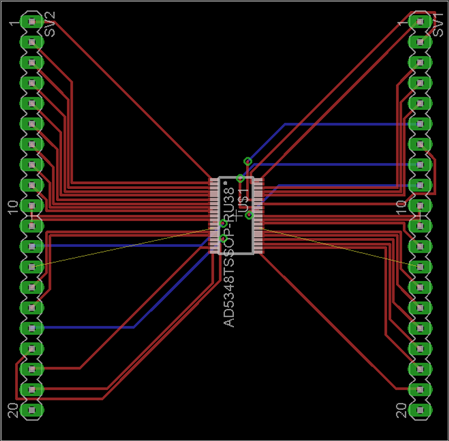
    I managed to have it route 100% most of the time. Initially it would route

    100% but drop back after the final rats nest as the GND polygon could not

    reach some pins.


    Change the normal grid millimetres and set the grid size to 0.1mm

    Then move the DAC package onto that grid by holding down the CTL key when

    you click the package. That gets the pins of the DAC chip onto the 0.1mm

    grid so when we make the routing grid 0.1mm also, the traces will be

    optimally placed.


    Then select the autorouter and change the routing grid to 0.1mm

    The best results were attained with preferred directions for the traces set

    to  none (*)


    The trace size in your DRC of 10mil is fine and the spacing of 8mil is fine

    as well these sizes are similar in scale.

    Try removing the GND polygons initially and let the routing takepalce

    without them. Then add them.


    You dont have a board outline on the dimension layer(20) so the GND pour

    goes to the edge of the board. Decide if thats what you really want.

    Once done you can see a lot of changes that can be done manually to improve

    the routing result e.g swapping pins on resistors.


    HTH

    Warren


    --

    Viewed / responded via the newsgroup at

    news.cadsoft.de


    • Cancel
    • Vote Up 0 Vote Down
    • Sign in to reply
    • Verify Answer
    • Reject Answer
    • Cancel
element14 Community

element14 is the first online community specifically for engineers. Connect with your peers and get expert answers to your questions.

  • Members
  • Learn
  • Technologies
  • Challenges & Projects
  • Products
  • Store
  • About Us
  • Feedback & Support
  • FAQs
  • Terms of Use
  • Privacy Policy
  • Legal and Copyright Notices
  • Sitemap
  • Cookies

An Avnet Company © 2026 Premier Farnell Limited. All Rights Reserved.

Premier Farnell Ltd, registered in England and Wales (no 00876412), registered office: Farnell House, Forge Lane, Leeds LS12 2NE.

ICP 备案号 10220084.

Follow element14

  • X
  • Facebook
  • linkedin
  • YouTube