element14 Community
element14 Community
    Register Log In
  • Site
  • Search
  • Log In Register
  • Community Hub
    Community Hub
    • What's New on element14
    • Feedback and Support
    • Benefits of Membership
    • Personal Blogs
    • Members Area
    • Achievement Levels
  • Learn
    Learn
    • Ask an Expert
    • eBooks
    • element14 presents
    • Learning Center
    • Tech Spotlight
    • STEM Academy
    • Webinars, Training and Events
    • Learning Groups
  • Technologies
    Technologies
    • 3D Printing
    • FPGA
    • Industrial Automation
    • Internet of Things
    • Power & Energy
    • Sensors
    • Technology Groups
  • Challenges & Projects
    Challenges & Projects
    • Design Challenges
    • element14 presents Projects
    • Project14
    • Arduino Projects
    • Raspberry Pi Projects
    • Project Groups
  • Products
    Products
    • Arduino
    • Avnet & Tria Boards Community
    • Dev Tools
    • Manufacturers
    • Multicomp Pro
    • Product Groups
    • Raspberry Pi
    • RoadTests & Reviews
  • About Us
    About the element14 Community
  • Store
    Store
    • Visit Your Store
    • Choose another store...
      • Europe
      •  Austria (German)
      •  Belgium (Dutch, French)
      •  Bulgaria (Bulgarian)
      •  Czech Republic (Czech)
      •  Denmark (Danish)
      •  Estonia (Estonian)
      •  Finland (Finnish)
      •  France (French)
      •  Germany (German)
      •  Hungary (Hungarian)
      •  Ireland
      •  Israel
      •  Italy (Italian)
      •  Latvia (Latvian)
      •  
      •  Lithuania (Lithuanian)
      •  Netherlands (Dutch)
      •  Norway (Norwegian)
      •  Poland (Polish)
      •  Portugal (Portuguese)
      •  Romania (Romanian)
      •  Russia (Russian)
      •  Slovakia (Slovak)
      •  Slovenia (Slovenian)
      •  Spain (Spanish)
      •  Sweden (Swedish)
      •  Switzerland(German, French)
      •  Turkey (Turkish)
      •  United Kingdom
      • Asia Pacific
      •  Australia
      •  China
      •  Hong Kong
      •  India
      •  Japan
      •  Korea (Korean)
      •  Malaysia
      •  New Zealand
      •  Philippines
      •  Singapore
      •  Taiwan
      •  Thailand (Thai)
      •  Vietnam
      • Americas
      •  Brazil (Portuguese)
      •  Canada
      •  Mexico (Spanish)
      •  United States
      Can't find the country/region you're looking for? Visit our export site or find a local distributor.
  • Translate
  • Profile
  • Settings
Autodesk EAGLE
  • Products
  • More
Autodesk EAGLE
EAGLE User Support (English) TSSOP 38 routing problems
  • Blog
  • Forum
  • Documents
  • Events
  • Polls
  • Files
  • Members
  • Mentions
  • Sub-Groups
  • Tags
  • More
  • Cancel
  • New
Join Autodesk EAGLE to participate - click to join for free!
Actions
  • Share
  • More
  • Cancel
Forum Thread Details
  • State Suggested Answer
  • Replies 16 replies
  • Answers 1 answer
  • Subscribers 191 subscribers
  • Views 2826 views
  • Users 0 members are here
  • problems
  • tssop
  • autoroute
Related

TSSOP 38 routing problems

BigJon
BigJon over 13 years ago

Hi,


I've created a dozen or so through hole boards with Eagle (mostly Arduino shields), but I need to create a surface mount board. The DAC I need to use is a TSSOP 38 package (AD5348).


I created a custom library following an online tutorial for the DAC and copied the TSSOP 38 package for a different existing library.


I laid out the board (with the DAC and some op-amps) but the auto route couldnt get past about 75%.


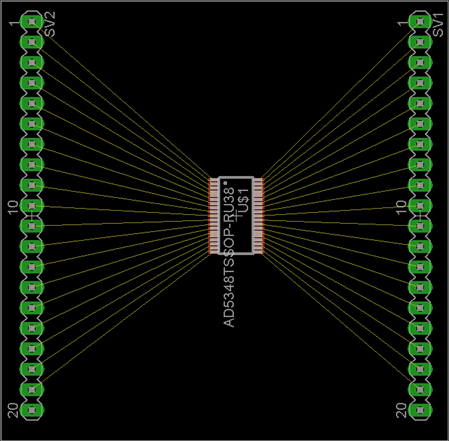
I played for a while, but couldn’t get any further. So, I thought I'd test the part with a simple breakout board. I created a board with just the TSSOP 38 device, fanned out to 0.1" headers.


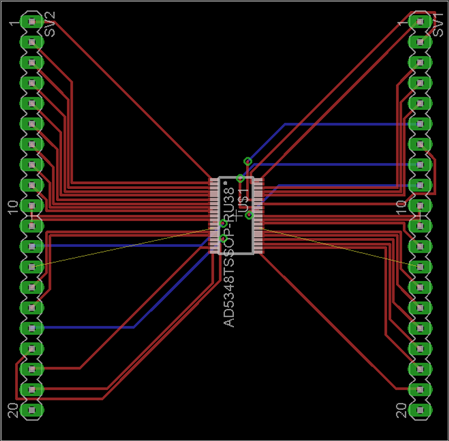
However, to my surprise, the auto route failed to route this simple board as well. See below. Why would the auto route not be able to fan out this simple board ?


What am I doing wrong ? Or am I expecting too much ?


I'm using the free version of Eagle v6.3.0 with a two layer board.


Thanks.


Jon.
 

image


image

  • Sign in to reply
  • Cancel
Parents
  • BigJon
    0 BigJon over 13 years ago

    Hi,


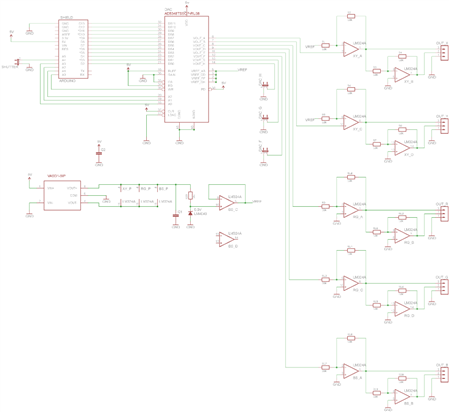
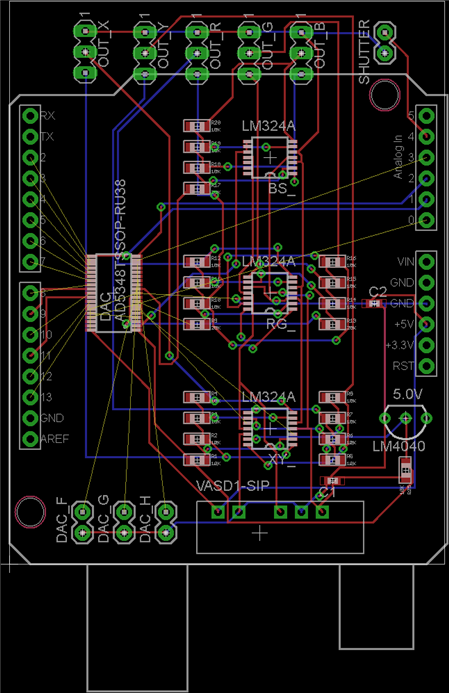
    Thanks for the all the advice. My board still won’t route and my hand routing sucks. If I upload the files, does anyone fancy telling me if it’s possible to get the auto router to work ? And what setting I need to have to do that ... ?


    I've got other changes / iterations I want to make to the board, and don’t want to have to keep hand routing it (badly :-)


    Thanks.


    Jon.


    image


    image

    • Cancel
    • Vote Up 0 Vote Down
    • Sign in to reply
    • Verify Answer
    • Cancel
  • e14 Contributor
    0 e14 Contributor over 13 years ago in reply to BigJon

    Jon Russell wrote:

    Hi,


    Thanks for the all the advise. My board still wont route and my hand

    routing sucks. If I upload the files, does anyone fancy telling me if

    its possible to get the quto router to work ? And what setting I need

    to have to do that ... ?


    I've got other changes / iterations I want to make to the board, and

    dont want to have to keep hand routing it (badly image


    Thanks.


    Jon.

    Image:DACShield-sch.png


    Image:DACShield-brd.png


    Sure,  upload the files.

    I'm faily sure you will run into the size limitation, which for the

    newsgroup and Eagle Central is around 40k   You will likely have to deposit

    them out there on the web somewhere for people to grab.


    Warren


    --

    Viewed / responded via the newsgroup at

    news.cadsoft.de


    • Cancel
    • Vote Up 0 Vote Down
    • Sign in to reply
    • Verify Answer
    • Cancel
  • BigJon
    0 BigJon over 13 years ago in reply to e14 Contributor

    Files attached. Any advice welcomed (my first SMD board, first TSSOP 38, etc).


    Ideally I want to understand what I need to do to get the auto router to route this board. I have a couple of iterations I want to make, and I don't want to have to re-route it by hand every time ?


    THANKS !


    Jon.

    Attachments:
    DACShield.zip
    • Cancel
    • Vote Up 0 Vote Down
    • Sign in to reply
    • Verify Answer
    • Cancel
  • e14 Contributor
    0 e14 Contributor over 13 years ago in reply to BigJon

    Jon Russell wrote:

    Files attached. Any advice welcomed (my first SMD board, first TSSOP

    38, etc).


    Ideally I want to understand what I need to do to get the auto router

    to route this board. I have a couple of iterations I want to make,

    and I don't want to have to re-route it by hand every time ?


    THANKS !


    Jon.


    --

    To view any images and attachments in this post, visit:


    http://www.element14.com/community/message/69363#69363/l/re-tssop-38-routing-problems


    Attachments:

    DACShield.zip


    I managed to have it route 100% most of the time. Initially it would route

    100% but drop back after the final rats nest as the GND polygon could not

    reach some pins.


    Change the normal grid millimetres and set the grid size to 0.1mm

    Then move the DAC package onto that grid by holding down the CTL key when

    you click the package. That gets the pins of the DAC chip onto the 0.1mm

    grid so when we make the routing grid 0.1mm also, the traces will be

    optimally placed.


    Then select the autorouter and change the routing grid to 0.1mm

    The best results were attained with preferred directions for the traces set

    to  none (*)


    The trace size in your DRC of 10mil is fine and the spacing of 8mil is fine

    as well these sizes are similar in scale.

    Try removing the GND polygons initially and let the routing takepalce

    without them. Then add them.


    You dont have a board outline on the dimension layer(20) so the GND pour

    goes to the edge of the board. Decide if thats what you really want.

    Once done you can see a lot of changes that can be done manually to improve

    the routing result e.g swapping pins on resistors.


    HTH

    Warren


    --

    Viewed / responded via the newsgroup at

    news.cadsoft.de


    • Cancel
    • Vote Up 0 Vote Down
    • Sign in to reply
    • Verify Answer
    • Reject Answer
    • Cancel
Reply
  • e14 Contributor
    0 e14 Contributor over 13 years ago in reply to BigJon

    Jon Russell wrote:

    Files attached. Any advice welcomed (my first SMD board, first TSSOP

    38, etc).


    Ideally I want to understand what I need to do to get the auto router

    to route this board. I have a couple of iterations I want to make,

    and I don't want to have to re-route it by hand every time ?


    THANKS !


    Jon.


    --

    To view any images and attachments in this post, visit:


    http://www.element14.com/community/message/69363#69363/l/re-tssop-38-routing-problems


    Attachments:

    DACShield.zip


    I managed to have it route 100% most of the time. Initially it would route

    100% but drop back after the final rats nest as the GND polygon could not

    reach some pins.


    Change the normal grid millimetres and set the grid size to 0.1mm

    Then move the DAC package onto that grid by holding down the CTL key when

    you click the package. That gets the pins of the DAC chip onto the 0.1mm

    grid so when we make the routing grid 0.1mm also, the traces will be

    optimally placed.


    Then select the autorouter and change the routing grid to 0.1mm

    The best results were attained with preferred directions for the traces set

    to  none (*)


    The trace size in your DRC of 10mil is fine and the spacing of 8mil is fine

    as well these sizes are similar in scale.

    Try removing the GND polygons initially and let the routing takepalce

    without them. Then add them.


    You dont have a board outline on the dimension layer(20) so the GND pour

    goes to the edge of the board. Decide if thats what you really want.

    Once done you can see a lot of changes that can be done manually to improve

    the routing result e.g swapping pins on resistors.


    HTH

    Warren


    --

    Viewed / responded via the newsgroup at

    news.cadsoft.de


    • Cancel
    • Vote Up 0 Vote Down
    • Sign in to reply
    • Verify Answer
    • Reject Answer
    • Cancel
Children
No Data
element14 Community

element14 is the first online community specifically for engineers. Connect with your peers and get expert answers to your questions.

  • Members
  • Learn
  • Technologies
  • Challenges & Projects
  • Products
  • Store
  • About Us
  • Feedback & Support
  • FAQs
  • Terms of Use
  • Privacy Policy
  • Legal and Copyright Notices
  • Sitemap
  • Cookies

An Avnet Company © 2026 Premier Farnell Limited. All Rights Reserved.

Premier Farnell Ltd, registered in England and Wales (no 00876412), registered office: Farnell House, Forge Lane, Leeds LS12 2NE.

Follow element14

  • X
  • Facebook
  • linkedin
  • YouTube