element14 Community
element14 Community
    Register Log In
  • Site
  • Search
  • Log In Register
  • Community Hub
    Community Hub
    • What's New on element14
    • Feedback and Support
    • Benefits of Membership
    • Personal Blogs
    • Members Area
    • Achievement Levels
  • Learn
    Learn
    • Ask an Expert
    • eBooks
    • element14 presents
    • Learning Center
    • Tech Spotlight
    • STEM Academy
    • Webinars, Training and Events
    • Learning Groups
  • Technologies
    Technologies
    • 3D Printing
    • FPGA
    • Industrial Automation
    • Internet of Things
    • Power & Energy
    • Sensors
    • Technology Groups
  • Challenges & Projects
    Challenges & Projects
    • Design Challenges
    • element14 presents Projects
    • Project14
    • Arduino Projects
    • Raspberry Pi Projects
    • Project Groups
  • Products
    Products
    • Arduino
    • Avnet & Tria Boards Community
    • Dev Tools
    • Manufacturers
    • Multicomp Pro
    • Product Groups
    • Raspberry Pi
    • RoadTests & Reviews
  • About Us
  • Store
    Store
    • Visit Your Store
    • Choose another store...
      • Europe
      •  Austria (German)
      •  Belgium (Dutch, French)
      •  Bulgaria (Bulgarian)
      •  Czech Republic (Czech)
      •  Denmark (Danish)
      •  Estonia (Estonian)
      •  Finland (Finnish)
      •  France (French)
      •  Germany (German)
      •  Hungary (Hungarian)
      •  Ireland
      •  Israel
      •  Italy (Italian)
      •  Latvia (Latvian)
      •  
      •  Lithuania (Lithuanian)
      •  Netherlands (Dutch)
      •  Norway (Norwegian)
      •  Poland (Polish)
      •  Portugal (Portuguese)
      •  Romania (Romanian)
      •  Russia (Russian)
      •  Slovakia (Slovak)
      •  Slovenia (Slovenian)
      •  Spain (Spanish)
      •  Sweden (Swedish)
      •  Switzerland(German, French)
      •  Turkey (Turkish)
      •  United Kingdom
      • Asia Pacific
      •  Australia
      •  China
      •  Hong Kong
      •  India
      •  Korea (Korean)
      •  Malaysia
      •  New Zealand
      •  Philippines
      •  Singapore
      •  Taiwan
      •  Thailand (Thai)
      • Americas
      •  Brazil (Portuguese)
      •  Canada
      •  Mexico (Spanish)
      •  United States
      Can't find the country/region you're looking for? Visit our export site or find a local distributor.
  • Translate
  • Profile
  • Settings
Autodesk EAGLE
  • Products
  • More
Autodesk EAGLE
EAGLE User Support (English) Pin names on custom symbol
  • Blog
  • Forum
  • Documents
  • Events
  • Polls
  • Files
  • Members
  • Mentions
  • Sub-Groups
  • Tags
  • More
  • Cancel
  • New
Join Autodesk EAGLE to participate - click to join for free!
Actions
  • Share
  • More
  • Cancel
Forum Thread Details
  • State Not Answered
  • Replies 3 replies
  • Subscribers 179 subscribers
  • Views 1665 views
  • Users 0 members are here
Related

Pin names on custom symbol

Former Member
Former Member over 12 years ago

Hello,


Is there an ASCII character to make certain characters in a symbol pin name subscript?  I am aware that the '!' character before and after text creates an overline for NOT inputs/outputs etc.


Also, how can you reduce the font size so that the opposite pin names do not overlap?  Currently it is set to 'Proportional' but I have also tried 'Fixed'.  Can the existing font size for pin names be changed?


The picture below shows the symbol I have attempted to create in Eagle with the actual manufacturers pin assignment diagram to the right of it.  I cannot reduce the font size of the (N.C.) Boost pin name on my Eagle part hence the symbol size has to be stretched horizontally to avoid overlap with the V+ text.  I also could not make +/- and V(OUT) subscript?


Thanks.


image

  • Sign in to reply
  • Cancel
  • autodeskguest
    0 autodeskguest over 12 years ago

    On 18.04.2013 18:20, Gallium wrote:

    Hello,


    Is there an ASCII character to make certain characters in a symbol pin

    name subscript?  I am aware that the '!' character before and after text

    creates an overline for NOT inputs/outputs etc.


    Also, how can you reduce the font size so that the opposite pin names do

    not overlap?  Currently it is set to 'Proportional' but I have also

    tried 'Fixed'.  Can the existing font size for pin names be changed?


    No, the font size and position is fix and not user-definable.

    You could set Vsible = off and write the pin texts with the TEX command

    directly.


    The diagram below shows the symbol I have attempted to create in Eagle

    with the actual manufacturers pin assignment diagram to the right of

    it.  I cannot reduce the font size of the (N.C.) Boost pin name on my

    Eagle part hence the symbol size has to be stretched horizontally to

    avoid overlap with the V+ text.  I also could not make +/- and V(OUT)

    subscript?


    Thanks.


    --

    To view any images and attachments in this post, visit:

    http://www.element14.com/community/message/74426#74426


    --

    Mit freundlichen Gruessen / Best regards

    Richard Hammerl

      CadSoft Support -- hotline@cadsoft.de

      FAQ: http://www.cadsoft.de/training/faq/


    • Cancel
    • Vote Up 0 Vote Down
    • Sign in to reply
    • Verify Answer
    • Cancel
  • Former Member
    0 Former Member over 12 years ago in reply to autodeskguest


    No, the font size and position is fix and not user-definable.

    You could set Vsible = off and write the pin texts with the TEX command

    directly.


    --

    Mit freundlichen Gruessen / Best regards

    Richard Hammerl

      CadSoft Support -- hotline@cadsoft.de

      FAQ: http://www.cadsoft.de/training/faq/


    Richard,


    Could you please explain what you mean by the above - How do I set Vsible = off?


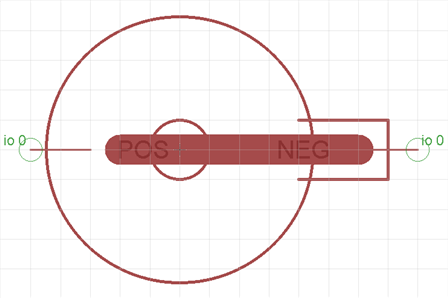
    Also, is it possible to move the symbol pin text?  I would like to move POS and NEG in the coin cell battery holder symbol below?


    image


    Thanks.

    • Cancel
    • Vote Up 0 Vote Down
    • Sign in to reply
    • Verify Answer
    • Cancel
  • bmoe
    0 bmoe over 12 years ago in reply to Former Member

    Hi.


    The symbol pin text can not be moved but in the library symbol editor you can rightclick on your pin and chose properties, there you have an option called visible and if you set thet to OFF then you will not see either the pin name or number in your schematic.

    Instead you can use the text command to add text, like pin names wich you can change the size of, to your symbol, and place it whereever you want.


    /Matias

    • Cancel
    • Vote Up 0 Vote Down
    • Sign in to reply
    • Verify Answer
    • Cancel
element14 Community

element14 is the first online community specifically for engineers. Connect with your peers and get expert answers to your questions.

  • Members
  • Learn
  • Technologies
  • Challenges & Projects
  • Products
  • Store
  • About Us
  • Feedback & Support
  • FAQs
  • Terms of Use
  • Privacy Policy
  • Legal and Copyright Notices
  • Sitemap
  • Cookies

An Avnet Company © 2025 Premier Farnell Limited. All Rights Reserved.

Premier Farnell Ltd, registered in England and Wales (no 00876412), registered office: Farnell House, Forge Lane, Leeds LS12 2NE.

ICP 备案号 10220084.

Follow element14

  • X
  • Facebook
  • linkedin
  • YouTube