element14 Community
element14 Community
    Register Log In
  • Site
  • Search
  • Log In Register
  • Community Hub
    Community Hub
    • What's New on element14
    • Feedback and Support
    • Benefits of Membership
    • Personal Blogs
    • Members Area
    • Achievement Levels
  • Learn
    Learn
    • Ask an Expert
    • eBooks
    • element14 presents
    • Learning Center
    • Tech Spotlight
    • STEM Academy
    • Webinars, Training and Events
    • Learning Groups
  • Technologies
    Technologies
    • 3D Printing
    • FPGA
    • Industrial Automation
    • Internet of Things
    • Power & Energy
    • Sensors
    • Technology Groups
  • Challenges & Projects
    Challenges & Projects
    • Design Challenges
    • element14 presents Projects
    • Project14
    • Arduino Projects
    • Raspberry Pi Projects
    • Project Groups
  • Products
    Products
    • Arduino
    • Avnet & Tria Boards Community
    • Dev Tools
    • Manufacturers
    • Multicomp Pro
    • Product Groups
    • Raspberry Pi
    • RoadTests & Reviews
  • About Us
  • Store
    Store
    • Visit Your Store
    • Choose another store...
      • Europe
      •  Austria (German)
      •  Belgium (Dutch, French)
      •  Bulgaria (Bulgarian)
      •  Czech Republic (Czech)
      •  Denmark (Danish)
      •  Estonia (Estonian)
      •  Finland (Finnish)
      •  France (French)
      •  Germany (German)
      •  Hungary (Hungarian)
      •  Ireland
      •  Israel
      •  Italy (Italian)
      •  Latvia (Latvian)
      •  
      •  Lithuania (Lithuanian)
      •  Netherlands (Dutch)
      •  Norway (Norwegian)
      •  Poland (Polish)
      •  Portugal (Portuguese)
      •  Romania (Romanian)
      •  Russia (Russian)
      •  Slovakia (Slovak)
      •  Slovenia (Slovenian)
      •  Spain (Spanish)
      •  Sweden (Swedish)
      •  Switzerland(German, French)
      •  Turkey (Turkish)
      •  United Kingdom
      • Asia Pacific
      •  Australia
      •  China
      •  Hong Kong
      •  India
      • Japan
      •  Korea (Korean)
      •  Malaysia
      •  New Zealand
      •  Philippines
      •  Singapore
      •  Taiwan
      •  Thailand (Thai)
      • Vietnam
      • Americas
      •  Brazil (Portuguese)
      •  Canada
      •  Mexico (Spanish)
      •  United States
      Can't find the country/region you're looking for? Visit our export site or find a local distributor.
  • Translate
  • Profile
  • Settings
Autodesk EAGLE
  • Products
  • More
Autodesk EAGLE
EAGLE User Support (English) Help for footprint (edge mounted connector)
  • Blog
  • Forum
  • Documents
  • Events
  • Polls
  • Files
  • Members
  • Mentions
  • Sub-Groups
  • Tags
  • More
  • Cancel
  • New
Join Autodesk EAGLE to participate - click to join for free!
Actions
  • Share
  • More
  • Cancel
Forum Thread Details
  • State Suggested Answer
  • Replies 8 replies
  • Answers 1 answer
  • Subscribers 183 subscribers
  • Views 1485 views
  • Users 0 members are here
Related

Help for footprint (edge mounted connector)

cgroen
cgroen over 12 years ago

Hello,

I'm doing my first few boards in Eagle, and so far everything is running perfectly (and will upgrade to the full version now) image

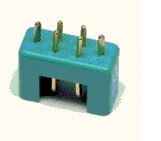
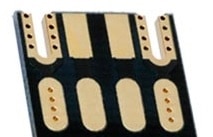
On a new board I'm trying to do I have two 6 pin connectors that I would like to mount on the edge of the board (horisontal). I'm having a hard time how to design that as a footprint. There needs to be to cutouts in the board and these should be plated. I have attached a picture of the connecotor and a picture of how it has been done in another product.

Any help out there ? This is the last thing I need to resolve before my board is being sent (I'm using PCB-POOL)


Thanks for any help (would even consider paying you for a ready made footprint that would do this if reasonable..)


image

image

  • Sign in to reply
  • Cancel
Parents
  • dukepro
    0 dukepro over 12 years ago

    Carsten,


    The attached isn't exactly what you want, but it should serve as a guide

    on how to design an edge connector.  It's a 50-pin card edge connector

    with three different configurations - left end of board edge, right end

    of board edge, and middle of board edge.  As Richard mentioned, you will

    have to work with your board house to specify the gold plating.


    Note that zero-width wires are placed in the Dimension layer to specify

    the cutout.  What's NOT in the design is a polygon or rectangle that

    specifies the top and bottom finish.  Eagle has tFinish and bFinish

    layers to specify exactly this.  You can add sections to your CAM job to

    produce gerber files for these two layers, then name the output files

    AuTop.gbr and AuBot.gbr.  That and a note in the README file should make

    it pretty obvious to the board house which pads should be gold plated.


    Argh!!!  I had to zip the file to get it to post - it's just a hair over

    50k unzipped.


    HTH,

        - Chuck


    On 01/20/2014 11:00 AM, Carsten Groen wrote:

    Hello,

    I'm doing my first few boards in Eagle, and so far everything is running

    perfectly (and will upgrade to the full version now) image

    On a new board I'm trying to do I have two 6 pin connectors that I would

    like to mount on the edge of the board (horisontal). I'm having a hard

    time how to design that as a footprint. There needs to be to cutouts in

    the board and these should be plated. I have attached a picture of the

    connecotor and a picture of how it has been done in another product.

    Any help out there ? This is the last thing I need to resolve before my

    board is being sent (I'm using PCB-POOL)


    Thanks for any help (would even consider paying you for a ready made

    footprint that would do this if reasonable..)


    --

    To view any images and attachments in this post, visit:

    http://www.element14.com/community/message/101512


    Attachments:
    card-edge.lbr.zip
    • Cancel
    • Vote Up 0 Vote Down
    • Sign in to reply
    • Verify Answer
    • Reject Answer
    • Cancel
Reply
  • dukepro
    0 dukepro over 12 years ago

    Carsten,


    The attached isn't exactly what you want, but it should serve as a guide

    on how to design an edge connector.  It's a 50-pin card edge connector

    with three different configurations - left end of board edge, right end

    of board edge, and middle of board edge.  As Richard mentioned, you will

    have to work with your board house to specify the gold plating.


    Note that zero-width wires are placed in the Dimension layer to specify

    the cutout.  What's NOT in the design is a polygon or rectangle that

    specifies the top and bottom finish.  Eagle has tFinish and bFinish

    layers to specify exactly this.  You can add sections to your CAM job to

    produce gerber files for these two layers, then name the output files

    AuTop.gbr and AuBot.gbr.  That and a note in the README file should make

    it pretty obvious to the board house which pads should be gold plated.


    Argh!!!  I had to zip the file to get it to post - it's just a hair over

    50k unzipped.


    HTH,

        - Chuck


    On 01/20/2014 11:00 AM, Carsten Groen wrote:

    Hello,

    I'm doing my first few boards in Eagle, and so far everything is running

    perfectly (and will upgrade to the full version now) image

    On a new board I'm trying to do I have two 6 pin connectors that I would

    like to mount on the edge of the board (horisontal). I'm having a hard

    time how to design that as a footprint. There needs to be to cutouts in

    the board and these should be plated. I have attached a picture of the

    connecotor and a picture of how it has been done in another product.

    Any help out there ? This is the last thing I need to resolve before my

    board is being sent (I'm using PCB-POOL)


    Thanks for any help (would even consider paying you for a ready made

    footprint that would do this if reasonable..)


    --

    To view any images and attachments in this post, visit:

    http://www.element14.com/community/message/101512


    Attachments:
    card-edge.lbr.zip
    • Cancel
    • Vote Up 0 Vote Down
    • Sign in to reply
    • Verify Answer
    • Reject Answer
    • Cancel
Children
  • cgroen
    0 cgroen over 12 years ago in reply to dukepro

    thanks Chuck!

    That did guide me in the right direction! I will have a talk with the PCB guys and see what they say about this.

    Thanks for your help !

    • Cancel
    • Vote Up 0 Vote Down
    • Sign in to reply
    • Verify Answer
    • Cancel
  • Former Member
    0 Former Member over 11 years ago in reply to dukepro

    Chuck -


    Very helpful library!


    I am modifying your CARDEDGE-50 to be a 72-pin edge connector that I need.


    I noticed that the odd-numbered SMD's in CARDEDGE-50 did not exclude stop and cream. That is, the did not have the stop="no" cream="no" attribute. See below.


    All the other SMDs in the library did.


    Is this by design, and, if so, for what reason?


    <smd name="4" x="-27.94" y="5.08" dx="1.397" dy="10.16" layer="1" stop="no" cream="no"/>

    <smd name="2" x="-30.48" y="5.08" dx="1.397" dy="10.16" layer="1" stop="no" cream="no"/>

    <smd name="21" x="-5.08" y="5.08" dx="1.397" dy="10.16" layer="16" rot="R180"/>

    <smd name="23" x="-2.54" y="5.08" dx="1.397" dy="10.16" layer="16" rot="R180"/>


    I am making a simple extender card so I'm not sure it matters. But I certainly would like to know.


    Thanks again for the great card-edge library!


    Cameron Jones

    Synclavier Digital

    • Cancel
    • Vote Up 0 Vote Down
    • Sign in to reply
    • Verify Answer
    • Cancel
element14 Community

element14 is the first online community specifically for engineers. Connect with your peers and get expert answers to your questions.

  • Members
  • Learn
  • Technologies
  • Challenges & Projects
  • Products
  • Store
  • About Us
  • Feedback & Support
  • FAQs
  • Terms of Use
  • Privacy Policy
  • Legal and Copyright Notices
  • Sitemap
  • Cookies

An Avnet Company © 2026 Premier Farnell Limited. All Rights Reserved.

Premier Farnell Ltd, registered in England and Wales (no 00876412), registered office: Farnell House, Forge Lane, Leeds LS12 2NE.

ICP 备案号 10220084.

Follow element14

  • X
  • Facebook
  • linkedin
  • YouTube