element14 Community
element14 Community
    Register Log In
  • Site
  • Search
  • Log In Register
  • Community Hub
    Community Hub
    • What's New on element14
    • Feedback and Support
    • Benefits of Membership
    • Personal Blogs
    • Members Area
    • Achievement Levels
  • Learn
    Learn
    • Ask an Expert
    • eBooks
    • element14 presents
    • Learning Center
    • Tech Spotlight
    • STEM Academy
    • Webinars, Training and Events
    • Learning Groups
  • Technologies
    Technologies
    • 3D Printing
    • FPGA
    • Industrial Automation
    • Internet of Things
    • Power & Energy
    • Sensors
    • Technology Groups
  • Challenges & Projects
    Challenges & Projects
    • Design Challenges
    • element14 presents Projects
    • Project14
    • Arduino Projects
    • Raspberry Pi Projects
    • Project Groups
  • Products
    Products
    • Arduino
    • Avnet & Tria Boards Community
    • Dev Tools
    • Manufacturers
    • Multicomp Pro
    • Product Groups
    • Raspberry Pi
    • RoadTests & Reviews
  • About Us
  • Store
    Store
    • Visit Your Store
    • Choose another store...
      • Europe
      •  Austria (German)
      •  Belgium (Dutch, French)
      •  Bulgaria (Bulgarian)
      •  Czech Republic (Czech)
      •  Denmark (Danish)
      •  Estonia (Estonian)
      •  Finland (Finnish)
      •  France (French)
      •  Germany (German)
      •  Hungary (Hungarian)
      •  Ireland
      •  Israel
      •  Italy (Italian)
      •  Latvia (Latvian)
      •  
      •  Lithuania (Lithuanian)
      •  Netherlands (Dutch)
      •  Norway (Norwegian)
      •  Poland (Polish)
      •  Portugal (Portuguese)
      •  Romania (Romanian)
      •  Russia (Russian)
      •  Slovakia (Slovak)
      •  Slovenia (Slovenian)
      •  Spain (Spanish)
      •  Sweden (Swedish)
      •  Switzerland(German, French)
      •  Turkey (Turkish)
      •  United Kingdom
      • Asia Pacific
      •  Australia
      •  China
      •  Hong Kong
      •  India
      • Japan
      •  Korea (Korean)
      •  Malaysia
      •  New Zealand
      •  Philippines
      •  Singapore
      •  Taiwan
      •  Thailand (Thai)
      • Vietnam
      • Americas
      •  Brazil (Portuguese)
      •  Canada
      •  Mexico (Spanish)
      •  United States
      Can't find the country/region you're looking for? Visit our export site or find a local distributor.
  • Translate
  • Profile
  • Settings
Autodesk EAGLE
  • Products
  • More
Autodesk EAGLE
EAGLE User Support (English) How can I select components booth in schematic and layout at the same time?
  • Blog
  • Forum
  • Documents
  • Events
  • Polls
  • Files
  • Members
  • Mentions
  • Sub-Groups
  • Tags
  • More
  • Cancel
  • New
Join Autodesk EAGLE to participate - click to join for free!
Actions
  • Share
  • More
  • Cancel
Forum Thread Details
  • State Verified Answer
  • Replies 21 replies
  • Subscribers 182 subscribers
  • Views 5641 views
  • Users 0 members are here
Related

How can I select components booth in schematic and layout at the same time?

malevil
malevil over 11 years ago

I've seen and used this practical feature in an other designer system. However if I select let's say IC1 in schematic and move to the layout there is no selection for IC1 at all...

Is there any solution for this?


Thanks,

Zoltan

  • Sign in to reply
  • Cancel

Top Replies

  • AnalogNotes
    AnalogNotes over 11 years ago in reply to AnalogNotes +1 verified
    Well, I copied and pasted from that last message and it was a bit wonky, so I uploaded it to my web page: http://analognotes.com/eagle/pickgrouped.ulp When/if Lorenz uploads it to the Cadsoft site, I'll…
Parents
  • Former Member
    0 Former Member over 11 years ago

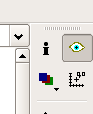
    Doesn't the 'show' button do exactly what the OP asks? With the sch and pcb editor windows both open (and in sync), click the 'show' mode button,

    image

    , then select the component you want highlighting in the schematic, it is also highlighted in the PCB.

    • Cancel
    • Vote Up 0 Vote Down
    • Sign in to reply
    • Verify Answer
    • Cancel
  • malevil
    0 malevil over 11 years ago in reply to Former Member

    actually I doesn't care about simultaneously showing a component on sch and layout but simultaneously selecting a component on booth sch and layout editors!

    So this way I can easily move and distribute them along the layout.

    • Cancel
    • Vote Up 0 Vote Down
    • Sign in to reply
    • Verify Answer
    • Cancel
  • RayA
    0 RayA over 11 years ago in reply to malevil

    This does seem like a useful ULP. Can someone upload it to the ULP files section? I haven't been able to copy the text version in a way that doesn't just provide an error when I run it in EAGLE. I have tried copying in "plain text" format in Textedit, Word, and Open Office. Apparently they all stick enough formatting into the file to mess it up.


    Thanks,

    • Cancel
    • Vote Up 0 Vote Down
    • Sign in to reply
    • Verify Answer
    • Cancel
  • AnalogNotes
    0 AnalogNotes over 11 years ago in reply to RayA

    It's also in the thread "Two scripts to help layout a board from a multi-page schematic..." and I asked Lorenz if he had thought about uploading it.  It does take a couple days to do that because you have to create an account and they approve any uploads before they appear.  I'll try to insert the script again here:


    #usage "<b>pick-up parts in the board editor that are grouped in the schematic</b>\n"

          "<p>"

          "group parts in the schematic, then run pickGrouped"

          "<p>"

          "<author>Author: lorenznl@yahoo.com</author>"


    // THIS PROGRAM IS PROVIDED AS IS AND WITHOUT WARRANTY OF ANY KIND, EXPRESSED OR IMPLIED


    void main (void) {

    string gInSch[], cmd;

    int    gCnt, mx, my;


       // collect the grouped parts

       project.schematic(SCH) {

         SCH.parts(PAR) PAR.instances (INS) {

           if (PAR.device.package && ingroup(INS))

             gInSch[gCnt++] = PAR.name;

         }

       }


       if (gCnt == 0) {

         dlgMessageBox("Nothing grouped in schematic!");

         exit(1);

       }


       project.board (B) {

         clrgroup(B);


         // regroup the collected parts in the board

         //  and determine center of weight

         B.elements (E) {

           if (lookup(gInSch, E.name, 0) != "") {

             mx += E.x;

             my += E.y;

             setgroup(E);

           }

         }


         // pick up the grouped parts at center of weight

         sprintf(cmd, "move (>%.1fmic %.1fmic)", u2mic(mx/gCnt), u2mic(my/gCnt));

         if (project.schematic) cmd = "edit .brd;" + cmd;

         exit(cmd);

       }

    }


    Hopefully that worked.  If not, I'll post it on my web site an give a link...

    • Cancel
    • Vote Up 0 Vote Down
    • Sign in to reply
    • Verify Answer
    • Cancel
  • AnalogNotes
    0 AnalogNotes over 11 years ago in reply to AnalogNotes

    Well, I copied and pasted from that last message and it was a bit wonky, so I uploaded it to my web page:


    http://analognotes.com/eagle/pickgrouped.ulp


    When/if Lorenz uploads it to the Cadsoft site, I'll point to that...

    • Cancel
    • Vote Up +1 Vote Down
    • Sign in to reply
    • Reject Answer
    • Cancel
  • RayA
    0 RayA over 11 years ago in reply to AnalogNotes

    Hi Doug,

    Thanks for the rapid response.


    I downloaded it from the your link, and now I can run it in EAGLE without getting an error. That's an improvement. However, if I group parts in the schematic editor, and "run pickgrouped" in the schematic editor, it does switch me to the layout editor, but nothing is selected there. Is there a trick to picking up the desired parts to move in the layout?


    And if I select a group in the schematic, then switch to the layout and "run pickgrouped" there, I get a message that says "Nothing selected in the schematic.", even though I can still see the group highlighted in the schematic.


    That's better than before, but still not quite successful.

    Ray

    • Cancel
    • Vote Up 0 Vote Down
    • Sign in to reply
    • Verify Answer
    • Cancel
  • AnalogNotes
    0 AnalogNotes over 11 years ago in reply to RayA

    That's odd...  Bear with the silly questions for just a second please, but what version of EAGLE are you running, and what kind of computer and OS do you have?


    FWIW, I tested on a Windows 7 computer with EAGLE 6.5 and I can run the script from either schematic or board.  I'll test on my Vista box and Macbook when I get home tonight...

    • Cancel
    • Vote Up 0 Vote Down
    • Sign in to reply
    • Verify Answer
    • Cancel
  • AnalogNotes
    0 AnalogNotes over 11 years ago in reply to AnalogNotes

    Tested on Macbook with EAGLE 5.12.0, worked fine.


    Vista with 5.6 failed.  Clrgroup() was added in the next version...

    • Cancel
    • Vote Up 0 Vote Down
    • Sign in to reply
    • Verify Answer
    • Cancel
  • malevil
    0 malevil over 11 years ago in reply to AnalogNotes

    wow, wow and wow image

    Its works like a charm on my Win7 (x64) + 6.4 Eagle!


    After I select the components in the schematic, and run the script it's automatically select the parts in the layout, switching over the focus immediately. Thanks a lot Doug for sharing this!


    Best Regards,

    Zoltan

    image

    • Cancel
    • Vote Up 0 Vote Down
    • Sign in to reply
    • Verify Answer
    • Cancel
  • AnalogNotes
    0 AnalogNotes over 11 years ago in reply to malevil

    Zoltan Doczi wrote:

    Thanks a lot Doug for sharing this!

    Just to be sure ("credit where credit is due" as they say) I didn't write the script, Lorenz did.  I just cleaned it up slightly and posted it...  image

    • Cancel
    • Vote Up 0 Vote Down
    • Sign in to reply
    • Verify Answer
    • Cancel
Reply
  • AnalogNotes
    0 AnalogNotes over 11 years ago in reply to malevil

    Zoltan Doczi wrote:

    Thanks a lot Doug for sharing this!

    Just to be sure ("credit where credit is due" as they say) I didn't write the script, Lorenz did.  I just cleaned it up slightly and posted it...  image

    • Cancel
    • Vote Up 0 Vote Down
    • Sign in to reply
    • Verify Answer
    • Cancel
Children
No Data
element14 Community

element14 is the first online community specifically for engineers. Connect with your peers and get expert answers to your questions.

  • Members
  • Learn
  • Technologies
  • Challenges & Projects
  • Products
  • Store
  • About Us
  • Feedback & Support
  • FAQs
  • Terms of Use
  • Privacy Policy
  • Legal and Copyright Notices
  • Sitemap
  • Cookies

An Avnet Company © 2026 Premier Farnell Limited. All Rights Reserved.

Premier Farnell Ltd, registered in England and Wales (no 00876412), registered office: Farnell House, Forge Lane, Leeds LS12 2NE.

ICP 备案号 10220084.

Follow element14

  • X
  • Facebook
  • linkedin
  • YouTube