element14 Community
element14 Community
    Register Log In
  • Site
  • Search
  • Log In Register
  • Community Hub
    Community Hub
    • What's New on element14
    • Feedback and Support
    • Benefits of Membership
    • Personal Blogs
    • Members Area
    • Achievement Levels
  • Learn
    Learn
    • Ask an Expert
    • eBooks
    • element14 presents
    • Learning Center
    • Tech Spotlight
    • STEM Academy
    • Webinars, Training and Events
    • Learning Groups
  • Technologies
    Technologies
    • 3D Printing
    • FPGA
    • Industrial Automation
    • Internet of Things
    • Power & Energy
    • Sensors
    • Technology Groups
  • Challenges & Projects
    Challenges & Projects
    • Design Challenges
    • element14 presents Projects
    • Project14
    • Arduino Projects
    • Raspberry Pi Projects
    • Project Groups
  • Products
    Products
    • Arduino
    • Avnet & Tria Boards Community
    • Dev Tools
    • Manufacturers
    • Multicomp Pro
    • Product Groups
    • Raspberry Pi
    • RoadTests & Reviews
  • About Us
  • Store
    Store
    • Visit Your Store
    • Choose another store...
      • Europe
      •  Austria (German)
      •  Belgium (Dutch, French)
      •  Bulgaria (Bulgarian)
      •  Czech Republic (Czech)
      •  Denmark (Danish)
      •  Estonia (Estonian)
      •  Finland (Finnish)
      •  France (French)
      •  Germany (German)
      •  Hungary (Hungarian)
      •  Ireland
      •  Israel
      •  Italy (Italian)
      •  Latvia (Latvian)
      •  
      •  Lithuania (Lithuanian)
      •  Netherlands (Dutch)
      •  Norway (Norwegian)
      •  Poland (Polish)
      •  Portugal (Portuguese)
      •  Romania (Romanian)
      •  Russia (Russian)
      •  Slovakia (Slovak)
      •  Slovenia (Slovenian)
      •  Spain (Spanish)
      •  Sweden (Swedish)
      •  Switzerland(German, French)
      •  Turkey (Turkish)
      •  United Kingdom
      • Asia Pacific
      •  Australia
      •  China
      •  Hong Kong
      •  India
      • Japan
      •  Korea (Korean)
      •  Malaysia
      •  New Zealand
      •  Philippines
      •  Singapore
      •  Taiwan
      •  Thailand (Thai)
      • Vietnam
      • Americas
      •  Brazil (Portuguese)
      •  Canada
      •  Mexico (Spanish)
      •  United States
      Can't find the country/region you're looking for? Visit our export site or find a local distributor.
  • Translate
  • Profile
  • Settings
Autodesk EAGLE
  • Products
  • More
Autodesk EAGLE
EAGLE User Support (English) Connect vias in bottom plane, and increasing supply to smd pads
  • Blog
  • Forum
  • Documents
  • Events
  • Polls
  • Files
  • Members
  • Mentions
  • Sub-Groups
  • Tags
  • More
  • Cancel
  • New
Join Autodesk EAGLE to participate - click to join for free!
Actions
  • Share
  • More
  • Cancel
Forum Thread Details
  • State Verified Answer
  • Replies 3 replies
  • Subscribers 178 subscribers
  • Views 676 views
  • Users 0 members are here
  • smd
  • pcb
  • vias
  • question
Related

Connect vias in bottom plane, and increasing supply to smd pads

vebjornr
vebjornr over 11 years ago

2 questions:

1) how do i connect these two segments? (see pic) The vias have the same name as the net. but when i try to use the routing-tool in the bottom plane, it automatically pops back up to the top plane..


2) How to i increase the thickness of the "legs" that connect the smd solder pads, to the rest of the ground-plane? (also see pic)
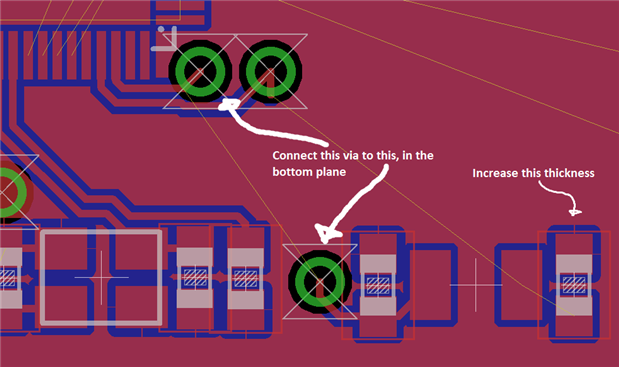
 

image

  • Sign in to reply
  • Cancel
  • autodeskguest
    0 autodeskguest over 11 years ago

    On 26/09/14 17:59, Vebjørn Røed Myklebust wrote:

    2 questions:

    1) how do i connect these two segments? (see pic) The vias have the same

    name as the net. but when i try to use the routing-tool in the bottom

    plane, it automatically pops back up to the top plane..


    Which end are you starting from? The end of the airwire towards the top

    of the image doesn't come from the via, so starting there will be forced

    onto the top layer. Try routing from the other via, or using

    click. You may still need to re-select bottom after you start

    routing, but normally you shouldn't as long as Eagle knows you're

    starting from a via.


    2) How to i increase the thickness of the "legs" that connect the smd

    solder pads, to the rest of the ground-plane? (also see pic)


    The automatic connections to a polygon are formed at the wire width of

    the polygon, I think. Edit the properties of your ground plane polygon

    to have a sensible width.


    • Cancel
    • Vote Up 0 Vote Down
    • Sign in to reply
    • Reject Answer
    • Cancel
  • autodeskguest
    0 autodeskguest over 11 years ago in reply to autodeskguest

    On 27/09/2014 6:24 a.m., Rob Pearce wrote:

    On 26/09/14 17:59, Vebjørn Røed Myklebust wrote:

    2 questions:

    1) how do i connect these two segments? (see pic) The vias have the same

    name as the net. but when i try to use the routing-tool in the bottom

    plane, it automatically pops back up to the top plane..


    Which end are you starting from? The end of the airwire towards the top

    of the image doesn't come from the via, so starting there will be forced

    onto the top layer. Try routing from the other via, or using

    <ctrl>click. You may still need to re-select bottom after you start

    routing, but normally you shouldn't as long as Eagle knows you're

    starting from a via.


    2) How to i increase the thickness of the "legs" that connect the smd

    solder pads, to the rest of the ground-plane? (also see pic)


    The automatic connections to a polygon are formed at the wire width of

    the polygon, I think. Edit the properties of your ground plane polygon

    to have a sensible width.


    I see there is another problem with the Element14 front end to the

    EagleCad forums.


    Rob wrote "click" and only "click" is displayed by Element14.

    Fingers crossed that the double quotes in this message will assist here.


    Warren


    • Cancel
    • Vote Up 0 Vote Down
    • Sign in to reply
    • Verify Answer
    • Cancel
  • autodeskguest
    0 autodeskguest over 11 years ago in reply to autodeskguest

    On 27/09/2014 7:42 a.m., warrenbrayshaw wrote:

    On 27/09/2014 6:24 a.m., Rob Pearce wrote:

    On 26/09/14 17:59, Vebjørn Røed Myklebust wrote:

    2 questions:

    1) how do i connect these two segments? (see pic) The vias have the same

    name as the net. but when i try to use the routing-tool in the bottom

    plane, it automatically pops back up to the top plane..


    Which end are you starting from? The end of the airwire towards the top

    of the image doesn't come from the via, so starting there will be forced

    onto the top layer. Try routing from the other via, or using

    <ctrl>click. You may still need to re-select bottom after you start

    routing, but normally you shouldn't as long as Eagle knows you're

    starting from a via.


    2) How to i increase the thickness of the "legs" that connect the smd

    solder pads, to the rest of the ground-plane? (also see pic)


    The automatic connections to a polygon are formed at the wire width of

    the polygon, I think. Edit the properties of your ground plane polygon

    to have a sensible width.


    I see there is another problem with the Element14 front end to the

    EagleCad forums.


    Rob wrote "<ctrl>click" and only "click" is displayed by Element14.

    Fingers crossed that the double quotes in this message will assist here.


    Warren


    Nope that didn't work. So I'll try again using square brackets

    > Rob wrote "[ctrl]click" and only "click" is displayed by Element14.


    • Cancel
    • Vote Up 0 Vote Down
    • Sign in to reply
    • Verify Answer
    • Cancel
element14 Community

element14 is the first online community specifically for engineers. Connect with your peers and get expert answers to your questions.

  • Members
  • Learn
  • Technologies
  • Challenges & Projects
  • Products
  • Store
  • About Us
  • Feedback & Support
  • FAQs
  • Terms of Use
  • Privacy Policy
  • Legal and Copyright Notices
  • Sitemap
  • Cookies

An Avnet Company © 2026 Premier Farnell Limited. All Rights Reserved.

Premier Farnell Ltd, registered in England and Wales (no 00876412), registered office: Farnell House, Forge Lane, Leeds LS12 2NE.

ICP 备案号 10220084.

Follow element14

  • X
  • Facebook
  • linkedin
  • YouTube