element14 Community
element14 Community
    Register Log In
  • Site
  • Search
  • Log In Register
  • Community Hub
    Community Hub
    • What's New on element14
    • Feedback and Support
    • Benefits of Membership
    • Personal Blogs
    • Members Area
    • Achievement Levels
  • Learn
    Learn
    • Ask an Expert
    • eBooks
    • element14 presents
    • Learning Center
    • Tech Spotlight
    • STEM Academy
    • Webinars, Training and Events
    • Learning Groups
  • Technologies
    Technologies
    • 3D Printing
    • FPGA
    • Industrial Automation
    • Internet of Things
    • Power & Energy
    • Sensors
    • Technology Groups
  • Challenges & Projects
    Challenges & Projects
    • Design Challenges
    • element14 presents Projects
    • Project14
    • Arduino Projects
    • Raspberry Pi Projects
    • Project Groups
  • Products
    Products
    • Arduino
    • Avnet & Tria Boards Community
    • Dev Tools
    • Manufacturers
    • Multicomp Pro
    • Product Groups
    • Raspberry Pi
    • RoadTests & Reviews
  • About Us
  • Store
    Store
    • Visit Your Store
    • Choose another store...
      • Europe
      •  Austria (German)
      •  Belgium (Dutch, French)
      •  Bulgaria (Bulgarian)
      •  Czech Republic (Czech)
      •  Denmark (Danish)
      •  Estonia (Estonian)
      •  Finland (Finnish)
      •  France (French)
      •  Germany (German)
      •  Hungary (Hungarian)
      •  Ireland
      •  Israel
      •  Italy (Italian)
      •  Latvia (Latvian)
      •  
      •  Lithuania (Lithuanian)
      •  Netherlands (Dutch)
      •  Norway (Norwegian)
      •  Poland (Polish)
      •  Portugal (Portuguese)
      •  Romania (Romanian)
      •  Russia (Russian)
      •  Slovakia (Slovak)
      •  Slovenia (Slovenian)
      •  Spain (Spanish)
      •  Sweden (Swedish)
      •  Switzerland(German, French)
      •  Turkey (Turkish)
      •  United Kingdom
      • Asia Pacific
      •  Australia
      •  China
      •  Hong Kong
      •  India
      • Japan
      •  Korea (Korean)
      •  Malaysia
      •  New Zealand
      •  Philippines
      •  Singapore
      •  Taiwan
      •  Thailand (Thai)
      • Vietnam
      • Americas
      •  Brazil (Portuguese)
      •  Canada
      •  Mexico (Spanish)
      •  United States
      Can't find the country/region you're looking for? Visit our export site or find a local distributor.
  • Translate
  • Profile
  • Settings
Autodesk EAGLE
  • Products
  • More
Autodesk EAGLE
EAGLE User Support (English) What is the difference between the wire tool and router tool in the layout?
  • Blog
  • Forum
  • Documents
  • Events
  • Polls
  • Files
  • Members
  • Mentions
  • Sub-Groups
  • Tags
  • More
  • Cancel
  • New
Join Autodesk EAGLE to participate - click to join for free!
Actions
  • Share
  • More
  • Cancel
Forum Thread Details
  • State Not Answered
  • Replies 2 replies
  • Subscribers 179 subscribers
  • Views 869 views
  • Users 0 members are here
  • router
Related

What is the difference between the wire tool and router tool in the layout?

Former Member
Former Member over 11 years ago

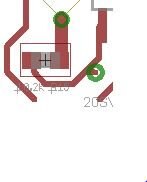
After I used the autorouter on my design I was left with a couple of unrouted airwires which I had to route manually and that was okay. My problem started when I found a broken connection without any airwire (see the bottom of the picture). I might have deleted it without purpose. Since the airwire was gone I wasn't able to make a connection with the router. Will the wire tool work for routing? Or is it a way of routing where there is no airwires?
 

image

  • Sign in to reply
  • Cancel
Parents
  • dukepro
    0 dukepro over 11 years ago

    The difference is that the wire tool will simply place a copper wire on

    the board.  It will usually be given a name automatically as S$1, where

    the 1 would be replaced by the first unique value.  The route tool is

    used to route air wires into copper traces.  In this case, the traces

    produced inherit the name of the air wire.  I personally regard the wire

    tool as finger painting with copper.  I find rare use for it.


    As far as the broken connection in the image, the net may be connected

    elsewhere on the board, which would leave the two traces that are

    unconnected as stubs.  Another possibility is that an air wire exists

    for this broken connection, but not where you expect it.  The air wire

    will show up connecting the two closest vertexes on unconnected portions

    of the net.


    If you need to connect these at this point, click on the route tool,

    then do a Ctrl-Click on or near the end of the stub.


    HTH,

        - Chuck


    On 01/08/2015 01:31 PM, Simen Hexeberg wrote:

    After I used the autorouter on my design I was left with a couple of

    unrouted airwires which I had to route manually and that was okay. My

    problem started when I found a broken connection without any airwire

    (see the bottom of the picture). I might have deleted it without

    purpose. Since the airwire was gone I wasn't able to make a connection

    with the router. Will the wire tool work for routing? Or is it a way of

    routing where there is no airwires?


    --

    To view any images and attachments in this post, visit:

    http://www.element14.com/community/message/136862


    Attachments:
    1220.att1.html.zip
    • Cancel
    • Vote Up 0 Vote Down
    • Sign in to reply
    • Verify Answer
    • Cancel
Reply
  • dukepro
    0 dukepro over 11 years ago

    The difference is that the wire tool will simply place a copper wire on

    the board.  It will usually be given a name automatically as S$1, where

    the 1 would be replaced by the first unique value.  The route tool is

    used to route air wires into copper traces.  In this case, the traces

    produced inherit the name of the air wire.  I personally regard the wire

    tool as finger painting with copper.  I find rare use for it.


    As far as the broken connection in the image, the net may be connected

    elsewhere on the board, which would leave the two traces that are

    unconnected as stubs.  Another possibility is that an air wire exists

    for this broken connection, but not where you expect it.  The air wire

    will show up connecting the two closest vertexes on unconnected portions

    of the net.


    If you need to connect these at this point, click on the route tool,

    then do a Ctrl-Click on or near the end of the stub.


    HTH,

        - Chuck


    On 01/08/2015 01:31 PM, Simen Hexeberg wrote:

    After I used the autorouter on my design I was left with a couple of

    unrouted airwires which I had to route manually and that was okay. My

    problem started when I found a broken connection without any airwire

    (see the bottom of the picture). I might have deleted it without

    purpose. Since the airwire was gone I wasn't able to make a connection

    with the router. Will the wire tool work for routing? Or is it a way of

    routing where there is no airwires?


    --

    To view any images and attachments in this post, visit:

    http://www.element14.com/community/message/136862


    Attachments:
    1220.att1.html.zip
    • Cancel
    • Vote Up 0 Vote Down
    • Sign in to reply
    • Verify Answer
    • Cancel
Children
No Data
element14 Community

element14 is the first online community specifically for engineers. Connect with your peers and get expert answers to your questions.

  • Members
  • Learn
  • Technologies
  • Challenges & Projects
  • Products
  • Store
  • About Us
  • Feedback & Support
  • FAQs
  • Terms of Use
  • Privacy Policy
  • Legal and Copyright Notices
  • Sitemap
  • Cookies

An Avnet Company © 2026 Premier Farnell Limited. All Rights Reserved.

Premier Farnell Ltd, registered in England and Wales (no 00876412), registered office: Farnell House, Forge Lane, Leeds LS12 2NE.

ICP 备案号 10220084.

Follow element14

  • X
  • Facebook
  • linkedin
  • YouTube