element14 Community
element14 Community
    Register Log In
  • Site
  • Search
  • Log In Register
  • Community Hub
    Community Hub
    • What's New on element14
    • Feedback and Support
    • Benefits of Membership
    • Personal Blogs
    • Members Area
    • Achievement Levels
  • Learn
    Learn
    • Ask an Expert
    • eBooks
    • element14 presents
    • Learning Center
    • Tech Spotlight
    • STEM Academy
    • Webinars, Training and Events
    • Learning Groups
  • Technologies
    Technologies
    • 3D Printing
    • FPGA
    • Industrial Automation
    • Internet of Things
    • Power & Energy
    • Sensors
    • Technology Groups
  • Challenges & Projects
    Challenges & Projects
    • Design Challenges
    • element14 presents Projects
    • Project14
    • Arduino Projects
    • Raspberry Pi Projects
    • Project Groups
  • Products
    Products
    • Arduino
    • Avnet & Tria Boards Community
    • Dev Tools
    • Manufacturers
    • Multicomp Pro
    • Product Groups
    • Raspberry Pi
    • RoadTests & Reviews
  • About Us
  • Store
    Store
    • Visit Your Store
    • Choose another store...
      • Europe
      •  Austria (German)
      •  Belgium (Dutch, French)
      •  Bulgaria (Bulgarian)
      •  Czech Republic (Czech)
      •  Denmark (Danish)
      •  Estonia (Estonian)
      •  Finland (Finnish)
      •  France (French)
      •  Germany (German)
      •  Hungary (Hungarian)
      •  Ireland
      •  Israel
      •  Italy (Italian)
      •  Latvia (Latvian)
      •  
      •  Lithuania (Lithuanian)
      •  Netherlands (Dutch)
      •  Norway (Norwegian)
      •  Poland (Polish)
      •  Portugal (Portuguese)
      •  Romania (Romanian)
      •  Russia (Russian)
      •  Slovakia (Slovak)
      •  Slovenia (Slovenian)
      •  Spain (Spanish)
      •  Sweden (Swedish)
      •  Switzerland(German, French)
      •  Turkey (Turkish)
      •  United Kingdom
      • Asia Pacific
      •  Australia
      •  China
      •  Hong Kong
      •  India
      • Japan
      •  Korea (Korean)
      •  Malaysia
      •  New Zealand
      •  Philippines
      •  Singapore
      •  Taiwan
      •  Thailand (Thai)
      • Vietnam
      • Americas
      •  Brazil (Portuguese)
      •  Canada
      •  Mexico (Spanish)
      •  United States
      Can't find the country/region you're looking for? Visit our export site or find a local distributor.
  • Translate
  • Profile
  • Settings
Autodesk EAGLE
  • Products
  • More
Autodesk EAGLE
EAGLE User Support (English) RIPUP command line in 7.2 & 7.3
  • Blog
  • Forum
  • Documents
  • Events
  • Polls
  • Files
  • Members
  • Mentions
  • Sub-Groups
  • Tags
  • More
  • Cancel
  • New
Join Autodesk EAGLE to participate - click to join for free!
Actions
  • Share
  • More
  • Cancel
Forum Thread Details
  • State Suggested Answer
  • Replies 6 replies
  • Answers 1 answer
  • Subscribers 178 subscribers
  • Views 2568 views
  • Users 0 members are here
  • ripup
  • polygon
Related

RIPUP command line in 7.2 & 7.3

Former Member
Former Member over 10 years ago

I have a .BRD with named wires and polygons, but when I go to RIPUP; it misses ripping up one of the wires, and when I RIPUP @;, it rips up the fillings, but not the wires/contours.  Am I misinterpreting what the command line is to do when typed or in a .SCR?  I need the functionality working in a ULP whose purpose is to partially rebuild the wires and polygons on a board.after an errant ULP trashed it.  I did see something out here regarding problems with RIPUP in 7.2, so I went to 7.3 to see if it was fixed.

  • Sign in to reply
  • Cancel
  • autodeskguest
    0 autodeskguest over 10 years ago

    Am 30.06.2015 um 18:34 schrieb Bruce Mellen:

    I have a .BRD with named wires and polygons, but when I go to RIPUP; it

    misses ripping up one of the wires, and when I RIPUP @;, it rips up the

    fillings, but not the wires/contours.  Am I misinterpreting what the

    command line is to do when typed or in a .SCR?  I need the functionality

    working in a ULP whose purpose is to partially rebuild the wires and

    polygons on a board.after an errant ULP trashed it.  I did see something

    out here regarding problems with RIPUP in 7.2, so I went to 7.3 to see

    if it was fixed.


    --

    To view any images and attachments in this post, visit:

    http://www.element14.com/community/message/153861


    If  RIPUP;  does not ripup one of the wires, please check if it is a

    real signal. i suppose it is a simple wire, but not a real signal. IN

    this case you have to delete it.


    --

    Mit freundlichen Gruessen / Best regards

    Richard Hammerl

      CadSoft Support -- hotline@cadsoft.de

      FAQ: http://www.cadsoft.de/training/faq/


    • Cancel
    • Vote Up 0 Vote Down
    • Sign in to reply
    • Verify Answer
    • Cancel
  • Former Member
    0 Former Member over 10 years ago in reply to autodeskguest

    I apologize for my ignorance...  Can you please clarify, as I need to understand the difference?

    How do I check to see if it is a "real signal" versus "simple wire"?

    What must be done to make a simple wire (or Polygon for that matter)  a "real signal" so that it can be removed with ripup;? 

    I thought all wires, regardless of how they are added, are assigned a signal name even if I don't explicitly name it.

    If the wire properties says signal ATEST and netclass 0 default, and if I have two similarly named wires and a via of the same signal name that aren't joined, and ratsnest produces airwires between the wires and via, and traversing the object hierarchy signal/via/wire with a URL encounters those wires, isn't it a "real signal"?

    What differentiates these two wires and via from my other wires and via?

    I can send the simplified example board I'm testing with,  Some things ripup and others don't.


    And do you have insight as to why my polygon contour/perimeter wires with assigned signal GND does not get ripped up with ripup @; ?


    I'm obviously confused and apologize, but need to understand so I can complete my work,

    • Cancel
    • Vote Up 0 Vote Down
    • Sign in to reply
    • Verify Answer
    • Cancel
  • autodeskguest
    0 autodeskguest over 10 years ago in reply to Former Member

    On 2/07/2015 12:42 a.m., Bruce Mellen wrote:


    ...............

    And do you have insight as to why my polygon contour/perimeter wires

    with assigned signal GND does not get ripped up with ripup @; ?


    Have you used the word contour correctly? Contour is the calculated

    polygon  boundary and not the one the user draws.


    Post a image of your issue similat to the ones I have attached.

    On the left the polygon contour wires can be seen going around the via.

    On the right, after ripup@; the polygon outline as drawn by the user

    remains.


    Your post reads as if you get the left image, less the horizontal fill

    wires, after a ripup@;


    You should say which version of Eagle you are using and the OS.


    HTH

    Warren


    Attachments:
    image
    • Cancel
    • Vote Up 0 Vote Down
    • Sign in to reply
    • Verify Answer
    • Cancel
  • Former Member
    0 Former Member over 10 years ago in reply to autodeskguest

    I encountered the difficulty using 7.2.0 64 bit on Windows Ultimate up to date SP1 with 8GB memory, and when I saw reports of ripup problems on 7.2, I tried on 7.3.0 64bit.

    Sorry about the contour nomenclature.  I’m not sure about the correct term for the wires I draw as part of a polygon, but that is what I am referring to.  I need to be able to ripup all polygons on the board using a .scr and the documentation led me to believe it is the RIPUP @; command.  Please correct me if I’m mistaken.

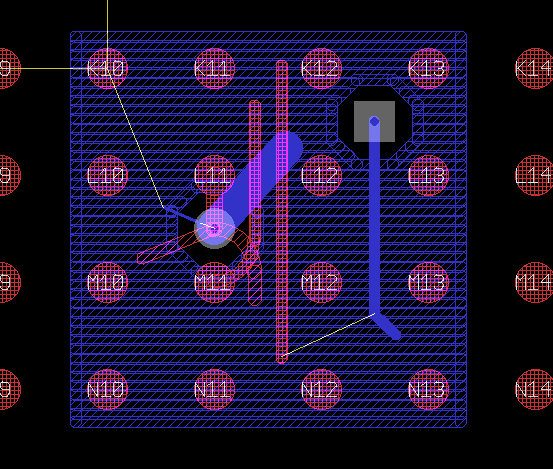
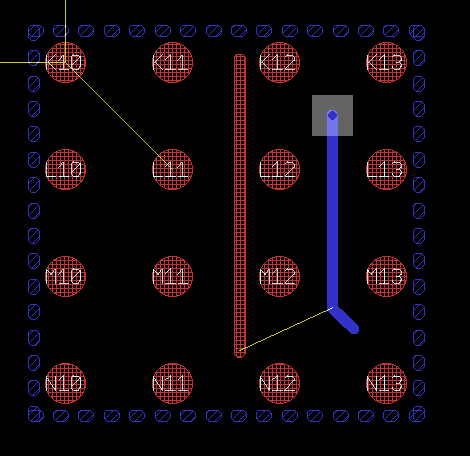
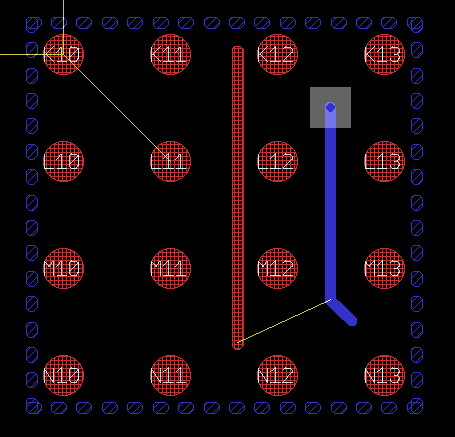
    The ripup @; command is ripping up the fill and contour wires, as shown in the original, ripup; and ripup @; sequence attached, but not the polygon wires I've created the polygon with.

    In the example 6-layer board diagram, the BTEST signal is associated with the round via (between BGA pads) and traces that appear to be attached or airwired. The CTEST signal is associated with the M11 pad and visibly attached trace.  The ATEST signal is associated with the square via, attached trace, and other layer trace that has an airwire connecting.  The surrounding polygon on layer 2 (diagonal blue) has been assigned the GND signal and I’ve done a ratsnest.  All relevant layers are being displayed. Layer 1: pads/hash red, Layer 3 the diagonal red stripes, Layers 14&15 not used in the example, and layer 16 the solid blue.  The vias are grey.


    The original image is as described above

    The 2nd ripup image is after typing ripup;

    The 3rd ripup@ image is after typing ripup @; (no visible change and a subsequent ratsnest refills the horizontal fill wires)


    Perhaps you or someone can let me know:

    1. Why the square via and 2 associated wires were not ripped up in the ripup image, and
    2. Why the polygon I put down was not ripped up with the ripup @; command
      1. And if the ripup@; command is not supposed to ripup all polygons, is there a command that does so?

    …searching for the truth

    imageimageimage

    • Cancel
    • Vote Up 0 Vote Down
    • Sign in to reply
    • Verify Answer
    • Cancel
  • autodeskguest
    0 autodeskguest over 10 years ago in reply to Former Member

    From the first few lines in HELP > RIPUP

    Changes routed wires and vias into airwires.

    Changes the display of polygons to "outlines".

    So to delete a polygon outline you need to use delete.

    Checkout HELP >DELETE . To delete in one click you need to hold down the

    shift key.

    in a script you need to find the locations of the drawn wires and DELETE(Sx

    y)

    See HELP > Command Syntax > Coordinates


    The above also explains the wires that did not ripup in your images.

    The wires are not routed. They are named wires that do not have a

    contact-ref. When ripup occurs the result should reduce to an air wire. An

    air wire cannot cannot exist following a ripup; if there are not 2

    remaining points for it to connect between and the remaining points can

    only be pads or SMDs (ie contact-referrences). I suspect there are no pads

    with a signal name that matches those wires/via.


    HTH

    Warren


    --

    Web access to CadSoft support forums at www.eaglecentral.ca.  Where the CadSoft EAGLE community meets.


    • Cancel
    • Vote Up 0 Vote Down
    • Sign in to reply
    • Verify Answer
    • Reject Answer
    • Cancel
  • Former Member
    0 Former Member over 10 years ago in reply to autodeskguest

    Warren,

    Wow. The ‘routed’ nomenclature has much more meaning than I [would have] thought and have seen/realized in the documentation.  It doesn’t seem to have much of an implication for GUI users, as a functional board can be created without routed wires, but can have significant implications for URL developers and scripts when the board has plain wires that the [board] developer expects are routed or of value.

    Is there an existing URL that you know of that allows one to list/find board wires that are not routed? I looked with a keyword of ‘routed’ but only found one (since 2005), and it appears to somewhat misuse the term. Thinking, I’m not even sure how to approach that URL.  I also find it interesting that the unrouted wires don't show up on layer 19, just airwires?  Or should unrouted non-air wires be reported as part of the DRC or displayed with an wirwire?

    I experimented a bit and found that wire ripup took place as soon as a plain wire had one connected SMD pad and must have been, thus, considered then routed.  Ripup @ seems to do nothing other than remove the polygon pour shown on screen.

    The HELP piece in the Editor Commands/RIPUP that I was reading and still find muddles things is : “The RIPUP command changes routed wires (tracks) into airwires.  That can be done for:…all polygons (RIPUP@;)...”. It probably should be restricted/reworded a bit.

    Can the perimeter wires of a polygon be[come] routed?

    Also complicating user understanding is if, say, one creates a board, they cannot initially use the Route symbol.  As they use the Wire symbol, the wires will end up routed as they get named and connected to the center of a Pad/SMD.

    Is the description that you gave somewhere in the HELPs or URL manual?  It might want to be linked or appropriately described within the ripup, netscript, route, maybe delete editor commands descriptions in HELP as well as other places.

    I also ran across a confusing dangling/incomplete sentence/thought in DELETE: “After wires or vias have been deleted from a signal which contains polygons, all polygons belong to the signal keeping the original name (usually the bigger part).”

    Thank you for your time and insight, but now my URL gets more complicated as I apparently need to have my URL search for each polygon and delete each perimeter wire, as well as somehow find only routed wires versus looping through signal/wires which can be unrouted.  I also find it interesting that the unrouted wires don't show up on layer 19, just airwires?

    …Bruce

    • Cancel
    • Vote Up 0 Vote Down
    • Sign in to reply
    • Verify Answer
    • Cancel
element14 Community

element14 is the first online community specifically for engineers. Connect with your peers and get expert answers to your questions.

  • Members
  • Learn
  • Technologies
  • Challenges & Projects
  • Products
  • Store
  • About Us
  • Feedback & Support
  • FAQs
  • Terms of Use
  • Privacy Policy
  • Legal and Copyright Notices
  • Sitemap
  • Cookies

An Avnet Company © 2025 Premier Farnell Limited. All Rights Reserved.

Premier Farnell Ltd, registered in England and Wales (no 00876412), registered office: Farnell House, Forge Lane, Leeds LS12 2NE.

ICP 备案号 10220084.

Follow element14

  • X
  • Facebook
  • linkedin
  • YouTube