element14 Community
element14 Community
    Register Log In
  • Site
  • Search
  • Log In Register
  • Community Hub
    Community Hub
    • What's New on element14
    • Feedback and Support
    • Benefits of Membership
    • Personal Blogs
    • Members Area
    • Achievement Levels
  • Learn
    Learn
    • Ask an Expert
    • eBooks
    • element14 presents
    • Learning Center
    • Tech Spotlight
    • STEM Academy
    • Webinars, Training and Events
    • Learning Groups
  • Technologies
    Technologies
    • 3D Printing
    • FPGA
    • Industrial Automation
    • Internet of Things
    • Power & Energy
    • Sensors
    • Technology Groups
  • Challenges & Projects
    Challenges & Projects
    • Design Challenges
    • element14 presents Projects
    • Project14
    • Arduino Projects
    • Raspberry Pi Projects
    • Project Groups
  • Products
    Products
    • Arduino
    • Avnet & Tria Boards Community
    • Dev Tools
    • Manufacturers
    • Multicomp Pro
    • Product Groups
    • Raspberry Pi
    • RoadTests & Reviews
  • About Us
    About the element14 Community
  • Store
    Store
    • Visit Your Store
    • Choose another store...
      • Europe
      •  Austria (German)
      •  Belgium (Dutch, French)
      •  Bulgaria (Bulgarian)
      •  Czech Republic (Czech)
      •  Denmark (Danish)
      •  Estonia (Estonian)
      •  Finland (Finnish)
      •  France (French)
      •  Germany (German)
      •  Hungary (Hungarian)
      •  Ireland
      •  Israel
      •  Italy (Italian)
      •  Latvia (Latvian)
      •  
      •  Lithuania (Lithuanian)
      •  Netherlands (Dutch)
      •  Norway (Norwegian)
      •  Poland (Polish)
      •  Portugal (Portuguese)
      •  Romania (Romanian)
      •  Russia (Russian)
      •  Slovakia (Slovak)
      •  Slovenia (Slovenian)
      •  Spain (Spanish)
      •  Sweden (Swedish)
      •  Switzerland(German, French)
      •  Turkey (Turkish)
      •  United Kingdom
      • Asia Pacific
      •  Australia
      •  China
      •  Hong Kong
      •  India
      •  Japan
      •  Korea (Korean)
      •  Malaysia
      •  New Zealand
      •  Philippines
      •  Singapore
      •  Taiwan
      •  Thailand (Thai)
      •  Vietnam
      • Americas
      •  Brazil (Portuguese)
      •  Canada
      •  Mexico (Spanish)
      •  United States
      Can't find the country/region you're looking for? Visit our export site or find a local distributor.
  • Translate
  • Profile
  • Settings
Autodesk EAGLE
  • Products
  • More
Autodesk EAGLE
Forum I need help with modifying library parts
  • Blog
  • Forum
  • Documents
  • Events
  • Polls
  • Files
  • Members
  • Mentions
  • Sub-Groups
  • Tags
  • More
  • Cancel
  • New
Join Autodesk EAGLE to participate - click to join for free!
Actions
  • Share
  • More
  • Cancel
Forum Thread Details
  • State Suggested Answer
  • Replies 7 replies
  • Answers 4 answers
  • Subscribers 189 subscribers
  • Views 1518 views
  • Users 0 members are here
Related

I need help with modifying library parts

veryfungi
veryfungi over 8 years ago

I've used Eagle extensively in the past, like version 3.5. I need to make some boards so rather than try to recover my original purchased files I just downloaded the latest version. I had a set of notes for copying a part into my library, modifying it, and saving the new part. It was never easy, but I had notes that made it easy. Now everything looks different, I can't get anywhere. I have tried several online tutorials but they are too old, or they leave out important details.


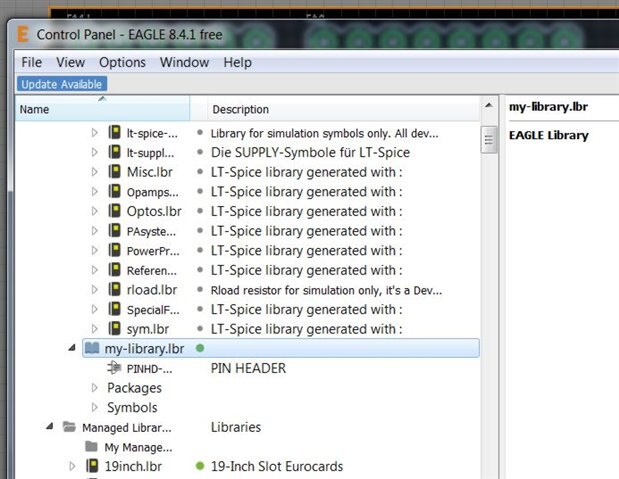
All I want to do is copy some pin headers to my library and change the pad size to a smaller size for an arduino shield I want to draw up. I can not get it to see the modified part when I add parts. I'm sure I did something wrong.
 

image

  • Sign in to reply
  • Cancel
Parents
  • rachaelp
    0 rachaelp over 8 years ago

    Hi Jim,

    veryfungi  wrote:


    All I want to do is copy some pin headers to my library and change the pad size to a smaller size for an arduino shield I want to draw up. I can not get it to see the modified part when I add parts. I'm sure I did something wrong.


    Have you found the part you wish to copy in one of the standard libraries? If so it's fairly easy to copy it into another library for editing.


    1. Firstly open your target library (where you wish to copy the part to) in the library editor.
    2. With that editor still open, switch to the EAGLE control panel and navigate the tree on the left to find the part you wish to copy.
    3. Right click on that part and choose the "Copy to Library" option from the context menu.
    4. Switch back to the library where you will find the copy of the part which you can then modify as you wish.


    Best Regards,


    Rachael

    • Cancel
    • Vote Up +1 Vote Down
    • Sign in to reply
    • Verify Answer
    • Reject Answer
    • Cancel
Reply
  • rachaelp
    0 rachaelp over 8 years ago

    Hi Jim,

    veryfungi  wrote:


    All I want to do is copy some pin headers to my library and change the pad size to a smaller size for an arduino shield I want to draw up. I can not get it to see the modified part when I add parts. I'm sure I did something wrong.


    Have you found the part you wish to copy in one of the standard libraries? If so it's fairly easy to copy it into another library for editing.


    1. Firstly open your target library (where you wish to copy the part to) in the library editor.
    2. With that editor still open, switch to the EAGLE control panel and navigate the tree on the left to find the part you wish to copy.
    3. Right click on that part and choose the "Copy to Library" option from the context menu.
    4. Switch back to the library where you will find the copy of the part which you can then modify as you wish.


    Best Regards,


    Rachael

    • Cancel
    • Vote Up +1 Vote Down
    • Sign in to reply
    • Verify Answer
    • Reject Answer
    • Cancel
Children
  • veryfungi
    0 veryfungi over 8 years ago in reply to rachaelp

    Hello Rachael,


    Yes, that is in fact what I have done. But when I add a part to the board "my library" does not show up. As you can see in the image the part does not look like the others. Can you tell me why "my library" does not show up when adding parts? Thanks

    • Cancel
    • Vote Up 0 Vote Down
    • Sign in to reply
    • Verify Answer
    • Cancel
element14 Community

element14 is the first online community specifically for engineers. Connect with your peers and get expert answers to your questions.

  • Members
  • Learn
  • Technologies
  • Challenges & Projects
  • Products
  • Store
  • About Us
  • Feedback & Support
  • FAQs
  • Terms of Use
  • Privacy Policy
  • Legal and Copyright Notices
  • Sitemap
  • Cookies

An Avnet Company © 2026 Premier Farnell Limited. All Rights Reserved.

Premier Farnell Ltd, registered in England and Wales (no 00876412), registered office: Farnell House, Forge Lane, Leeds LS12 2NE.

Follow element14

  • X
  • Facebook
  • linkedin
  • YouTube