element14 Community
element14 Community
    Register Log In
  • Site
  • Search
  • Log In Register
  • Community Hub
    Community Hub
    • What's New on element14
    • Feedback and Support
    • Benefits of Membership
    • Personal Blogs
    • Members Area
    • Achievement Levels
  • Learn
    Learn
    • Ask an Expert
    • eBooks
    • element14 presents
    • Learning Center
    • Tech Spotlight
    • STEM Academy
    • Webinars, Training and Events
    • Learning Groups
  • Technologies
    Technologies
    • 3D Printing
    • FPGA
    • Industrial Automation
    • Internet of Things
    • Power & Energy
    • Sensors
    • Technology Groups
  • Challenges & Projects
    Challenges & Projects
    • Design Challenges
    • element14 presents Projects
    • Project14
    • Arduino Projects
    • Raspberry Pi Projects
    • Project Groups
  • Products
    Products
    • Arduino
    • Avnet & Tria Boards Community
    • Dev Tools
    • Manufacturers
    • Multicomp Pro
    • Product Groups
    • Raspberry Pi
    • RoadTests & Reviews
  • About Us
  • Store
    Store
    • Visit Your Store
    • Choose another store...
      • Europe
      •  Austria (German)
      •  Belgium (Dutch, French)
      •  Bulgaria (Bulgarian)
      •  Czech Republic (Czech)
      •  Denmark (Danish)
      •  Estonia (Estonian)
      •  Finland (Finnish)
      •  France (French)
      •  Germany (German)
      •  Hungary (Hungarian)
      •  Ireland
      •  Israel
      •  Italy (Italian)
      •  Latvia (Latvian)
      •  
      •  Lithuania (Lithuanian)
      •  Netherlands (Dutch)
      •  Norway (Norwegian)
      •  Poland (Polish)
      •  Portugal (Portuguese)
      •  Romania (Romanian)
      •  Russia (Russian)
      •  Slovakia (Slovak)
      •  Slovenia (Slovenian)
      •  Spain (Spanish)
      •  Sweden (Swedish)
      •  Switzerland(German, French)
      •  Turkey (Turkish)
      •  United Kingdom
      • Asia Pacific
      •  Australia
      •  China
      •  Hong Kong
      •  India
      • Japan
      •  Korea (Korean)
      •  Malaysia
      •  New Zealand
      •  Philippines
      •  Singapore
      •  Taiwan
      •  Thailand (Thai)
      • Vietnam
      • Americas
      •  Brazil (Portuguese)
      •  Canada
      •  Mexico (Spanish)
      •  United States
      Can't find the country/region you're looking for? Visit our export site or find a local distributor.
  • Translate
  • Profile
  • Settings
Autodesk EAGLE
  • Products
  • More
Autodesk EAGLE
Forum Importing Specctra SES files into Eagle Cad
  • Blog
  • Forum
  • Documents
  • Events
  • Polls
  • Files
  • Members
  • Mentions
  • Sub-Groups
  • Tags
  • More
  • Cancel
  • New
Join Autodesk EAGLE to participate - click to join for free!
Actions
  • Share
  • More
  • Cancel
Forum Thread Details
  • State Not Answered
  • Replies 12 replies
  • Subscribers 181 subscribers
  • Views 2705 views
  • Users 0 members are here
  • ulp
  • topor
Related

Importing Specctra SES files into Eagle Cad

Former Member
Former Member over 15 years ago

Short Story:


I'm trying import specctra SES formated files into eaglecad, I'm told there is a ulp for that. But I'm having no luck finding it.


Long Story:


I'm trying to use TopoRs router with eaglecad. So I can export eaglecad .brd files to TopoR by first converting it to dsn files using a ulp i found here. http://www.freerouting.net/download/brd_to_dsn.ulp


After TopoR is done routing it can only export files in SES , DXF formats. Do u guys know of any ulps or ways to import these files into eagecad.

  • Sign in to reply
  • Cancel
  • Jorge_Garcia
    0 Jorge_Garcia over 15 years ago

    Hi Kvik,


    You can import dxf files into EAGLE using dxf2scr. You can find it on the website www.cadsoftusa.com-> Downloads->Miscellaneous.


    hth,


    Jorge Garcia

    • Cancel
    • Vote Up 0 Vote Down
    • Sign in to reply
    • Verify Answer
    • Cancel
  • Former Member
    0 Former Member over 15 years ago in reply to Jorge_Garcia

    Thnx for the reply Jorge


    Ok so dxf2scr is not working for me. I tried running the SCR it generates in a empty brd files.. and nothing happens. I looked at the dxf file that topor generates with a third part dxf viewer and it looks fine.  The description for dxf2scr says it only does "board outlines from AutoCAD to Eagle" so it may not import the routing anyway.
    I tried dxf2scr-1 , its look like its just a clone with a gui , and it doesn't work too.
    the DXF importer from EagleCad power tools, seems to be the only one that kinda works. It presemnts me a list of layers in the dxf and how they should be transfered to eaglecad like top to layer 1 , bottom to layer 16. But when i run it it only seems to translate the pads and not the traces and routing. Could be because I'm running it in demo mode. 

    Ok so dxf2scr is not working for me. I tried running the SCR it generates in a empty brd files.. and nothing happens. I looked at the dxf file that topor generates with a third part dxf viewer and it looks fine.  The description for dxf2scr says it only does "board outlines from AutoCAD to Eagle" so it may not import the routing anyway.

    I tried dxf2scr-1 , its look like its just a clone with a gui , and it doesn't work too.

    the DXF importer from EagleCad power tools, seems to be the only one that kinda works. It presemnts me a list of layers in the dxf and how they should be transfered to eaglecad like top to layer 1 , bottom to layer 16. But when i run it it only seems to translate the pads and not the traces and routing. Could be because I'm running it in demo mode. 

    • Cancel
    • Vote Up 0 Vote Down
    • Sign in to reply
    • Verify Answer
    • Cancel
  • Jorge_Garcia
    0 Jorge_Garcia over 15 years ago in reply to Former Member

    Hi Vikram,


    Please make sure that the dxf is "exploded" in other words it should only be made up of single lines. If the dxf files has polylines, NONE of the dxf scripts I mentioned will work properly. So make sure to explode the route before exporting it as a dxf, otherwise you will have these issues.


    I have no experience with freerouting.net so I won't be able to guide as to how to export and exploded layout, but this should help alot.


    hth,

    Jorge Garcia

    • Cancel
    • Vote Up 0 Vote Down
    • Sign in to reply
    • Verify Answer
    • Cancel
  • Former Member
    0 Former Member over 15 years ago in reply to Jorge_Garcia

    Topor doesn't give me the option for that :/ . Heres the screenshot of TopoRs dxf export window

    http://dl.dropbox.com/u/4668926/dxf_export.jpg

    • Cancel
    • Vote Up 0 Vote Down
    • Sign in to reply
    • Verify Answer
    • Cancel
  • Jorge_Garcia
    0 Jorge_Garcia over 15 years ago in reply to Former Member

    Hi Vikram,


    Do you have access to AutoCAD or Solidworks? You could open the DXF file there, explode it and then re-export it as a DXF (now exploded). That should work.

    • Cancel
    • Vote Up 0 Vote Down
    • Sign in to reply
    • Verify Answer
    • Cancel
  • Former Member
    0 Former Member over 15 years ago in reply to Jorge_Garcia

    Wow that worked Jorge. My coworker had a copy of autocad , and he was able to explode the dxf file and save it again.


    Now dxf2scr, dxf2scr-1, d2e_110 all worked  But dxf2scr and d2c_110 imported it in wrong scale. dxf2scr-1 was the only one that imported it in right scale and position. But it brought all the traces in layer 20. I couldn't change the layer to top layer 1 or bottom layer 16.

    • Cancel
    • Vote Up 0 Vote Down
    • Sign in to reply
    • Verify Answer
    • Cancel
  • Former Member
    0 Former Member over 15 years ago in reply to Former Member

    Ok I edited the scr file that dxf2scr-1 generated to post everything in layer top instead  of dimension , it helped..but its messy.

    • Cancel
    • Vote Up 0 Vote Down
    • Sign in to reply
    • Verify Answer
    • Cancel
  • Former Member
    0 Former Member over 15 years ago

    Earlier this year, I hacked a very limited SES-to-SCR converter for exactly the same purpose: getting Topor routings back to Eagle. Since I asked in various forums and no one seemed to be interested in it, I didn't bother to put more work into it since it's already doing all I need.


    Try it if you like:

    http://www.retrode.org/upload/ses2scr.exe <input.ses> <output.scr>
    • Cancel
    • Vote Up 0 Vote Down
    • Sign in to reply
    • Verify Answer
    • Cancel
  • Richard_H
    0 Richard_H over 15 years ago in reply to Former Member

    Hi Matthias,


    looks to be a very useful tool. If you don't mind you could upload it at the CadSoft web server at http://www.cadsoft.de/upload.htm . I am sure it will be highly appreciated by the EAGLE User community.


    Thank you.

    Richard

    • Cancel
    • Vote Up 0 Vote Down
    • Sign in to reply
    • Verify Answer
    • Cancel
  • Former Member
    0 Former Member over 15 years ago in reply to Richard_H

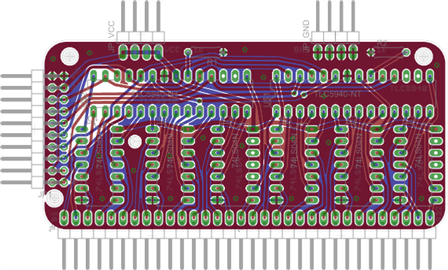
    Can do, though you need to be aware that it really has strong limitations: 2 layers. Wires only (straight lines and arcs). No part placement. No via parameters. Reads only so-and-so-many lines in the SES file. And so on, and so forth. All of these should be pretty easy to fix if someone is really interested in it.


    Here's a PWM board for LEDs that I routed in Topor (manually; push-and-shove is gold!!), after re-import in Eagle:

    image

    • Cancel
    • Vote Up 0 Vote Down
    • Sign in to reply
    • Verify Answer
    • Cancel
>
element14 Community

element14 is the first online community specifically for engineers. Connect with your peers and get expert answers to your questions.

  • Members
  • Learn
  • Technologies
  • Challenges & Projects
  • Products
  • Store
  • About Us
  • Feedback & Support
  • FAQs
  • Terms of Use
  • Privacy Policy
  • Legal and Copyright Notices
  • Sitemap
  • Cookies

An Avnet Company © 2026 Premier Farnell Limited. All Rights Reserved.

Premier Farnell Ltd, registered in England and Wales (no 00876412), registered office: Farnell House, Forge Lane, Leeds LS12 2NE.

ICP 备案号 10220084.

Follow element14

  • X
  • Facebook
  • linkedin
  • YouTube