element14 Community
element14 Community
    Register Log In
  • Site
  • Search
  • Log In Register
  • Community Hub
    Community Hub
    • What's New on element14
    • Feedback and Support
    • Benefits of Membership
    • Personal Blogs
    • Members Area
    • Achievement Levels
  • Learn
    Learn
    • Ask an Expert
    • eBooks
    • element14 presents
    • Learning Center
    • Tech Spotlight
    • STEM Academy
    • Webinars, Training and Events
    • Learning Groups
  • Technologies
    Technologies
    • 3D Printing
    • FPGA
    • Industrial Automation
    • Internet of Things
    • Power & Energy
    • Sensors
    • Technology Groups
  • Challenges & Projects
    Challenges & Projects
    • Design Challenges
    • element14 presents Projects
    • Project14
    • Arduino Projects
    • Raspberry Pi Projects
    • Project Groups
  • Products
    Products
    • Arduino
    • Avnet & Tria Boards Community
    • Dev Tools
    • Manufacturers
    • Multicomp Pro
    • Product Groups
    • Raspberry Pi
    • RoadTests & Reviews
  • About Us
  • Store
    Store
    • Visit Your Store
    • Choose another store...
      • Europe
      •  Austria (German)
      •  Belgium (Dutch, French)
      •  Bulgaria (Bulgarian)
      •  Czech Republic (Czech)
      •  Denmark (Danish)
      •  Estonia (Estonian)
      •  Finland (Finnish)
      •  France (French)
      •  Germany (German)
      •  Hungary (Hungarian)
      •  Ireland
      •  Israel
      •  Italy (Italian)
      •  Latvia (Latvian)
      •  
      •  Lithuania (Lithuanian)
      •  Netherlands (Dutch)
      •  Norway (Norwegian)
      •  Poland (Polish)
      •  Portugal (Portuguese)
      •  Romania (Romanian)
      •  Russia (Russian)
      •  Slovakia (Slovak)
      •  Slovenia (Slovenian)
      •  Spain (Spanish)
      •  Sweden (Swedish)
      •  Switzerland(German, French)
      •  Turkey (Turkish)
      •  United Kingdom
      • Asia Pacific
      •  Australia
      •  China
      •  Hong Kong
      •  India
      • Japan
      •  Korea (Korean)
      •  Malaysia
      •  New Zealand
      •  Philippines
      •  Singapore
      •  Taiwan
      •  Thailand (Thai)
      • Vietnam
      • Americas
      •  Brazil (Portuguese)
      •  Canada
      •  Mexico (Spanish)
      •  United States
      Can't find the country/region you're looking for? Visit our export site or find a local distributor.
  • Translate
  • Profile
  • Settings
Altium CircuitStudio
  • Products
  • Manufacturers
  • Altium CircuitStudio
  • More
  • Cancel
Altium CircuitStudio
Altium CircuitStudio Forum New Schematic Library Designator and Comment not Visible
  • Blog
  • Forum
  • Documents
  • Events
  • Polls
  • Members
  • Mentions
  • Sub-Groups
  • Tags
  • More
  • Cancel
  • New
Join Altium CircuitStudio to participate - click to join for free!
Actions
  • Share
  • More
  • Cancel
Forum Thread Details
  • State Verified Answer
  • Locked Locked
  • Replies 5 replies
  • Subscribers 90 subscribers
  • Views 2434 views
  • Users 0 members are here
  • frontpage
Related
This discussion has been locked.
You can no longer post new replies to this discussion. If you have a question you can start a new discussion

New Schematic Library Designator and Comment not Visible

jimku
jimku over 7 years ago

I'm having a problem creating a new schematic library. When I create a new schematic library, a component is automatically created called Component_1. The problem is that the Default Designator and Default Comment in the Properties paged are checked as visible but they are not visible in the symbol. I can add a parameter and check it as visible and it will show up visible in the symbol. If I add a component to this new library I get the same result in that the Default Designator and Default Comment in the Properties paged are checked as visible but they are not visible in the symbol. I have tried unchecking and saving and then checking but they still remain invisible. Is this a bug? How can I get the Designator and Comment to show up in new parts in a new library? If I create a new component in an existing library, the Default Designator and Comment show up checked and do show up visible in the symbol as expected. This problem only appears in newly created libraries.

  • Cancel

Top Replies

  • csiemer
    csiemer over 7 years ago in reply to jimku +1 verified
    Since Designators and comments are default to autoposition, their visibility in the Library can be disabled so you do not have to worry about their positions. Once placed into a schematic they will be…
  • jimku
    jimku over 7 years ago in reply to csiemer +1
    Thank you! I never had to change anything in the Library Editor Workspace for the comment and designator to show up before but I followed your instructions and now I see them. I don't know how it got un…
  • jimku
    0 jimku over 7 years ago

    I did find a work around. I copied a working library (file_lib.SchLib) using windows explorer, renamed the new file, then added it to the existing library project. I added a new component and the Default Designator and Default Comment now show up in the symbol correctly. I had to go through the components that were copied over from the existing library and delete them but at least my new components are working correctly.

    • Cancel
    • Vote Up 0 Vote Down
    • Cancel
  • csiemer
    0 csiemer over 7 years ago in reply to jimku

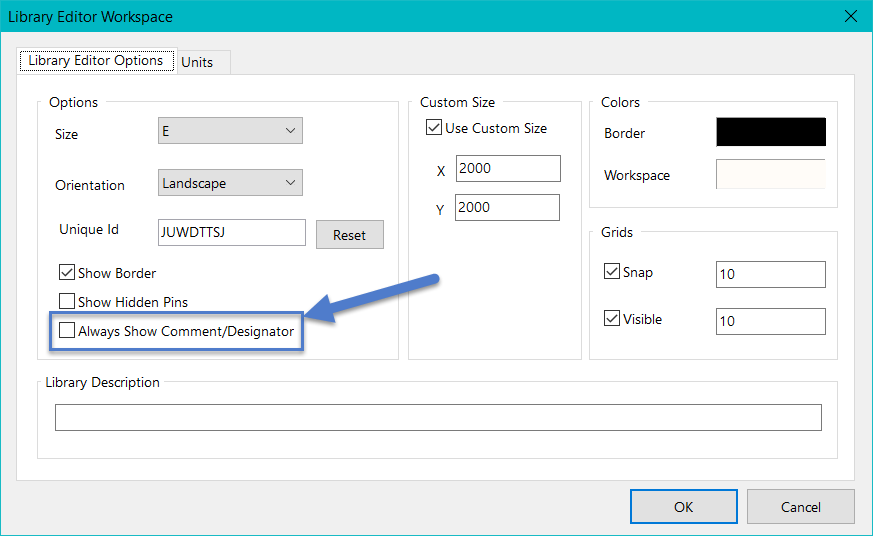
    Since Designators and comments are default to autoposition, their visibility in the Library can be disabled so you do not have to worry about their positions.  Once placed into a schematic they will be visible.


    To show the Comment and Designator while editing a schematic library, open the Document Options under the Tools tab while you have the Library open and enable the checkbox to Always Show Comment/Designator.


    image

    • Cancel
    • Vote Up +1 Vote Down
    • Cancel
  • jimku
    0 jimku over 7 years ago in reply to csiemer

    Thank you! I never had to change anything in the Library Editor Workspace for the comment and designator to show up before but I followed your instructions and now I see them. I don't know how it got un-checked in the first place. Thanks again!

    • Cancel
    • Vote Up +1 Vote Down
    • Cancel
  • jbecker32
    0 jbecker32 over 7 years ago in reply to jimku

    This is a very good hint as the option seems to be disabled from the start. And without this option the font style for comments and designators is not changeable. I had the problem that the 'default' font (?) of my parts was correctly displayed on the screen, correctly shown when printing directly from the schematic editor, but totally crippled when generating outputs.Very annoying until I read this!!!     

    • Cancel
    • Vote Up 0 Vote Down
    • Cancel
  • blackiyto
    0 blackiyto over 7 years ago

    Thank you!

    Lucky Patcher 9Apps VidMate

    • Cancel
    • Vote Up 0 Vote Down
    • Cancel
element14 Community

element14 is the first online community specifically for engineers. Connect with your peers and get expert answers to your questions.

  • Members
  • Learn
  • Technologies
  • Challenges & Projects
  • Products
  • Store
  • About Us
  • Feedback & Support
  • FAQs
  • Terms of Use
  • Privacy Policy
  • Legal and Copyright Notices
  • Sitemap
  • Cookies

An Avnet Company © 2026 Premier Farnell Limited. All Rights Reserved.

Premier Farnell Ltd, registered in England and Wales (no 00876412), registered office: Farnell House, Forge Lane, Leeds LS12 2NE.

ICP 备案号 10220084.

Follow element14

  • X
  • Facebook
  • linkedin
  • YouTube