element14 Community
element14 Community
    Register Log In
  • Site
  • Search
  • Log In Register
  • Community Hub
    Community Hub
    • What's New on element14
    • Feedback and Support
    • Benefits of Membership
    • Personal Blogs
    • Members Area
    • Achievement Levels
  • Learn
    Learn
    • Ask an Expert
    • eBooks
    • element14 presents
    • Learning Center
    • Tech Spotlight
    • STEM Academy
    • Webinars, Training and Events
    • Learning Groups
  • Technologies
    Technologies
    • 3D Printing
    • FPGA
    • Industrial Automation
    • Internet of Things
    • Power & Energy
    • Sensors
    • Technology Groups
  • Challenges & Projects
    Challenges & Projects
    • Design Challenges
    • element14 presents Projects
    • Project14
    • Arduino Projects
    • Raspberry Pi Projects
    • Project Groups
  • Products
    Products
    • Arduino
    • Avnet & Tria Boards Community
    • Dev Tools
    • Manufacturers
    • Multicomp Pro
    • Product Groups
    • Raspberry Pi
    • RoadTests & Reviews
  • About Us
  • Store
    Store
    • Visit Your Store
    • Choose another store...
      • Europe
      •  Austria (German)
      •  Belgium (Dutch, French)
      •  Bulgaria (Bulgarian)
      •  Czech Republic (Czech)
      •  Denmark (Danish)
      •  Estonia (Estonian)
      •  Finland (Finnish)
      •  France (French)
      •  Germany (German)
      •  Hungary (Hungarian)
      •  Ireland
      •  Israel
      •  Italy (Italian)
      •  Latvia (Latvian)
      •  
      •  Lithuania (Lithuanian)
      •  Netherlands (Dutch)
      •  Norway (Norwegian)
      •  Poland (Polish)
      •  Portugal (Portuguese)
      •  Romania (Romanian)
      •  Russia (Russian)
      •  Slovakia (Slovak)
      •  Slovenia (Slovenian)
      •  Spain (Spanish)
      •  Sweden (Swedish)
      •  Switzerland(German, French)
      •  Turkey (Turkish)
      •  United Kingdom
      • Asia Pacific
      •  Australia
      •  China
      •  Hong Kong
      •  India
      • Japan
      •  Korea (Korean)
      •  Malaysia
      •  New Zealand
      •  Philippines
      •  Singapore
      •  Taiwan
      •  Thailand (Thai)
      • Vietnam
      • Americas
      •  Brazil (Portuguese)
      •  Canada
      •  Mexico (Spanish)
      •  United States
      Can't find the country/region you're looking for? Visit our export site or find a local distributor.
  • Translate
  • Profile
  • Settings
Altium CircuitStudio
  • Products
  • Manufacturers
  • Altium CircuitStudio
  • More
  • Cancel
Altium CircuitStudio
Altium CircuitStudio Forum Update a project with all component updates from multiple libraries
  • Blog
  • Forum
  • Documents
  • Events
  • Polls
  • Members
  • Mentions
  • Sub-Groups
  • Tags
  • More
  • Cancel
  • New
Join Altium CircuitStudio to participate - click to join for free!
Actions
  • Share
  • More
  • Cancel
Forum Thread Details
  • State Suggested Answer
  • Locked Locked
  • Replies 6 replies
  • Answers 1 answer
  • Subscribers 89 subscribers
  • Views 2121 views
  • Users 0 members are here
Related
This discussion has been locked.
You can no longer post new replies to this discussion. If you have a question you can start a new discussion

Update a project with all component updates from multiple libraries

lamabrew
lamabrew over 7 years ago

A similar question was asked in the past (update a schematic with an updated library component, which is done by selecting the library component and the 'pushing' the update to the schematic, which must be open).  That is NOT the problem I need to solve.


I need to update every component in a project with the current symbol, parameters (for those that are linked), and footprint for every component in the project.  Opening every schematic sheet in the project and then going through every possible component in every possible library to make sure one doesn't get missed isn't workable.  I've searched through everything I can think of to figure out how to do this and I'm not finding the answer, apologies in advance if I missed the obvious.


Here's the use case I'm dealing with:

  • System with 6 PCB designs in it, each with multi-sheet schematics.
  • System specific (Altium Integrated) libraries, about a dozen (libraries for specific vendors, components, etc)
  • Working on PCB A, realize that half dozen library parts need modification (could be as simple updated supplier PN, or more serious like a footprint change)
  • Make the library mods and update PCB A to verify using the documented method to push changes from SchLib & PCBLib to schematics & layout for PCB A project
  • Now need to update schematics and layouts for PCB B, C, D, etc...

.

So far the only thing I can see is opening every schematic/layout in all of the PCB projects and then going back through each library with a written list of which components to push out an update to. IMHO the odds of getting every part in every project correct are zero; doesn't seem to be a way to run a report that would show where the project and the library have diverged?  There are definitely cases where I would not want to update a project with updated libraries - for example after release. But if you accidentally have a schematic page from something else open now that's been trashed if you push out the changes from the library side.

  • Cancel
Parents
  • e14softwareuk
    0 e14softwareuk over 7 years ago

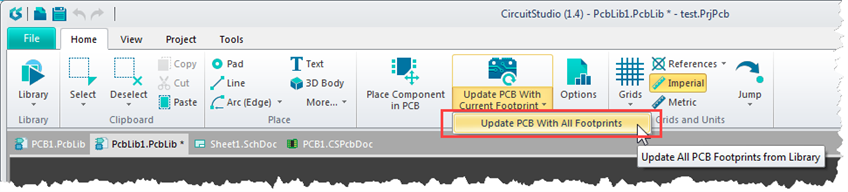
    It is possible to update all footprints from one library at a time.

    image

    • Cancel
    • Vote Up 0 Vote Down
    • Cancel
Reply
  • e14softwareuk
    0 e14softwareuk over 7 years ago

    It is possible to update all footprints from one library at a time.

    image

    • Cancel
    • Vote Up 0 Vote Down
    • Cancel
Children
  • lamabrew
    0 lamabrew over 7 years ago in reply to e14softwareuk

    Hi Peter,


    I was actually more thinking about schematics than PCBs.


    Regardless, as I was just reminded when I hit this again after my post, "one library at a time" is unworkable as I have a number of integrated libraries, and then within those a lot of them are collections of individual components that I've pulled from various vendors and/or parts services. I'm around 30 .pcblib files at the moment. (yes I guess there's no harm in consolidated the one component per schlib/pcblib ones in to a 'common' schlib/pcblib per integrated lib, but I like the idea of keeping the files the way I get them in case there's an update).


    If I'm understanding it what you show is a "push" from the library, which means if I forgot to open a file or the converse (i.e. an older "frozen" release is opened) I would easily make a mess of things.


    What I'm looking for is some sort of right click on the PcbPrj file and select "update all components in schematics" and "update all components in layout" options.  Of course finer grain control would be much more useful, along with the ability to run a report prior to doing this to see what CS thinks the differences actually are.


    Somewhat parenthetically and not to rant nor to go all negative on CS, but the component handling is awful vs. my expectations. Sadly my expectations came from reading about Altium Component Vault from googling for documentation and not realizing it's something in Altium Designer that has no obvious relationship with what's included in CS.


    IMHO the Vault thing in CS is some bizarre anti-productivity tool dreamed up by Altium's competitors.  It's so bad that I've totally stopped using it, ignoring the incessant prompts to log in to it. However there's nothing else in CS to support organizing components, searching, cataloging, etc., so I've gone to "outside" CS to do that.


    The rest of CS IMHO represents really good value for the functionality and for me hits a sweet spot for low complexity designs I'm doing. But components/libraries has been nothing but disappointment and if I had to vote for one thing for Altium to do is to deal with that. I'm hoping the (announced but no sign of it yet)  integration with Ocotpart might be a step in that direction.


    Thanks again for looking in to this.

    • Cancel
    • Vote Up 0 Vote Down
    • Cancel
  • jaza_tom
    0 jaza_tom over 7 years ago in reply to e14softwareuk

    I also am wondering how the heck to synchronize/update more than one component on my schematic at a time.


    I'm going through my schematic libraries and manually adding supplier links to each component.  Now that I have done that, I want the ability to either push all of those changes to my schematic document at the same time (from inside each library).  Alternatively, the ability to run a check from within my schematic document to see if any of the components in my design have corresponding source library diferences, and pull those differences to my schematic document.


    Thanks peterbarnard e14softwareuk

    • Cancel
    • Vote Up 0 Vote Down
    • Cancel
  • e14softwareuk
    0 e14softwareuk over 7 years ago in reply to jaza_tom

    Sorry but I don't know of a way to mass update as you are looking to do.

    • Cancel
    • Vote Up 0 Vote Down
    • Cancel
  • jaza_tom
    0 jaza_tom over 7 years ago in reply to e14softwareuk

    Darn.

    • Cancel
    • Vote Up 0 Vote Down
    • Cancel
element14 Community

element14 is the first online community specifically for engineers. Connect with your peers and get expert answers to your questions.

  • Members
  • Learn
  • Technologies
  • Challenges & Projects
  • Products
  • Store
  • About Us
  • Feedback & Support
  • FAQs
  • Terms of Use
  • Privacy Policy
  • Legal and Copyright Notices
  • Sitemap
  • Cookies

An Avnet Company © 2025 Premier Farnell Limited. All Rights Reserved.

Premier Farnell Ltd, registered in England and Wales (no 00876412), registered office: Farnell House, Forge Lane, Leeds LS12 2NE.

ICP 备案号 10220084.

Follow element14

  • X
  • Facebook
  • linkedin
  • YouTube