element14 Community
element14 Community
    Register Log In
  • Site
  • Search
  • Log In Register
  • Community Hub
    Community Hub
    • What's New on element14
    • Feedback and Support
    • Benefits of Membership
    • Personal Blogs
    • Members Area
    • Achievement Levels
  • Learn
    Learn
    • Ask an Expert
    • eBooks
    • element14 presents
    • Learning Center
    • Tech Spotlight
    • STEM Academy
    • Webinars, Training and Events
    • Learning Groups
  • Technologies
    Technologies
    • 3D Printing
    • FPGA
    • Industrial Automation
    • Internet of Things
    • Power & Energy
    • Sensors
    • Technology Groups
  • Challenges & Projects
    Challenges & Projects
    • Design Challenges
    • element14 presents Projects
    • Project14
    • Arduino Projects
    • Raspberry Pi Projects
    • Project Groups
  • Products
    Products
    • Arduino
    • Avnet & Tria Boards Community
    • Dev Tools
    • Manufacturers
    • Multicomp Pro
    • Product Groups
    • Raspberry Pi
    • RoadTests & Reviews
  • About Us
  • Store
    Store
    • Visit Your Store
    • Choose another store...
      • Europe
      •  Austria (German)
      •  Belgium (Dutch, French)
      •  Bulgaria (Bulgarian)
      •  Czech Republic (Czech)
      •  Denmark (Danish)
      •  Estonia (Estonian)
      •  Finland (Finnish)
      •  France (French)
      •  Germany (German)
      •  Hungary (Hungarian)
      •  Ireland
      •  Israel
      •  Italy (Italian)
      •  Latvia (Latvian)
      •  
      •  Lithuania (Lithuanian)
      •  Netherlands (Dutch)
      •  Norway (Norwegian)
      •  Poland (Polish)
      •  Portugal (Portuguese)
      •  Romania (Romanian)
      •  Russia (Russian)
      •  Slovakia (Slovak)
      •  Slovenia (Slovenian)
      •  Spain (Spanish)
      •  Sweden (Swedish)
      •  Switzerland(German, French)
      •  Turkey (Turkish)
      •  United Kingdom
      • Asia Pacific
      •  Australia
      •  China
      •  Hong Kong
      •  India
      • Japan
      •  Korea (Korean)
      •  Malaysia
      •  New Zealand
      •  Philippines
      •  Singapore
      •  Taiwan
      •  Thailand (Thai)
      • Vietnam
      • Americas
      •  Brazil (Portuguese)
      •  Canada
      •  Mexico (Spanish)
      •  United States
      Can't find the country/region you're looking for? Visit our export site or find a local distributor.
  • Translate
  • Profile
  • Settings
Altium CircuitStudio
  • Products
  • Manufacturers
  • Altium CircuitStudio
  • More
  • Cancel
Altium CircuitStudio
Altium CircuitStudio Forum Generate Outputs stuck in grayscale
  • Blog
  • Forum
  • Documents
  • Events
  • Polls
  • Members
  • Mentions
  • Sub-Groups
  • Tags
  • More
  • Cancel
  • New
Join Altium CircuitStudio to participate - click to join for free!
Actions
  • Share
  • More
  • Cancel
Forum Thread Details
  • Locked Locked
  • Replies 18 replies
  • Subscribers 90 subscribers
  • Views 2522 views
  • Users 0 members are here
Related
This discussion has been locked.
You can no longer post new replies to this discussion. If you have a question you can start a new discussion

Generate Outputs stuck in grayscale

spe672
spe672 over 9 years ago

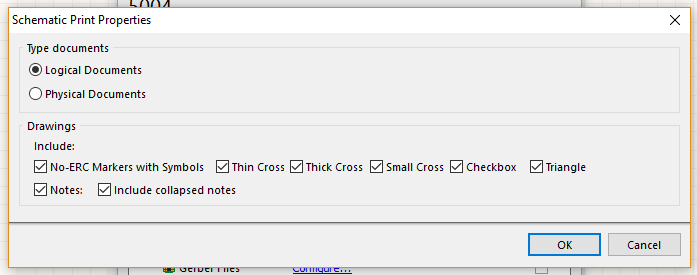
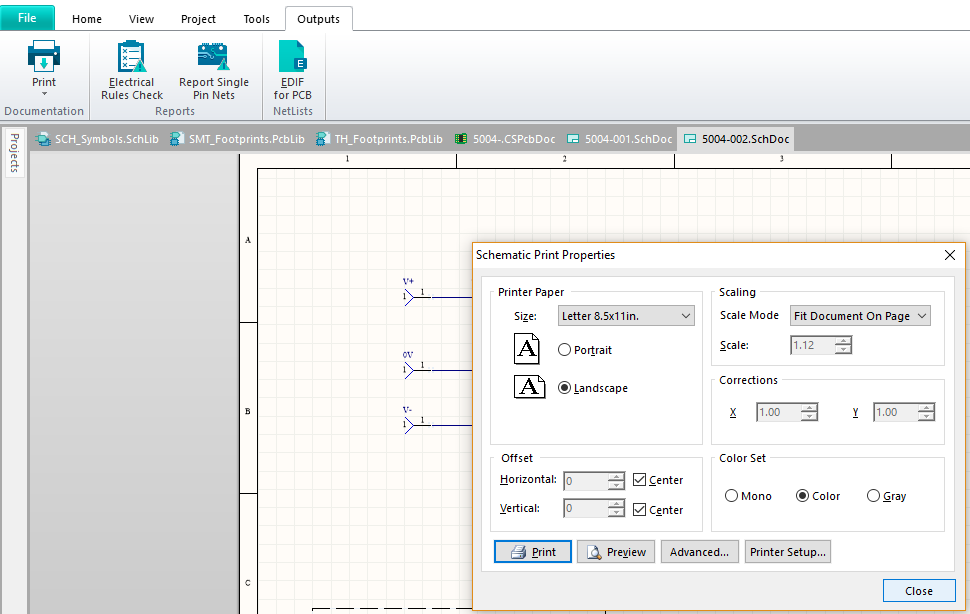
I can't get the batch job generate outputs function to allow me to make a color PDF of the schematic.  I have found where I can make the schematic mono, color and grayscale for individual prints, but I don't have the full version of acrobat...so it seems the only way to make a PDF is through the batch job where the schematic is stuck in grayscale.


Here's where I can batch output the schematic, but no color options seem to be available.

image


The options I get when I "Configure" the schematic print.
image


This panel affects individual prints, but I don't want a hard copy.  I need the batch to follow the color setting I've set here...
image


Thanks!

Andy

  • Cancel

Top Replies

  • harvie256
    harvie256 over 9 years ago in reply to spe672 +1
    Like wise I used AD professionally, but now that I run a small business, when I get grumpy about using the cut down version I just think about the amount of money that hasn't left my wallet!
  • harvie256
    harvie256 over 9 years ago in reply to jstrautman +1
    You are much better off just hacking the OutJob file, when you print to a PDF you're rending a image then compressing it. The file size ends up much bigger (like 20x) and you loose the great capability…
  • harvie256
    harvie256 over 9 years ago

    There's no proper way of doing it (it's missing functionality.)


    I described how you can work around the problem here:

    Generate Outputs in Color

    • Cancel
    • Vote Up 0 Vote Down
    • Cancel
  • spe672
    spe672 over 9 years ago in reply to harvie256

    Thank you for the reply!  I've used full version of Altium at work for 20 years (back in the Protel days) and it's so hard to use a whittled-down version.  I've found most of what I need through other methods, but it's pretty painful.  I'll check it out when I get home tonight!


    Andy

    • Cancel
    • Vote Up 0 Vote Down
    • Cancel
  • harvie256
    harvie256 over 9 years ago in reply to spe672

    Like wise I used AD professionally, but now that I run a small business, when I get grumpy about using the cut down version I just think about the amount of money that hasn't left my wallet!

    • Cancel
    • Vote Up +1 Vote Down
    • Cancel
  • jstrautman
    jstrautman over 9 years ago

    Any chance you can use a pdf printer like "cutepdfprinter" or something similar to make the color prints you need?


    That's what I have been doing when I need to provide a color print to make it look more professional.  I do like the look of a color print much better than the greyscale.  The thing you lose is the ability to select components and nets in the bookmark section.

    • Cancel
    • Vote Up 0 Vote Down
    • Cancel
  • spe672
    spe672 over 9 years ago in reply to harvie256

    Yes, same situation and I feel the same way!

    • Cancel
    • Vote Up 0 Vote Down
    • Cancel
  • harvie256
    harvie256 over 9 years ago in reply to jstrautman

    You are much better off just hacking the OutJob file, when you print to a PDF you're rending a image then compressing it.  The file size ends up much bigger (like 20x) and you loose the great capability of auto generating a complete and bookmarked document stack.


    All you have to do is open the <project name>.OutJob in your favourite text editor and do a search and replace for "PrintKind=1" to "PrintKind=0". Save it and you're now generating colour docs.


    I wrote a powershell script to do this, but since you only have to do it once per project I've never found it really any quicker than using a notepad++

    • Cancel
    • Vote Up +1 Vote Down
    • Cancel
  • spe672
    spe672 over 9 years ago in reply to harvie256

    At work, I developed our Altium templates;  we have an .outjob that travels with each project as a template file and the CS outjob doesn't exactly have this capability.  We start each PCB with a prjpcb, PCBdoc, several SCHdocs and outjob.  The outjob has been tailored to contain 4 output containers towards our release process; 2 for PCB release and 2 for assembly release.  It's a one stop shop outjob for our company and since we've got 50+ people using our floating seats, we have to simplify where we can for drawing release consistency.


    I opened the CS outjob file to try and tweak it so I could keep the project out settings common to my typical jobs, but got lost in all the stuff in there.  I'm specifically talking about setting up an outjob for  Schematic generation appended to a  specific PCB view (specific layers and with some draft view settings to make some stuff clear) and then gerber layers.  I would set up templates for a 2, 4 and 6 layer boards.  I messed with this during the first board I was working on in December.  I've since resorted to setting up each outjob on it's own (on my 4th board now) and it's not so bad, but I know i'm going to miss a detail on one of these jobs...


    My question is, what's your outjob workflow in CS since you're familiar with the power of output containers?  Have you found a good way to make a "Template" outjob?  I made one, but it retained some details of the original project it was associated with.  When it made the outputs folder, it kept the name of the original project, etc and didn't do what I was hoping it would.  I guess I could dig around till I made it work the way I wanted to, but haven't been motivated to attack that yet.


    Thanks

    Andy

    • Cancel
    • Vote Up 0 Vote Down
    • Cancel
  • harvie256
    harvie256 over 9 years ago in reply to spe672

    I haven't got anything thoroughly worked yet, but the most promising thing from my perspective is to setup a template outjob then use simple powershell (or whatever floats your boat) scripts to replace the text elements necessary for each new project.


    So far the only way I've found to work with CS outjobs is a combination of setting stuff up roughly how I want it in the dialogs then modifying the outjob file to finish it off.  There's just too much missing from the CS outjob dialogs.  Also the outjob file is very easy to modify since it's all human readable text.

    • Cancel
    • Vote Up 0 Vote Down
    • Cancel
  • spe672
    spe672 over 9 years ago in reply to harvie256

    I was scared of messing with the text in there, but running two simple find and replace functions in Notepad++ does exactly what I need!  Thanks for pointing me in the right direction, you killed two birds with one stone!  I had to tweak both the outjob and the prjpcb file to make it work. 


    I know extremely little about scripting, but I have several coworkers that can fix me up.


    thanks!


    Andy

    • Cancel
    • Vote Up 0 Vote Down
    • Cancel
  • jamesharrimanaltium
    jamesharrimanaltium over 8 years ago in reply to spe672

    Page Setup dialogs are being added to CircuitStudio in the up coming version 1.4. In the mean time it's no problem for you to hack the OutJob file carefully as described by harvie256 as this won't conflict with the up coming feature.


    Best regards,

    James Harriman

    Altium

    • Cancel
    • Vote Up 0 Vote Down
    • Cancel
>
element14 Community

element14 is the first online community specifically for engineers. Connect with your peers and get expert answers to your questions.

  • Members
  • Learn
  • Technologies
  • Challenges & Projects
  • Products
  • Store
  • About Us
  • Feedback & Support
  • FAQs
  • Terms of Use
  • Privacy Policy
  • Legal and Copyright Notices
  • Sitemap
  • Cookies

An Avnet Company © 2026 Premier Farnell Limited. All Rights Reserved.

Premier Farnell Ltd, registered in England and Wales (no 00876412), registered office: Farnell House, Forge Lane, Leeds LS12 2NE.

ICP 备案号 10220084.

Follow element14

  • X
  • Facebook
  • linkedin
  • YouTube