element14 Community
element14 Community
    Register Log In
  • Site
  • Search
  • Log In Register
  • Community Hub
    Community Hub
    • What's New on element14
    • Feedback and Support
    • Benefits of Membership
    • Personal Blogs
    • Members Area
    • Achievement Levels
  • Learn
    Learn
    • Ask an Expert
    • eBooks
    • element14 presents
    • Learning Center
    • Tech Spotlight
    • STEM Academy
    • Webinars, Training and Events
    • Learning Groups
  • Technologies
    Technologies
    • 3D Printing
    • FPGA
    • Industrial Automation
    • Internet of Things
    • Power & Energy
    • Sensors
    • Technology Groups
  • Challenges & Projects
    Challenges & Projects
    • Design Challenges
    • element14 presents Projects
    • Project14
    • Arduino Projects
    • Raspberry Pi Projects
    • Project Groups
  • Products
    Products
    • Arduino
    • Avnet & Tria Boards Community
    • Dev Tools
    • Manufacturers
    • Multicomp Pro
    • Product Groups
    • Raspberry Pi
    • RoadTests & Reviews
  • About Us
    About the element14 Community
  • Store
    Store
    • Visit Your Store
    • Choose another store...
      • Europe
      •  Austria (German)
      •  Belgium (Dutch, French)
      •  Bulgaria (Bulgarian)
      •  Czech Republic (Czech)
      •  Denmark (Danish)
      •  Estonia (Estonian)
      •  Finland (Finnish)
      •  France (French)
      •  Germany (German)
      •  Hungary (Hungarian)
      •  Ireland
      •  Israel
      •  Italy (Italian)
      •  Latvia (Latvian)
      •  
      •  Lithuania (Lithuanian)
      •  Netherlands (Dutch)
      •  Norway (Norwegian)
      •  Poland (Polish)
      •  Portugal (Portuguese)
      •  Romania (Romanian)
      •  Russia (Russian)
      •  Slovakia (Slovak)
      •  Slovenia (Slovenian)
      •  Spain (Spanish)
      •  Sweden (Swedish)
      •  Switzerland(German, French)
      •  Turkey (Turkish)
      •  United Kingdom
      • Asia Pacific
      •  Australia
      •  China
      •  Hong Kong
      •  India
      •  Japan
      •  Korea (Korean)
      •  Malaysia
      •  New Zealand
      •  Philippines
      •  Singapore
      •  Taiwan
      •  Thailand (Thai)
      •  Vietnam
      • Americas
      •  Brazil (Portuguese)
      •  Canada
      •  Mexico (Spanish)
      •  United States
      Can't find the country/region you're looking for? Visit our export site or find a local distributor.
  • Translate
  • Profile
  • Settings
Raspberry Pi
  • Products
  • More
Raspberry Pi
Blog Building a Thermal Imaging System with the Raspberry Pi 3, Sense HAT and Panasonic Grid-EYE
  • Blog
  • Forum
  • Documents
  • Quiz
  • Events
  • Polls
  • Files
  • Members
  • Mentions
  • Sub-Groups
  • Tags
  • More
  • Cancel
  • New
Join Raspberry Pi to participate - click to join for free!
Featured Articles
Announcing Pi
Technical Specifications
Raspberry Pi FAQs
Win a Pi
GPIO Pinout
Raspberry Pi Wishlist
Comparison Chart
Quiz
  • Share
  • More
  • Cancel
Group Actions
  • Group RSS
  • More
  • Cancel
Engagement
  • Author Author: shabaz
  • Date Created: 9 Nov 2016 12:09 PM Date Created
  • Views 12809 views
  • Likes 19 likes
  • Comments 63 comments
Related
Recommended
  • thermopile sensor
  • pi 3
  • rpiintermediate
  • panasonic grid eye
  • amg8832ek
  • amg8834ek
  • rpibeginner
  • amg8834
  • thermopile
  • amg8832
  • infrared_sensor
  • panasonic grid-eye
  • grid eye
  • thermopile array
  • grid-eye sensor
  • rasberry pi 3
  • javascript
  • panasonic_industrial_europe
  • infrared array
  • node.js
  • pi3-ibm-iot-learnkit
  • grid-eye

Building a Thermal Imaging System with the Raspberry Pi 3, Sense HAT and Panasonic Grid-EYE

shabaz
shabaz
9 Nov 2016

Introduction

Sometimes it is great to be able to see if things are hot or cold with a thermometer or other device. Multiply it by 64 and it is possible to get a graphical image of hot spots or detect humans for instance.

A thermopile array can be used to measure temperature from a distance and a special part from Panasonic called Grid-EYE happens to have 64 of them : )

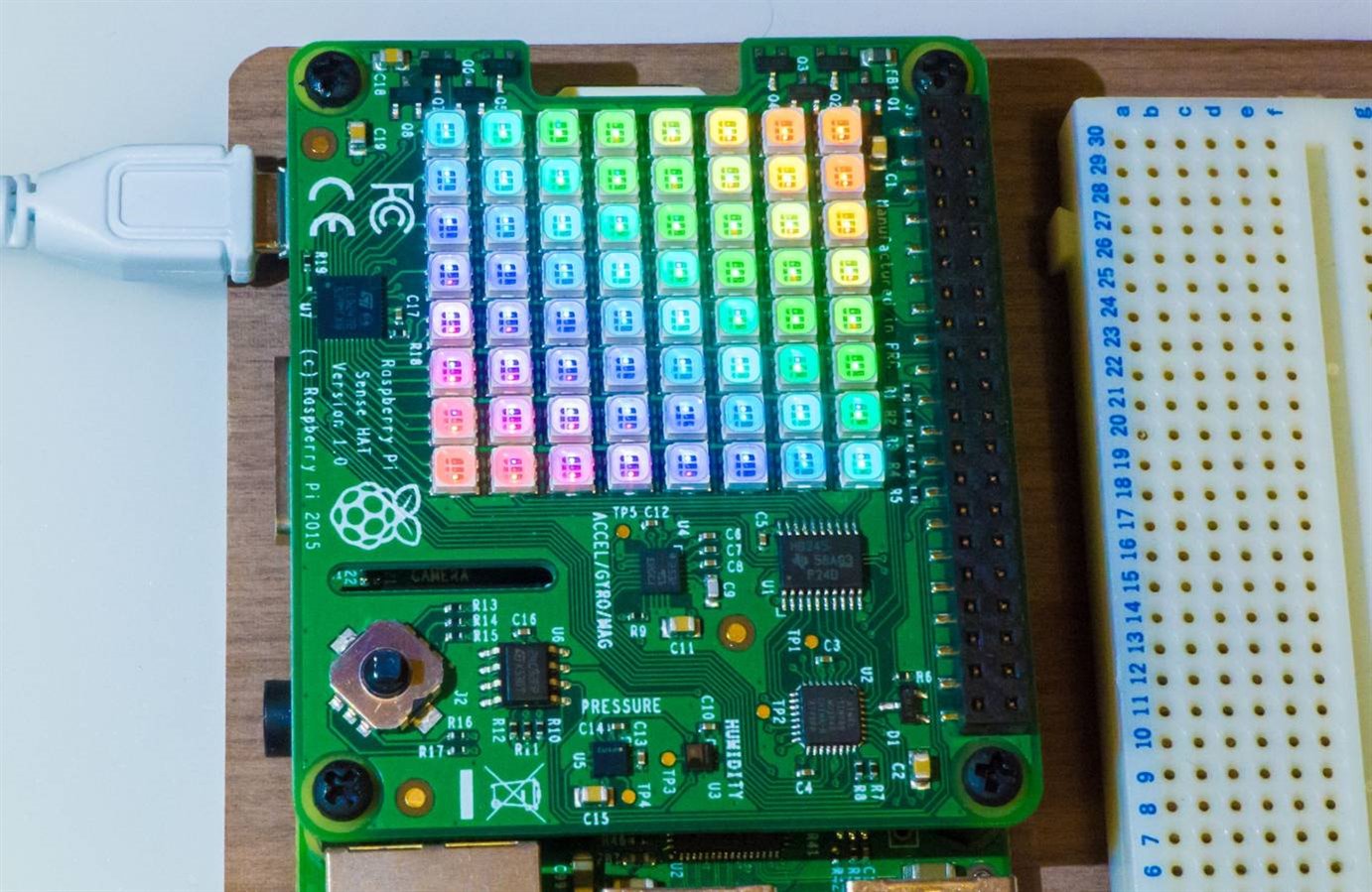
Since the Sense HAT has 64 LEDs, I wanted to try them together : )
image


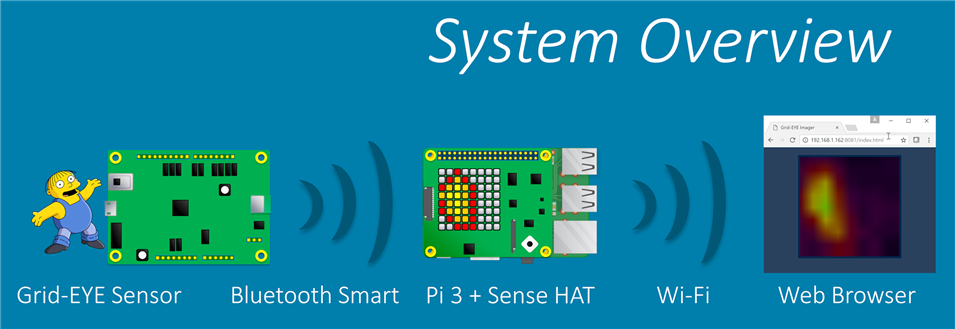
This is what is implemented:

image


For more experiments with the Grid-EYE and a review, see here: Panasonic Grid-EYE RoadTest - Review


What can you do with it?

The Grid-EYE is designed for detecting humans or objects that come into its field of view. It could be used for automatically turning on the heating when a human is detected, or automatically opening doors for instance. It differs greatly from the usual passive infrared (PIR) sensors used in alarm systems; they require movement whereas thermopile sensors will continuously detect objects while they remain in the field of view. By processing the images over time it is possible to see which direction humans or objects are moving. This could be useful for more intelligent automated doors or barriers, or for innovative electronic advertising that is triggered by human presence and actions.


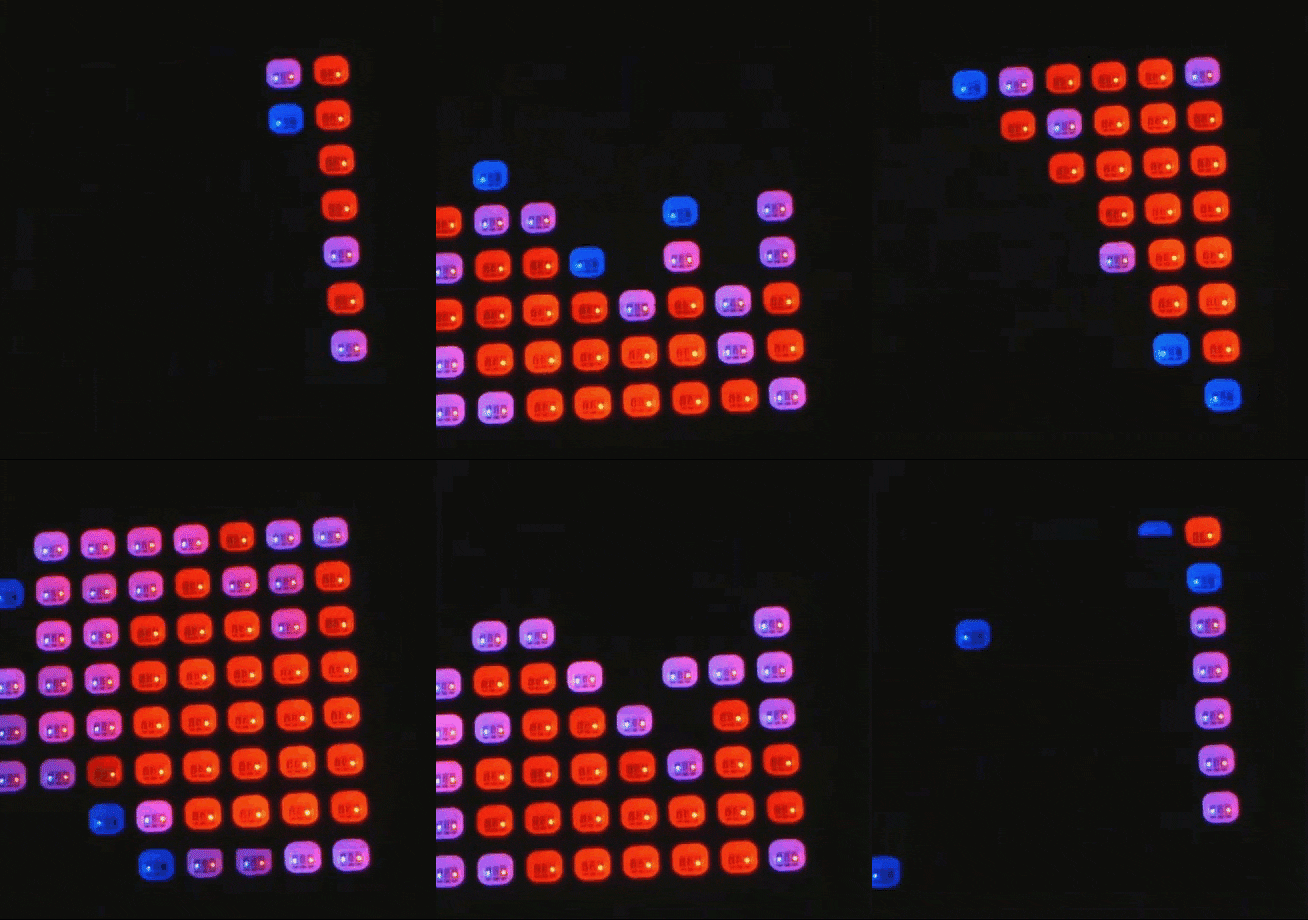
In the brief time that I explored, it was possible to see people from a distance of five metres, and a 10 ohm resistor connected to an AA battery from about an inch away. By experimenting with the software it is possible to choose the spectrum of color that is desired for the particular temperature range of interest.
image


Grid-EYE usefulness for people detection (occupancy sensor) was explored in the Grid-EYE Review blog post.


Build Steps

The project is straightforward and simple, so in the interests of efficiency this report won’t have a lot of text!

To build this project, a Pi 3 and a Sense HAT is needed, and the Grid-Eye evaluation kit. I already had the Pi 3 and Sense HAT (and the associated memory card and power supply) as part of the Pi 3 IBM IoT Learner KitPi 3 IBM IoT Learner Kit reviewed here. The Grid-EYE evaluation board is available separately. The one I had (model AMG8832) is not available any more but there is a better performance AMG8834 Grid-EYE Evaluation ModuleAMG8834 Grid-EYE Evaluation Module that can detect humans up to 7 metres away.


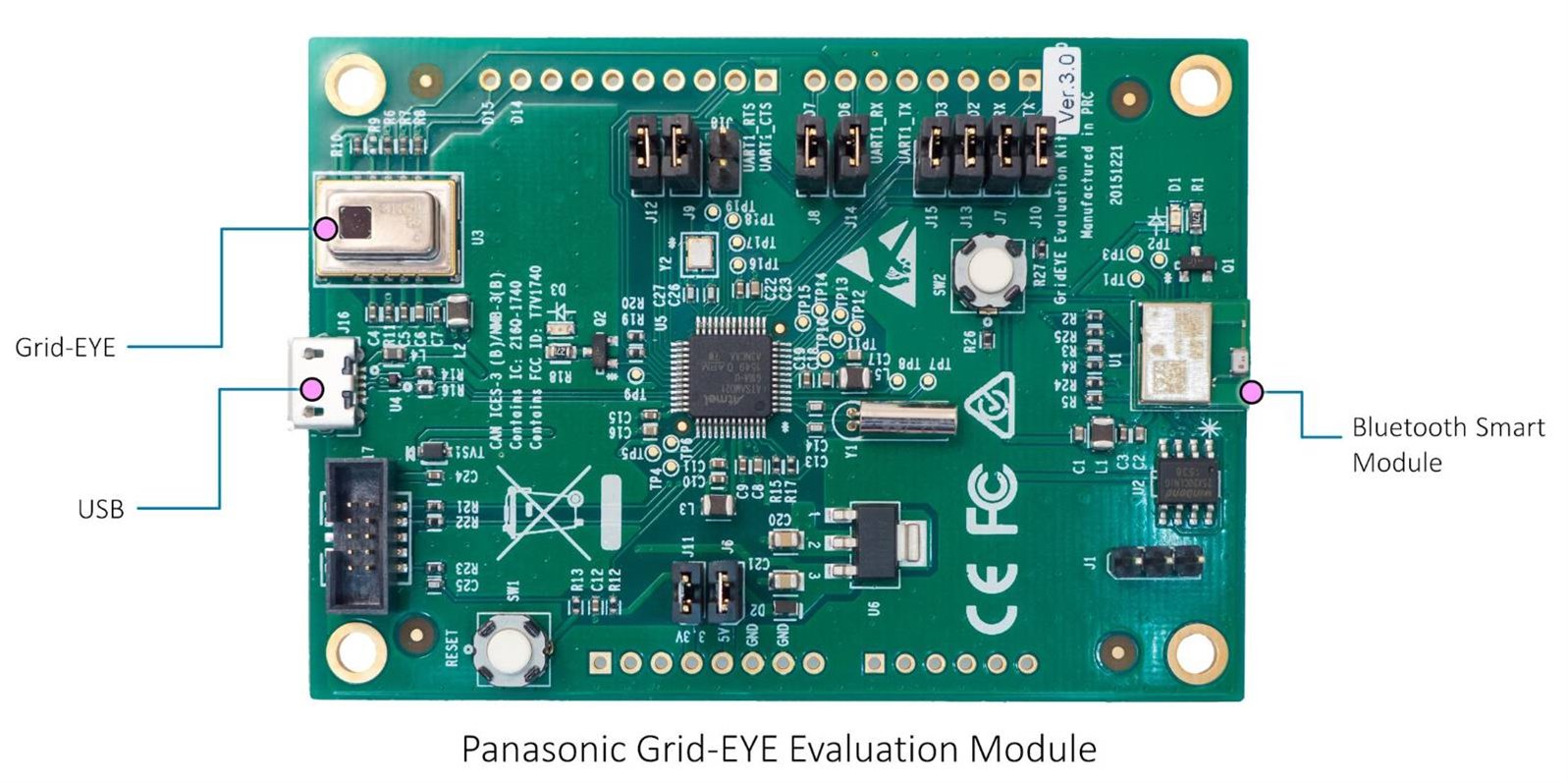
The evaluation board contains the Grid-EYE, a pre-programmed microcontroller and Bluetooth Smart capability. Basically nothing needs to be done with the eval board except plug it into a power supply! The supply can be a 5V mobile phone charger or a PC USB port. The photo here shows the Grid-EYE evaluation board. It is about the footprint of a playing card. The Grid-EYE module itself is very small, about 12mm on its longest dimension.
image


Since the Pi 3 also has Bluetooth Smart capability, the Grid-EYE board connects to the Pi using this. This is great because it means that the imaging can be performed remotely.

The Pi 3 is responsible for translating the 8x8 array of values into colours and sending them to the Sense HAT’s display. The Pi 3 also runs a little web server so any web browser (e.g. PC or mobile phone) can be used to connect to the Pi and view the images live.

Check out the short video (1.5 mins) for some example capture.

You don't have permission to edit metadata of this video.
Edit media
x
image
Upload Preview
image


Here are the instructions to build it. First, as root user (or prepend sudo to these commands):


apt-get install libbluetooth-dev
update-nodejs-and-nodered


Then, as normal user (e.g. pi or your username):


git clone https://github.com/shabaz123/grid-eye
cd grid-eye
npm install noble
npm install sense-hat-led
npm install rotate-matrix
npm install ioctl
npm install socket.io
npm install imagejs


Change the index.js file at grid-eye/node_modules/sense-hat-led using the index.js_mine file (which has been through the babel transpiler) using this command:


cp index.js_mine node_modules/sense-hat-led/index.js


The grid-eye/index.js file will need a modification, search for the line with the text progpath and set it to point to the grid-eye folder. The slash at the end is important. For example for me it says:


var progpath='/home/shabaz/grid-eye/';


That’s it! To run it, as root user (or prepend with sudo) type:


node index.js


Use a browser to navigate to http://xx.xx.xx.xx:8081/index.html

The code works but is just prototype quality and there is lots of room for improvement. It seems to work reasonably well but would benefit from some configuration options (things like temperature range are hard-coded).

Attachments:
index_pc.zip
  • Sign in to reply

Top Comments

  • ajens23
    ajens23 over 9 years ago +5
    Now that is pretty cool! (errr....hot,,,, or something like that) I'm going to have to try that.
  • DAB
    DAB over 9 years ago +5
    Excellent post. I knew that the Grideye sensor had great capability, so it was great to see that it could be as useful as I thought. Now all I need to do is find some time to play with one. DAB
  • beacon_dave
    beacon_dave over 9 years ago +5
    I have been pondering over how well these Grid-EYE sensors might work for room occupancy monitoring purposes. For example if they were mounted on a ceiling over a seating bank, then could they identify…
  • shabaz
    shabaz over 9 years ago in reply to aidualc

    Hi Claudia,


    Oh, excellent. I too was downloading the latest image to re-attempt. Glad it is working.


    Regarding the output, if you see the 'RGB color xxxx violates'... message, this just means that the mapping between temperature and color is out of range (I wanted to map room temperature range to colors, but if the temperature is colder or hotter than expected in a room then it generate that error - if you see it too many times then this just means that the values inside the code need to be tweaked to map to your desired temperature range). Since it was prototype code, I didn't make any configuration to adjust it, but it is easy to tweak a couple of values in the code to do this.


    Regarding the output, it basically waits to see a device with the service UUID that matches a particular value that is hard-coded in the source code. If it finds it, then it prints "found service ...".

    Then it waits to see if it can find three characteristics which are also hard-coded in the source code, and prints "found characteristic...". Then, it expects to see a stream of data (the pixel data) from the Grid-EYE board, using the function called grideye_func() in the index.js code, and when any data arrives, the grideye_data.char.on('read'..) function will return in the 'data' array.

    The code then tries to match on a stream of three magic values which are 0x2a,0x2a,0x2a which the Grid-EYE board happens to send at the start of every frame. Once the code sees this, then the remainder bytes are in pairs, and they are converted to a temperature value (see lines 105-109 in the code). The 'cval' variable contains the temperature in degrees C (it is a floating point number, with granularity of 0.25 degrees C).

    Then I convert that to a color (using the temp2pixel function, and then store the color value in an array called 'frame'.

    Then I send that to the sense HAT board (using matrix.setPixels), and also to the web browser.

    In the output text, the lines 'url is...' just means that the web browser is trying to do a HTTP GET on those files.


    Regarding the ' RGB color xxx violates..' issue, you can see in the function temp2pixel in index.js how the temperature (cval) is converted to a color, using:

    single2rgb24((cval-19)*1700);

    Basically I subtracted 19 (I'm assuming the room will never be colder than 19 degrees C (I like it warm : ) and then just multiply by a large number, to get a value between zero and a large number. That value is then converted to a 24-bit RGB color. You can eliminate the 'violates' message by subtracting a smaller value, but it affects the colors in the output on the web browser.

    • Cancel
    • Vote Up +5 Vote Down
    • Sign in to reply
    • More
    • Cancel
  • aidualc
    aidualc over 9 years ago in reply to shabaz

    Hi,


    I came back image


    Because did not work trying again and again...I used another micro SD card and wrote again

    the Jessie image with pixel (the same like the first time). And then, I followed the instructions provided

    on this page and it worked image


    Could you explain me the meaning of the following, please? I would be interested in accessing the

    values sent by the grid-eye; maybe having these in a file.


    pi@raspberrypi:~/grid-eye $ sudo node index.js
    scanning..
    found:  { localName: 'Grid Eye',
      txPowerLevel: undefined,
      manufacturerData: undefined,
      serviceData: [],
      serviceUuids: [ '0783b03e8535b5a07140a304d2495cb7' ],
      solicitationServiceUuids: [],
      serviceSolicitationUuids: [] }
    found service:  0783b03e8535b5a07140a304d2495cb7
    found characteristic: 0783b03e8535b5a07140a304d2495cb8
    found characteristic: 0783b03e8535b5a07140a304d2495cba
    found characteristic: 0783b03e8535b5a07140a304d2495cb9
    RGB color -57,-122,0 violates [0, 0, 0] < RGB < [255, 255, 255]
    RGB color -57,-122,0 violates [0, 0, 0] < RGB < [255, 255, 255]
    RGB color -57,-122,0 violates [0, 0, 0] < RGB < [255, 255, 255]
    RGB color -57,-122,0 violates [0, 0, 0] < RGB < [255, 255, 255]
    RGB color -57,-122,0 violates [0, 0, 0] < RGB < [255, 255, 255]
    RGB color -57,-122,0 violates [0, 0, 0] < RGB < [255, 255, 255]
    RGB color -57,-122,0 violates [0, 0, 0] < RGB < [255, 255, 255]
    RGB color -57,-122,0 violates [0, 0, 0] < RGB < [255, 255, 255]
    RGB color -57,-122,0 violates [0, 0, 0] < RGB < [255, 255, 255]
    RGB color -57,-122,0 violates [0, 0, 0] < RGB < [255, 255, 255]
    RGB color -57,-122,0 violates [0, 0, 0] < RGB < [255, 255, 255]
    RGB color -57,-122,0 violates [0, 0, 0] < RGB < [255, 255, 255]
    RGB color -57,-122,0 violates [0, 0, 0] < RGB < [255, 255, 255]
    RGB color -57,-122,0 violates [0, 0, 0] < RGB < [255, 255, 255]
    RGB color -57,-122,0 violates [0, 0, 0] < RGB < [255, 255, 255]
    RGB color -57,-122,0 violates [0, 0, 0] < RGB < [255, 255, 255]
    RGB color -57,-122,0 violates [0, 0, 0] < RGB < [255, 255, 255]
    RGB color -57,-122,0 violates [0, 0, 0] < RGB < [255, 255, 255]
    RGB color -57,-122,0 violates [0, 0, 0] < RGB < [255, 255, 255]
    RGB color -57,-122,0 violates [0, 0, 0] < RGB < [255, 255, 255]
    RGB color -57,-122,0 violates [0, 0, 0] < RGB < [255, 255, 255]
    RGB color -57,-122,0 violates [0, 0, 0] < RGB < [255, 255, 255]
    url is index.html
    url is jquery.event.drag-2.0.js
    url is style.css
    url is scripts.js
    url is favicon.ico
    url is index.html
    url is jquery.event.drag-2.0.js
    url is style.css
    url is scripts.js
    url is favicon.ico
    RGB color -57,-122,0 violates [0, 0, 0] < RGB < [255, 255, 255]
    RGB color -57,-122,0 violates [0, 0, 0] < RGB < [255, 255, 255]

    • Cancel
    • Vote Up +3 Vote Down
    • Sign in to reply
    • More
    • Cancel
  • aidualc
    aidualc over 9 years ago in reply to shabaz

    Hi Shabaz,


    Thanks for answering me so prompt.

    I followed your sugestions

    image

    and it seems that the result is different..Is there anything wrong in how I do, please?

    Here is my result after the npm install noble:

    pi@raspberrypi:~/grid-eye $ npm install noble
    npm WARN optional dep failed, continuing xpc-connection@0.1.4
    |
    > usb@1.2.0 install /home/pi/node_modules/noble/node_modules/bluetooth-hci-socke                                                                                        t/node_modules/usb
    > node-pre-gyp install --fallback-to-build
    
    
    node-pre-gyp ERR! Tried to download: https://github.com/tessel/node-usb/releases                                                                                        /download/1.2.0/usb_bindings-v1.2.0-node-v46-linux-arm.tar.gz
    node-pre-gyp ERR! Pre-built binaries not found for usb@1.2.0 and node@4.2.1 (nod                                                                                        e-v46 ABI) (falling back to source compile with node-gyp)
    gyp ERR! configure error
    gyp ERR! stack Error: Can't find Python executable "/path/to/executable/python2.                                                                                        7", you can set the PYTHON env variable.
    gyp ERR! stack     at failNoPython (/usr/lib/node_modules/npm/node_modules/node-                                                                                        gyp/lib/configure.js:449:14)
    gyp ERR! stack     at /usr/lib/node_modules/npm/node_modules/node-gyp/lib/config                                                                                        ure.js:353:11
    gyp ERR! stack     at F (/usr/lib/node_modules/npm/node_modules/which/which.js:6                                                                                        9:16)
    gyp ERR! stack     at E (/usr/lib/node_modules/npm/node_modules/which/which.js:8                                                                                        1:29)
    gyp ERR! stack     at /usr/lib/node_modules/npm/node_modules/which/which.js:90:1                                                                                        6
    gyp ERR! stack     at /usr/lib/node_modules/npm/node_modules/which/node_modules/                                                                                        isexe/index.js:44:5
    gyp ERR! stack     at /usr/lib/node_modules/npm/node_modules/which/node_modules/                                                                                        isexe/access.js:8:5
    gyp ERR! stack     at FSReqWrap.oncomplete (fs.js:82:15)
    gyp ERR! System Linux 4.4.38-v7+
    gyp ERR! command "/usr/local/bin/node" "/usr/lib/node_modules/npm/node_modules/n                                                                                        ode-gyp/bin/node-gyp.js" "configure" "--fallback-to-build" "--module=/home/pi/no                                                                                        de_modules/noble/node_modules/bluetooth-hci-socket/node_modules/usb/src/binding/                                                                                        usb_bindings.node" "--module_name=usb_bindings" "--module_path=/home/pi/node_mod                                                                                        ules/noble/node_modules/bluetooth-hci-socket/node_modules/usb/src/binding" "--py                                                                                        thon=/path/to/executable/python2.7"
    gyp ERR! cwd /home/pi/node_modules/noble/node_modules/bluetooth-hci-socket/node_                                                                                        modules/usb
    gyp ERR! node -v v4.2.1
    gyp ERR! node-gyp -v v3.4.0
    gyp ERR! not ok
    node-pre-gyp ERR! build error
    node-pre-gyp ERR! stack Error: Failed to execute '/usr/local/bin/node /usr/lib/n                                                                                        ode_modules/npm/node_modules/node-gyp/bin/node-gyp.js configure --fallback-to-bu                                                                                        ild --module=/home/pi/node_modules/noble/node_modules/bluetooth-hci-socket/node_                                                                                        modules/usb/src/binding/usb_bindings.node --module_name=usb_bindings --module_pa                                                                                        th=/home/pi/node_modules/noble/node_modules/bluetooth-hci-socket/node_modules/us                                                                                        b/src/binding --python=/path/to/executable/python2.7' (1)
    node-pre-gyp ERR! stack     at ChildProcess.<anonymous> (/home/pi/node_modules/n                                                                                        oble/node_modules/bluetooth-hci-socket/node_modules/usb/node_modules/node-pre-gy                                                                                        p/lib/util/compile.js:83:29)
    node-pre-gyp ERR! stack     at emitTwo (events.js:87:13)
    node-pre-gyp ERR! stack     at ChildProcess.emit (events.js:172:7)
    node-pre-gyp ERR! stack     at maybeClose (internal/child_process.js:818:16)
    node-pre-gyp ERR! stack     at Process.ChildProcess._handle.onexit (internal/chi                                                                                        ld_process.js:211:5)
    node-pre-gyp ERR! System Linux 4.4.38-v7+
    node-pre-gyp ERR! command "/usr/local/bin/node" "/home/pi/node_modules/noble/nod                                                                                        e_modules/bluetooth-hci-socket/node_modules/usb/node_modules/.bin/node-pre-gyp"                                                                                         "install" "--fallback-to-build"
    node-pre-gyp ERR! cwd /home/pi/node_modules/noble/node_modules/bluetooth-hci-soc                                                                                        ket/node_modules/usb
    node-pre-gyp ERR! node -v v4.2.1
    node-pre-gyp ERR! node-pre-gyp -v v0.6.30
    node-pre-gyp ERR! not ok
    Failed to execute '/usr/local/bin/node /usr/lib/node_modules/npm/node_modules/no                                                                                        de-gyp/bin/node-gyp.js configure --fallback-to-build --module=/home/pi/node_modu                                                                                        les/noble/node_modules/bluetooth-hci-socket/node_modules/usb/src/binding/usb_bin                                                                                        dings.node --module_name=usb_bindings --module_path=/home/pi/node_modules/noble/                                                                                        node_modules/bluetooth-hci-socket/node_modules/usb/src/binding --python=/path/to                                                                                        /executable/python2.7' (1)
    npm WARN optional dep failed, continuing usb@1.2.0
    
    
    > bluetooth-hci-socket@0.5.1 install /home/pi/node_modules/noble/node_modules/bl                                                                                        uetooth-hci-socket
    > node-gyp rebuild
    
    
    gyp ERR! configure error
    gyp ERR! stack Error: Can't find Python executable "/path/to/executable/python2.                                                                                        7", you can set the PYTHON env variable.
    gyp ERR! stack     at Object.failNoPython (/usr/local/lib/node_modules/npm/node_                                                                                        modules/node-gyp/lib/configure.js:454:19)
    gyp ERR! stack     at Object.<anonymous> (/usr/local/lib/node_modules/npm/node_m                                                                                        odules/node-gyp/lib/configure.js:368:16)
    gyp ERR! stack     at F (/usr/local/lib/node_modules/npm/node_modules/which/whic                                                                                        h.js:73:25)
    gyp ERR! stack     at E (/usr/local/lib/node_modules/npm/node_modules/which/whic                                                                                        h.js:76:29)
    gyp ERR! stack     at /usr/local/lib/node_modules/npm/node_modules/which/which.j                                                                                        s:84:16
    gyp ERR! stack     at FSReqWrap.oncomplete (fs.js:82:15)
    gyp ERR! System Linux 4.4.38-v7+
    gyp ERR! command "/usr/local/bin/node" "/usr/local/lib/node_modules/npm/node_mod                                                                                        ules/node-gyp/bin/node-gyp.js" "rebuild"
    gyp ERR! cwd /home/pi/node_modules/noble/node_modules/bluetooth-hci-socket
    gyp ERR! node -v v4.2.1
    gyp ERR! node-gyp -v v3.5.0
    gyp ERR! not ok
    npm WARN optional dep failed, continuing bluetooth-hci-socket@0.5.1
    noble@1.7.0 ../node_modules/noble
    ├── bplist-parser@0.0.6
    └── debug@2.2.0 (ms@0.7.1)

    • Cancel
    • Vote Up +2 Vote Down
    • Sign in to reply
    • More
    • Cancel
  • shabaz
    shabaz over 9 years ago

    Hi Claudia,


    Some of these warnings and errors are ok. For example, I too see the error that you pasted regarding downloading binaries for usb_bindings-v1.2.0-node-v46-linux-arm.tar.gz but then it proceeds to compile (CC and CXX lines on the command output appear). For the sense-hat-led I also see a node version warning like you do, but I don't see the 'ERR!' lines you have in your output.

    Could you delete the grid-eye folder (i.e. to start from scratch) and then type  (as root user, or with sudo),

    apt-get update

    and then retry the entire commands? Also, can you confirm that the apt-get install libbluetooth-dev and update-nodejs-and-nodered steps were issued as root user or with sudo prepended? If those commands failed, then I expect the installation to fail.

    Basically, those two steps should be typed as

    sudo apt-get install libbluetooth-dev
    sudo update-nodejs-and-nodered

    (sudo is mandatory unless you've enabled root user password, which by default is not the case with Raspbian).


    I've pasted the expected output for the steps after the apt-get install libbluetooth-dev and update-nodejs-and-nodered steps below.


    Let me know if it doesn't work, and I'll troubleshoot further.


    pi@raspberrypi:~$ git clone https://github.com/shabaz123/grid-eye
    Cloning into 'grid-eye'...
    remote: Counting objects: 20, done.
    remote: Total 20 (delta 0), reused 0 (delta 0), pack-reused 20
    Unpacking objects: 100% (20/20), done.
    Checking connectivity... done.
    pi@raspberrypi:~$ cd grid-eye
    pi@raspberrypi:~/grid-eye$ npm install noble
    npm WARN optional dep failed, continuing xpc-connection@0.1.4
    |
    > usb@1.2.0 install /home/pi/grid-eye/node_modules/noble/node_modules/bluetooth-hci-socket/node_modules/usb
    > node-pre-gyp install --fallback-to-build
    
    
    node-pre-gyp ERR! Tried to download: https://github.com/tessel/node-usb/releases/download/1.2.0/usb_bindings-v1.2.0-node-v46-linux-arm.tar.gz 
    node-pre-gyp ERR! Pre-built binaries not found for usb@1.2.0 and node@4.6.1 (node-v46 ABI) (falling back to source compile with node-gyp) 
    make: Entering directory '/home/pi/grid-eye/node_modules/noble/node_modules/bluetooth-hci-socket/node_modules/usb/build'
      CC(target) Release/obj.target/libusb/libusb/libusb/core.o
      CC(target) Release/obj.target/libusb/libusb/libusb/descriptor.o
      CC(target) Release/obj.target/libusb/libusb/libusb/hotplug.o
      CC(target) Release/obj.target/libusb/libusb/libusb/io.o
      CC(target) Release/obj.target/libusb/libusb/libusb/strerror.o
      CC(target) Release/obj.target/libusb/libusb/libusb/sync.o
      CC(target) Release/obj.target/libusb/libusb/libusb/os/poll_posix.o
      CC(target) Release/obj.target/libusb/libusb/libusb/os/threads_posix.o
      CC(target) Release/obj.target/libusb/libusb/libusb/os/linux_usbfs.o
      CC(target) Release/obj.target/libusb/libusb/libusb/os/linux_udev.o
      AR(target) Release/obj.target/usb.a
      COPY Release/usb.a
      CXX(target) Release/obj.target/usb_bindings/src/node_usb.o
      CXX(target) Release/obj.target/usb_bindings/src/device.o
      CXX(target) Release/obj.target/usb_bindings/src/transfer.o
      SOLINK_MODULE(target) Release/obj.target/usb_bindings.node
      COPY Release/usb_bindings.node
      COPY /home/pi/grid-eye/node_modules/noble/node_modules/bluetooth-hci-socket/node_modules/usb/src/binding/usb_bindings.node
      TOUCH Release/obj.target/action_after_build.stamp
    make: Leaving directory '/home/pi/grid-eye/node_modules/noble/node_modules/bluetooth-hci-socket/node_modules/usb/build'
    
    
    > bluetooth-hci-socket@0.5.1 install /home/pi/grid-eye/node_modules/noble/node_modules/bluetooth-hci-socket
    > node-gyp rebuild
    
    
    make: Entering directory '/home/pi/grid-eye/node_modules/noble/node_modules/bluetooth-hci-socket/build'
      CXX(target) Release/obj.target/binding/src/BluetoothHciSocket.o
      SOLINK_MODULE(target) Release/obj.target/binding.node
      COPY Release/binding.node
    make: Leaving directory '/home/pi/grid-eye/node_modules/noble/node_modules/bluetooth-hci-socket/build'
    noble@1.7.0 node_modules/noble
    ├── bplist-parser@0.0.6
    ├── debug@2.2.0 (ms@0.7.1)
    └── bluetooth-hci-socket@0.5.1 (nan@2.5.1, usb@1.2.0)
    pi@raspberrypi:~/grid-eye$ npm install sense-hat-led
    npm WARN engine sense-hat-led@1.0.0: wanted: {"node":">=6"} (current: {"node":"4.6.1","npm":"2.15.9"})
    -
    > sleep@3.0.1 install /home/pi/grid-eye/node_modules/sense-hat-led/node_modules/sleep
    > node-gyp rebuild
    
    
    make: Entering directory '/home/pi/grid-eye/node_modules/sense-hat-led/node_modules/sleep/build'
      CXX(target) Release/obj.target/node_sleep/sleep.o
      SOLINK_MODULE(target) Release/obj.target/node_sleep.node
      COPY Release/node_sleep.node
    make: Leaving directory '/home/pi/grid-eye/node_modules/sense-hat-led/node_modules/sleep/build'
    sense-hat-led@1.0.0 node_modules/sense-hat-led
    ├── glob@7.0.3 (path-is-absolute@1.0.1, inherits@2.0.3, once@1.4.0, inflight@1.0.6, minimatch@3.0.3)
    ├── pngjs@2.3.1
    └── sleep@3.0.1 (nan@2.5.1)
    pi@raspberrypi:~/grid-eye$ npm install rotate-matrix
    rotate-matrix@0.0.1 node_modules/rotate-matrix
    pi@raspberrypi:~/grid-eye$ npm install ioctl
    -
    > ioctl@2.0.0 install /home/pi/grid-eye/node_modules/ioctl
    > node-gyp rebuild
    
    
    make: Entering directory '/home/pi/grid-eye/node_modules/ioctl/build'
      CXX(target) Release/obj.target/ioctl/src/ioctl.o
      SOLINK_MODULE(target) Release/obj.target/ioctl.node
      COPY Release/ioctl.node
    make: Leaving directory '/home/pi/grid-eye/node_modules/ioctl/build'
    ioctl@2.0.0 node_modules/ioctl
    ├── bindings@1.2.1
    └── nan@2.5.1
    pi@raspberrypi:~/grid-eye$ npm install socket.io
    socket.io@1.7.2 node_modules/socket.io
    ├── object-assign@4.1.0
    ├── socket.io-adapter@0.5.0
    ├── has-binary@0.1.7 (isarray@0.0.1)
    ├── debug@2.3.3 (ms@0.7.2)
    ├── socket.io-parser@2.3.1 (isarray@0.0.1, json3@3.3.2, component-emitter@1.1.2, debug@2.2.0)
    ├── engine.io@1.8.2 (base64id@1.0.0, cookie@0.3.1, engine.io-parser@1.3.2, ws@1.1.1, accepts@1.3.3)
    └── socket.io-client@1.7.2 (to-array@0.1.4, component-emitter@1.2.1, indexof@0.0.1, object-component@0.0.3, component-bind@1.0.0, backo2@1.0.2, parseuri@0.0.5, engine.io-client@1.8.2)
    pi@raspberrypi:~/grid-eye$ npm install imagejs
    npm WARN engine node-png@0.4.3: wanted: {"node":"0.8.x"} (current: {"node":"4.6.1","npm":"2.15.9"})
    imagejs@0.0.9 node_modules/imagejs
    ├── underscore@1.4.4
    ├── node-png@0.4.3
    ├── jpeg-js@0.1.1
    └── bluebird@3.4.7
    pi@raspberrypi:~/grid-eye$ cp index.js_mine node_modules/sense-hat-led/index.js

    • Cancel
    • Vote Up +2 Vote Down
    • Sign in to reply
    • More
    • Cancel
  • aidualc
    aidualc over 9 years ago

    Hi,


    This project is useful and practical. image

    I started to replicate it, and during installation I encountered some difficulties. Could anyone help with these, please?


                                         - $npm install sense-hat-led=======> npm WARN engine sense-hat-led@1.0.0:wanted: {"node":">=6"}

                                                                                                      (current: {"node":"4.2.1","npm":"2.14.7"})

                                         - $npm install noble=============>  npm WARN optional dep failed,continuing xpc-connection@0.1.4

                                                                                                       node-pre-gyp ERR! Tried to download:https://github.com/tessel/node-                                                                                                                       usb/releases/download/1.2.0/usb_bindings-v1.2.0-node-v46-linux-arm.tar.gz


    image

    • Cancel
    • Vote Up +2 Vote Down
    • Sign in to reply
    • More
    • Cancel
<>
element14 Community

element14 is the first online community specifically for engineers. Connect with your peers and get expert answers to your questions.

  • Members
  • Learn
  • Technologies
  • Challenges & Projects
  • Products
  • Store
  • About Us
  • Feedback & Support
  • FAQs
  • Terms of Use
  • Privacy Policy
  • Legal and Copyright Notices
  • Sitemap
  • Cookies

An Avnet Company © 2026 Premier Farnell Limited. All Rights Reserved.

Premier Farnell Ltd, registered in England and Wales (no 00876412), registered office: Farnell House, Forge Lane, Leeds LS12 2NE.

Follow element14

  • X
  • Facebook
  • linkedin
  • YouTube